Introducció
Welcome to the user manual for your new Casio CDP-S110WE Electronic Piano. This instrument is designed to provide a high-quality piano experience with its 88 weighted keys and slim, portable design. It is an ideal choice for beginners and experienced players alike, offering a range of sounds and versatile connectivity options. This manual will guide you through the setup, operation, maintenance, and troubleshooting of your digital piano.
Configuració
Follow these steps to set up your Casio CDP-S110WE Electronic Piano:
- Desembalatge: Carefully remove the piano and all accessories from the packaging. Ensure all components are present: the CDP-S110WE unit, AC adapter, music stand, and sustain pedal.
- Col·locació: Place the piano on a stable, flat surface or a compatible keyboard stand. Ensure there is adequate space around the instrument for ventilation and comfortable playing.
- Connexió d'alimentació: Connect the supplied AC adapter to the DC 12V jack on the rear of the piano. Plug the other end of the adapter into a standard electrical outlet. Alternatively, the piano can be powered by 6 AA-size alkaline batteries (not included) for portable use.
- Connexió del pedal de sosteniment: Connect the included sustain pedal to the PEDAL jack on the rear of the piano.
- Music Stand Attachment: Insert the music stand into the slots provided on the top panel of the piano.

Image: The Casio CDP-S110WE Electronic Piano, showcasing its full 88-key layout and slim design.
Instruccions de funcionament
Familiarize yourself with the basic operations of your digital piano:
- Encès/apagat: Premeu el botó PODER button located on the left side of the top panel to turn the piano on or off.
- Ajust de volum: Utilitza el VOLUM knob to adjust the overall sound output level. Turn clockwise to increase volume and counter-clockwise to decrease.
- Selecció de so: The CDP-S110WE features 10 built-in tones. To select a tone, hold down the FUNCIÓ button and press the corresponding key on the keyboard as indicated in the manual's tone list.
- Metrònom: To activate the metronome, hold down the FUNCIÓ botó i premeu METRONOM key. You can adjust the tempo by holding FUNCIÓ and using the tempo keys.
- Connectivity (USB to Host): The USB Type B port on the rear panel allows you to connect the piano to a computer for MIDI data transfer. This enables use with music software.
- Entrada d’àudio: The AUDIO IN jack allows you to connect an external audio player (e.g., smartphone, MP3 player) to play along with your favorite music through the piano's speakers. Use a 3.5mm stereo mini-plug cable.
- Auriculars: Connect standard stereo headphones to the PHONES/OUTPUT jack for private practice. This will mute the internal speakers.
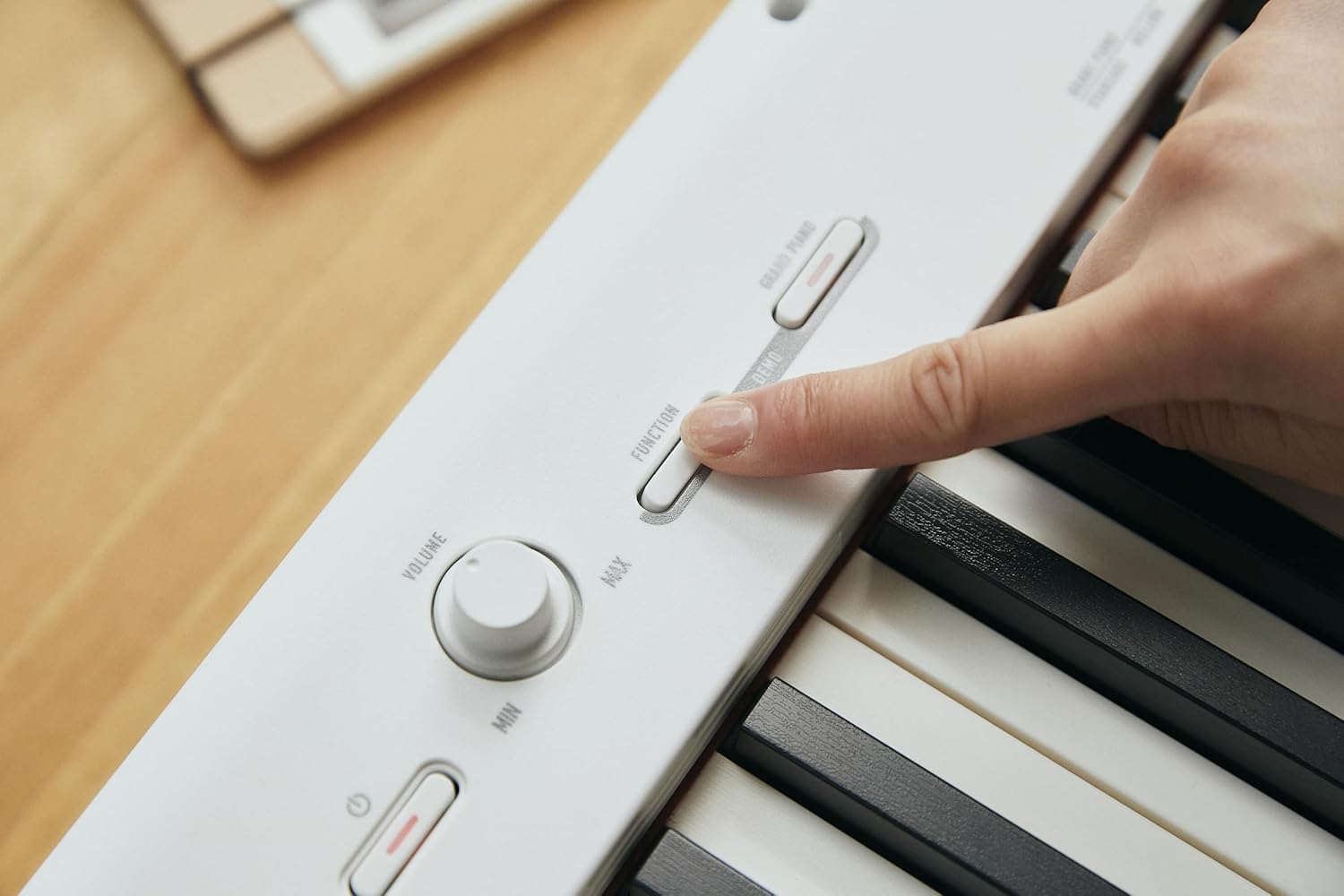
Imatge: Un primer pla view of the control panel on the Casio CDP-S110WE, showing the volume knob and function buttons.

Image: The rear panel of the Casio CDP-S110WE, highlighting the various input/output ports including USB and audio connections.
Manteniment
Proper care will ensure the longevity and optimal performance of your digital piano:
- Neteja: Feu servir un drap suau i sec per netejar la superfície del piano. Per a la brutícia persistent, netegeu lleugerament.ampen the cloth with water and a mild, neutral detergent, then wipe dry immediately. Avoid using abrasive cleaners, solvents, or polishes, as they can damage the finish.
- Neteja de claus: Netegeu suaument les tecles amb un drap suau i lleugeramentamp drap. No utilitzeu humitat excessiva.
- Emmagatzematge: When not in use for extended periods, store the piano in a cool, dry place away from direct sunlight, extreme temperatures, and high humidity. If using batteries, remove them to prevent leakage.
- Manipulació: Avoid placing heavy objects on the piano or subjecting it to strong impacts. Do not block the speaker grilles.
Resolució de problemes
If you encounter issues with your piano, refer to the following common problems and solutions:
- Sense so:
- Assegureu-vos que l'adaptador de corrent estigui connectat correctament i que el piano estigui encès.
- Check the VOLUME knob and ensure it is not set to minimum.
- If headphones are connected, disconnect them to hear sound from the speakers.
- So distorsionat:
- Reduce the VOLUME level.
- If an external device is connected to AUDIO IN, check its volume level.
- Les tecles no responen:
- Assegureu-vos que el piano estigui encès.
- If only certain keys are not responding, contact customer support.
- Connectivity Issues (USB/Audio In):
- Assegureu-vos que els cables estiguin ben connectats.
- For USB connection, verify that the necessary drivers are installed on your computer (if required by your operating system).
- Check the volume settings on the connected external device.
Especificacions
| Característica | Especificació |
|---|---|
| Nom del model | CDP S110WE |
| Número de model de l'article | CDP-S110WEC5 |
| Nombre de claus | 88 Weighted Keys |
| Dimensions (L x A x A) | 1322 x 232 x 99 millimeters (57.48 x 8.27 x 12.2 inches) |
| Pes de l'article | 10.5 quilograms (23.1 lliures) |
| Color | Blanc |
| Connectivitat | MIDI USB, Auxiliary (Audio In) |
| Conector d'auriculars | Jack de 3.5 mm |
| Font d'alimentació | AC Adapter (included), Battery Powered (6 AA-size alkaline batteries) |
| Fabricant | CASIO |
Garantia i Suport
Your Casio CDP-S110WE Electronic Piano comes with a manufacturer's warranty. Please refer to the warranty card included with your product for specific terms and conditions, including warranty period and coverage details.
For technical support, service, or additional information, please visit the official Casio website or contact Casio customer service. You can find more information and resources at the Botiga Casio a Amazon or the main Casio support portal.


