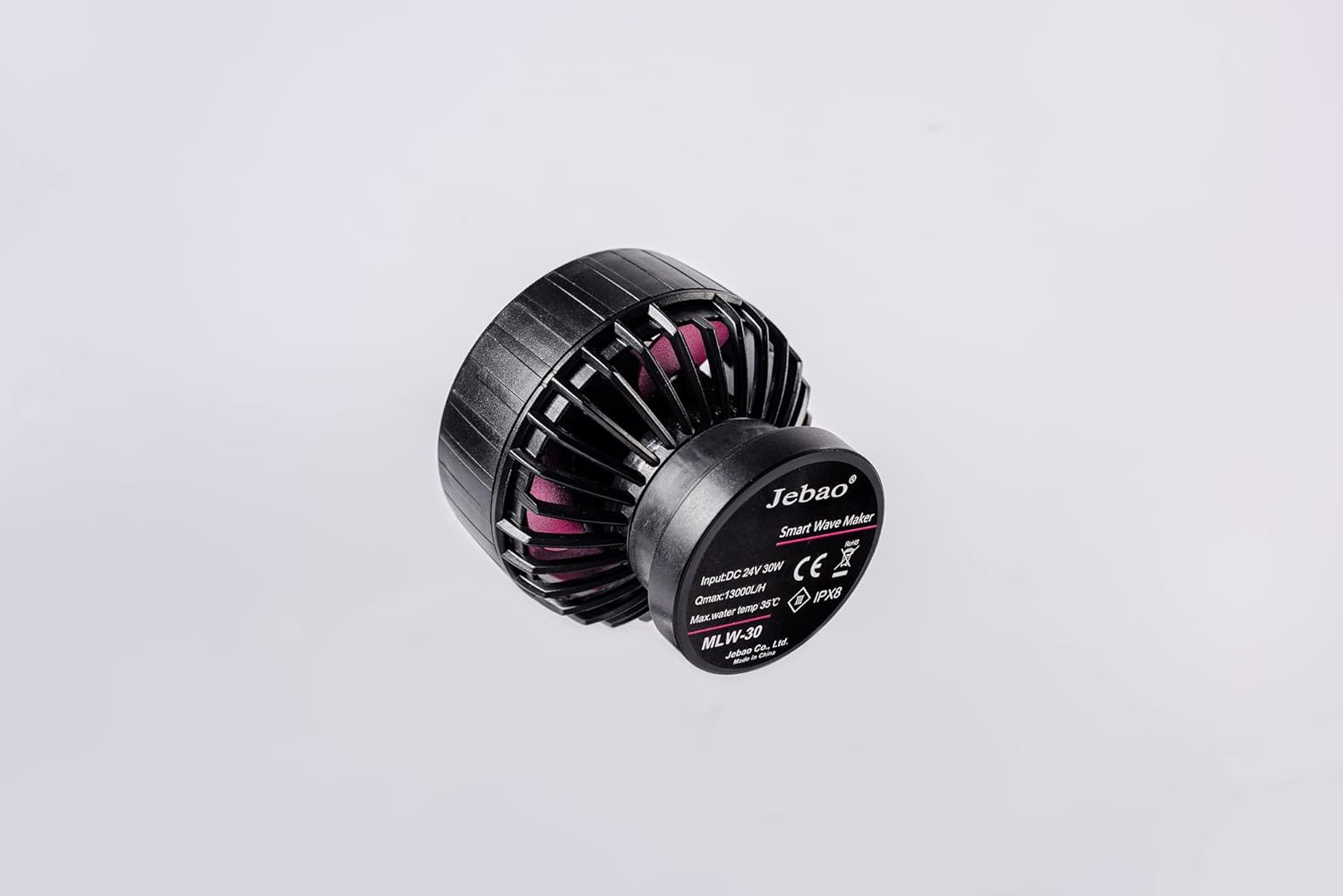
The Jebao MLW-30 Smart Wave Maker is designed to create diverse wave patterns in saltwater tanks, providing an optimal environment for aquatic life. Featuring a unique control system with multiple wave styles and functions, this device offers wireless control for synchronized operation. Its low voltage DC brushless electronic motor ensures safe and quiet performance.
2. Què hi ha a la caixa
Upon unboxing your Jebao MLW-30 Smart Wave Maker, ensure all components listed below are present and free from damage.
Jebao MLW-30 Wave Maker Pump
LCD Display Controller
Adaptador d'alimentació
Base Magnètica
Angled Rubber Mount
Manual d'usuari
Figure 2.1: Contents of the Jebao MLW-30 Smart Wave Maker package.
3. Producte acabatview
Familiarize yourself with the different parts of the Jebao MLW-30 Wave Maker.
Figura 3.1: Frontal view of the wave maker pump.
Figura 3.2: lateral view of the wave maker pump.
Figura 3.3: superior view of the wave maker pump.
Figura 3.4: posterior view of the wave maker pump with specifications.
4. Instruccions de configuració
Desembalar: Carefully unbox the Jebao MLW Smart Wave Maker and remove all protective packaging materials.
Position Wave Maker: Place the wave maker inside your aquarium. Ensure the magnetic base is securely attached to the aquarium glass. The angled rubber mount can be used to adjust the pump's direction.
Connectar l'alimentació: Connect the power cable adapter to the wave maker and then to a power outlet.
Descarregar l'aplicació: Download and install the 'Jebao Aqua' app on your iOS or Android device.
Connectar Wi-Fi: Follow the in-app instructions to connect the wave maker to your Wi-Fi network.
Initial Control: Once connected, you can begin controlling the wave maker using either the LCD display controller or the mobile app.
Rendiment òptim: Always ensure the submerged water intake is not blocked for optimal performance.
Seguretat: Do not operate the pump without water. Keep the device away from children and pets.
Video 4.1: Unboxing and initial setup guide for the Jebao MLW Series Wavemaker, demonstrating component identification and basic assembly.
5. Instruccions de funcionament
5.1. Manual Control (LCD Display Controller)
Encès/apagat: Press and hold the middle button to turn the wave maker on or off.
Ajustar el cabal: Use the up and down arrow buttons to adjust the flow rate. The lowest flow rate is 30%, and the highest is 100%. Tap to adjust by 1%, or press and hold for quick adjustment.
Mode d'alimentació: Quickly press the middle button to enter Feed Mode. Press it again to exit.
Canvi de modes: Press the 'Mode' button to cycle through different wave modes (e.g., Classic, Sine, Random). The display will show an image representing the selected wave mode.
Ajust de freqüència: Press and hold the 'Mode' button to adjust the frequency of the wave maker. The number in the lower-left corner will flash. Use the up and down buttons to adjust the frequency from 5% to 100%.
Mode mestre/esclau: Tap the Wi-Fi symbol to enter Master or Slave mode. The display will show 'S' for Slave or 'M' for Master in the lower-right corner.
Video 5.1: Demonstration of manual control functions on the LCD display controller, including power, flow, mode, and frequency adjustments.
5.2. App Control (Jebao Aqua App)
Connectar el dispositiu: Open the Jebao Aqua app and select your wave maker from the 'My Devices' list.
Encès/apagat: Press the central 'OFF' button on the app interface to turn the wave maker on. It will change to 'ON'.
Configuració manual: Tap the 'Manual' button (lower-left) to adjust flow rate and frequency. You can select different wave types like Pulse or Cross-flow and set their parameters.
Feed Pause Time: Within the manual settings, you can adjust the duration of the feed pause time.
Linkage (Master/Slave): Use the 'Linkage' button to select between Master and Slave pump modes for synchronized operation with multiple wave makers.
Horari del programa: The 'Program' button (lower-right) allows you to set a schedule for when the pump should turn on and operate in specific modes (e.g., Classic, Sine, Random, Feed). You can define start and end times and select the desired mode, flow rate, and frequency for each programmed period. Programs can also be deleted.
Rename/Delete Device: Tap the three-dot symbol in the top-right corner of the app to rename or delete your device from the app.
Video 5.2: Detailed guide on connecting the wave maker to the Jebao Aqua app and utilizing its various control features, including manual settings and programming.
6. Manteniment
Regularly check and clean the water intake to prevent blockages, which can affect performance.
Ensure the wave maker is always submerged in water during operation. Operating without water can cause damage.
Inspeccioneu periòdicament el cable d'alimentació i les connexions per detectar qualsevol signe de desgast o dany.
7. Solució De Problemes
If you encounter issues with your Jebao MLW-30 Smart Wave Maker, consider the following general troubleshooting steps:
Sense energia: Check all power connections and ensure the power adapter is securely plugged into both the wave maker and a working power outlet.
Weak Flow/No Waves: Verify that the water intake is not blocked by debris. Ensure the pump is fully submerged and operating correctly.
Problemes de connectivitat de l'aplicació: Confirm your Wi-Fi network is active and stable. Ensure your mobile device is connected to a 2.4GHz Wi-Fi network during initial setup, as some devices may struggle with 5GHz. Restart the app and the wave maker controller.
Soroll inusual: Check for any foreign objects inside the pump impeller. Ensure the magnetic mount is securely attached and the pump is not vibrating against the tank glass.
For more detailed troubleshooting or specific error codes, please refer to the Jebao Aqua app's help section or the official Jebao weblloc.
8. Especificacions
Característica
Detall
Model
MLW-30
Marca
Jebao
Poder
24V 30-watt
Flux màxim
3434 GPH (13000 L/H)
Control
2.4G Wi-Fi (iOS/Android) + LCD Display Controller
Tecnologia
SINE wave technology for ultra-quiet operation
Tipus d'aigua
Suitable for both marine and fresh water
Material
Plastic, Stainless Steel (No exposed copper elements)
Dimensions (Pump Only)
2" x 3" diameter
Pes de l'article
2.07 lliures
9. Garantia i Suport
For detailed warranty information, product registration, and customer support, please visit the official Jebao weblloc web o contacteu directament amb el servei d'atenció al client. Conserveu el rebut de compra com a comprovant de compra per a reclamacions de garantia.