Introducció
Gràcies per la compraasing the Tzumi 7796 GO Theater Wi-Fi LED Cinema Projector. This manual provides essential information for setting up, operating, and maintaining your projector. Please read it thoroughly before use to ensure proper functionality and to maximize your viewing experience. This projector is designed for versatile use, including home entertainment, outdoor movie nights, and business presentations, offering a portable solution with Wi-Fi and multiple connectivity options.
Informació important de seguretat
- No mireu directament a la lent del projector quan estigui encès.amp està activat.
- Assegureu-vos que hi hagi una ventilació adequada al voltant del projector per evitar el sobreescalfament. No bloquegeu les obertures de ventilació.
- Mantingueu el projector allunyat de l'aigua o altres líquids.
- Feu servir només l'adaptador de corrent que s'inclou amb el projector.
- No intenteu reparar el projector vosaltres mateixos. Encarregueu totes les tasques de manteniment a personal qualificat.
- Place the projector on a stable, level surface to prevent damage from falling.
- Desendolleu el projector durant tempestes o quan no l'utilitzeu durant períodes prolongats.
Contingut del paquet
Si us plau, comproveu que hi hagi tots els elements:
- Tzumi 7796 GO Theater Wi-Fi LED Cinema Projector
- Control remot
- Adaptador d'alimentació
- Manual d'usuari (aquest document)
- AV Cable (if included)
Producte acabatview
Davant View

Imatge: Davant view of the Tzumi 7796 projector. This image displays the main projection lens on the left side and ventilation grilles along the front and right side of the device. The overall casing és blanc.
lateral View amb ports
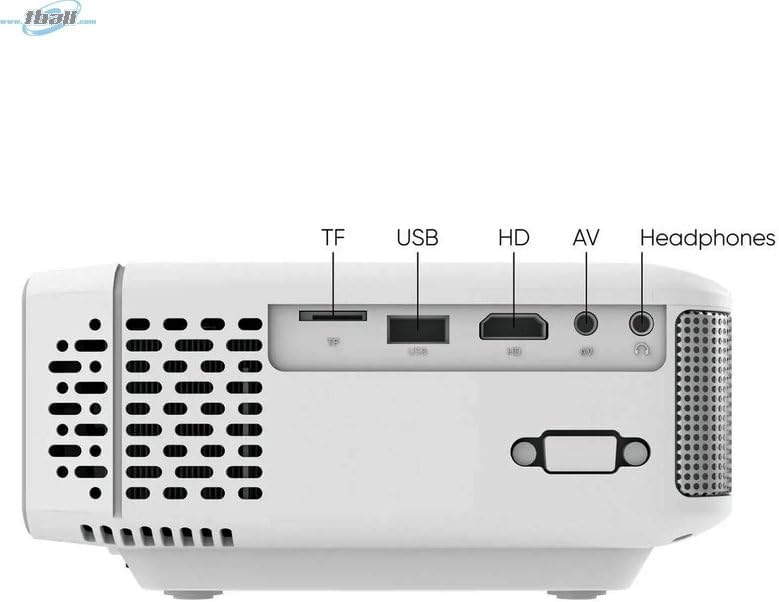
Imatge: lateral view of the Tzumi 7796 projector highlighting its various input ports. From left to right, these include a TF card slot, a USB port, an HD (HDMI) port, an AV input, and a headphone jack. This side also features ventilation grilles.
A dalt View amb els controls

Imatge: A dalt view of the Tzumi 7796 projector. This image shows the manual focus and keystone correction dials located near the lens. The central control panel features directional buttons (Up, Down, Left, Right), Home, Option, Back, Power, and Enter buttons for navigation and control.
posterior View amb entrada d'alimentació

Imatge: posterior view of the Tzumi 7796 projector. This view primarily shows the power input socket on the left side and additional ventilation grilles on the right side.
Guia de configuració
1. Col·locació
Col·loqueu el projector sobre una superfície estable i plana. Per a una òptima viewing, position the projector directly in front of your screen or wall. The ideal projection distance will vary based on the desired screen size. Ensure there is adequate space around the projector for ventilation.

Imatge: This image illustrates the versatility of the Tzumi 7796 projector, showing it being used in both an indoor home setting and an outdoor movie night environment. This highlights its suitability for various entertainment scenarios.
2. Connexió d'alimentació
- Connect the power adapter to the projector's power input port (refer to "Rear View with Power Input" image).
- Connecteu l'altre extrem de l'adaptador d'alimentació a una presa de corrent.
- L'indicador lluminós d'engegada del projector s'hauria d'encendre.
3. Dispositius de connexió
El projector admet diverses fonts d'entrada:
- HDMI: Connect your laptop, gaming console, or streaming device using an HDMI cable to the HD port.
- USB: Inseriu una unitat flaix USB al port USB per reproduir contingut multimèdia files directament.
- DE: Use the provided AV cable to connect older devices like DVD players to the AV port.
- Targeta TF: Insert a TF (MicroSD) card into the TF card slot to play media files.
- Wi-Fi: For wireless screen mirroring or streaming, connect the projector to your Wi-Fi network (see "Operating Instructions - Wi-Fi Connectivity").
4. Ajust de l'enfocament i la distorsió trapezoidal
- Focus: Gira el ENFOCAR ring near the lens until the projected image is clear and sharp.
- Clau clau: If the image appears trapezoidal (wider at the top or bottom), adjust the PEDRA CLAVE correction dial until the image is rectangular.
Instruccions de funcionament
Encès/Apagat
- Encès: Premeu el botó Poder button on the projector's control panel or the remote control.
- Apagar: Premeu el botó Poder button again. Confirm shutdown if prompted.
Selecció de la font d'entrada
After powering on, the projector will display its main menu. To select an input source:
- Use the directional buttons on the projector or remote to navigate to the desired input (e.g., HDMI, USB, AV, TF Card, Wi-Fi).
- Premeu el botó Entra botó per confirmar la selecció.
Connectivitat Wi-Fi
To connect your projector to a Wi-Fi network for screen mirroring or online content:
- From the main menu, navigate to the Wi-Fi or Configuració de la xarxa opció.
- Seleccioneu Configuració Wi-Fi and choose your desired network from the list.
- Enter the Wi-Fi password using the on-screen keyboard and confirm.
- Once connected, you can use screen mirroring features (e.g., Miracast, AirPlay) or access built-in smart features if available.
Configuració d'àudio
The projector features two built-in 3W speakers. You can also connect external audio devices:
- Altaveus integrats: Audio will play automatically through the projector's speakers. Adjust volume using the remote or control panel.
- Headphones/External Speakers: Connect headphones or external speakers to the 3.5mm headphone jack on the side of the projector. This will typically mute the built-in speakers.
Manteniment
Neteja de la lent
To maintain optimal image quality, keep the projector lens clean.
- Feu servir un drap suau i sense borrissol dissenyat específicament per a lents òptiques.
- Netegeu suaument la lent amb moviments circulars.
- Avoid using abrasive cleaners or excessive pressure, which can scratch the lens.
Cura general i emmagatzematge
- Keep the projector in a cool, dry place when not in use.
- Protect the projector from dust and extreme temperatures.
- Do not expose the projector to direct sunlight for extended periods.
- Netegeu l'exterior casing amb un suau, damp tela. Eviteu els productes químics durs.
Resolució de problemes
| Problema | Causa possible | Solució |
|---|---|---|
| No es projecta cap imatge |
|
|
| La imatge és borrosa |
|
|
| La imatge és trapezoïdal |
|
|
| Sense so |
|
|
| Problemes de connexió Wi-Fi |
|
|
Especificacions
- Model: 7796
- Marca: Tzumi
- Resolució de visualització: 1920 x 1080 (Full HD)
- Brillantor: 1600 lúmens
- Tecnologia de connectivitat: HDMI, Wi-Fi, USB, AV, TF Card
- Característica especial: Portàtil
- Usos recomanats: Home entertainment, Outdoor movie nights, Business presentations
- Pes de l'article: 3 lliures
- Dimensions del paquet: 11 x 9 x 5 polzades
- Altaveus integrats: Two 3W speakers
Garantia i Suport
For warranty information and technical support, please refer to the documentation included with your purchase or visit the official Tzumi weblloc web. Conserveu el comprovant de compra per a reclamacions de garantia.
Assistència en línia: Visit the Tzumi Store on Amazon


