1. Introducció
This manual provides detailed instructions for the setup, operation, and maintenance of your CHERRY DW 9100 Slim Wireless Keyboard and Mouse Set. This rechargeable desktop set offers both 2.4 GHz wireless and Bluetooth connectivity, featuring a slim design and silent keystroke SX Scissor Mechanism for comfortable and efficient use in various environments.

Image 1.1: The CHERRY DW 9100 Slim Wireless Keyboard and Mouse Set, including the USB nano receiver.
2. Contingut del paquet
Si us plau, comproveu el contingut del paquet en desembalar-lo per assegurar-vos que hi hagi tots els components:
- CHERRY DW 9100 Slim Wireless Keyboard
- CHERRY DW 9100 Slim Wireless Mouse
- Nano receptor USB
- Cable de càrrega USB-C
- Manual d'usuari (aquest document)
3. Configuració
3.1 Càrrega dels dispositius
Both the keyboard and mouse are equipped with rechargeable lithium batteries.
- Connecteu el cable de càrrega USB-C subministrat al port USB-C del teclat i del ratolí.
- Connect the other end of the cable to a powered USB port (e.g., computer, USB wall adapter).
- The status LED on each device will indicate the charging status. A full charge is indicated when the LED changes color or turns off (refer to Section 4.3 for LED indicators).
3.2 Connexió mitjançant una xarxa sense fil de 2.4 GHz
For a stable and fast wireless connection, use the included USB nano receiver.
- Locate the USB nano receiver.
- Connecteu el nanoreceptor USB a un port USB disponible de l'ordinador.
- On both the keyboard and mouse, locate the connectivity switch. Set the switch to the 2.4 GHz position (often indicated by a receiver icon or "RF").
- Els dispositius s'haurien de connectar automàticament a l'ordinador.
3.3 Connexió mitjançant Bluetooth
The set supports Bluetooth connectivity for devices that have Bluetooth capabilities.
- On both the keyboard and mouse, locate the connectivity switch. Set the switch to the Bluetooth position (often indicated by a Bluetooth icon).
- A l'ordinador o dispositiu, obriu la configuració de Bluetooth.
- Initiate the pairing process on your device. The keyboard and mouse should appear in the list of discoverable devices (e.g., "CHERRY DW 9100 Keyboard", "CHERRY DW 9100 Mouse").
- Select each device to pair them. Follow any on-screen prompts, such as entering a pairing code for the keyboard.
Nota: The keyboard and mouse can be paired with multiple Bluetooth devices. Use the connectivity switch to toggle between paired devices or 2.4 GHz mode.
4. Instruccions de funcionament
4.1 Funcions del teclat
The CHERRY DW 9100 Slim Keyboard features a full-size layout with an SX Scissor Mechanism for silent and precise keystrokes.
- Claus estàndard: All standard alphanumeric and symbol keys function as expected.
- Tecles de funció (F1-F12): Aquestes tecles poden tenir funcions secundàries (per exemple, control multimèdia, volum, brillantor) accessibles prement la tecla Fn key simultaneously. Refer to your operating system's settings for specific function key behavior.
- Teclat numèric: Provides dedicated number entry.

Imatge 4.1: Pro lateralfile of the CHERRY DW 9100 Slim Keyboard, highlighting its thin design.

Image 4.2: Visual representation of the CHERRY SX Scissor Mechanism, responsible for silent and precise keystrokes.
4.2 Funcions del ratolí
The CHERRY DW 9100 Slim Mouse features 6 buttons and a scroll wheel for versatile navigation.
- Clic esquerre/dret: Botons estàndard del ratolí.
- Roda de desplaçament: For vertical scrolling and as a middle click button.
- Botons laterals: Normalment s'utilitza per a la navegació endavant/enrere en web navegadors.
- Commutador DPI: A button, usually near the scroll wheel, allows adjustment of the mouse's sensitivity (DPI - Dots Per Inch). Pressing this button cycles through different DPI settings, indicated by the mouse's status LED.

Imatge 4.3: Part superior view of the CHERRY DW 9100 Slim Mouse, showing the left/right click buttons, scroll wheel, and DPI switch.
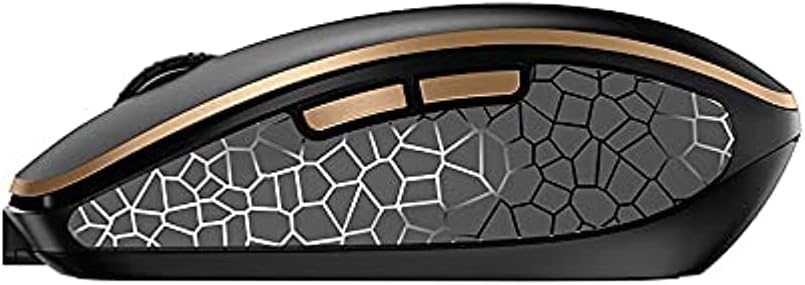
Imatge 4.4: Lateral view of the CHERRY DW 9100 Slim Mouse, illustrating the ergonomic design and side buttons.
4.3 LED d'estat
Both the keyboard and mouse feature status LEDs to provide information on battery level, charging status, and mouse resolution.
- Bateria baixa: The LED will flash or illuminate in a specific color (e.g., red) when the battery level is low, indicating that charging is required.
- Càrrega: The LED will illuminate while charging and typically change color or turn off when fully charged.
- Mouse Resolution (DPI): When adjusting the DPI, the mouse LED may briefly flash to indicate the current setting.
5. Manteniment
5.1 Neteja
Per mantenir el rendiment i l'aspecte dels vostres dispositius:
- Desconnecteu els dispositius de l'ordinador abans de netejar-los.
- Utilitzeu un drap suau i sense pelusa lleugerament dampamb aigua o una solució de neteja suau.
- Eviteu utilitzar productes químics agressius, netejadors abrasius o dissolvents, ja que poden danyar les superfícies.
- Per al teclat, feu servir aire comprimit per eliminar la pols i les restes que hi ha entre les tecles.
5.2 Cura de la bateria
The integrated lithium batteries are designed for long-term use.
- Torneu a carregar els dispositius quan aparegui l'indicador de bateria baixa.
- Eviteu descarregar completament les bateries amb freqüència per allargar-ne la vida útil.
- If storing the devices for an extended period, charge them to approximately 50% before storage.
6. Solució De Problemes
If you encounter issues with your CHERRY DW 9100 Slim set, refer to the following common solutions:
6.1 Problemes de connectivitat
- No Connection (2.4 GHz):
- Ensure the USB nano receiver is securely plugged into a working USB port.
- Verify the keyboard and mouse connectivity switches are set to the 2.4 GHz posició.
- Prova de connectar el receptor a un port USB diferent.
- Assegureu-vos que els dispositius estiguin prou carregats.
- Sense connexió (Bluetooth):
- Ensure the keyboard and mouse connectivity switches are set to the Bluetooth posició.
- Confirm Bluetooth is enabled on your computer/device.
- Remove previous pairings from your device's Bluetooth settings and attempt to re-pair.
- Assegureu-vos que els dispositius estiguin prou carregats.
6.2 Power and Charging Issues
- Dispositius que no es carreguen:
- Check that the USB-C charging cable is properly connected to both the device and the power source.
- Prova un altre cable USB-C o una altra font d'alimentació USB.
- Assegureu-vos que la font d'alimentació estigui activa.
- Durada de la bateria curta:
- Ensure devices are fully charged before use.
- Battery life can vary based on usage patterns.
6.3 Mouse Tracking Issues
- Inaccurate or No Tracking:
- Assegureu-vos que el sensor del ratolí estigui net i lliure de residus.
- Use the mouse on a suitable surface (e.g., mouse pad). Highly reflective or transparent surfaces may cause issues.
- Ajusteu la configuració de DPI amb el commutador DPI del ratolí.
7. Especificacions
| Característica | Detall |
|---|---|
| Número de model | JD-9100US-2 |
| Dimensions del producte | 17.32 x 5.12 x 0.59 polzades |
| Pes de l'article | 2.35 lliures |
| Bateries | Rechargeable Lithium (USB-C) |
| Tecnologia de connectivitat | Bluetooth, 2.4 GHz Radio Frequency (USB) |
| Característica especial | Rechargeable, Silent Keystroke (SX Scissor Mechanism) |
| Dispositius compatibles | Ordinador personal |
| Fabricant | CIRERERA |
Note on Batteries: The product description indicates USB-C rechargeable lithium batteries. The specification "1 AA batteries required. (included)" in the source data appears to be a discrepancy. Please rely on the USB-C rechargeable feature for this model.
8. Garantia i Suport
CHERRY products are manufactured to high-quality standards. For detailed warranty information, including terms and conditions, please refer to the official CHERRY weblloc web o la targeta de garantia inclosa amb el producte.
For technical support, troubleshooting assistance beyond this manual, or to inquire about replacement parts, please visit the official CHERRY support portal or contact their customer service directly.
- Official CHERRY Weblloc: www.cherry.de/en/ (or regional equivalent)
- Atenció al client: Consulteu el weblloc per obtenir dades de contacte.


