1. Introducció
This instruction manual provides detailed information on the setup, operation, maintenance, and troubleshooting for your Aibecy withzoom 1080P 3X Optical Zoom Webcam. Please read this manual thoroughly before using the product to ensure proper functionality and to prevent damage.
2. Producte acabatview
2.1 Característiques clau
- 1080P Full HD Video Resolution
- Lent de zoom òptic 3X
- 355° Horizontal Rotation and 90° Vertical Rotation
- Operació de control remot
- Connectivitat USB
- Compatible with Windows, Mac, Linux, and Chromebook operating systems
- Infrared (IR) support
2.2 Contingut del paquet
Verifiqueu que tots els elements siguin presents al paquet:
- Aibecy withzoom Weblleva
- Control remot
- Adaptador de corrent alterna
- Cable USB
- Suport de muntatge
- Cargols per a la instal·lació

Figura 1: Contingut del paquet
2.3 Diagrama del producte

Figura 2: Frontal View i Components
- Lent HD: Captura vídeo d'alta definició.
- 355° Rotating Gimbal: Allows for wide-angle coverage and precise positioning.
- IR Infrared Receiver: Rep senyals del comandament a distància.
- Indicador d'alimentació: Mostra l'estat d'alimentació del dispositiu.
- Remote Indicator: Lights up when a remote control signal is received.
3. Guia de configuració
3.1 Mètodes d'instal·lació
The Aibecy withzoom webcam offers flexible installation options:
- Col·locació de la taula: Place the camera on a flat surface such as a desk or conference table.
- Muntatge al sostre: Use the included mounting bracket and screws to attach the camera to the ceiling. Ensure the image flip function is enabled if mounting upside down.
- Muntatge del suport: Attach the camera to a tripod or other compatible bracket using the screw hole at the bottom.

Figura 3: Opcions d'instal·lació
3.2 Connexió de la càmera
Follow these steps to connect your weblleva:
- Connexió d'alimentació: Connect the AC power adapter to the camera's 12V power input port and plug it into a power outlet.
- Connexió USB: Connect the USB cable from the camera's USB port to an available USB port on your computer (Windows, Mac, Linux, or Chromebook). The camera is plug-and-play and does not require driver software.
- Optional RS232/RS422 Connection: If advanced control via RS232 or RS422 is required, connect the appropriate cable from the camera to your control device.

Figura 4: Diagrama de connexió
Once connected, open your video conferencing software (e.g., Zoom, Skype, Microsoft Teams) and select the Aibecy withzoom camera as your video input device.
4. Instruccions de funcionament
4.1 Funcionament bàsic
- Encès: After connecting the power adapter, the camera will automatically power on. The Power Indicator light will illuminate.
- Apagar: Disconnect the power adapter from the camera.
4.2 Ús del comandament a distància
The included remote control allows for easy adjustment of camera functions.

Figura 5: Webcàmera i comandament a distància
- Camera Selection Buttons: If multiple cameras are connected, use these buttons to select the camera you wish to control.
- Control de velocitat de rotació: Adjust the pan/tilt speed for smoother movements.
- Pan/Tilt/Zoom (PTZ) Controls: Use the directional arrows to pan (left/right) and tilt (up/down) the camera. Use the zoom in/out buttons to adjust the optical zoom.
- Preset Function Area: Save and recall specific camera positions and zoom levels using the preset buttons.
4.3 Camera Movement and Zoom
The camera supports wide-range movement for comprehensive coverage:
- Rotació horitzontal: The camera head can rotate 355 degrees horizontally.
- Rotació vertical: The camera head can tilt 90 degrees vertically.
- Zoom òptic: Utilize the 3X optical zoom to focus on specific areas without loss of image quality.
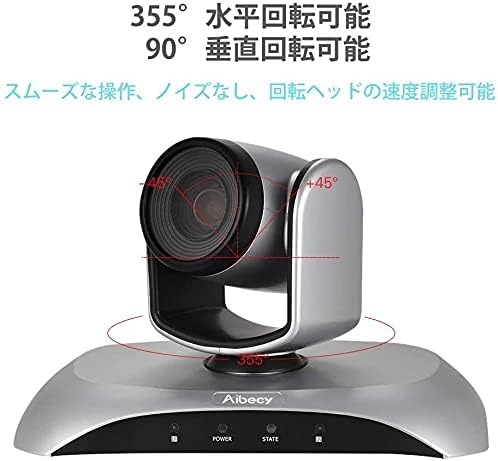
Figure 6: Camera Rotation Capabilities
4.4 Image Flip Function
If the camera is mounted upside down (e.g., on a ceiling), you can use the image flip function to correct the video orientation.

Figure 7: Image Flip Function in Use
Refer to the remote control instructions for the specific button to activate or deactivate the image flip function.
5. Manteniment
Un manteniment adequat garanteix la longevitat i el rendiment òptim del vostre weblleva.
- Neteja: Feu servir un drap suau i sec per netejar el cos de la càmera. Per a l'objectiu, feu servir un drap i una solució especials per a la neteja d'objectius. Eviteu productes de neteja o dissolvents abrasius.
- Emmagatzematge: Quan no la feu servir durant períodes prolongats, guardeu la càmera en un lloc fresc i sec, allunyat de la llum solar directa i de temperatures extremes.
- Manipulació: Eviteu deixar caure la càmera ni sotmetre-la a impactes forts.
6. Solució De Problemes
If you encounter issues with your Aibecy withzoom webcam, refer to the table below for common problems and solutions.
| Problema | Causa possible | Solució |
|---|---|---|
| No image or video output | Power not connected; USB cable loose; Incorrect camera selected in software. | Ensure power adapter is securely connected. Check USB cable connection. Select the Aibecy withzoom camera in your video conferencing software settings. |
| El comandament a distància no funciona | Batteries low/dead; Obstruction between remote and camera; Remote not pointed at IR receiver. | Replace remote control batteries. Ensure a clear line of sight to the camera's IR receiver. Point the remote directly at the camera. |
| Image is upside down | Camera mounted upside down and image flip not activated. | Activate the image flip function using the remote control. |
| Poca qualitat de vídeo | Insufficient lighting; Dirty lens; Network bandwidth issues. | Ensure adequate lighting in the room. Clean the camera lens. Check your internet connection speed. |
7. Especificacions tècniques
| Característica | Especificació |
|---|---|
| Marca | Aibecy |
| Número de model | withzoom |
| Resolució de captura de vídeo | 1080p |
| Zoom òptic | 3X |
| Rotació horitzontal | 355° |
| Rotació vertical | 90° |
| Tecnologia de connectivitat | USB |
| Dispositius compatibles | Windows, Mac, Linux, Chromebook |
| Característiques especials | Remote Control, Infrared |
| Estabilització d'imatge | No |
| Dimensions del paquet | 29.7 x 22.4 x 19.9 cm |
| Pes de l'article | 1.51 kg |
8. Informació de suport
For further assistance or inquiries not covered in this manual, please refer to the official Aibecy support channels or contact your retailer. Keep your purchase receipt for warranty purposes.