1. Producte acabatview
The FOXWELL NT726 is a professional automotive diagnostic scanner designed for comprehensive vehicle system analysis and maintenance. It features full-system diagnostic capabilities, bi-directional control, and 12 commonly used service reset functions. This tool is ideal for both home mechanics and professional repair shops, offering a user-friendly interface and lifetime free updates.
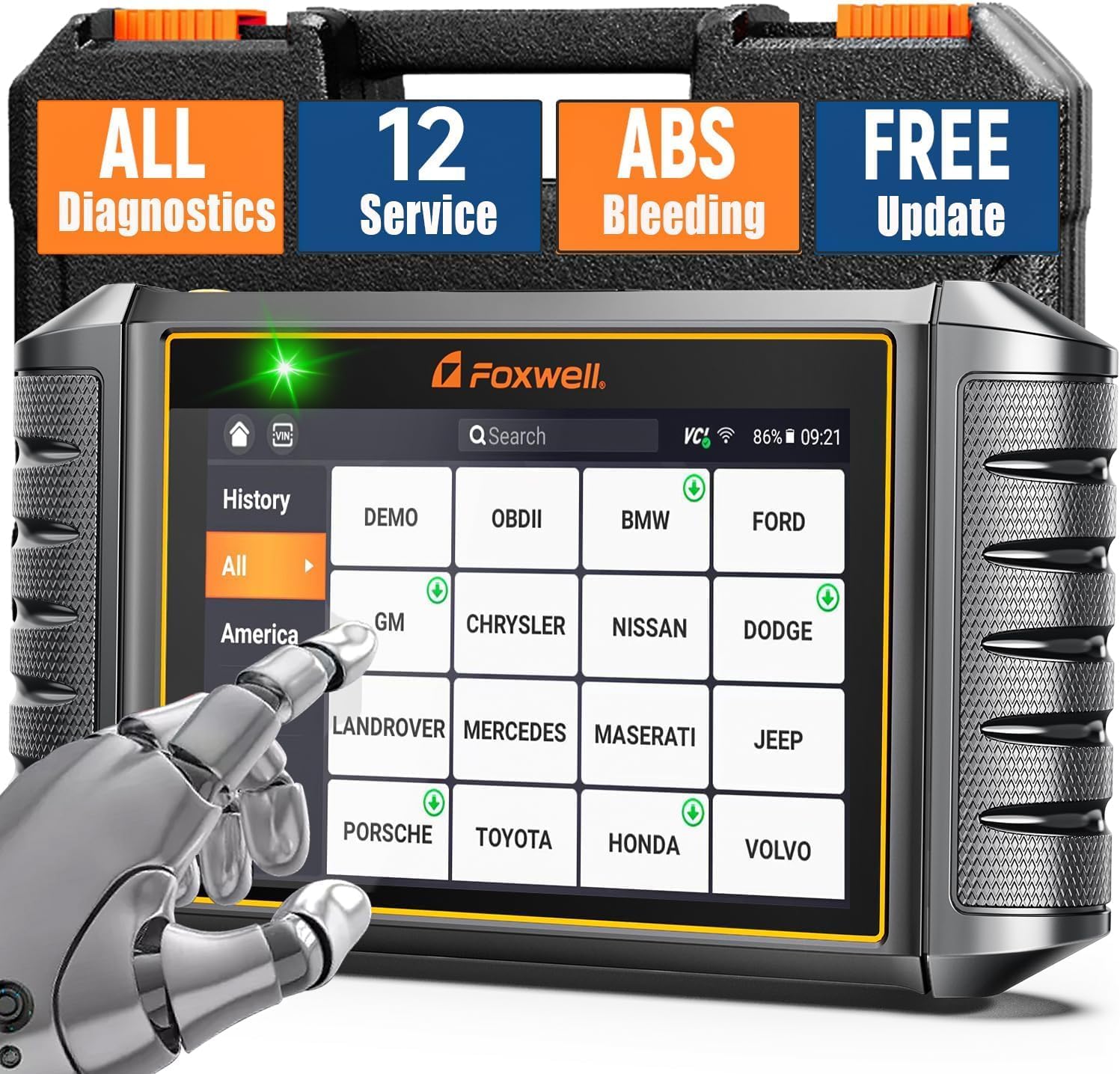
Figure 1.1: FOXWELL NT726 OBD2 Scanner and Protective Case
This device operates on an Android 9.0 system, features a 5.5-inch touchscreen, a 4000mAh built-in battery, and 32GB SSD storage with 1GB DDR4 memory, ensuring fast and smooth operation. It supports Wi-Fi for convenient one-click updates and allows for printing and sharing of vehicle health reports.
2. Què hi ha a la caixa
En obrir el paquet, comproveu que hi hagi tots els elements següents:
- 1 x FOXWELL NT726 Car Code Reader (Main Unit)
- 1 x Heavy Duty Protective Case
- 1 x Diagnostic Cable
- 1 x cable USB C
- 1 x Manual d'usuari
- 1 x Guia d'inici ràpid

Figure 2.1: Package Contents of FOXWELL NT726
3. Configuració i ús inicial
3.1 Engegada i configuració inicial
- Carregueu el dispositiu: Before first use, ensure the NT726 is fully charged using the provided USB C cable.
- Encès: Premeu i manteniu premut el botó d'engegada situat al lateral del dispositiu fins que la pantalla s'il·lumini.
- Selecció d'idioma: Upon first boot, you will be prompted to select your preferred language. Navigate using the touchscreen and select "English".
- Connexió Wi-Fi: Connect the device to a stable Wi-Fi network. This is crucial for software updates and accessing online features. Go to Configuració > Wi-Fi and select your network.
- Registration (Optional): You may be prompted to register your product. Follow the on-screen instructions to complete registration, which may be required for warranty or support.
3.2 Actualització de programari
The NT726 offers lifetime free updates via Wi-Fi. It is highly recommended to update the software immediately after initial setup to ensure you have the latest vehicle coverage and functions.
- From the main menu, tap on the "Update" icon.
- The device will check for available updates.
- Tap "Update All" or select specific updates to download and install. Ensure a stable Wi-Fi connection throughout the process.

Figure 3.1: One-Click Software Update Interface
4. Operating the NT726 Scanner
The FOXWELL NT726 is designed for intuitive operation. Connect the diagnostic cable to the vehicle's OBDII port, usually located under the dashboard on the driver's side.
4.1 All System Diagnostic
This function allows you to scan all available electronic control modules (ECUs) in the vehicle to read and clear diagnostic trouble codes (DTCs), view live data, and retrieve vehicle information. This includes systems such as Engine, Transmission, ABS, SRS (Airbag), TPMS, EPB, BMS, SAS, HVAC, and more.
- Connect the diagnostic cable to the vehicle's OBDII port and the NT726.
- Gireu el contacte del vehicle a la posició "ON" (motor apagat).
- From the main menu, tap "Diagnostic".
- The device will attempt to automatically identify the vehicle via Auto VIN Scan. If unsuccessful, you can manually select the vehicle make, model, and year.
- Select "Quick Scan" to perform a comprehensive scan of all systems or choose specific modules for diagnosis.
- Review the scan results, including DTCs, live data streams, and vehicle health reports.

Figure 4.1: All System Diagnostic Interface

Figure 4.2: All System Diagnostics Capabilities
4.2 Control bidireccional (prova activa)
The NT726 supports bi-directional control, also known as Active Test, allowing you to send commands to vehicle systems and components to test their functionality. This is useful for pinpointing issues and verifying repairs.
- Examples de proves actives: Parking Brake, Fuel Pump, Radiator Fan, Injectors, A/C Clutch, Door Locks, Wipers, etc.
- After selecting the vehicle and system, navigate to the "Active Test" or "Bi-directional Control" option.
- Select the component you wish to test from the displayed list.
- Seguiu les instruccions que apareixen a la pantalla per activar o desactivar el component i observeu-ne la resposta.

Figure 4.3: Full Bi-directional Controls
Figure 4.4: Active Test Function Diagnosis Workflow
4.3 12 Commonly Used Service Resets
The NT726 provides access to 12 essential service reset functions, enabling you to perform common maintenance tasks without needing specialized dealer tools.

Figure 4.5: 12 Essential Service Resets
- Sagnat de l'ABS: Used to bleed air from the ABS system after component replacement or brake fluid change.

Figure 4.6: ABS Bleeding Reset
- Reinicialització d'oli: Reinicia el sistema de control de la vida útil de l'oli després d'un canvi d'oli.

Figura 4.7: Reinici de la llum d'oli
- Registre de bateries: Registers a new battery with the vehicle's ECU to ensure proper charging and system function.
- Codificació de l'injector: Codes new injector numbers to the ECU after replacement to ensure correct fuel delivery.
- Restabliment de l'EPB: Restableix el sistema de fre d'estacionament electrònic després de la substitució de les pastilles de fre.
- Restabliment de la suspensió: Resets the electronic suspension system.
- Restabliment de TPMS: Reinicia el sistema de control de pressió dels pneumàtics després de la rotació dels pneumàtics o la substitució del sensor.
- Reaprenentatge de l'accelerador: Relearns the throttle body position after cleaning or replacement.
- Regeneració del DPF: Initiates the Diesel Particulate Filter regeneration process to clear accumulated soot.
- Calibració SAS: Calibrates the Steering Angle Sensor after steering component replacement or alignment.

Figure 4.8: SAS Reset and Airbag Reset
- Adaptació de la transmissió: Restableix els valors adaptatius de la transmissió.
- Windows-door: Performs window and door system initialization.
To perform a service reset: Navigate to the "Maintenance" section from the main menu, select the desired reset function, and follow the on-screen instructions.
4.4 Funcions OBDII completes
The NT726 supports all 10 modes of OBDII testing, providing comprehensive engine and emission-related diagnostics.
- Llegir codis: Mostra els codis de diagnòstic d'errors (DTC) actuals, pendents i permanents.
- Codis clars: Esborra els DTC de l'ordinador del vehicle i apaga l'indicador d'avaria Lamp (MIL).
- Dades en directe: Displays real-time data stream from the vehicle's sensors in text and graph format (supports 4-in-1 live data graph).
- Congelar fotograma: Shows a snapshot of operating conditions at the time of an emission-related fault.
- Preparació I/M: Comprova la disponibilitat dels sistemes de monitorització d'emissions.
- Prova del monitor d'O2: Recupera els resultats de la prova del monitor del sensor d'O2.
- Prova del monitor integrat: Retrieves results for emission-related diagnostic monitoring tests of specific components/systems.
- Prova del sistema EVAP: Inicia una prova del sistema de control d'emissions evaporatives.
- Informació del vehicle: Recupera el número d'identificació del vehicle (VIN), l'ID de calibratge (CALID) i el número de verificació de calibratge (CVN).
- Cerca DTC: Provides definitions for generic and manufacturer-specific codes.

Figura 4.9: Funcions OBDII completes
4.5 Vídeo oficial del producte
Watch the official product video for a visual guide on the FOXWELL NT726's features and operation.
Video 4.1: FOXWELL NT726 - Android Tablet All System Scanner with 12 Service Functions. This video demonstrates the key features and operational flow of the NT726 diagnostic tool, including all system scanning, service resets, and user interface navigation.
5. Manteniment i cura
- Neteja: Utilitzeu un suau, damp cloth to clean the device. Avoid harsh chemicals or abrasive cleaners.
- Emmagatzematge: Store the NT726 in its protective case when not in use to prevent damage. Keep it in a cool, dry place away from direct sunlight and extreme temperatures.
- Actualitzacions de programari: Regularly check for and install software updates to ensure optimal performance and the latest vehicle coverage.
- Cura de la bateria: For prolonged storage, ensure the battery is charged to about 50%. Recharge periodically if stored for long periods to maintain battery health.
6. Solució De Problemes
| Problema | Causa possible | Solució |
|---|---|---|
| El dispositiu no s'encén. | Low battery; faulty power button; internal issue. | Charge the device for at least 30 minutes. If still unresponsive, contact customer support. |
| Failed to connect to vehicle. | Loose cable connection; ignition not on; vehicle's OBDII port issue; incompatible vehicle. | Ensure diagnostic cable is securely connected. Turn ignition to "ON". Try on another vehicle if possible. Verify vehicle compatibility. |
| L'actualització del programari falla. | Connexió Wi-Fi inestable; emmagatzematge insuficient; problema amb el servidor. | Ensure strong Wi-Fi signal. Check available storage on the device. Try updating again later. |
| La pantalla no respon. | Error de programari; danys físics. | Reinicieu el dispositiu. Si el problema persisteix, poseu-vos en contacte amb l'atenció al client. |
7. Especificacions
| Característica | Detall |
|---|---|
| Model | FOXWELL NT726 |
| Sistema operatiu | Android 9.0 |
| Mostra | 5.5-inch Touch Screen (1280x720 resolution) |
| Memòria | 1 GB DDR4 |
| Emmagatzematge | SSD de 32 GB |
| Bateria | Ió de liti de 4000 mAh (inclosa) |
| Connectivitat | USB tipus C, Wi-Fi |
| Dimensions | 9.29 x 4.88 x 1.5 polzades |
| Pes | 1.91 lliures |
| Cobertura de vehicles | Compatible with over 100 car makes (USA, European, Asian) |
| Mètode d'actualització | Lifetime Free WiFi Update |
| Suport multilingüe | 24+ languages including English, German, French, Spanish, etc. |

Figure 7.1: 5.5" Touch Screen Display

Figure 7.2: Wide Car Model Coverage

Figure 7.3: Multilingual Support
8. Garantia i Suport
8.1 Informació de la garantia
The FOXWELL NT726 comes with a 12-month warranty from the date of purchase. This warranty covers manufacturing defects and malfunctions under normal use. It does not cover damage caused by misuse, accidents, unauthorized modifications, or improper maintenance.
For detailed warranty terms and conditions, please refer to the Warranty card included in your product package or visit the official FOXWELL weblloc.
8.2 Atenció al client
If you encounter any issues or have questions regarding your FOXWELL NT726 scanner, please contact FOXWELL customer support through the following channels:
- Oficial Weblloc: Visita el FOXWELL Store on Amazon for FAQs, software downloads, and contact information.
- Suport per correu electrònic: Refer to your Quick Start Guide or User Manual for the dedicated support email address.
- Recursos en línia: Accedeix al Manual d'usuari (PDF) i Guia de l'usuari (PDF) per obtenir informació addicional.
When contacting support, please have your product model (NT726) and serial number (found on the back of the device or in the device's settings under "About") ready to expedite the process.


