1. Introducció
The Xiaomi Mi Smart Band 6 is an advanced fitness tracker designed to help you monitor your health and activity levels. Featuring a vibrant 1.56-inch AMOLED display, comprehensive health monitoring capabilities including heart rate and blood oxygen (SpO2) tracking, and a wide array of sport modes, the Mi Smart Band 6 is your ideal companion for a healthier lifestyle. This manual provides essential information on setting up, operating, maintaining, and troubleshooting your device.

Figura 1.1: The Xiaomi Mi Smart Band 6, a sleek black fitness tracker with a vibrant display showing time, date, weather, and health metrics.
2. Configuració
2.1 Càrrega inicial
Before first use, fully charge your Mi Smart Band 6. Connect the magnetic charging cable to the charging pins on the back of the band and plug the USB end into a power adapter or computer USB port. The band will display a charging animation.

Figura 2.1: The magnetic charging connection point on the back of the Mi Smart Band 6, showing the charging pins and the magnetic charger attached.
2.2 Emparellament amb el telèfon intel·ligent
- Descarrega't el Mi Fit or Mi Wear l'aplicació des de la botiga d'aplicacions del teu telèfon intel·ligent (Google Play Store per a Android, Apple App Store per a iOS).
- Open the app and log in with your Xiaomi account, or create a new one.
- Assegureu-vos que el Bluetooth estigui habilitat al vostre telèfon intel·ligent.
- In the app, navigate to 'Profile' > 'Add device' > 'Band'.
- Follow the on-screen instructions to search for and pair with your Mi Smart Band 6. Confirm the pairing request on the band's screen.
2.3 Wearing the Band
Wear the Mi Smart Band 6 comfortably on your wrist, about one finger's width above your wrist bone. Ensure the sensor on the back is in contact with your skin for accurate heart rate and SpO2 measurements. Do not wear it too tightly or too loosely.
3. Operating Your Mi Smart Band 6
3.1 Pantalla i navegació
The Mi Smart Band 6 features a 1.56-inch AMOLED full-screen display with 326 ppi resolution, offering a 50% larger display area compared to its predecessor. This allows for clearer viewing of images and text, and easy checking of messages, calls, and notifications.

Figura 3.1: A visual comparison highlighting the 50% larger display area of the Mi Smart Band 6, showing more information at a glance.
Swipe up or down to navigate through menus and features. Swipe left or right to quickly access common functions like music control or weather.
3.2 Vigilància de la salut
- Monitorització de SpO2 (oxigen en sang): The band can detect your blood oxygen saturation, providing insights into your respiratory health.
- Monitorització de la freqüència cardíaca: The 24-hour heart rate monitoring system pays attention to your cardiac health, with alerts for abnormal heart rates.
- Monitorització del son: Accurately records sleep duration, deep sleep, light sleep, and REM sleep based on heart rate changes. It provides scientific advice to help develop regular sleeping habits.
- PAI (Intel·ligència d'Activitat Personal): A 7-day PAI score provides a comprehensive assessment of your physical activity.
- Monitorització de l'estrès: Feu un seguiment dels vostres nivells d'estrès durant tot el dia.
- Exercicis de respiració: Guided breathing exercises to help you relax and reduce stress.
- Female Menstrual Cycle Tracking: Monitor and predict menstrual cycles.

Figura 3.2: The Mi Smart Band 6 displaying a blood oxygen saturation reading (SpO2) of 96%, indicating healthy oxygen levels.
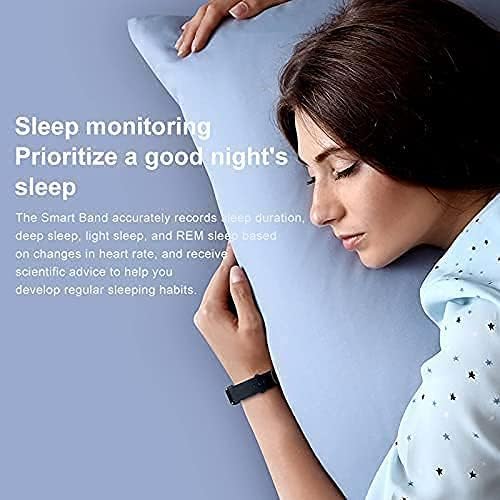
Figura 3.3: A person sleeping with the Mi Smart Band 6 on their wrist, illustrating the sleep monitoring feature.
3.3 Seguiment de l'aptitud física
The Mi Smart Band 6 supports 30 sport modes, acting as your personal wrist coach. It automatically recognizes six fitness modes: outdoor running, treadmill, walking, outdoor cycling, elliptical, and rowing machine.
- Supported Sport Modes: Outdoor running, walking, dancing, treadmill, outdoor cycling, elliptical, rowing machine, HIIT, basketball, boxing, Zumba, Pilates, ice skating, badminton, street dance, and more.

Figura 3.4: Icons representing various sport modes available on the Mi Smart Band 6, including Basketball, Boxing, Zumba, HIIT, Core Training, Pilates, Ice Skating, Badminton, and Street Dance.
3.4 Altres funcions
- Resistència a l'aigua 5ATM: The band is water-resistant up to 50 meters, making it suitable for swimming pools or surfing on the beach. It supports five different swimming styles for accurate tracking.
- Notificacions: Receive text messages, calls, and app notifications directly on your wrist.
- Control de la càmera: Feu servir la banda com a obturador remot per a la càmera del vostre telèfon intel·ligent.
- Control de música: Controla la reproducció de música al teu telèfon intel·ligent.
- Alarmes: Set silent vibrating alarms.

Figura 3.5: The Mi Smart Band 6 with water droplets, illustrating its 50-meter water resistance capability.
4. Manteniment
4.1 Cleaning the Band
Regularly clean your Mi Smart Band 6 and its strap to prevent skin irritation and maintain hygiene. Use a soft, damp cloth to wipe the device. For the strap, especially the black antibacterial Ag+ strap, you can use mild soap and water. Ensure the band is completely dry before wearing it again.
4.2 Durada i càrrega de la bateria
The Mi Smart Band 6 offers impressive battery life:
- Fins a 14 dies en mode normal.
- Fins a 19 dies in power-saving mode.
Charge the device using the magnetic charging cable as described in Section 2.1. Avoid exposing the charging pins to water or corrosive liquids.
5. Solució De Problemes
If you encounter issues with your Mi Smart Band 6, refer to the following common troubleshooting steps:
- La banda no s'encén: Assegureu-vos que la corretja estigui completament carregada. Connecteu-la al carregador durant almenys 10 minuts.
- No es pot emparellar amb el telèfon intel·ligent:
- Assegureu-vos que el Bluetooth estigui activat al telèfon i que la banda estigui dins del rang.
- Restart both your smartphone and the Mi Smart Band 6.
- Clear the Bluetooth cache on your phone (Android) or forget the device in Bluetooth settings (iOS) and try pairing again.
- Ensure the Mi Fit/Mi Wear app is updated to the latest version.
- Lectures inexactes de la freqüència cardíaca/SpO2: Ensure the band is worn correctly, snug but not too tight, and the sensor is clean and in direct contact with your skin. Avoid excessive movement during measurements.
- Notificacions que no apareixen: Check app notification settings on your smartphone and within the Mi Fit/Mi Wear app to ensure they are enabled for the desired applications. Ensure the band is connected via Bluetooth.
- La pantalla no respon: Try restarting the band by connecting it to the charger. If the issue persists, contact customer support.
6. Especificacions
| Característica | Especificació |
|---|---|
| Marca | XIAOMI |
| Número de model | Mi Band 6 |
| Mida de la pantalla | 1.56 polzades |
| Tipus de visualització | AMOLED |
| Color | Negre |
| Sistema operatiu | Android Wear 1.0 (Compatible) |
| Connectivitat | USB, Bluetooth |
| Comunicació sense fils estàndard | Bluetooth |
| Característiques especials | Text Messaging, Activity Tracker, Heart Rate Monitor, SpO2 Monitor, Sleep Monitor |
| Dispositius compatibles | Smartphone |
| Composició de la bateria | Polímer de liti |
| Resistència a l'aigua | 5 ATM (fins a 50 metres) |
| Capacitat d'emmagatzematge de memòria | 16 MB |
| Formulari d'article | Rectangular |
| Fabricant | Xiaomi |
| País d'origen | Alemanya |
7. Garantia i Suport
For information regarding product warranty, returns, or technical support, please refer to the official Xiaomi weblloc web o poseu-vos en contacte amb el vostre distribuïdor autoritzat local. Conserveu el comprovant de compra per a reclamacions de garantia.
Assistència en línia: Visit the official Xiaomi support page for FAQs, software updates, and contact information.


