1. Introducció
La creativa Stage 360 is a 2.1 Bluetooth Sound Bar Speaker system designed to enhance your home entertainment experience with cinematic audio. It features Dolby Atmos integration, upgraded system drivers, and multiple connectivity options for versatile use with various devices.
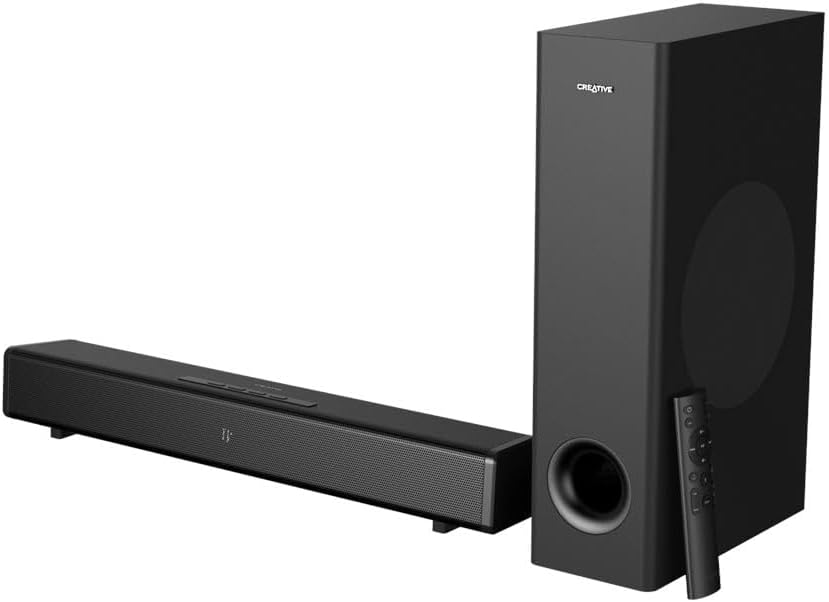
Image: The Creative Stage 360 soundbar and its accompanying subwoofer, both in black, with the remote control placed next to the subwoofer.
2. Què hi ha a la caixa
Upon unboxing your Creative Stage 360, please ensure all the following components are present:
- Creativa Stage 360 Sound Bar
- Subwoofer amb cable
- Control remot
- Cable d'alimentació
- Cable HDMI
- Cable òptic
- Manual d'usuari i documentació

Imatge: Una imatge superior view of all components included in the Creative Stage 360 package, neatly laid out on a white surface.
3. Configuració
3.1. Col·locació
Place the soundbar directly in front of your television or monitor. The subwoofer can be placed on the floor near the soundbar, ideally in a corner for enhanced bass response.
3.2. Connexió de la barra de so
Follow these steps to connect your Creative Stagi 360:
- Connexió d'alimentació: Connect the power cord to the soundbar and then to a wall outlet.
- Connexió del subwoofer: Connect the wired subwoofer to the dedicated subwoofer output port on the soundbar.
- Connexió de font d'àudio: Trieu un dels mètodes següents per connectar la font d'àudio:
- ARC HDMI: For optimal audio quality and control, connect an HDMI cable from the HDMI ARC port on the soundbar to the HDMI ARC port on your TV. This allows your TV remote to control the soundbar's volume.
- HDMI 2.0: Use the HDMI 2.0 input ports for connecting devices like gaming consoles (PS5, Xbox Series X/S, Nintendo Switch), PCs, Blu-ray, or DVD players.
- Òptic: Connect an optical cable from the soundbar's Optical In port to your TV or other audio source's optical output.
- Bluetooth 5.0: For wireless audio streaming from mobile phones, tablets, computers, or MP3 players.

Imatge: Un primer pla view of the rear panel of the Creative Stage 360 soundbar, showing the various input and output ports including HDMI ARC, HDMI 2.0, Optical, and power input.
4. Instruccions de funcionament
4.1. Encendre/apagar
Premeu el botó d'engegada de la barra de so o del comandament a distància per encendre o apagar la unitat.
4.2. Ajust de volum
Use the Volume Up (+) and Volume Down (-) buttons on the soundbar or the remote control to adjust the audio level. If connected via HDMI ARC, your TV remote may also control the volume.
4.3. Ús del comandament a distància
The included remote control provides full command over your soundbar's features:
- Selecció de la font: Use the Source button to cycle through input modes (HDMI ARC, HDMI 2.0, Optical, Bluetooth).
- Modes de so: Press the 'Mode' button to switch between optimized sound profiles:
- Mode de música: Balanced audio for music listening.
- Mode pel·lícula: Enhanced soundstage for cinematic experiences.
- Mode nocturn: Reduces dynamic range for late-night viewsense molestar els altres.
- Mode ample: Expandeix els sonstage for a broader audio experience.
- Ajust dels baixos: Use the 'Bass +' and 'Bass -' buttons to increase or decrease the subwoofer's output.
- Far/Near Listening: Adjusts the audio for optimal listening depending on your distance from the soundbar.

Imatge: Una imatge detallada view de la S creativatage 360 remote control, highlighting its various buttons for power, volume, source, sound modes, and bass control.
4.4. Emparellament Bluetooth
To pair your mobile device with the soundbar via Bluetooth:
- Press the Bluetooth button on the remote control or the Source button on the soundbar until 'BT' appears on the display. The Bluetooth indicator will flash, indicating pairing mode.
- On your mobile device, enable Bluetooth and search for 'Creative Stage 360' in the list of available devices.
- Select 'Creative Stage 360' to connect. Once connected, the Bluetooth indicator on the soundbar will turn solid blue.
5. Manteniment
To ensure the longevity and optimal performance of your Creative Stage 360, follow these maintenance guidelines:
- Neteja: Use a soft, dry cloth to wipe down the surfaces of the soundbar and subwoofer. Avoid using liquid cleaners or abrasive materials, as they may damage the finish.
- Ventilació: Assegureu-vos que hi hagi una ventilació adequada al voltant de la barra de so i el subwoofer. No bloquegeu cap obertura de ventilació.
- Medi ambient: Keep the unit away from direct sunlight, heat sources, excessive dust, moisture, and strong magnetic fields.
- Manipulació: Manipuleu la unitat amb cura. Eviteu deixar-la caure ni sotmetre-la a impactes forts.
6. Solució De Problemes
If you encounter issues with your Creative Stage 360, consulteu els següents problemes i solucions habituals:
- Sense so:
- Assegureu-vos que la barra de so estigui engegada i que s'hagi seleccionat la font d'entrada correcta.
- Check all cable connections (HDMI, Optical, Power) are secure.
- Verify the volume on both the soundbar and your connected device (TV, phone) is not muted or set too low.
- If using HDMI ARC, ensure your TV's HDMI ARC function is enabled in its settings.
- Subwoofer Not Working / Distorted Bass:
- Check the wired connection between the soundbar and the subwoofer.
- Ajusteu el nivell de greus amb el comandament a distància.
- Ensure the subwoofer is receiving power.
- El control remot no respon:
- Reviseu i substituïu les piles del comandament a distància.
- Assegureu-vos que no hi hagi obstacles entre el comandament a distància i el receptor d'infrarojos de la barra de so.
- Problemes de vinculació de Bluetooth:
- Ensure the soundbar is in Bluetooth pairing mode (flashing 'BT' on display).
- Desactiveu i torneu a activar el Bluetooth al vostre dispositiu mòbil.
- Forget 'Creative Stage 360' from your device's Bluetooth list and attempt to pair again.
- Sound Distortion / Intermittent Audio:
- Comproveu si hi ha connexions de cable soltes.
- Try a different audio source or input method.
- Assegureu-vos que la barra de so no estigui massa a prop d'altres dispositius electrònics que puguin causar interferències.
7. Especificacions
| Característica | Detall |
|---|---|
| Nom del model | 51MF8385AA001 24110985 |
| Tipus d'altaveu | Barra de so |
| Característica especial | Bass Boost, Dolby Enabled, Subwoofer |
| Usos recomanats per al producte | For Computers, For Music Players, For Smartphones or Tablets, For Televisions |
| Dispositius compatibles | Ordinador personal, Televisió |
| Recompte d'unitats | 1 recompte |
| Tipus de controlador | Control remot |
| Configuració del canal de so envoltant | 2.1 |
| Color | Multicolor |
| Components inclosos | Altaveus |
| Dimensions del producte | 3.4 "P x 22.2" W x 2.9" H |
| Pes de l'article | 13.6 lliures |
| És impermeable | FALSA |
| Tipus de garantia | Limitat |
| Nombre d'articles | 1 |
| Mètode de control | Remot |
| Tecnologia de comunicació sense fils | Bluetooth |
| Mida de l'altaveu | 56.39 centímetres |
| Font d'alimentació | Elèctric amb cable |
| Diàmetre del woofer | 12 centímetres |
| Nivell de resistència a l'aigua | No resistent a l'aigua |
| Tipus de paquet del client | FFP |
| Tipus de controlador d'àudio | Conductor dinàmic |
| Interval Bluetooth | 10 metres |
| Tecnologia de connectivitat del subwoofer | Amb cable |
| Protocol de connectivitat | Bluetooth |
| Inclou reproductor de MP3? | No |
| Nombre de circuits | 1 |
| Nombre de nivells de potència | 1 |
| UPC | 054651194625 |
| Fabricant | Laboratoris creatius |
| Número de model de l'article | MF8385 |
| Data de primera disponibilitat | 3 d'agost de 2021 |
| Marca | Creatiu |
| Potència de sortida màxima dels altaveus | 240 watts |
| Tecnologia de connectivitat | Bluetooth |
| Mode de sortida d'àudio | Envoltant |
| Tipus de muntatge | Muntatge de la barra |
8. Garantia i Suport
La creativa Stage 360 comes with a Garantia limitada. For specific terms and conditions, please refer to the warranty documentation included in your product packaging.
For further assistance, technical support, or to explore other Creative products, please visit the official Creative Store:


