1. Introducció
This manual provides essential information for the safe and effective operation of your BenQ GV30 Portable Projector. Please read this manual thoroughly before using the device and retain it for future reference.

Figure 1: BenQ GV30 Portable Projector
2. Què hi ha a la caixa
Verifiqueu que tots els elements que s'enumeren a continuació s'inclouen al vostre paquet:
- BenQ GV30 Portable Projector
- Cable d'alimentació
- Control remot
- Manual d'usuari (aquest document)
- Targeta de garantia
- Android TV Dongle (QS01)
- Base Magnètica
- Maleta de transport
3. Producte acabatview
3.1 Característiques clau
- Visualització: 720p HD Resolution, 300 ANSI Lumens.
- Àudio: 2.1 Channel Bluetooth Speaker with Extra Bass (4W x 2 midrange tweeters & 8W woofer).
- Funcions intel·ligents: Integrated Android TV, Chromecast, Airplay.
- Projection Flexibility: Adjustable 135-degree projection angle, Auto Focus, Vertical Keystone.
- Connectivitat: HDMI, USB-C DisplayPort, 3.5mm Headphone Jack.
- Portabilitat: Compact design with a leather loop for easy carrying, built-in battery.
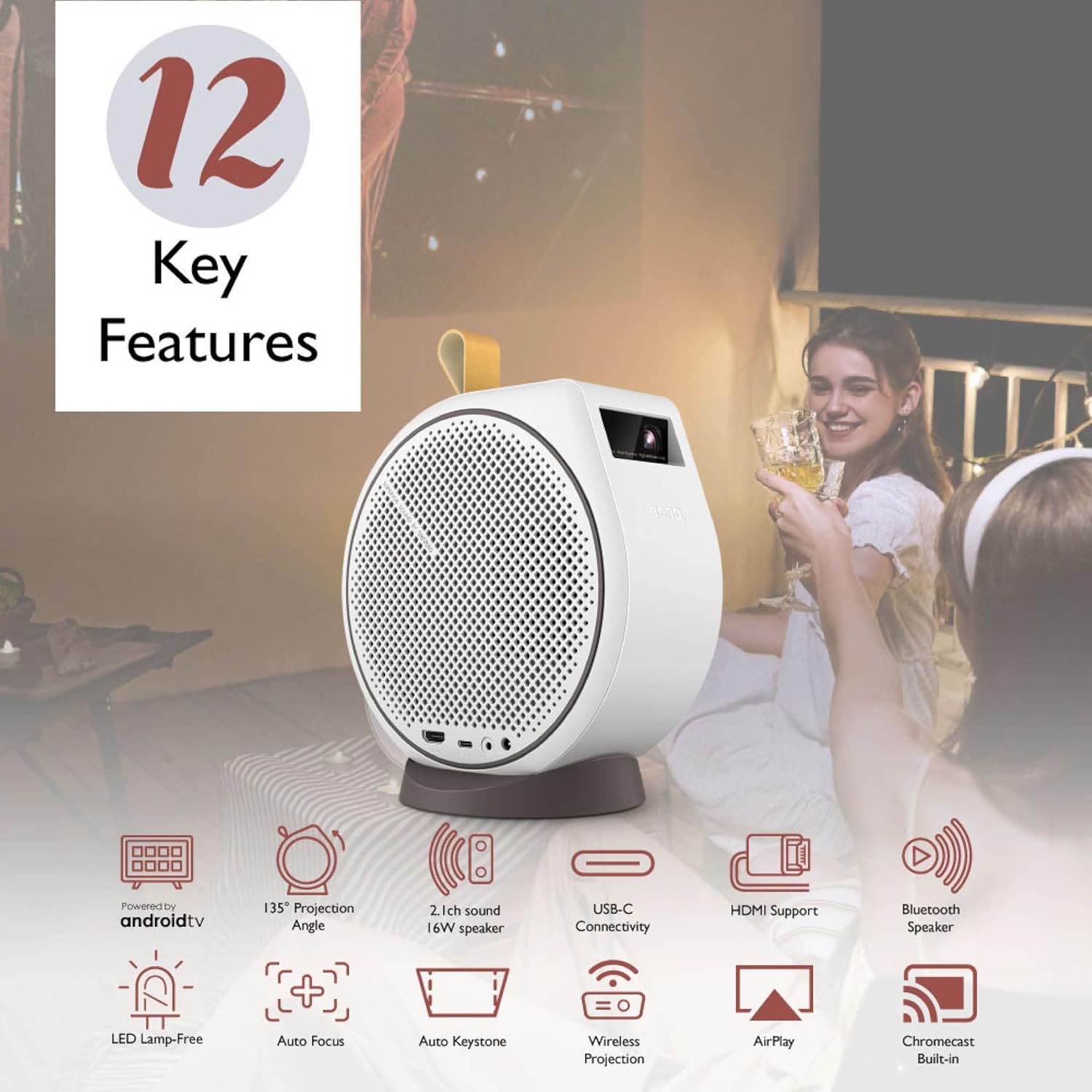
Figura 2: Mésview of BenQ GV30 Key Features
3.2 Ports i controls
The BenQ GV30 features various ports for connectivity and control buttons for easy operation.
- Port HDMI: For connecting external devices such as game consoles or Blu-ray players.
- USB-C DisplayPort: Supports data transmission, DisplayPort output (DP Alt Mode), and power delivery (PD inputs only, support 15V/3A).
- Presa d'auriculars de 3.5 mm: For connecting external audio devices or headphones.
- Entrada d'alimentació: Per connectar l'adaptador de corrent.
- Controls del tauler superior: Power button, volume up/down, Bluetooth connection button.

Figura 3: Ports de connectivitat
4. Configuració
4.1 Installing the Android TV Dongle
- Carefully remove the side panel of the projector using the provided tool or a thin, non-abrasive object.
- Insert the BenQ QS01 Android TV dongle into the designated HDMI port inside the compartment.
- Connect the dongle's power cable to the internal USB port.
- Replace the side panel securely.
4.2 Engegada inicial i connexió de xarxa
- Connecteu el cable d'alimentació al projector i a una presa de corrent.
- Premeu el botó d'encesa del projector o del comandament a distància per encendre el dispositiu.
- Follow the on-screen prompts to connect to your Wi-Fi network.
- Log in with your Google account to access Android TV features and download streaming applications.

Figura 4: Interfície d'Android TV
5. Instruccions de funcionament
5.1 Flexible Projection
The BenQ GV30 offers versatile projection options:
- 135-Degree Projection Angle: The projector can be rotated on its magnetic base to project onto walls, ceilings, or any desired surface.
- Auto Focus & Vertical Keystone: The projector automatically adjusts focus and corrects image distortion to ensure a clear, rectangular picture regardless of the projection angle.

Figure 5: 135-Degree Projection Angle
5.2 Casting and Screen Mirroring
Utilize the built-in Chromecast and Airplay features to cast content from your mobile devices or computers.
- Chromecast: Cast videos, photos, and music from compatible Android devices or Chrome browser tabs.
- Airplay: Mirror your screen or stream content from Apple devices.
Mode d'altaveu Bluetooth 5.3
The GV30 can function as a standalone Bluetooth speaker:
- Press the Bluetooth button on the projector's top panel or remote control.
- Enable Bluetooth on your mobile device and select 'BenQ GV30' from the list of available devices to pair.
- Play audio from your device through the projector's 2.1 channel speaker system.
Video 1: Demonstrates how to set up a Bluetooth connection on the BenQ GV30 projector.
6. Qualitat de la imatge
The BenQ GV30 delivers a clear and vibrant viewExperiència:
- Resolució: Native 720p HD resolution provides sharp images for its class.
- Brillantor: 300 ANSI Lumens are suitable for dark environments. For optimal viewing, ensure the room is as dark as possible.
- Precisió del color: Optimized Picture Modes powered by CinematicColor and 98% Rec. 709 wide color gamut ensure true and vivid colors.
- Mida de pantalla recomanada: Optimal image quality is achieved with screen sizes up to 100 inches. Larger sizes may result in pixelation.

Figure 6: Authentic Color Reproduction
7. Funcions d'àudio
Experience rich and clear audio with the integrated 2.1 channel speaker system:
- So potent: Dual 4W midrange tweeters and an 8W woofer provide balanced audio with enhanced bass.
- Veus clares: Voices are clear and easy to understand, making it suitable for movies and TV shows.
- Àudio extern: Connect external speakers or headphones via Bluetooth or the 3.5mm audio jack for a customized audio experience.

Figure 7: 2.1 Channel Audio System
8. Portabilitat
The BenQ GV30 is designed for on-the-go entertainment:
- Compacte i lleuger: Weighing 3.53 pounds with dimensions of 7.3 x 4.7 x 7.7 inches, it is easy to transport.
- Bateria incorporada: Provides approximately 2.5 hours of battery life under power-efficient settings (low brightness, low volume). Expect around 2 hours with medium brightness and average volume. It is recommended to carry the power cord for longer viewsessions de realització.
- Estoig de transport: A dedicated carrying case is included to protect the projector and its accessories during transport.

Figure 8: Easy-to-Carry Design
Video 2: Showcases the casting features of the BenQ GV30 projector.
Video 3: Highlights the personal theater features of the BenQ GV30 projector.
Video 4: Demonstrates how to project content onto the ceiling using the BenQ GV30 projector.
9. Especificacions
| Característica | Detall |
|---|---|
| Dimensions del producte | 7.3 x 4.7 x 7.7 polzades |
| Pes de l'article | 3.53 lliures |
| Número de model de l'article | GV30 |
| Bateries | Necessites 2 piles AAA (incloses) |
| Resolució de visualització | 1280 x 720 (720p HD) |
| Tecnologia de connectivitat | HDMI, USB-C, Bluetooth, Wi-Fi |
| Característica especial | Built-In Speaker, Auto Focus, Vertical Keystone |
| Usos recomanats | Bedroom, Business, Education, Gaming, Home Cinema |
10. Solució De Problemes
- Baixa brillantor: Ensure the projector is used in a dark environment for optimal viewing. Adjust power mode settings if necessary.
- Unstable Magnetic Base: The magnetic connection of the base is not extremely strong. Exercise caution when rotating the projector on its base to prevent it from slipping off. Avoid picking up the projector by the base.
- Streaming Stick Compatibility: The internal compartment for the Android TV dongle is specifically designed for the BenQ QS01. Other streaming sticks (e.g., Roku, Amazon Fire Stick) may not fit or receive adequate power due to size or power supply port placement.
- Soroll del ventilador: The projector's fan noise is minimal and generally does not hinder the audio experience due to the quality of the built-in speakers.
11. Manteniment
- Neteja: Use a soft, dry cloth to clean the exterior of the projector. For the lens, use a specialized lens cleaning cloth and solution.
- Emmagatzematge: When not in use, store the projector in its provided carrying case in a cool, dry place away from direct sunlight.
- Cura de la bateria: Per allargar la durada de la bateria, eviteu descarregar-la completament amb freqüència. Carregueu el projector regularment, fins i tot si no l'utilitzeu.
12. Garantia i Suport
Your BenQ GV30 Portable Projector comes with a warranty. Please refer to the included Warranty Card for detailed terms and conditions. For technical support, product registration, or service inquiries, please visit the official BenQ weblloc o poseu-vos en contacte amb el seu servei d'atenció al client.


