1. Introducció
Gràcies per la compraasing the Muse MT-112 W Micro System. This versatile audio system combines a classic turntable with modern features such as a CD player, FM radio, Bluetooth connectivity, and USB/SD card playback and encoding. This manual provides essential information for the safe and efficient operation of your device. Please read it thoroughly before use and retain it for future reference.
2. Instruccions de seguretat
- Font d'alimentació: Assegureu-vos que la font d'alimentació voltage coincideix amb l'etiqueta de classificació de la unitat.
- Ventilació: No bloquegeu les obertures de ventilació. Deixeu prou espai al voltant de la unitat per a un flux d'aire adequat.
- Aigua i humitat: Do not expose the unit to rain, moisture, or dripping/splashing liquids. Do not place objects filled with liquids on the unit.
- Calor: Mantingueu la unitat allunyada de fonts de calor com ara radiadors, registres de calor, estufes o altres aparells que produeixin calor.
- Neteja: Desendolleu la unitat de la presa de corrent abans de netejar-la. Feu servir un drap suau i sec. No utilitzeu netejadors líquids ni aerosols.
- Manteniment: No intenteu atendre aquest producte vosaltres mateixos. Consulteu tots els serveis a personal de servei qualificat.
- Col·locació: Col·loqueu la unitat sobre una superfície estable i plana per evitar que caigui.
3. Contingut del paquet
Si us plau, comproveu que els següents elements estiguin inclosos al vostre paquet:
- Muse MT-112 W Micro System Unit
- Adaptador de 45 RPM
- Cable d'alimentació de CA.
- Manual d'usuari
Si falta algun article o està malmès, poseu-vos en contacte amb el vostre distribuïdor.
4. Producte acabatview
Familiarize yourself with the various parts and controls of your Muse MT-112 W Micro System.

Figura 1: Davant view of the Muse MT-112 W Micro System with the transparent dust cover open, revealing the turntable and a vinyl record. The front panel features controls and a display.
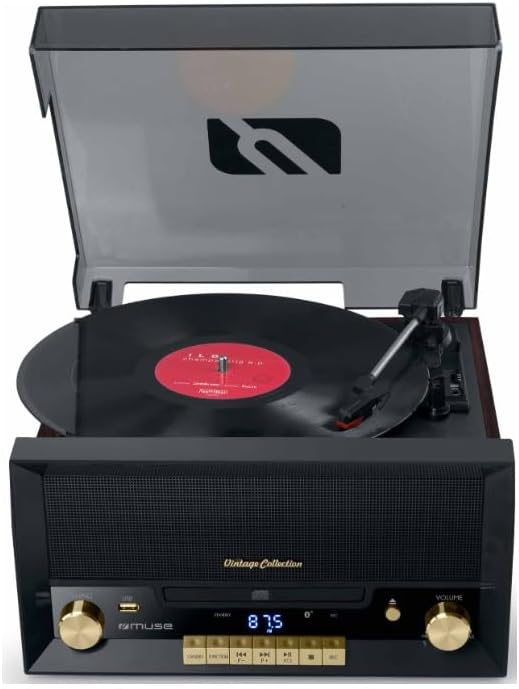
Figura 2: Front detallat view of the micro system with the turntable lid closed. The central display shows '87.5', indicating FM radio frequency. Controls for tuning, volume, and playback are visible.

Figura 3: Close-up of the front control panel, highlighting the CD tray in its closed position, the digital display, and various function buttons (e.g., USB, SD, Play/Pause, Skip, Stop) and the volume knob.
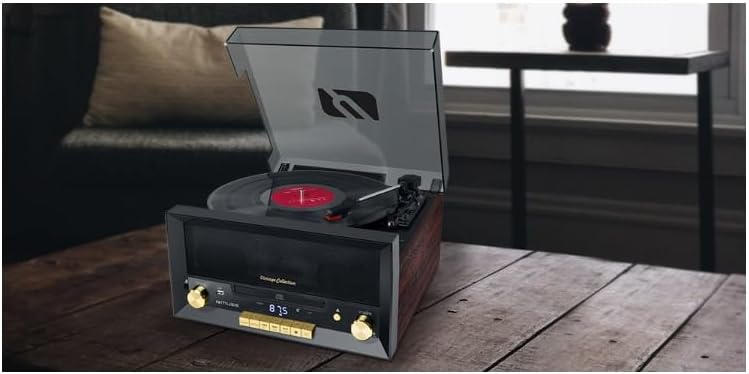
Figura 4: posterior view of the micro system, displaying the power input socket, RCA audio output jacks (red and white), and potentially an FM antenna connection.
Controls del panell frontal:
- Power/Function Knob: Turns the unit on/off and selects input source (Phono, CD, FM, Bluetooth, USB, SD, AUX).
- Pom d'afinació: Ajusta la freqüència de ràdio FM.
- Pom de volum: Ajusta el volum general del so.
- Safata de CD: Per inserir CD d'àudio.
- Visualització: Shows current function, track number, or radio frequency.
- Port USB: For USB flash drives (playback and encoding).
- Ranura per a targeta SD: For SD memory cards (playback and encoding).
- Botons de control de reproducció: Reproduir/Pausa, Aturar, Saltar endavant/enrere.
- Botó Obrir/Tancament: Obre i tanca la safata del CD.
Connexions del panell posterior:
- Entrada d'alimentació de CA: Es connecta a la font d'alimentació principal.
- Sortida RCA (E/D): Es connecta a l'extern ampelevadors o altaveus alimentats.
- Antena FM: Per a una millor recepció de ràdio FM.
Top Panel (Turntable):
- Plat giratori: Where vinyl records are placed.
- Braç: Sosté el punter (agulla).
- Selector de velocitat: Switches between 33, 45, and 78 RPM.
- Interruptor d'aturada automàtica: Activa/desactiva l'aturada automàtica del plat al final d'un disc.
- Adaptador de 45 RPM: Used for records with a large center hole.
5. Configuració
5.1 Desembalatge i col·locació
- Traieu amb cura la unitat del seu embalatge.
- Place the unit on a flat, stable surface, ensuring adequate ventilation around it.
- Remove any protective materials from the turntable platter and tonearm.
5.2 Connexió d'alimentació
Connect the supplied AC power cable to the AC power input on the rear of the unit, then plug the other end into a standard wall outlet.
5.3 Connexió de l'antena
For optimal FM radio reception, extend the built-in FM wire antenna or connect an external FM antenna to the designated port on the rear of the unit, if available.
5.4 External Audio Output (Optional)
If you wish to connect the micro system to an external amplifier or powered speakers, use RCA cables (not included) to connect the RCA L/R output jacks on the rear of the unit to the corresponding input jacks on your external audio equipment.
6. Instruccions de funcionament
6.1 Funcionament general
- Encès/apagat: Rotate the Power/Function knob clockwise to turn the unit on. Rotate counter-clockwise until it clicks to turn off.
- Selecció de la funció: Rotate the Power/Function knob to select your desired source: PHONO (Turntable), CD, FM, BT (Bluetooth), USB, SD, or AUX.
- Ajust de volum: Rotate the Volume knob to increase or decrease the sound level.
6.2 Turntable Operation (PHONO)
- Aixequeu la coberta antipols.
- Place a vinyl record on the turntable platter. If playing a 45 RPM single, place the 45 RPM adapter on the center spindle first.
- Estableix el Selector de velocitat to 33, 45, or 78 RPM, matching your record.
- Estableix el Interruptor d'aturada automàtica to ON if you want the platter to stop automatically at the end of the record, or OFF for continuous rotation.
- Gently lift the tonearm using the cueing lever and position the stylus over the desired track on the record.
- Baixeu lentament el braç sobre el disc utilitzant la palanca de cueing. Començarà la reproducció.
- To stop playback, lift the tonearm, return it to its rest, and lower the cueing lever.
6.3 CD Player Operation (CD)
- Select the CD function using the Power/Function knob.
- Premeu el botó OBRIR/TANCAR botó per obrir la safata de CD.
- Place a CD (CD, CD-R, or CD-RW) with the label side facing up into the tray.
- Premeu el botó OBRIR/TANCAR Premeu el botó de nou per tancar la safata. La unitat llegirà el disc.
- Premeu el botó REPRODUCCIÓ/PAUSA per iniciar la reproducció.
- Utilitza el ENDAVANT/ENDARRERE botons per navegar entre pistes.
- Premeu el botó STOP botó per finalitzar la reproducció.
6.4 FM Radio Operation (FM)
- Select the FM function using the Power/Function knob.
- Gira el Pom de sintonització to manually scan for radio stations. The frequency will be shown on the display.
- Estacions preseleccionades: The unit supports 20 FM presets. Refer to the full manual for detailed instructions on how to store and recall presets.
6.5 Bluetooth Operation (BT)
- Select the BT function using the Power/Function knob. The display will show 'BT' and flash, indicating it's in pairing mode.
- Activa el Bluetooth al teu dispositiu mòbil (telèfon intel·ligent, tauleta, etc.) i cerca els dispositius disponibles.
- Select 'MT-112 W' (or similar name) from the list of devices.
- Once paired, the 'BT' indicator on the display will stop flashing. You can now play audio from your device through the micro system.
6.6 USB/SD Card Playback and Encoding
- Reproducció: Insert a USB flash drive into the USB port or an SD card into the SD card slot. Select USB or SD function. The unit will automatically detect and play compatible audio files. Use playback control buttons to navigate.
- Encoding (Recording): The unit supports recording audio from the turntable, CD, or FM radio directly to a USB drive or SD card. Refer to the full manual for specific steps on how to initiate and manage recording.
6.7 Entrada auxiliar (AUX)
- Connect an external audio device (e.g., MP3 player, smartphone) to the 3.5mm AUX IN jack on the front panel using a 3.5mm audio cable (not included).
- Select the AUX function using the Power/Function knob.
- Play audio from your connected device. The sound will be output through the micro system's speakers.
6.8 Sortida d'auriculars
Connect headphones to the 3.5mm headphone jack on the front panel for private listening. When headphones are connected, the main speakers will be muted.
7. Manteniment
7.1 Neteja de la unitat
- Desconnecteu sempre la unitat abans de netejar-la.
- Feu servir un drap suau i sec per netejar les superfícies exteriors. No utilitzeu productes de neteja abrasius, ceres ni dissolvents.
- For the dust cover, use a soft cloth to avoid scratches.
7.2 Cura del llapis òptic
- The stylus is a delicate component. Handle it with care.
- Netegeu el llapis periòdicament amb un raspall suau, raspallant suaument de darrere cap endavant.
- Substitueix el llapis quan notis una degradació de la qualitat del so o un desgast visible.
8. Solució De Problemes
If you encounter any issues, please refer to the following common problems and solutions:
- Sense energia: Ensure the power cable is securely connected to both the unit and the wall outlet. Check if the outlet is functioning.
- Sense so: Check the volume level. Ensure the correct function (source) is selected. If using external speakers, check their power and connections. If using headphones, ensure they are fully plugged in.
- Turntable Not Spinning/Skipping: Ensure the speed selector matches the record. Check if the auto-stop switch is set correctly. Ensure the tonearm is properly lowered. Clean the stylus.
- El CD no es reprodueix: Ensure the CD is inserted correctly (label side up) and is clean and free of scratches. Try a different CD.
- Problemes de vinculació de Bluetooth: Ensure the unit is in Bluetooth mode and flashing. Make sure Bluetooth is enabled on your device and it's within range. Disconnect from other Bluetooth devices.
- Mala recepció de ràdio: Adjust the position of the FM antenna. Try relocating the unit to a different area.
Si el problema persisteix, poseu-vos en contacte amb l'atenció al client.
9. Especificacions
| Marca | MUSA |
| Model | MT-112 W |
| Potència de sortida | 20 W |
| Velocitats de la placa giratòria | 33/45/78 RPM |
| Compatibilitat amb CD | CD, CD-R / RW |
| Connectivitat | Bluetooth, USB, SD Card, 3.5mm Aux-in, RCA Output, Headphone Output |
| Sintonitzador | FM (20 Presets) |
| Dimensions (A x A x P) | 171 x 343 x 324 mm |
| Pes | 3.83 kg |
| Material | Fusta, plàstic |
| Font d'alimentació | Cable CA |
10. Garantia i Suport
This product is covered by a manufacturer's warranty. Please refer to the warranty card included in your package for detailed terms and conditions. For technical support, service, or warranty claims, please contact your retailer or the official Muse customer service department. Keep your proof of purchase for warranty validation.


