Introducció
Thank you for choosing the CASIO Baby-G BGA-280 Series watch. This manual provides detailed instructions on how to use and maintain your watch. Please read this manual carefully to ensure proper operation and to get the most out of its features.

Figura 1: Frontal view of the BGA-280-6ADR watch. This image displays the watch's translucent pink case and strap, with a clear view of its analog hands and digital display, indicating the current time and day.
Precaucions de seguretat
To ensure safe and proper use of your watch, please observe the following precautions:
- Do not attempt to open the watch case or remove its back cover.
- Avoid exposing the watch to extreme temperatures (above 60°C or below -10°C) or direct sunlight for prolonged periods.
- Do not expose the watch to strong magnetic fields or static electricity.
- Clean the watch with a soft, dry cloth. Do not use chemical cleaners.
- The watch is water resistant up to 10 BAR. Avoid operating buttons underwater.
Identificació de components
Familiarize yourself with the various components and buttons of your BGA-280 watch:

Figura 2: lateral view of the BGA-280-6ADR watch, showing the button layout. This image clearly displays the four buttons located on the sides of the watch case, which are used for various functions and mode navigation.
| Component | Funció |
|---|---|
| A Button (Adjust) | S'utilitza per entrar i sortir dels modes de configuració i per confirmar la configuració. |
| B Button (Light) | Activa la retroiluminació LED. |
| C Button (Mode) | Cycles through the different watch modes (Timekeeping, World Time, Stopwatch, Timer, Alarm). |
| D Button (Search/Forward) | Used to change settings (increase values) and for search functions in certain modes. |
| Pantalla digital | Shows time, date, and other mode-specific information. |
| Analog Hands | Indicate the current hour and minute. |
Configuració
Setting the Home City and Time
- En el mode d'indicació de l'hora, manteniu premut A button for about two seconds until the city code starts to flash on the digital display. This indicates the setting mode.
- Premeu el botó D button to scroll through the city codes until your desired Home City is displayed. Refer to the World Time City Code List (not provided in this manual, refer to full Casio manual if needed).
- Premeu el botó C button to cycle through the settings: City Code → DST (Daylight Saving Time) → 12/24-hour format → Seconds → Hour → Minute → Year → Month → Day → Illumination Duration → Button Tone.
- Mentre un paràmetre parpelleja, utilitzeu el botó D button to change it. For DST, press D to toggle between ON and OFF.
- After configuring all settings, press the A button to exit the setting mode. The watch will automatically adjust the analog hands to match the digital time.
Instruccions de funcionament
Modes de navegació
Premeu el botó C button to cycle through the watch's modes in the following order:
Timekeeping Mode → World Time Mode → Stopwatch Mode → Timer Mode → Alarm Mode
Mode de cronometratge
This is the default mode, displaying the current time and date for your Home City.
- A view the current date, press the D botó.
- To return to the time display, press the D botó de nou.
Mode d’hora mundial
Aquest mode us permet view the current time in 48 cities (31 time zones) around the world.
- Des del mode de mesura del temps, premeu C to enter World Time Mode. The city code of the currently selected World Time City will be displayed.
- Premeu el botó D button to scroll through the city codes.
- To swap your Home City and World Time City, hold down the A botó durant uns tres segons.
Mode de cronòmetre
The stopwatch measures elapsed time in 1/100-second units for the first 60 minutes, and 1-second units thereafter, up to 24 hours.
- From World Time Mode, press C to enter Stopwatch Mode. The display will show "0'00"00".
- Premeu D per iniciar/aturar el cronòmetre.
- While the stopwatch is stopped, press A to reset it to "0'00"00".
Mode temporitzador
The countdown timer can be set from 1 minute to 24 hours in 1-minute increments.
- From Stopwatch Mode, press C to enter Timer Mode.
- Manteniu premuda la A button for about two seconds until the hour setting starts to flash.
- Utilitza el D button to change the hour, then press C per passar a la configuració dels minuts.
- Utilitza el D botó per canviar el minut.
- Premeu A per sortir del mode de configuració.
- Premeu D to start/stop the countdown timer. An alarm will sound when the countdown reaches zero.
Mode d'alarma
The watch has five daily alarms and an hourly senyal horari.
- From Timer Mode, press C to enter Alarm Mode. The alarm number (AL1, AL2, etc.) will be displayed.
- Premeu D to cycle through the alarms (AL1 to AL5, SNZ, SIG).
- To set an alarm, select the desired alarm (e.g., AL1) and hold down the A button for about two seconds until the hour setting flashes.
- Utilitza el D button to change the hour, then press C per passar a la configuració dels minuts.
- Utilitza el D botó per canviar el minut.
- Premeu A per sortir del mode de configuració.
- To turn an alarm ON/OFF, select the alarm and press D. "ON" or "OFF" will appear.
- Per girar el Hourly Time Signal (SIG) ON/OFF, select SIG and press D.
Il·luminació
The watch is equipped with an LED backlight for easy reading in the dark.
- Premeu el botó B botó per il·luminar la pantalla.
- The illumination duration can be set in the Timekeeping Mode settings (refer to "Setting the Home City and Time").
Manteniment
Neteja del rellotge
Una neteja regular ajuda a mantenir l'aspecte i la longevitat del rellotge.
- Wipe the watch case and band with a soft, dry cloth to remove dirt and moisture.
- Per a la brutícia persistent, feu servir un drap suauampened with water and a mild neutral detergent, then wipe dry.
- Do not use volatile agents like thinner, benzine, alcohol, or abrasive cleaners, as they may damage the resin components.
Resistència a l'aigua
Your BGA-280 watch is water resistant to 10 BAR (100 meters). This means it is suitable for everyday use, showering, swimming, and snorkeling. However, it is not suitable for scuba diving.
- No accioneu els botons del rellotge mentre estigui mullat o submergit a l'aigua.
- Després de l'exposició a l'aigua salada, esbandiu el rellotge amb aigua neta i eixugueu-lo.
- Avoid exposing the watch to strong water pressure, such as from a high-pressure car wash.
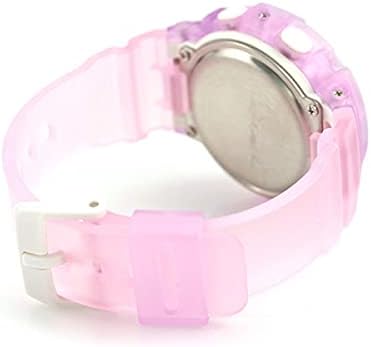
Figura 3: posterior view of the BGA-280-6ADR watch. This image shows the stainless steel case back, where important information such as the model number and water resistance rating (10 BAR) are engraved.
Resolució de problemes
Si teniu algun problema amb el rellotge, consulteu els següents problemes i solucions habituals:
| Problema | Solució |
|---|---|
| Les agulles analògiques no coincideixen amb l'hora digital. | This can happen after setting the Home City. The hands should automatically adjust. If not, refer to the full manual for manual hand alignment. |
| Sense pantalla o pantalla tènue. | The battery may be low. Contact a CASIO service center for battery replacement. |
| Els botons no responen. | Ensure the watch is not wet. If the issue persists, a reset may be needed (refer to full manual) or contact support. |
| L'hora és incorrecta. | Check your Home City and DST settings. Re-adjust if necessary. |
Especificacions
| Característica | Detall |
|---|---|
| Número de model | BGA-280-6ADR |
| Marca | CASIO |
| Moviment | Quars |
| Resistència a l'aigua | 10 BAR (100 metres) |
| Hora del món | 31 time zones (48 cities + UTC), daylight saving on/off, Home city/World time city swapping |
| Cronòmetre | 1/100-second stopwatch, Measuring capacity: 23:59'59.99'', Measuring modes: Elapsed time, split time, 1st-2nd place times |
| Temporitzador | Countdown timer, Measuring unit: 1 second, Countdown range: 1 minute to 24 hours (1-minute increments and 1-hour increments) |
| Alarmes | 5 daily alarms, Hourly senyal horari |
| Il·luminació | LED light (Super Illuminator), selectable illumination duration (1.5 seconds or 3 seconds), afterglow |
| Calendari | Calendari automàtic complet (fins a l'any 2099) |
| Precisió | ± 30 segons al mes |
| Durada de la bateria | Aproximadament 3 anys amb CR1220 |
Garantia i Suport
Your CASIO Baby-G watch is covered by a manufacturer's warranty. Please refer to the warranty card included with your purchase for specific terms and conditions, including warranty period and coverage details.
For technical support, repairs, or further inquiries, please contact your local authorized CASIO service center or visit the official CASIO weblloc per obtenir informació de contacte.
- Official CASIO Weblloc: www.casio.com
- Atenció al client: Refer to your regional CASIO website for local contact details.


