1. Introducció
This manual provides essential information for setting up, operating, and maintaining your Linksys EA8100 Max-Stream AC2600 Dual-Band Gigabit WiFi Router. The EA8100 is designed to deliver high-speed wireless connectivity for your home network, featuring dual-band technology, MU-MIMO, and Beamforming for efficient data transfer to multiple devices.
2. Contingut del paquet
Assegureu-vos que tots els elements estiguin presents al paquet del producte:
- Linksys EA8100 Dual-Band Gigabit WiFi Router
- Guia d'inici ràpid
- Cable Ethernet
- Adaptador d'alimentació
- Warranty and Regulatory Documentation
3. Producte acabatview
3.1. Característiques clau
- Dual-Band AC2600: Simultaneous 2.4GHz (up to 800Mbps) and 5GHz (up to 1733Mbps) networks.
- Tecnologia MU-MIMO: Multi-User, Multiple-Input, Multiple-Output ensures multiple devices receive high-speed Wi-Fi simultaneously.
- Formació de feixos: Focuses Wi-Fi signals directly to connected devices for improved range and performance.
- Processador potent: 880MHz dual-core processor for efficient data handling.
- Memòria: 128MB Flash and 256MB RAM.
- Antenes: Four detachable external adjustable antennas for optimal signal coverage.
3.2. Davant View
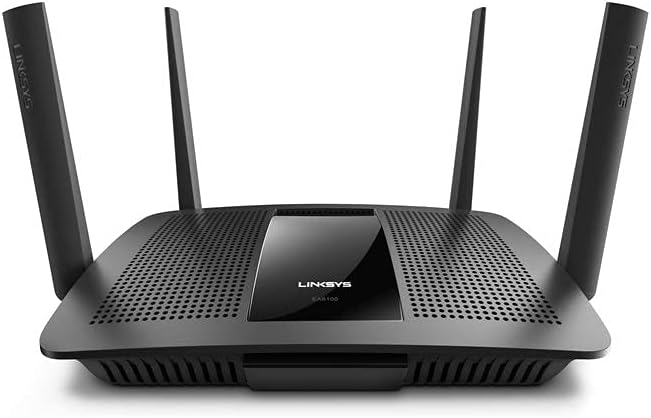
3.3. Back Panel Ports and Buttons

- USB 3.0 Port (USB 1): Per connectar dispositius d'emmagatzematge externs o impressores.
- USB 2.0 Port (USB 2): Per connectar dispositius d'emmagatzematge externs o impressores.
- Botó de restabliment: Manteniu premut durant 10 segons per restaurar la configuració predeterminada de fàbrica.
- Port d'Internet (WAN): Connecteu el vostre mòdem a aquest port mitjançant un cable Ethernet.
- Ports LAN (1-4): Connecteu dispositius amb cable com ara ordinadors, consoles de jocs o televisors intel·ligents.
- Power Port (12VDC): Connecteu l'adaptador d'alimentació inclòs.
- Botó On/Off: Premeu per encendre o apagar el router.
3.4. Indicadors LED
The router features LED indicators on the front panel to show the status of the device and its connections. Refer to the Quick Start Guide for detailed descriptions of each LED's behavior.
4. Configuració
Follow these steps to set up your Linksys EA8100 router:
- Unplug your modem: Desconnecta l'alimentació del mòdem.
- Connecteu el router: Connect one end of the included Ethernet cable to the Internet (WAN) port on your Linksys router and the other end to your modem's Ethernet port.
- Power on the modem: Plug in your modem and wait for it to fully boot up (usually indicated by stable lights).
- Power on the router: Connect the power adapter to your Linksys router and plug it into a power outlet. Press the On/Off button if necessary. Wait for the router's indicator lights to stabilize.
- Connecteu-vos al router:
- Sense fil: Connect to the default Wi-Fi network name (SSID) and password printed on the bottom of your router.
- Amb cable: Connect an Ethernet cable from your computer to one of the LAN ports on the router.
- Configuració completa: Obre a web navegador i navegueu a linksyssmartwifi.com or the IP address printed on the router's label (e.g., 192.168.1.1) to access the setup wizard. Follow the on-screen instructions to configure your network settings, including Wi-Fi name and password.
4.1. Linksys App Setup
For an easier setup experience, download the Linksys App on your mobile device. The app provides a guided setup process and allows for convenient management of your network settings.

5. Funcionament del router
5.1. Wi-Fi de doble banda
The EA8100 operates on two frequency bands:
- Banda de 2.4 GHz: Provides wider coverage and is ideal for general internet use, web browsing, and connecting devices further away from the router.
- Banda de 5 GHz: Offers faster speeds and is best for high-bandwidth activities like online gaming, 4K video streaming, and connecting devices closer to the router.
5.2. MU-MIMO and Beamforming

The router utilizes MU-MIMO technology to communicate with multiple devices simultaneously, ensuring each device receives its own dedicated high-speed Wi-Fi stream. Formació de feixos technology further enhances this by directing the Wi-Fi signal directly to your devices, improving signal strength and reducing interference.

5.3. Dispositius de connexió
You can connect up to 15+ devices to the router's dual bands for seamless connectivity.

6. Manteniment
- Actualitzacions de firmware: Regularly check for and install the latest firmware updates from the Linksys support weblloc per garantir un rendiment i una seguretat òptims.
- Col·locació òptima: Place the router in a central location, away from obstructions (thick walls, large metal objects) and interference sources (microwaves, cordless phones) to maximize Wi-Fi coverage and signal strength.
- Neteja: Mantingueu el router net i sense pols per evitar el sobreescalfament. Feu servir un drap suau i sec per netejar-lo.
- Seguretat: Use strong, unique passwords for your Wi-Fi networks and router administration. Enable WPA2/WPA3 encryption.
7. Solució De Problemes
- Sense connexió a Internet:
- Check all cable connections between your modem and router.
- Restart your modem and router by unplugging them for 30 seconds and then plugging them back in.
- Verify your internet service provider (ISP) is not experiencing outages.
- Velocitats Wi-Fi lentes:
- Assegureu-vos que el router estigui col·locat de manera òptima, lluny d'interferències.
- Check for too many devices on one band; try distributing devices between the 2.4 GHz and 5 GHz bands.
- Update your device drivers for your wireless adapters.
- No es pot connectar a Wi-Fi:
- Comproveu el nom de la xarxa Wi-Fi (SSID) i la contrasenya.
- Reinicieu el dispositiu i torneu a intentar connectar-vos.
- If using WPS, ensure the WPS button on both devices is pressed within the time limit.
8. Especificacions
| Marca | Linksys |
| Nom del model | EA8100 |
| Comunicació sense fils estàndard | 802.11ac (AC2600) |
| Classe de banda de freqüència | Doble banda (2.4 GHz i 5 GHz) |
| Max Wireless Data Rate | 1733 Mbps (5GHz), 800Mbps (2.4GHz) |
| Processador | 880 MHz de doble nucli |
| Memòria | 128MB Flash, 256MB RAM |
| Tecnologia de connectivitat | Ethernet, Wi-Fi |
| Ports Ethernet | 4 x Gigabit LAN, 1 x Gigabit WAN |
| Ports USB | 1x USB 3.0, 1x USB 2.0 |
| Antenes | 4 x Detachable External Adjustable Antennas |
| Dimensions del producte | 10.06 x 7.33 x 1.99 polzades |
| Pes de l'article | 2.61 lliures |
| Color | Negre |
9. Garantia i Suport
Your Linksys EA8100 router comes with Warranty and Regulatory Documentation included in the package. For detailed warranty information, technical support, and additional resources, please refer to the documentation provided or visit the official Linksys support weblloc.


