1. Introducció
The FrSky MC11 Gimbal is a high-precision replacement or upgrade component designed for the FrSky Tandem X20 and X20S radio transmitters. This manual provides essential information for proper installation, operation, and maintenance of your MC11 gimbal, ensuring optimal performance and longevity.
2. Contingut del paquet
Carefully unpack your MC11 Gimbal and verify that all components are present:
- FrSky MC11 Gimbal Unit
- Cargols de muntatge (diverses mides)
- Plastic Spacers/Accessories (as applicable)

Figura 2.1: Contents of the FrSky MC11 Gimbal package, including the gimbal, screws, and a storage box.
3. Configuració i instal·lació
Installation of the MC11 Gimbal requires careful handling of electronic components. If you are unsure about any step, please consult a qualified technician.
- Preparació: Ensure your FrSky Tandem X20/X20S radio transmitter is powered off and the battery is disconnected. Place the radio on a clean, static-free surface.
- Accessing the Gimbal Bay: Carefully open the radio transmitter casing according to the specific service instructions for your X20/X20S model. This typically involves removing screws from the back of the case.
- Removing Existing Gimbal (if applicable): If replacing an existing gimbal, gently disconnect its wiring harness from the radio's main board. Unscrew and remove the old gimbal unit.
- Installing the MC11 Gimbal:
- Connect the MC11 gimbal's wiring harness to the corresponding port on the radio's main board. Ensure the connector is fully seated and oriented correctly.
- Position the MC11 gimbal in the designated bay within the radio casing. Align the mounting holes on the gimbal with those on the radio's chassis.
- Secure the gimbal using the provided mounting screws. Do not overtighten the screws.
- Remuntatge: Carefully close the radio transmitter casing, ensuring all wires are clear of pinch points. Secure the casing with its original screws.
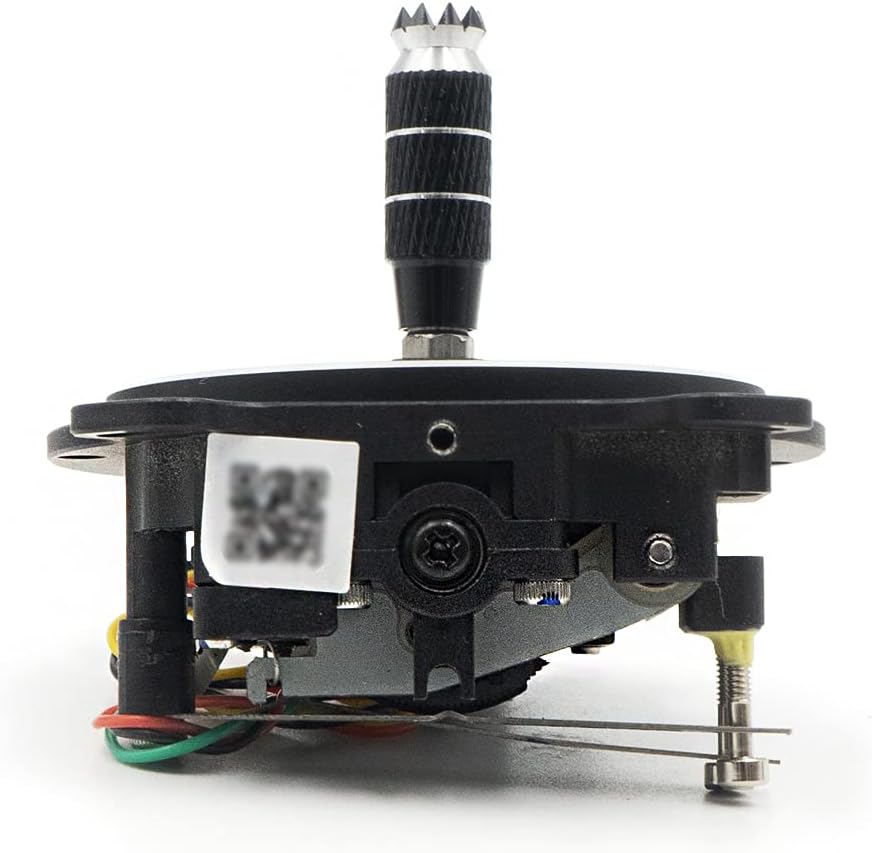
Figura 3.1: lateral view of the MC11 Gimbal, highlighting the wiring connection point.

Figura 3.2: Interna view of the MC11 Gimbal from the bottom, showing its precision components.
4. Operation and Calibration
After physical installation, the MC11 Gimbal requires calibration within your radio transmitter's firmware to ensure accurate control inputs.
- Encès: Power on your FrSky Tandem X20/X20S radio transmitter.
- Accés al menú de calibratge: Navigate to the calibration section in your radio's system settings. The exact menu path may vary depending on your radio's firmware version; refer to your radio's main instruction manual for precise navigation.
- Gimbal Calibration: Follow the on-screen prompts to calibrate the X (horizontal) and Y (vertical) axes of the gimbal. This typically involves moving the stick through its full range of motion several times.
- Verificar el funcionament: After calibration, access the radio's channel monitor screen to verify that the stick inputs are correctly registered and smooth across their full range.

Figura 4.1: Davant view of the MC11 Gimbal with the control stick.
5. Manteniment
Proper maintenance will extend the life and performance of your MC11 Gimbal:
- Keep the gimbal clean and free from dust, dirt, and debris. Use a soft, dry cloth for cleaning.
- Avoid exposing the gimbal to excessive moisture, liquids, or extreme temperatures.
- Periodically check the mounting screws for tightness. Loose screws can affect gimbal performance.
- Do not attempt to lubricate internal components unless specifically instructed by FrSky, as this may damage the precision sensors.
6. Solució De Problemes
If you encounter issues with your MC11 Gimbal, refer to the table below for common problems and solutions:
| Problema | Causa possible | Solució |
|---|---|---|
| Gimbal not responding | Loose wiring connection, incorrect installation. | Power off the radio, check all wiring connections, and ensure the gimbal is correctly seated. |
| Erratic or jumpy stick input | Calibration error, debris obstructing movement, damaged sensor. | Re-calibrate the gimbal through the radio's settings. Inspect for and remove any debris around the stick base. If the issue persists, contact support. |
| Stick feels stiff or too loose | Stick tension adjustment needed. | Refer to your FrSky Tandem X20/X20S radio's main manual for instructions on adjusting gimbal stick tension, if applicable. |
7. Especificacions
- Model: MC11
- Compatibilitat: FrSky Tandem X20, FrSky Tandem X20S Radio Transmitters
- Fabricant: FrSky
- Edat recomanada: 14 anys i més
- ASIN: B09CPQGK4H
8. Garantia i Suport
For detailed warranty information, technical support, and service inquiries, please refer to the official FrSky website or contact your authorized FrSky dealer. It is recommended to retain your purchase receipt for any warranty claims.
FrSky Oficial Weblloc: https://www.frsky-rc.com/


