Introducció
The Dune HD SmartBox 4K Plus is an advanced media player and Smart Android TV box designed for high-quality video and audio playback. It supports Ultra HD 4K video at up to 60 frames per second, High Dynamic Range (HDR) for superior contrast, and 10-bit color coding for a vast color palette. This device integrates the classic Dune HD user interface with the Android operating system, offering a comprehensive media experience. It is equipped with dual-band Wi-Fi, Bluetooth, and various connectivity options for seamless integration into your home entertainment system.
Què hi ha a la caixa
- Dune HD SmartBox 4K Plus unit
- Dune HD Slim IR Remote Control
- 2 piles AAA (per al comandament a distància)
- Font d'alimentació (12V 1A)
- A/V Cable (3.5mm to 3RCA)
- Cable HDMI
- Guia d'instal·lació ràpida
Producte acabatview



Configuració
1. Connexió del dispositiu
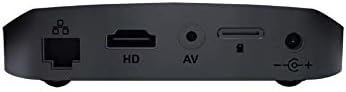
- Connexió d'alimentació: Connect the provided power adapter to the DC 12V input port on the rear of the Dune HD SmartBox 4K Plus, then plug the adapter into a wall outlet.
- Connexió HDMI: Use the included HDMI cable to connect the HDMI output port on the media player to an HDMI input port on your TV or display. Ensure your TV is set to the correct HDMI input source.
- Connexió de xarxa (opcional):
- Amb cable: For a stable connection, connect an Ethernet cable from your router to the Ethernet port on the rear of the device.
- Sense fil: The device supports dual-band Wi-Fi (2.4 GHz / 5 GHz). You will configure the wireless connection during the initial setup wizard.
- Audio/Video Connection (Optional): If your display does not support HDMI, use the provided A/V cable to connect the A/V output port on the player to the corresponding RCA inputs on your TV.
- Dispositius USB (opcionals): Connect external hard drives, USB flash drives, or other USB peripherals to the USB ports on the side of the device.
2. Assistent de configuració inicial
Upon first power-on, the Dune HD SmartBox 4K Plus will guide you through an initial setup wizard. Follow the on-screen prompts to:
- Seleccioneu el vostre idioma preferit.
- Configure network settings (Wi-Fi or Ethernet).
- Adjust display resolution and refresh rate.
- Log in to your Google account (optional, for Android features and app downloads).
- Perform system updates if available.
Ensure the remote control batteries are inserted correctly before starting the setup process.
Instruccions de funcionament
Navegació per la interfície d'usuari
The Dune HD SmartBox 4K Plus features a hybrid user interface combining the classic Dune HD experience with Android OS. Use the included IR remote control or the Dune Control App (available for iOS/Android) to navigate.

- Pantalla d'inici: Provides access to installed applications, media sources, and system settings.
- Fonts dels mitjans de comunicació: Browse content from connected USB drives, network shares (SMB, NFS, UPnP/DLNA), or the built-in micro SD card slot.
- Aplicacions: Access pre-installed apps or download new ones from the Google Play Store.
- Configuració: Configure network, display, audio, and other system preferences.
Reproducció multimèdia
The Dune HD SmartBox 4K Plus supports a wide range of video and audio formats:
- Còdecs de vídeo: MPEG2, MPEG4, XVID, WMV9, VC1, H.264, H.265, H.265 10-bit. Supports very high bitrate video up to 100 Mbit/s and higher.
- Vídeo File Formats: MKV, MPEG-TS, MPEG-PS, M2TS, VOB, AVI, MOV, MP4, QT, ASF, WMV, BD ISO, BDMV, DVD-ISO, VIDEO_TS.
- 4K Video Formats: H.265 up to 4Kp60 HDR, H.265 10-bit up to 4Kp60 HDR, H.264 up to 4Kp30.
- Formats d'àudio: Supports various audio codecs for high-fidelity sound.
To play media, navigate to your desired source (e.g., USB drive, network share), select the file, and press the Play button on your remote.
Manteniment
Neteja
To maintain the device's appearance and performance:
- Desconnecteu el dispositiu de la presa de corrent abans de netejar-lo.
- Utilitzeu un drap suau i sec per netejar l'exterior de la unitat.
- Do not use liquid cleaners, aerosols, or abrasive chemicals, as these may damage the surface or internal components.
- Mantingueu les obertures de ventilació netes de pols i deixalles.
Actualitzacions de firmware
Periodically check for firmware updates to ensure optimal performance, new features, and bug fixes. Updates can typically be found in the system settings menu under "About" or "System Update." Ensure a stable internet connection during updates and do not power off the device until the update process is complete.
Resolució de problemes
| Problema | Causa possible | Solució |
|---|---|---|
| Sense poder | Cable d'alimentació no connectat; problema amb la presa de corrent. | Ensure power adapter is securely connected to the device and a working power outlet. |
| No hi ha imatge al televisor | Incorrect HDMI/AV connection; wrong TV input selected. | Check HDMI/AV cable connections. Select the correct HDMI/AV input on your TV. Try a different HDMI port or cable. |
| Sense so | TV/receiver volume too low; audio settings incorrect. | Increase volume on TV/receiver. Check audio output settings on the Dune HD SmartBox 4K Plus. |
| El comandament a distància no funciona | Batteries depleted or incorrectly inserted; IR sensor blocked. | Canvieu les piles. Assegureu-vos que hi hagi una línia de visió entre el comandament a distància i el sensor d'infrarojos del dispositiu. |
| No es pot connectar a la Wi-Fi | Contrasenya incorrecta; problemes amb el router; interferències de senyal. | Verify Wi-Fi password. Restart your router. Move device closer to router or reduce interference. |
| Playback issues (stuttering, freezing) | Network speed insufficient; corrupted media file; external drive issues. | For network content, ensure stable and fast connection. Try playing a different file. Check external drive connection and integrity. |
Especificacions
- Nom del model: SmartBox 4K Plus
- Número de model de l'article: TV-175N
- Marca: Dune HD
- Color: Negre
- Dimensions: 4 x 4 x 1 polzades
- Pes de l'article: 1.12 lliures
- Resolució: Up to 4K (3840 x 2160) at 60fps with HDR
- Tecnologia de connectivitat: Wireless (Wi-Fi ac 2.4 GHz / 5 GHz), Ethernet, Bluetooth
- Tipus de connectors: HDMI 2.0a, 2 x USB, A/V, Ethernet, DC Power Input, Micro SD card slot
- Serveis d'Internet compatibles: Google Play, Dune APP, IPTV, YouTube (via Android OS)
- Tipus de controlador: Control remot, control d'aplicacions
- Bateries: 2 piles AAA (incloses per al comandament a distància)
- Còdecs de vídeo: MPEG2, MPEG4, XVID, WMV9, VC1, H.264, H.265, H.265 10-bit
- Vídeo File Formats: MKV, MPEG-TS, MPEG-PS, M2TS, VOB, AVI, MOV, MP4, QT, ASF, WMV, BD ISO, BDMV, DVD-ISO, VIDEO_TS
Garantia i Suport
Informació de la garantia
For detailed warranty information regarding your Dune HD SmartBox 4K Plus, please refer to the warranty card included in your product packaging or visit the official Dune HD weblloc. Els termes i condicions de la garantia poden variar segons la regió.
Atenció al client
If you encounter any issues or have questions not covered in this manual, please contact Dune HD customer support. You can typically find support contact information, FAQs, and additional resources on the official Dune HD weblloc:
Visit Dune HD Official Weblloc
For community support and discussions, you may also find helpful information on dedicated A/V forums, such as AVSForum, where Dune HD products are often discussed.


