Introducció
This manual provides comprehensive instructions for the setup, operation, and maintenance of your arkrocket 200 Wall-O-Matic Table Jukebox. Please read this manual thoroughly before using the product to ensure proper function and longevity.

Figure 1: The arkrocket 200 Wall-O-Matic Table Jukebox, designed to complement retro American diner aesthetics.
Informació de seguretat
- No exposeu la unitat a la pluja o la humitat.
- No desmunteu la unitat. Encarregueu tot el manteniment a personal qualificat.
- Assegureu-vos que l'adaptador de corrent estigui connectat correctament a una font d'alimentació adequada.
- Mantingueu la unitat allunyada de la llum solar directa, de fonts de calor i de l'excés de pols.
- Eviteu col·locar objectes pesats a la part superior de la unitat.
Què hi ha a la caixa
En desempaquetar, comproveu que hi hagi tots els elements següents:
- arkrocket 200 Wall-O-Matic Table Jukebox Unit
- Adaptador d'alimentació
- Manual d'usuari (aquest document)
- Song List Cards
Configuració
- Col·locació: Place the jukebox on a stable, flat surface. Ensure adequate ventilation around the unit. The unit can also be wall-mounted using the mounting points on the back.
- Connexió d'alimentació: Connect the provided power adapter to the 'DC IN' port on the side of the jukebox and then plug it into a standard electrical outlet.
- Encesa inicial: Locate the power switch, typically on the side or back, and switch it to the 'ON' position. The display on top should illuminate.
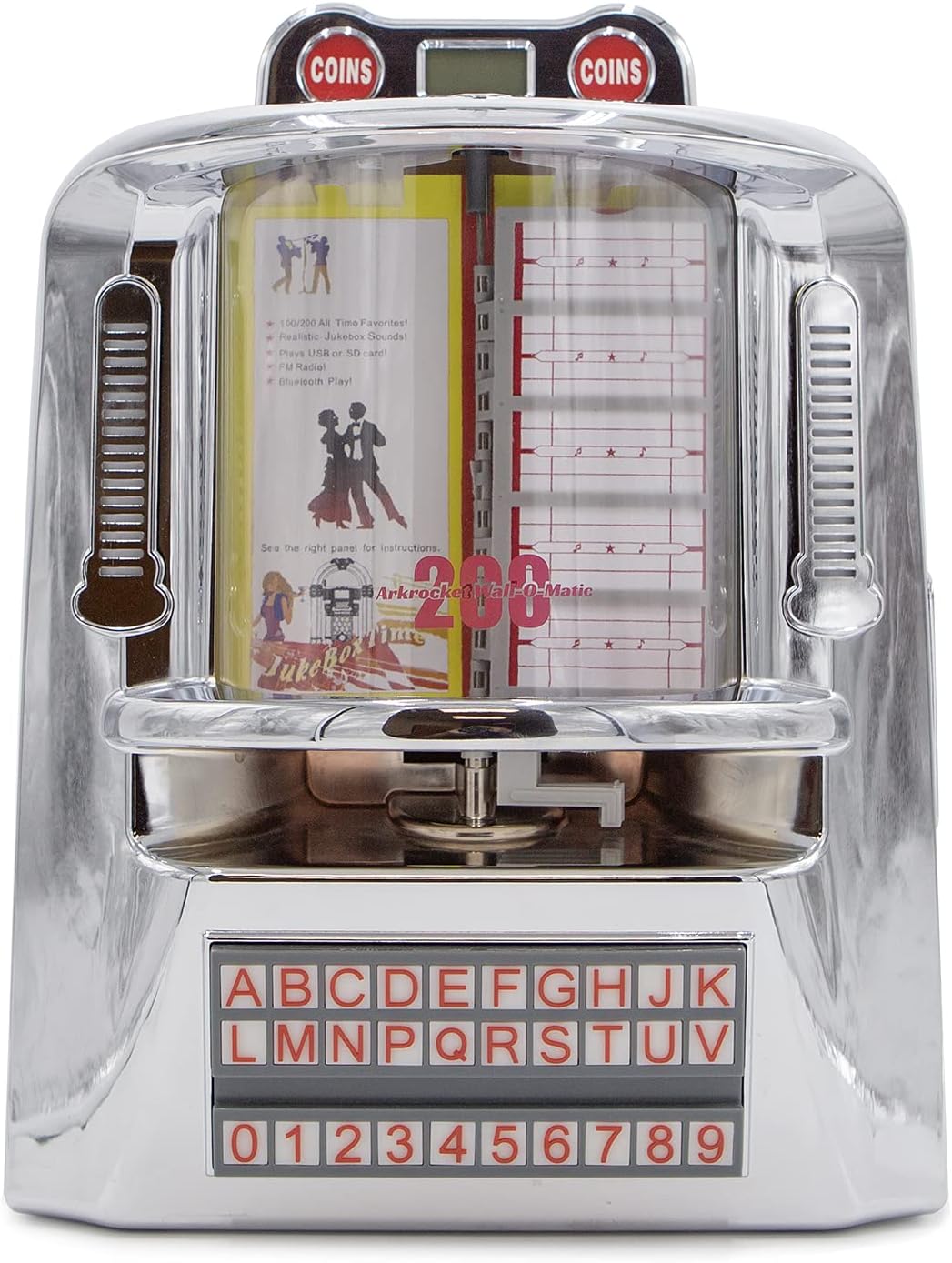
Figura 2: Frontal view of the jukebox, highlighting its classic design.

Figure 3: Dimensions of the jukebox for proper placement and fitting.
Instruccions de funcionament
Tauler de control acabatview
The main control panel is located on the right side of the unit. It features various buttons and ports for different functions.

Figure 4: Side control panel with various input and control options.
Selecció del mode
Press the 'MODE' button on the control panel to cycle through available input modes: Bluetooth (BT), FM Radio, USB, and SD Card. The top LED display will indicate the currently selected mode.
Emparellament Bluetooth
- Switch the jukebox to 'BT' mode using the 'MODE' button. The LED display will show 'BLUE'.
- Al dispositiu mòbil, activeu el Bluetooth i cerqueu els dispositius disponibles.
- Select 'arkrocket 200' from the list. Once paired, the jukebox will emit an audible confirmation.
- You can now play audio from your device through the jukebox speakers.
Funcionament de la ràdio FM
- Switch the jukebox to 'FM' mode using the 'MODE' button. The LED display will show the frequency.
- Use the 'PREV' and 'NEXT' buttons (left and right arrows) to tune to different radio stations.
Reproducció de targetes USB/SD
- Insert a USB drive into the 'USB' port or an SD card into the 'SD' slot on the control panel.
- Assegureu-vos de la vostra música files are in MP3 format. The jukebox supports up to 199 songs.
- The unit will automatically switch to USB or SD mode and begin playback.
- Use the 'PLAY/PAUSE', 'PREV', and 'NEXT' buttons to control playback. The 'RPT' button allows for repeat playback.

Figure 5: USB drive and SD card slots for playing digital music files.
Jukebox Song Selection (Physical Cards)
The jukebox features a classic song selection interface with physical cards.
- To access the song list cards, gently lift the top chrome cover near the 'COINS' display.
- Carefully pull out the transparent sleeves containing the song list cards.
- Write your desired song titles and artists on the provided cards, corresponding to the track numbers on your USB/SD media.
- Slide the sleeves back into place and close the chrome cover.
- Use the alphabet and number buttons on the front panel to select a song (e.g., A1, B2). The selected song will begin playing immediately if in USB/SD mode.

Figure 6: Top section of the jukebox where song list cards are housed.

Figure 7: The illuminated alphabet and number buttons for song selection.
Il·luminació ambiental
The jukebox features ambient lighting that enhances its retro aesthetic. To control the lighting:
- Locate the 'LIGHT' switch on the side control panel.
- Toggle the switch to 'ON' to activate the lights.
- The side lights are designed to react to the music, creating a dynamic visual effect.

Figure 8: The jukebox with its ambient lighting activated, adding to the retro atmosphere.
Aux In / Line Out
- AUX IN: Connect external audio devices (e.g., smartphones, MP3 players) to the 'AUX IN' port using a 3.5mm audio cable. Switch the jukebox to 'AUX' mode.
- FORMA DE LÍNIA: Connect the 'LINE OUT' port to an external amplifier or speaker system for enhanced audio output.
Manteniment
- Neteja: Use a soft, dry cloth to clean the exterior of the jukebox. For stubborn marks on the chrome, a slightly damp cloth followed by immediate drying is recommended. Do not use abrasive cleaners or solvents.
- Emmagatzematge: Si guardeu la unitat durant un període prolongat, desconnecteu-la de l'alimentació i guardeu-la en un lloc fresc i sec, allunyat de la llum solar directa i de temperatures extremes.
Resolució de problemes
| Problema | Causa possible | Solució |
|---|---|---|
| Sense poder | L'adaptador de corrent no està connectat; la presa de corrent no està activa. | Assegureu-vos que l'adaptador de corrent estigui ben connectat a la unitat i a una presa de corrent que funcioni. |
| Sense so | Volume too low; incorrect mode selected; external device issue. | Increase volume using VOL+ button. Verify correct mode (BT, USB, SD, FM, AUX). Check external device connection/volume. |
| Bluetooth no emparellat | Jukebox not in BT mode; device too far; previous connection active. | Ensure jukebox is in 'BT' mode. Move device closer. Disconnect from other Bluetooth devices. |
| La targeta USB/SD no es reprodueix | Incorrecte file format; targeta/unitat no inserida correctament; corrupta files. | Assegureu-vos files are MP3. Reinsert USB/SD card. Try a different USB/SD card or reformat. |
| Els llums no funcionen | Interruptor de llum apagat. | Toggle the 'LIGHT' switch to 'ON'. |
Especificacions
| Característica | Detall |
|---|---|
| Marca | arkrocket |
| Nom del model | 200 Wall-O-Matic |
| Número de model | AR-WB01 |
| Material | Chrome |
| Color | Crom platejat |
| Dimensions del producte | 6 "P x 11" W x 16" H |
| Pes de l'article | 7 lliures |
| Tipus d'altaveu | Component |
| Mida de l'altaveu | 5 polzades |
| Potència màxima de sortida de l'altaveu | 40 watts |
| Mode de sortida d'àudio | estèreo |
| Tecnologia de connectivitat | Auxiliar, Bluetooth, USB |
| Tecnologia de comunicació sense fils | Bluetooth |
| Interval Bluetooth | 10 metres |
| Característiques especials | Bluetooth, FM Radio, SD card, USB Port, Ambient Lighting |
| Font d'alimentació | Elèctric amb cable |
| Tipus de garantia | 1 ANY |
Garantia i suport
Your arkrocket 200 Wall-O-Matic Table Jukebox comes with a Garantia limitada de 1 anys des de la data de compra. Aquesta garantia cobreix els defectes de fabricació i la mà d'obra en condicions d'ús normal.
For warranty claims, technical support, or any inquiries regarding your product, please visit the official arkrocket website or contact their customer service directly. Please have your model number (AR-WB01) and proof of purchase ready when seeking support.


