1. Introducció
Gràcies per la compraasing the Yaheetech Computer Desk. This manual provides detailed instructions for the assembly, operation, maintenance, and troubleshooting of your new desk. Please read this manual carefully before assembly and retain it for future reference.
This computer desk features a compact design with three storage shelves, a sliding keyboard tray, and four wheels (two with brakes) for mobility and stability. It is constructed from durable particle board and a metal frame, designed for home office or study use.
2. Informació de seguretat
- Munta sempre l'escriptori sobre una superfície suau i neta per evitar ratllades.
- Assegureu-vos que tots els cargols i elements de fixació estiguin ben ajustats abans d'utilitzar-los. Comproveu-los periòdicament i torneu-los a apretar si cal.
- No sobrecarregueu els prestatges. Consulteu la secció "Especificacions" per conèixer la capacitat de pes.
- Mantingueu les peces petites i els materials d'embalatge fora de l'abast dels nens i les mascotes per evitar riscos d'asfíxia.
- Use the desk on a level surface to prevent tipping. Engage the wheel brakes when the desk is in a stationary position.
- Eviteu col·locar objectes calents directament sobre la superfície de l'escriptori sense protecció.
3. Contingut del paquet
Abans de començar el muntatge, verifiqueu que tots els components que s'enumeren a continuació siguin presents i no estiguin danyats. Si hi ha alguna peça que falti o que estigui danyada, poseu-vos en contacte amb el servei d'atenció al client.

Figura 1: Explotat View of Desk Components
This image illustrates the main components of the computer desk, including the top shelf, main desk surface, keyboard tray, small mobile storage shelf, lower storage shelf, and the metal frame structure with wheels.
- Main Desk Surface Panel
- Panell de prestatge superior
- Panell de prestatgeria d'emmagatzematge inferior
- Small Mobile Storage Shelf Panel
- Sliding Keyboard Tray Panel
- Metal Frame Components (Vertical supports, horizontal bars)
- Casters (4 pieces, 2 with brakes)
- Hardware Pack (Screws, bolts, nuts, Allen wrench, screwdriver)
- Keyboard Tray Rails (2 pieces)
4. Configuració (instruccions de muntatge)
Follow these steps carefully to assemble your Yaheetech Computer Desk. It is recommended to have two people for assembly.
- Attach Casters to Base Frame: Secure the four casters to the bottom metal frame components. Ensure the two lockable casters are positioned at the front for easy access.
- Assemble the Main Metal Frame: Connect the vertical and horizontal metal frame components using the provided screws and Allen wrench. Do not fully tighten all screws until the desk is mostly assembled to allow for minor adjustments.
- Install Lower Storage Shelf: Place the lower storage shelf panel onto the designated supports on the metal frame and secure it with screws.
- Attach Main Desk Surface: Position the main desk surface panel onto the upper frame supports and fasten it securely.
- Install Keyboard Tray Rails: Attach the sliding rails to the underside of the main desk surface and to the keyboard tray panel. Then, slide the keyboard tray into place.
- Fixeu el prestatge superior: Mount the top shelf panel to the upper vertical supports of the metal frame. Secure it firmly.
- Install Small Mobile Storage Shelf: Attach the small mobile storage shelf to the side of the desk as desired. This shelf is designed to be adjustable or removable.
- Ajustament final: Once all components are in place, go back and fully tighten all screws and fasteners.

Figure 2: Caster Wheel Detail
This image shows a close-up of one of the four caster wheels. Note the locking mechanism, which should be engaged when the desk is stationary to prevent movement.

Figure 3: Extendable Keyboard Shelf
This image highlights the sliding mechanism of the keyboard tray, designed for convenient storage and access to your keyboard and mouse.

Figure 4: Top Shelf Detail
This image shows the top shelf, suitable for a printer, speakers, or other accessories, with a metal handle for stability or aesthetic purposes.

Figure 5: Small Mobile Storage Shelf
This image displays the compact, adjustable storage shelf, ideal for small items like stationery or external hard drives.
5. Instruccions de funcionament
Your Yaheetech Computer Desk is designed for ease of use and versatility.
- Mobilitat: To move the desk, unlock the two front casters by flipping their levers. Gently push the desk to its desired location.
- Estabilitat: Once the desk is in position, engage the brakes on the two front casters to prevent unintended movement.
- Safata del teclat: The keyboard tray slides in and out smoothly. Pull it out for use and push it in to save space when not in use.
- Prestatges d'emmagatzematge: Utilize the top shelf for monitors, printers, or speakers. The lower shelf is suitable for a computer tower or larger items. The small side shelf provides convenient access for smaller accessories.

Figure 6: Assembled Computer Desk in Use
This image shows the Yaheetech Computer Desk fully assembled and in a typical usage scenario, demonstrating its functionality and storage capabilities.
6. Manteniment
Proper care will extend the life and appearance of your computer desk.
- Neteja: Netegeu les superfícies amb un suau, damp drap. Eviteu productes químics agressius o netejadors abrasius, que poden danyar l'acabat.
- Vessaments: Clean up spills immediately to prevent staining or damage to the particle board.
- Elements de fixació: Reviseu periòdicament tots els cargols i perns per assegurar-vos que romanen ajustats. Torneu a estrènyer-los si cal per mantenir l'estabilitat.
- Rodes: Mantingueu les rodes lliures de residus (cabells, pols) per garantir un moviment suau.
7. Solució De Problemes
Si teniu algun problema amb el vostre escriptori, consulteu els següents problemes i solucions habituals:
- L'escriptori està inestable: Ensure all screws and bolts are fully tightened. Check that the desk is on a level surface. Adjust the casters if necessary.
- La safata del teclat no llisca suaument: Check the rails for any obstructions or debris. Ensure the rails are properly aligned and securely attached.
- Casters are difficult to move: Check for debris (e.g., hair, dust) wrapped around the wheels. Clean the casters if necessary. Ensure the brakes are disengaged.
- Peces que falten: Double-check the packaging. If parts are genuinely missing, contact Yaheetech customer support with your model number and purchase information.
8. Especificacions
Detailed specifications for the Yaheetech Computer Desk (Model YA-00108395).
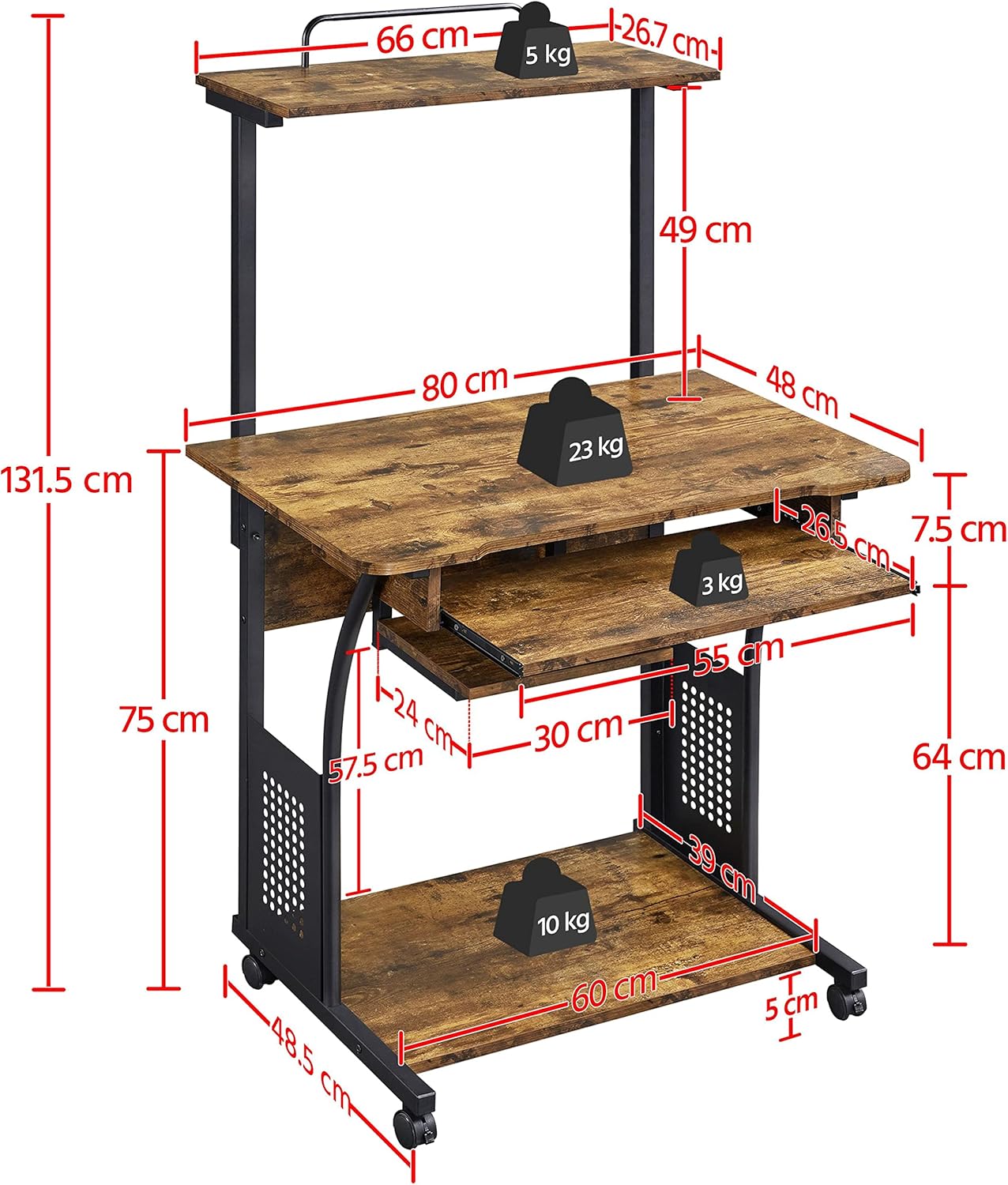
Figura 7: Dimensions del producte
Aquest diagrama ofereix una visió completaview of the desk's measurements, including height, width, depth, and individual shelf dimensions.
| Característica | Detall |
|---|---|
| Número de model | YA-00108395 |
| Dimensions totals (L x A x A) | 80 cm x 50.5 cm x 131.5 cm (31.5 polzades x 19.9 polzades x 51.8 polzades) |
| Main Desk Surface Dimensions | 80 cm x 48 cm (31.5 polzades x 18.9 polzades) |
| Top Shelf Dimensions | 66 cm x 26.7 cm (26 polzades x 10.5 polzades) |
| Lower Shelf Dimensions | 60 cm x 39 cm (23.6 polzades x 15.4 polzades) |
| Dimensions de la safata del teclat | 55 cm x 26.5 cm (21.7 polzades x 10.4 polzades) |
| Material | Engineered Wood (Particle Board), Metal Frame |
| Color | Marró Rústic |
| Pes de l'article | 19 kg (41.9 lliures) |
| Max. Load Capacity (Main Desk Surface) | 23 kg (50.7 lliures) |
| Capacitat de càrrega màxima (prestatge superior) | 5 kg (11 lliures) |
| Max. Load Capacity (Lower Shelf) | 10 kg (22 lliures) |
| Max. Load Capacity (Keyboard Tray) | 3 kg (6.6 lliures) |
| Característiques especials | Portable, 4 Casters (2 lockable), 3 Storage Shelves, Sliding Keyboard Tray |
9. Garantia i Suport
Yaheetech products are manufactured to high-quality standards. For warranty information, missing parts, or technical support, please contact Yaheetech customer service through the retailer where the product was purchased or visit the official Yaheetech website. Please have your model number (YA-00108395) and purchase details ready when contacting support.


