Introducció
Gràcies per la compraasing the WIITHINK Portable CD Player Boombox. This device offers versatile audio playback options including CD, FM radio, Bluetooth, USB, and AUX input, designed for both home and outdoor use. Please read this manual carefully before operating the unit to ensure proper use and to maximize its performance.
Instruccions de seguretat
- No exposeu la unitat a la pluja ni a la humitat per evitar incendis o descàrregues elèctriques.
- No bloquegeu cap obertura de ventilació. Assegureu-vos que hi hagi un flux d'aire adequat al voltant de la unitat.
- No col·loqueu la unitat a prop de fonts de calor com ara radiadors, registres de calor, estufes o altres aparells (inclosos amplificadors) que produeixen calor.
- Utilitzeu només accessoris/accessoris especificats pel fabricant.
- Desendolleu aquest aparell durant les tempestes amb llamps o quan no l'utilitzeu durant llargs períodes de temps.
- Demaneu tot el servei a personal de servei qualificat. Cal fer servei quan l'aparell s'hagi fet malbé d'alguna manera.
- Mantingueu la unitat allunyada de camps magnètics forts.
- No intenteu desmuntar ni modificar la unitat.
Contingut del paquet
Si us plau, comproveu el contingut del paquet en desempaquetar-lo:
- WIITHINK Portable CD Player Boombox
- AC Power Cord (UK Plug included)
- Manual d'usuari
Nota: Les piles no estan incloses i s'han de comprar per separat.
Producte acabatview

Figura 1: Frontal View of the Boombox. This image displays the main unit from the front, highlighting the two speakers, central control panel with LCD display, volume knob, and various function buttons. The extendable FM antenna is visible at the top.
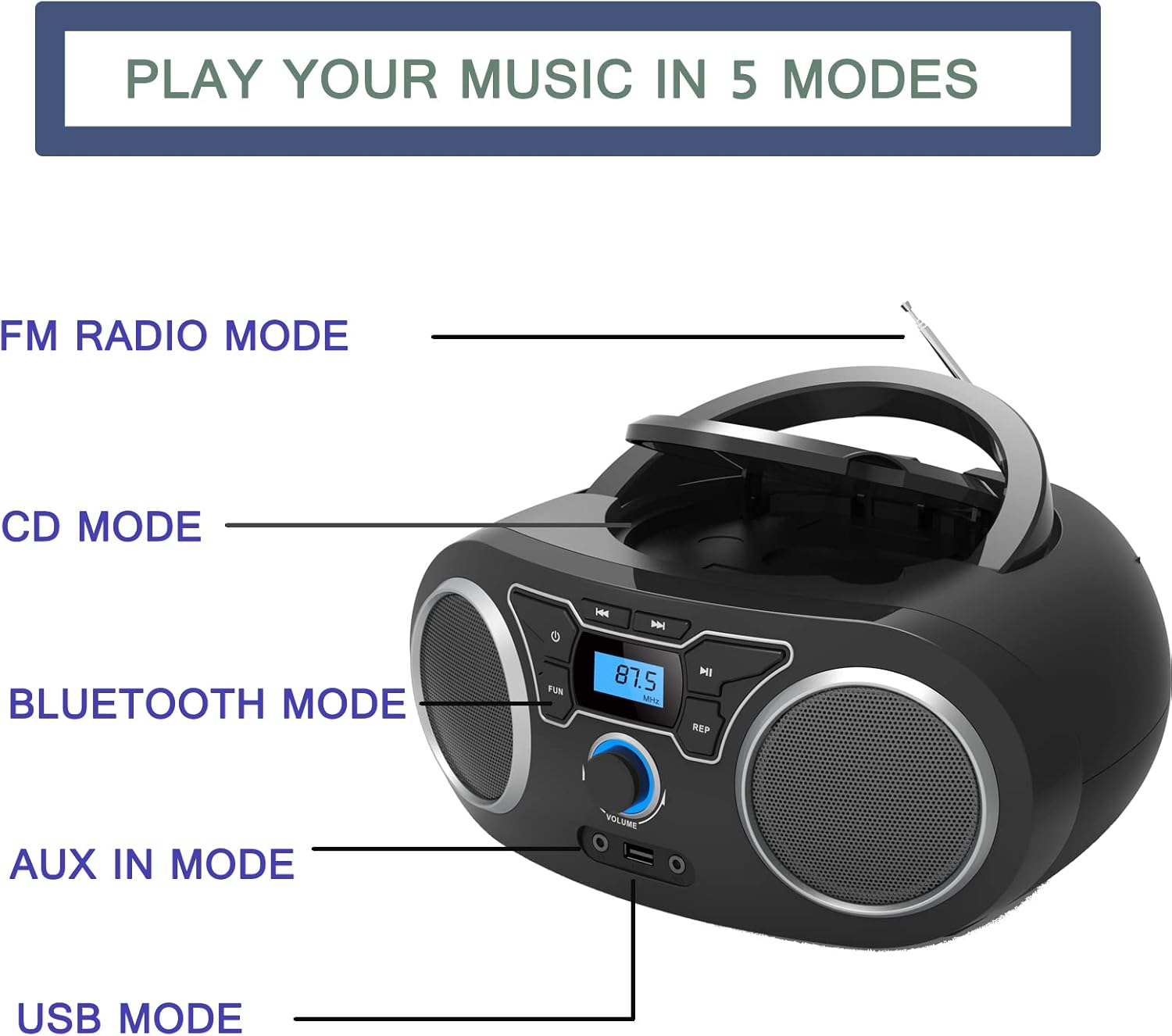
Figure 2: Playback Modes. This diagram illustrates the five primary ways to play music on the device: FM Radio, CD, Bluetooth, AUX In, and USB. Each mode is clearly labeled next to the corresponding part of the boombox.

Figure 3: Dimensions and Power. This image provides the dimensions of the boombox (285mm length, 240mm width, 128mm height) and indicates the AC port for power supply and the compartment for 4 C-cell batteries (not included).
Configuració
Alimentació de la Unitat
El boombox pot funcionar amb corrent altern o amb piles.
- Alimentació CA:
- Connect the supplied AC power cord to the AC port on the back of the unit.
- Connecteu l'altre extrem del cable d'alimentació a una presa de corrent estàndard.
- Potència de la bateria:
- Open the battery compartment located on the bottom of the unit.
- Insert 4 x 'C' size batteries (not included), ensuring correct polarity (+/-).
- Tanqueu bé la tapa del compartiment de la bateria.
Encès inicial
Premeu el botó ⏻ button on the front panel to turn on the unit. The LCD display will illuminate.
Instruccions de funcionament
Selecció d'un mode
Premeu el botó MODE or FUNCIÓ button repeatedly to cycle through the available modes: CD, FM Radio, Bluetooth, USB, and AUX.
Reproducció de CD
- Premeu el botó MODE botó fins que se seleccioni el mode "CD".
- Obriu la tapa del compartiment del CD aixecant-la suaument.
- Place a CD (Audio CD, CD-R, CD-RW, or MP3 CD) onto the spindle with the label side facing up.
- Close the CD compartment lid. The unit will begin reading the disc.
- Utilitza el REPRODUCCIÓ/PAUSA botó per iniciar o aturar la reproducció.
- Utilitza el SALTAR/CERCAR botons (⏮ / ⏭) to skip tracks or search within a track.
- Premeu el botó REPETIR button to repeat the current track (Repeat 1) or all tracks (Repeat All).
Funcionament de la ràdio FM
- Extend the telescopic FM antenna for optimal reception.
- Premeu el botó MODE botó fins que se seleccioni el mode "FM".
- Manteniu premut el botó REPRODUCCIÓ/PAUSA button (or a dedicated ESCANEAR button if available) to auto-scan and store available FM stations.
- Utilitza el SALTAR/CERCAR botons (⏮ / ⏭) to navigate through stored presets or manually tune frequencies.
Emparellament Bluetooth
- Premeu el botó MODE button until "Bluetooth" mode is selected. The display will show "BT" or a similar indicator, and the unit will enter pairing mode.
- Al dispositiu amb Bluetooth (telèfon intel·ligent, tauleta, etc.), activeu el Bluetooth i cerqueu els dispositius disponibles.
- Select "WIITHINK Boombox" (or similar name) from the list of found devices.
- Once paired, you will hear a confirmation sound, and the Bluetooth indicator on the boombox will stop flashing.
- You can now stream audio wirelessly from your device to the boombox.

Figura 4: Connectivitat Bluetooth. This image demonstrates the boombox's capability to connect wirelessly via Bluetooth to various devices, allowing for audio streaming from laptops, tablets, and smartphones.
Reproducció USB
- Inseriu una unitat flash USB que contingui MP3 files al port USB de la part frontal de la unitat.
- Premeu el botó MODE button until "USB" mode is selected.
- The unit will automatically detect and begin playing MP3 files de la unitat USB.
- Utilitza el REPRODUCCIÓ/PAUSA i SALTAR/CERCAR botons per controlar la reproducció.
Entrada AUX
- Connect an external audio device (e.g., MP3 player, smartphone) to the AUX IN port on the front of the unit using a 3.5mm audio cable (not included).
- Premeu el botó MODE botó fins que se seleccioni el mode "AUX".
- Audio from the connected device will now play through the boombox speakers. Control playback from your external device.
Ús d'auriculars
Plug 3.5mm headphones into the headphone jack on the front of the unit. The sound will automatically switch from the speakers to the headphones.
Control de volum
Gira el VOLUM knob on the front panel clockwise to increase volume and counter-clockwise to decrease volume.
Manteniment
- Neteja: Feu servir un drap suau i sec per netejar l'exterior de la unitat. No utilitzeu productes de neteja abrasius ni dissolvents.
- Cura de les lents de CD: If the CD lens gets dirty, use a commercially available CD lens cleaner. Do not touch the lens directly.
- Emmagatzematge: If the unit will not be used for an extended period, remove the batteries and store it in a cool, dry place away from direct sunlight.
- Antena: Handle the telescopic antenna gently to avoid damage.
Resolució de problemes
| Problema | Causa possible | Solució |
|---|---|---|
| La unitat no s'encén. | No power connection / Dead batteries. | Ensure AC cord is securely plugged in or replace batteries. |
| No hi ha so dels altaveus. | Volume too low / Headphones connected / Incorrect mode. | Increase volume / Disconnect headphones / Select correct mode. |
| El CD salta o no es reprodueix. | Dirty or scratched CD / CD inserted incorrectly / Dirty CD lens. | Clean or replace CD / Reinsert CD correctly / Clean CD lens. |
| Mala recepció de ràdio FM. | Antena no estesa / Senyal feble. | Fully extend and adjust the telescopic antenna / Try moving the unit to a different location. |
| El dispositiu Bluetooth no s'aparella. | Boombox not in pairing mode / Device too far / Bluetooth disabled on device. | Ensure boombox is in BT mode / Move device closer / Enable Bluetooth on your device. |
| Unitat USB no reconeguda. | Incorrecte file format / USB drive corrupted / USB drive not fully inserted. | Assegureu-vos files are MP3 / Try a different USB drive / Reinsert USB drive firmly. |
Especificacions
| Característica | Detall |
|---|---|
| Marca | PENSAR |
| Número de model | WTB771Black |
| Color | Negre |
| Tecnologia de connectivitat | Bluetooth, USB, Auxiliar |
| Mitjans suportats | CD (Audio CD, CD-R, CD-RW, MP3 CD), USB (MP3) |
| Ràdio | Digital FM Radio with 20 Presets |
| Tipus d'altaveu | estèreo |
| Potència de sortida | 2 x 2W RMS (4 Watts total) |
| Font d'alimentació | AC Power (UK Plug included) or 4 x 'C' Batteries (not included) |
| Dimensions de l'article (L x A x A) | 25.4 x 22.9 x 10.2 cm (10 x 9 x 4 inches approx.) |
| Pes de l'article | 1.2 quilos (2.65 lliures) |
| Conector d'auriculars | 3.5 mm |
Garantia i Suport
For warranty information and technical support, please refer to the documentation provided with your purchase or contact WIITHINK customer service. Details for contacting support are typically found on the product packaging or the official WIITHINK weblloc.
Si us plau, conserveu el comprovant de compra per a qualsevol reclamació de garantia.
