1. Introducció
This manual provides essential information for the safe and efficient use of your Xiaomi Redmi 9C smartphone. Please read this manual carefully before using the device and keep it for future reference.
The Xiaomi Redmi 9C features a 6.53-inch HD+ DotDrop display, a MediaTek Helio G35 processor, a 13MP AI triple rear camera, and a large 5000 mAh battery with 10W fast charging support. It comes with 4GB RAM and 128GB internal storage.
2. Configuració
2.1 Contingut del paquet
Comproveu que el vostre paquet contingui els elements següents:
- Telèfon intel·ligent Xiaomi Redmi 9C
- Adaptador de corrent (10 W)
- Cable USB
- Eina d'expulsió de SIM
- Manual d'usuari (aquest document)
2.2 Inserció de la targeta SIM i la targeta microSD
Locate the SIM card tray on the side of the device. Use the provided SIM eject tool to open the tray. Insert your Nano-SIM card(s) and an optional microSD card into the designated slots. Ensure the cards are correctly oriented as shown in the diagram.

Figura 2.2.1: lateral view of the Xiaomi Redmi 9C, showing the location of the SIM card tray. The tray is designed to hold two Nano-SIM cards and one microSD card simultaneously.
2.3 Engegada inicial i assistent de configuració
Press and hold the Power button until the Xiaomi logo appears. Follow the on-screen instructions to complete the initial setup, including language selection, Wi-Fi connection, Google account login, and security settings.
3. Funcionament del vostre dispositiu
3.1 Disseny del dispositiu

Figura 3.1.1: Frontal view of the Xiaomi Redmi 9C, highlighting the 6.53-inch DotDrop display and the front camera notch.
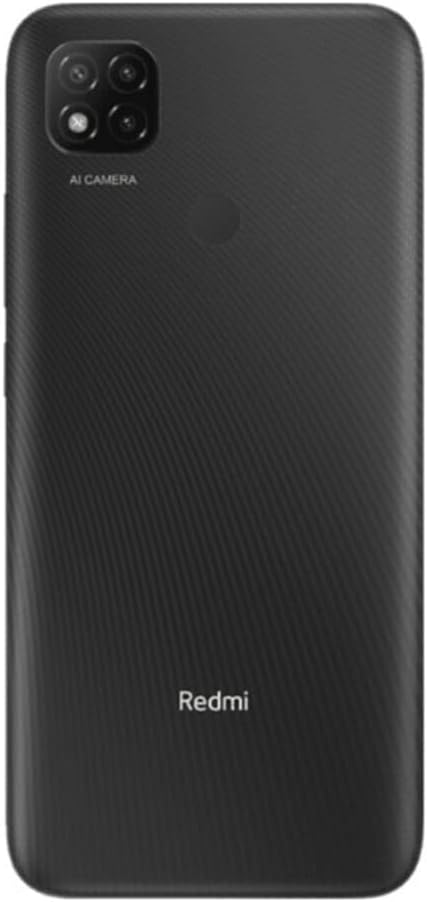
Figura 3.1.2: posterior view of the Xiaomi Redmi 9C, showing the triple camera module with AI capabilities and the rear-mounted fingerprint sensor.
The Redmi 9C features a large display on the front, with a small notch for the front camera. On the rear, it has a square camera module housing three lenses and a flash, along with a circular fingerprint sensor. The power and volume buttons are located on the right side of the device.
3.2 Funcions bàsiques
- Encès/apagat: Manteniu premut el botó d'engegada.
- Bloqueig/desbloqueig de pantalla: Premeu breument el botó d'engegada.
- Ajust de volum: Feu servir els botons de pujar/baixar el volum.
- Fer captures de pantalla: Press Volume Down and Power button simultaneously.
3.3 Ús de la càmera
The Xiaomi Redmi 9C is equipped with a 13MP AI triple rear camera system. To open the camera application, tap the camera icon on your home screen or app drawer.

Figura 3.3.1: Un primer pla view of the Redmi 9C's rear camera module, showing the three lenses and the "AI CAMERA" branding, indicating its artificial intelligence features for photography.
The AI features assist in scene recognition and optimization for better photo quality. Explore different modes like Portrait, Macro, and Pro mode for various photographic effects.

Figure 3.3.2: An image depicting a person interacting with the Redmi 9C in a dimly lit environment, showcasing the phone's display and user interface during use.

Figura 3.3.3: A sample selfie photo, demonstrating the clarity and color reproduction capabilities of the Redmi 9C's front-facing camera.

Figure 3.3.4: A user holding the Redmi 9C to take a selfie, illustrating the ergonomic design and ease of use for self-portraits.
3.4 Gestió de la bateria
The Redmi 9C is equipped with a 5000 mAh high-capacity battery, providing extended usage time. To maximize battery life:
- Redueix la brillantor de la pantalla.
- Desactiva el Wi-Fi, el Bluetooth i el GPS quan no els utilitzis.
- Tanca les aplicacions en segon pla.
- Use power-saving modes.

Figure 3.4.1: A graphical representation indicating the 5000 mAh battery capacity of the Redmi 9C, emphasizing its long-lasting power.
The device supports 10W fast charging. Always use the original charger and cable for optimal charging performance and safety.
3.5 Jocs i multimèdia
The MediaTek Helio G35 processor provides a smooth experience for everyday tasks and casual gaming. The large 6.53-inch display enhances the viewing experience for videos and games.

Figure 3.5.1: The Redmi 9C displaying a high-action racing game, illustrating its capability for multimedia consumption and gaming on its large screen.
For an optimal gaming experience, ensure your device is sufficiently charged and close unnecessary background applications.
3.6 Connectivitat
El Redmi 9C admet diverses opcions de connectivitat:
- Wi-Fi: Connecteu-vos a xarxes sense fil per accedir a Internet.
- Bluetooth: Emparella amb auriculars sense fil, altaveus i altres dispositius.
- GPS: Utilitzar serveis de localització per a aplicacions de navegació i cartografia.
- Conector d'àudio de 3.5 mm: Connecteu els auriculars amb cable.
4. Manteniment
4.1 Neteja del vostre dispositiu
Feu servir un drap suau i sense borrissol per netejar la pantalla i la carcassa del telèfon. Eviteu utilitzar productes químics agressius o materials abrasius que puguin danyar el dispositiu.
4.2 Actualitzacions de programari
Comproveu i instal·leu regularment si hi ha actualitzacions de programari per garantir un rendiment òptim, seguretat i accés a noves funcions. Navegueu a Configuració > Quant al telèfon > Versió MIUI per comprovar si hi ha actualitzacions.
4.3 Gestió d'emmagatzematge
Amb 128 GB d'emmagatzematge intern, tens ample space for apps and media. To manage storage, go to Configuració > Emmagatzematge. Consider regularly clearing cache and uninstalling unused applications to free up space.
5. Solució De Problemes
| Problema | Possible solució |
|---|---|
| El dispositiu no s'encén | Assegureu-vos que la bateria estigui carregada. Connecteu el carregador i espereu uns minuts abans d'intentar tornar-lo a engegar. Si no respon, feu un reinici forçat mantenint premut el botó d'engegada durant 10-15 segons. |
| Les aplicacions es bloquegen o es bloquegen | Esborra la memòria cau de l'aplicació (Configuració > Aplicacions > [Nom de l'aplicació] > Emmagatzematge > Esborra la memòria cau). Restart the device. If the issue persists, consider reinstalling the app or performing a factory reset (backup data first). |
| Poca durada de la bateria | Review ús de la bateria en Configuració > Bateria to identify power-hungry apps. Reduce screen brightness, disable unnecessary connectivity features (Wi-Fi, Bluetooth, GPS), and close background apps. |
| No es pot connectar a la Wi-Fi | Ensure Wi-Fi is enabled. Restart your router and the phone. Forget the network and reconnect. Check if other devices can connect to the same Wi-Fi network. |
6. Especificacions
| Característica | Detall |
|---|---|
| Nom del model | Redmi 9C |
| Número de model | MZB09YFEU |
| Mostra | 6.53-inch HD+ DotDrop Display |
| Processador | MediaTek Helio G35 (1.8 GHz CPU Speed) |
| RAM | 4 GB |
| Emmagatzematge intern | 128 GB |
| Càmera posterior | 13MP AI Triple Camera |
| Capacitat de la bateria | 5000 mAh (Nominal Power: 3600) |
| Carregant | Càrrega ràpida de 10 W |
| Dimensions | 0.9 x 7.71 x 16.49 cm |
| Pes | 196 g |
| Connectivitat | Wi-Fi, Bluetooth, GPS, Cellular (GSM), 3.5mm Audio Jack |
| Característiques especials | Camera, Flash |
7. Garantia i Suport
Per obtenir informació sobre la garantia i assistència tècnica, consulteu la pàgina oficial de Xiaomi. weblloc web o poseu-vos en contacte amb el servei d'atenció al client. Conserveu el comprovant de compra per a reclamacions de garantia.
Podeu trobar més informació i recursos de suport a la pàgina oficial de Xiaomi. weblloc: Suport de Xiaomi


