Introducció
This manual provides detailed instructions for the installation, operation, and maintenance of your Zemismart Tuya WiFi Rechargeable Roller Blind Motor. Please read this manual carefully before use to ensure proper functionality and safety.
The Zemismart Tuya WiFi Rechargeable Roller Blind Motor is designed to automate your roller blinds, offering convenient control via the Tuya Smart or Smart Life app, voice commands (Alexa, Google Home, Siri), and an optional RF433 remote control. It features a built-in rechargeable battery and is suitable for 28mm roller blind tubes.
Contingut del paquet
Verifiqueu que tots els components siguin presents al vostre paquet:
- Zemismart Roller Blind Motor (ZM16EL-03/33)
- Tuya WiFi 2.4 USB Dongle
- Cable de càrrega (tipus C)
- RF433 Remote Control (optional, may vary by package)
- Crown and Drive Adapter Set (for 28mm tube, other sizes may be included)
- Installation Brackets and Screws
- Manual d'usuari (aquest document)

Image: Components included with the Zemismart Roller Blind Motor, including the motor, WiFi dongle, remote control, charging cable, and various adapters/brackets.
Configuració i instal·lació
1. Motor Preparation and Tube Compatibility
The motor is designed for 28mm roller blind tubes. Ensure your blind tube is compatible. Adapters for 17mm and 25mm tubes may also be included or available separately.

Image: Visual guide showing the motor with adapters for 17mm, 25mm, and 28mm tubes, illustrating how the motor fits into different tube sizes.
2. Replacing the Tail Plug
If your blind tube requires a different size adapter, you may need to replace the motor's tail plug. Follow the diagrams below for 25mm or 28mm tube replacement operations. Carefully remove the existing plug and install the correct adapter.
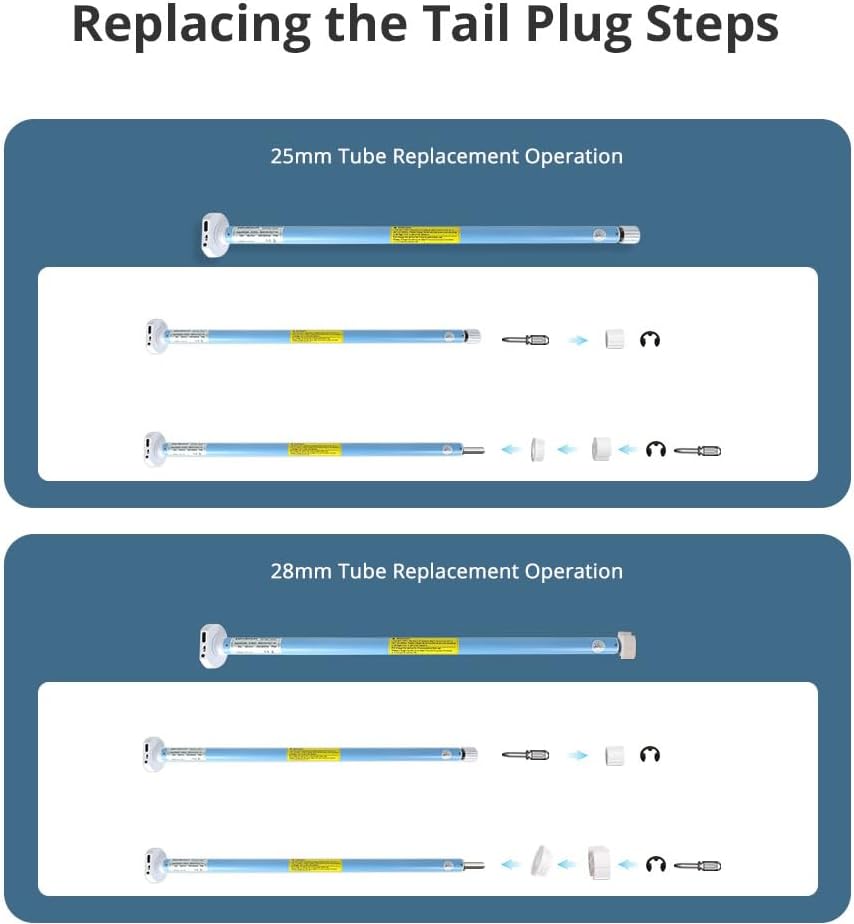
Image: Step-by-step diagrams illustrating how to replace the tail plug for 25mm and 28mm tube compatibility.
3. Càrrega del motor
Before initial use, fully charge the motor's built-in 800mAh lithium battery using the provided Type-C USB charging cable. The motor can also be charged via a compatible solar panel (sold separately).

Image: The motor showing its Type-C charging port and an illustration of how it can be connected to a solar panel for charging.
4. Passos d'instal·lació
- Insert Motor: Put the motor into the appropriate driving tube of your roller blind.
- Install End Plug and Mounting Bracket: Install the end plug and mounting bracket. Place them into the tube to test the whole length. Mark the position on the wall, and then install the mounting bracket on the wall or ceiling.
- Clip Blind: Clip the entire blind assembly onto the mounting bracket. The installation is now complete.

Image: Step-by-step visual instructions for installing the motor into the blind tube and mounting the blind to the wall or ceiling.
5. Connecting to WiFi Network (Tuya/Smart Life App)
To enable smart features, connect the motor to your WiFi network via the Tuya WiFi 2.4 USB Dongle.
- Plug the Tuya WiFi 2.4 USB Dongle into a power source.
- Obre l'aplicació Tuya Smart o Smart Life al teu telèfon intel·ligent.
- Follow the in-app instructions to add a new device and pair the motor with the app.

Image: Diagram showing the connection flow between the smartphone app, WiFi dongle, and the roller blind motor for network pairing.
Instruccions de funcionament
1. App Control (Tuya Smart / Smart Life)
Once paired with the app, you can control the motor's direction, set upper and lower limits, and create schedules.
- Pàgina de control: Use the main control page to open, stop, or close the blinds.
- Pàgina de configuració: Access the settings page to adjust motor direction (forward/back), set precise upper and lower limits for the blind's travel, or remove existing limits.
- Programació: Set up timers and schedules for automatic opening and closing of your blinds at specific times.

Image: Screenshots of the Tuya app interface, showing the main control page for opening/closing blinds and the settings page for motor direction, limits, and scheduling.

Image: Illustration demonstrating the timing function of the Tuya app, showing blinds automatically closing in the evening and opening in the morning based on a set schedule.
2. Control per veu
The motor supports voice control via Amazon Echo (Alexa), Google Home, and Apple Siri when integrated with the Tuya Smart or Smart Life app.
- Ensure your smart speaker or device is linked to your Tuya Smart or Smart Life account.
- Use commands such as "Alexa, open the roller shade" or "Hey Google, close the blinds."

Image: A person interacting with smart speakers (Alexa and Google Home) to control roller shades using voice commands.

Imatge: Un example of voice control in a living room setting, showing a user commanding "Open the bedroom's shades" to a smart speaker.
3. Control remot per radiofreqüència
If your package includes an RF433 remote control, you can use it for direct control of the blinds. The remote supports individual and group control.

Image: A hand holding an RF remote control, demonstrating its use to raise multiple roller blinds simultaneously.
Manteniment
Càrrega de la bateria
The motor is powered by a built-in rechargeable lithium battery. When the battery level is low, connect the motor to a power source using the provided Type-C USB cable. A full charge ensures optimal performance. For continuous charging, a compatible solar panel can be used.
Regular charging is recommended to prolong battery life. Avoid completely draining the battery frequently.
Resolució de problemes
- El motor no respon:
- Check if the motor battery is charged.
- Ensure the WiFi dongle is powered and connected to the network.
- Verify the motor is properly paired with the Tuya app and/or RF remote.
- Blind not moving smoothly or stopping incorrectly:
- Check for any obstructions in the blind's path.
- Recalibrate the upper and lower limits in the Tuya app.
- Ensure the motor is securely installed within the blind tube.
- El control per veu no funciona:
- Confirm your smart assistant (Alexa, Google Home, Siri) is linked to your Tuya account.
- Comproveu la vostra connexió a Internet.
- Ensure the device name in the Tuya app matches the name you are using for voice commands.
- Problemes de connexió Wi-Fi:
- Ensure the WiFi dongle is within range of your 2.4GHz WiFi router.
- Restart the WiFi dongle and your router.
- Re-pair the device in the Tuya app if necessary.
Especificacions
| Característica | Detall |
|---|---|
| Model | ZM16EL-03/33 |
| Marca | Zemismart |
| Entrada | DC5V/2A |
| Potència nominal | 5W |
| Capacitat de la bateria | 7.4V/800mAh (Rechargeable Lithium) |
| Torque | 0.3 Nm |
| RPM nominal | 33 RPM |
| Soroll corrent | 35-40 dB |
| Max Load (with 17mm tube) | 2 kg |
| Compatibilitat de tubs | 28mm (adapters for 17mm, 25mm available) |
| Mètodes de control | Tuya Smart/Smart Life App, Voice Control (Alexa, Google Home, Siri), RF433 Remote Control |

Image: Detailed diagram showing the dimensions of the motor and a table of its technical specifications.
Escenes aplicables
The Zemismart Tuya WiFi Rechargeable Roller Blind Motor is versatile and can be used with various types of window coverings, including:
- Persianes Enrotllables
- Zebra Blinds
- Shangri-La Blinds
- Persianes romanes
- Ombres transparents horitzontals
- Ombres de fusta teixida

Imatge: Examples of different blind types (roller, zebra, Shangri-La) that are compatible with the Zemismart motor.

Image: A collage showing the motor integrated with various window coverings in different room environments, highlighting its versatility.
Vídeo demostració
Video: A demonstration of the Zemismart roller blind motor in operation, showing the smooth movement of a zebra blind as it opens and closes, and adjusts for light control.
Garantia i Suport
For warranty information or technical support, please contact Zemismart customer service. Refer to your purchase documentation for specific warranty terms and contact details.
As a professional manufacturer and installer of window blinds, Zemismart is available for custom orders and support for all your window shading needs.
You can also visit the official Zemismart store on Amazon for more products and information: Zemismart Store


