1. Configuració
1.1 Desembalatge
Carefully remove the humidifier from its packaging. Ensure all components are present: the main unit, remote control, and power adapter. Retain packaging for future transport or storage.
1.2 Col·locació
Place the Duux Beam Mini 2 humidifier on a flat, stable, and water-resistant surface. Ensure it is at least 15 cm (6 inches) away from walls and furniture to allow for proper mist dispersion. Avoid placing it directly on carpets or near heat sources.
1.3 Omplir el dipòsit d'aigua
The Beam Mini 2 features a convenient top-fill design.
- Traieu la tapa superior de l'humidificador.
- Pour clean, cool tap water directly into the water tank opening. Do not exceed the maximum fill line.
- Torneu a col·locar la tapa superior de manera segura.

Image: A hand pouring water into the top opening of the Duux Beam Mini 2 humidifier. This illustrates the top-fill method for adding water to the unit.
1.4 Connexió d'alimentació
Connect the power adapter to the humidifier's power input port, then plug the adapter into a suitable electrical outlet. The unit will enter standby mode.
2. Instruccions de funcionament
2.1 Encès/Apagat
Press the power button on the control panel or remote control to turn the humidifier on or off. The LED display will illuminate when the unit is active.

Imatge: Detallada view of the control panel on the Duux Beam Mini 2 humidifier. This shows the various touch-sensitive buttons for controlling the device, including power, mode, and mist output.
2.2 Tauler de control i pantalla
The high-resolution LED screen displays current humidity, temperature, and selected settings. Touch-sensitive buttons below the display allow for direct control.

Image: Close-up of the Duux Beam Mini 2 humidifier's digital display. The screen shows the current humidity percentage, mist level indicator, and icons for various functions like Wi-Fi and timer.
2.3 Modes de funcionament
- Mode normal: Manually adjust mist output to your desired level.
- Mode automàtic: The humidifier will automatically adjust mist output to maintain a preset humidity level (between 40% and 90%).
2.4 Humidity and Mist Output Adjustment
Use the '+' and '-' buttons on the control panel or remote to adjust the desired humidity level in Automatic Mode or the mist output intensity in Normal Mode.
2.5 Funció d'aromateràpia
The Beam Mini 2 includes an aroma diffuser feature. To use, add a few drops of soluble en aigua essential oil to the designated aroma compartment. Do not add oil-based aromas directly into the water tank, as this can damage the unit.
2.6 Control remot
The included remote control allows for convenient operation from a distance. It can be stored in a dedicated slot on the side of the humidifier when not in use.

Image: The remote control for the Duux Beam Mini 2 humidifier. This shows the compact remote with buttons for power, mode selection, and adjusting mist output levels.

Imatge: Lateral view of the Duux Beam Mini 2 humidifier showing the integrated slot for the remote control. This demonstrates how the remote can be neatly stored within the unit itself.
2.7 Duux App Connectivity
For ultimate control and operation, download the free Duux app from your device's app store. Follow the in-app instructions to connect your Beam Mini 2 humidifier for remote control and advanced settings.
3. Manteniment
La neteja i el manteniment regulars són essencials per a un rendiment òptim i una llarga vida útil del vostre humidificador.
3.1 Neteja diària
- Empty and rinse the water tank daily with fresh water.
- Netegeu la sortida de boira i les superfícies exteriors amb un drap suau iamp tela.
3.2 Weekly Cleaning and Descaling
- Desendolla l'humidificador i buida l'aigua que quedi.
- Fill the water tank with a mixture of white vinegar and water (1:1 ratio). Let it sit for 30 minutes to an hour to loosen mineral deposits.
- Carefully scrub the inside of the tank and the ultrasonic membrane with a soft brush or cloth.
- Esbandiu bé amb aigua neta fins que desaparegui l'olor de vinagre.
- Wipe all surfaces dry before reassembling.
3.3 Substitució del filtre
The Beam Mini 2 uses a water filter cartridge to reduce mineral buildup. Replace the filter cartridge every 1-3 months, depending on water hardness and usage. Refer to the filter's packaging for specific replacement instructions.
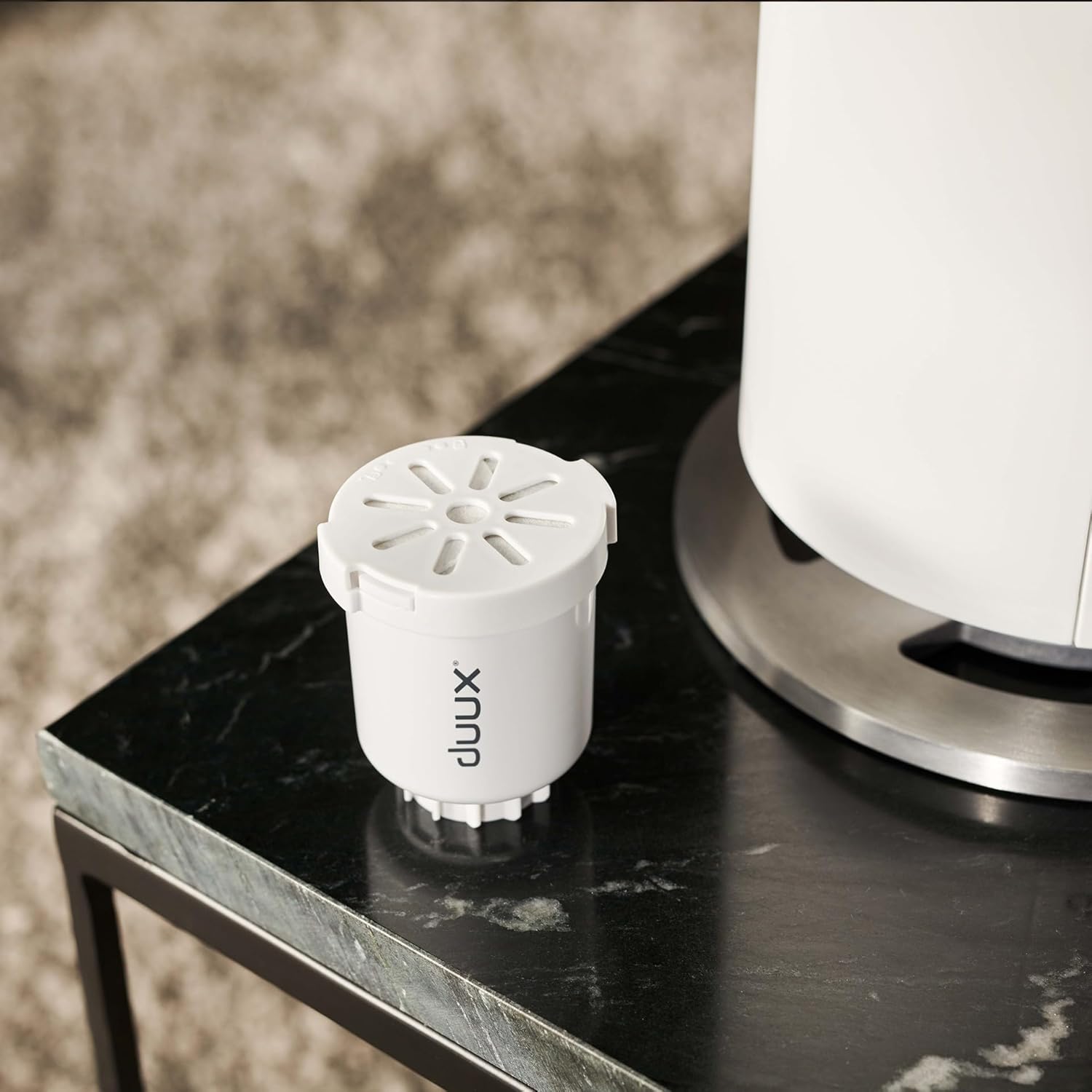
Image: A water filter cartridge for the Duux Beam Mini 2 humidifier placed next to the unit. This shows the removable filter component that helps purify the water.
4. Solució De Problemes
If you encounter issues with your Duux Beam Mini 2, consult the following table before contacting customer support.
| Problema | Causa possible | Solució |
|---|---|---|
| Sense sortida de boira | El dipòsit d’aigua està buit Ultrasonic membrane is dirty La unitat no està encès | Reomplir el dipòsit d’aigua Clean the ultrasonic membrane as per maintenance instructions Ensure power is connected and unit is turned on |
| Soroll inusual | La unitat no està sobre una superfície plana Nivell d'aigua massa baix Foreign object in tank | Col·locar sobre una superfície plana i estable Reomplir el dipòsit d’aigua Inspeccioneu i elimineu qualsevol objecte estrany |
| Humidifier not responding | Problema de potència Bateria baixa del comandament a distància | Comproveu la connexió i la presa de corrent Substituïu la bateria del comandament a distància |
| Pols blanca al voltant de la unitat | Aigua dura utilitzada El filtre necessita substitució | Utilitzeu aigua destil·lada o desmineralitzada Replace the water filter cartridge |
5. Especificacions
| Característica | Detall |
|---|---|
| Marca | Duux |
| Número de model | DXHU13 |
| Capacitat | 3 litres |
| Mist Emission | 300 ml/h |
| Mida de l'habitació | Fins a 30 m² |
| Temps d'execució | Fins a 15 hores |
| Nivell de soroll | Menys de 32 dB |
| Dimensions | 18 x 18 x 40 cm |
| Pes de l'article | 1 kg |
| Voltage | 240 Volts |
| Material | Alumini |
| Característiques especials | Aroma Diffuser, Hygrometer, Auto shut-off, Remote Control, App Control |
6. Garantia i Suport
6.1 Informació de la garantia
Your Duux Beam Mini 2 Smart Humidifier is covered by a manufacturer's warranty. Please refer to the warranty card included in your product packaging or visit the official Duux weblloc web per obtenir informació detallada sobre els termes i condicions de la garantia.
6.2 Atenció al client
For technical assistance, replacement parts, or any other inquiries, please contact Duux customer support. Contact information can typically be found on the official Duux weblloc web o a la documentació del producte.


