Introducció
This user manual provides comprehensive instructions for the TECLAST P30T Android 15 Tablet. It covers essential information regarding product features, setup, operation, maintenance, and troubleshooting to ensure optimal performance and user experience. Please read this manual thoroughly before using your device.
Contingut del paquet
En obrir el paquet, comproveu que hi hagi tots els elements següents:

Figure 1: TECLAST P30T 10-Piece Set Contents
- TECLAST P30T Tablet
- P30T Case
- Teclat Bluetooth
- Ratolí sense fil
- Bolígraf
- Protective Film (pre-applied or included)
- 3.5mm Headphones
- Suport per a tauletes
- Charging Kit (Adapter and USB Type-C Cable)
- OTG Interface Adapter
- Manual d'usuari (aquest document)
Producte acabatview
The TECLAST P30T is a high-performance Android 15 tablet designed for versatile use, from entertainment to productivity. Key features include:
- Sistema operatiu: Android 15, offering enhanced privacy controls and optimized performance.
- Memòria i emmagatzematge: 12GB RAM (4GB LPDDR4 + 8GB Virtual Memory) and 128GB ROM, expandable up to 4TB via Micro SD card.
- Processador: Unisoc T606 Octa-Core CPU (2x Arm Cortex-A75 2GHz + 6x Cortex-A55), with Mali-G57 GPU for efficient performance.
- Visualització: 10.1-inch IPS display with 1280x800 resolution, TÜV-certified for eye protection, and TDDI technology for improved touch response.
- Bateria: 6000mAh high-capacity battery for extended usage.
- Connectivitat: Dual-band Wi-Fi (2.4G/5G) and Bluetooth 5.0 for fast and stable connections.
- Càmeres: 5MP rear camera and 2MP front camera for photos and video calls.
- Disseny: Lightweight metal body, 8.0mm thin, weighing approximately 440g.
- Certificacions: GMS and Widevine L1 certified, allowing access to a wide range of applications and high-definition streaming.

Figure 2: TECLAST P30T Tablet and Accessories

Figure 3: TECLAST P30T Thin and Portable Design

Figure 4: Unisoc T606 Processor Overview
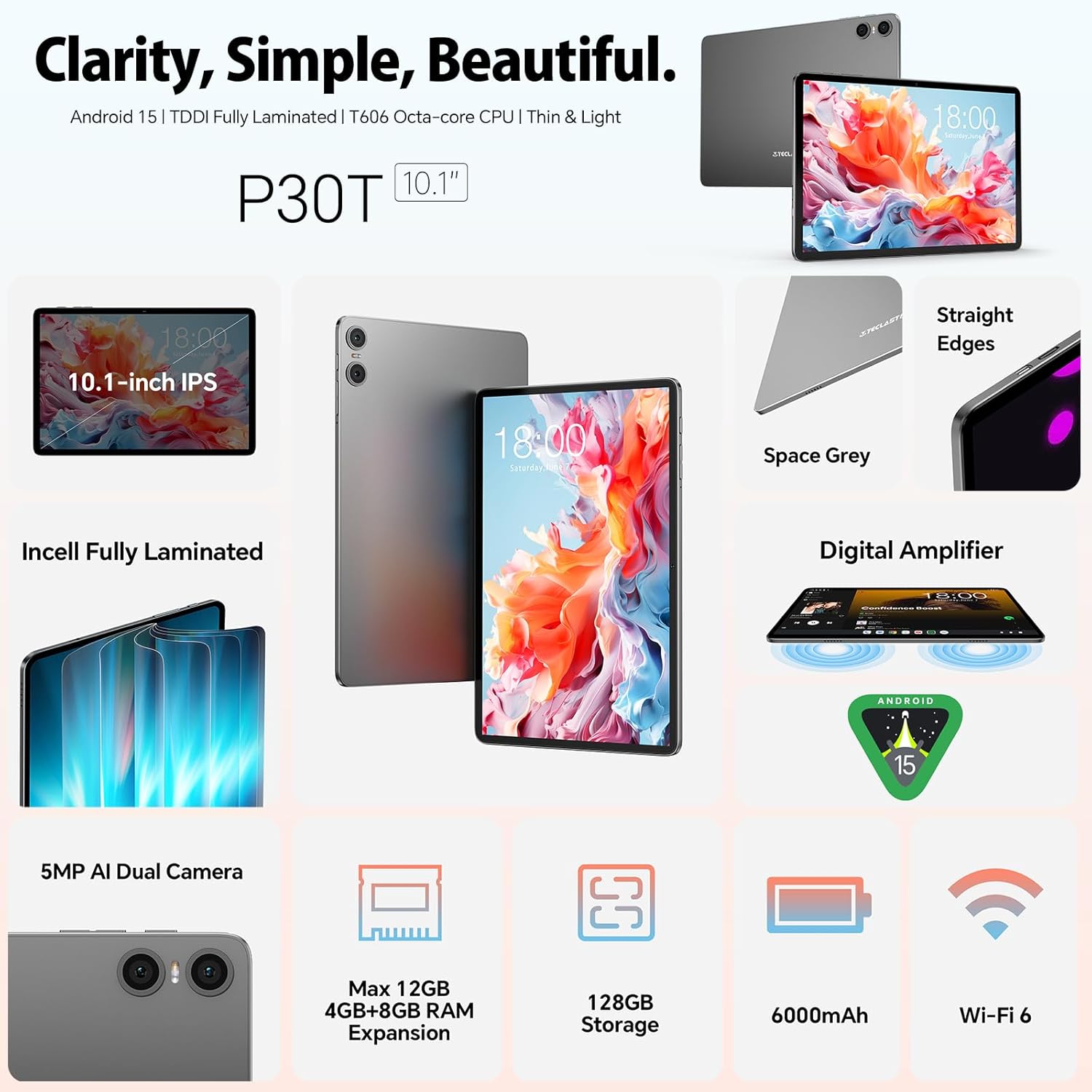
Figure 5: Key Features: Audio, Wi-Fi, Battery, and Camera

Figure 6: 10.1-inch TÜV-Certified Display
Video 1: TECLAST P30T Tablet Overview and Performance Demonstration. This video provides a visual demonstration of the tablet's features and smooth operation.
Configuració
1. Càrrega inicial
Before first use, it is recommended to fully charge the tablet. Connect the provided USB Type-C cable to the tablet's charging port and the other end to the power adapter. Plug the adapter into a wall outlet. The charging indicator will show the charging status. A full charge typically takes several hours.
2. Encès / apagat
- Per encendre: Press and hold the Power button (usually located on the side) until the TECLAST logo appears on the screen.
- Per apagar: Press and hold the Power button until a power-off menu appears. Select "Power off" or "Shut down".
- Per reiniciar: From the power-off menu, select "Restart".
3. Assistent de configuració inicial
En engegar-la per primera vegada, la tauleta us guiarà a través d'un assistent de configuració inicial. Seguiu les instruccions que apareixen a la pantalla per a:
- Seleccioneu el vostre idioma.
- Connecteu-vos a una xarxa Wi-Fi.
- Sign in with your Google account (or create a new one). This is essential for accessing the Google Play Store and other Google services.
- Configura el bloqueig de pantalla (PIN, patró, contrasenya).
- Review i acceptar els termes i condicions.
Instruccions de funcionament
1. Navegació bàsica
The TECLAST P30T uses standard Android touch gestures:
- Toca: Per seleccionar un element o obrir una aplicació.
- Llisca: Per desplaçar-se per pantalles o llistes.
- Pessiga per fer zoom: Per ampliar o reduir imatges o web pàgines.
- Premsa llarga: Per accedir a menús contextuals o moure icones.
2. Connexió d'accessoris
The TECLAST P30T comes with a 10-piece set, including a Bluetooth keyboard and mouse. Follow these steps to connect them:
- Bluetooth Keyboard/Mouse:
- Ensure the keyboard/mouse is charged and powered on.
- Put the accessory into pairing mode (refer to the accessory's specific instructions, usually a button press).
- A la tauleta, vés a Configuració > Dispositius connectats > Bluetooth.
- Turn on Bluetooth and tap "Pair new device".
- Select the keyboard/mouse from the list of available devices and follow any on-screen prompts to complete pairing.
- Bolígraf: The stylus pen is generally passive and does not require Bluetooth pairing. Simply use it directly on the screen.
- OTG Interface: Use the provided OTG adapter to connect USB devices such as flash drives, external hard drives, or other peripherals to your tablet.
3. Connexió Wi-Fi
Per connectar-se a una xarxa Wi-Fi:
- Vés a Configuració > Xarxa i Internet > Internet.
- Activa la Wi-Fi.
- Seleccioneu la xarxa desitjada de la llista.
- Introduïu la contrasenya si se us demana i toqueu "Connecta".
4. Ampliació de l'emmagatzematge
The tablet supports Micro SD card expansion up to 4TB. Insert the Micro SD card into the designated slot until it clicks into place. You may be prompted to format the card for use with the tablet.
Manteniment
1. Neteja de la tauleta
- Feu servir un drap suau i sense borrissol per netejar la pantalla i la carcassa.
- Per a taques persistents, lleugerament dampNetegeu el drap amb aigua o un netejador de pantalles. Eviteu productes químics agressius.
- No ruixeu líquids directament sobre la tauleta.
2. Actualitzacions de programari
Comproveu regularment si hi ha actualitzacions del sistema per assegurar-vos que la tauleta tingui les darreres funcions, pegats de seguretat i millores de rendiment. Aneu a Configuració > Sistema > Actualització del sistema.
3. Cura de la bateria
- Eviteu les temperatures extremes, ja que poden reduir la durada de la bateria.
- Use only the provided charging kit or certified compatible chargers.
- Per a l'emmagatzematge a llarg termini, carregueu la bateria al 50% aproximadament i apagueu el dispositiu.
Resolució de problemes
| Problema | Causa possible | Solució |
|---|---|---|
| La tauleta no s'encén. | Bateria baixa; bloqueig del sistema. | Carrega la tauleta durant almenys 30 minuts. Prem i mantén premut el botó d'engegada durant 10-15 segons per forçar el reinici. |
| No es pot connectar a la Wi-Fi. | Contrasenya incorrecta; problema amb l'encaminador; Wi-Fi desactivat. | Ensure Wi-Fi is enabled. Double-check the password. Restart your Wi-Fi router. Try connecting to another network. |
| Bluetooth accessory not pairing. | Accessory not in pairing mode; Bluetooth disabled; interference. | Ensure the accessory is in pairing mode. Turn Bluetooth off and on again on the tablet. Move closer to the accessory. |
| La tauleta va lenta o no respon. | Too many apps running; low storage; software glitch. | Close background apps. Clear cache. Free up storage space. Restart the tablet. |
Especificacions
| Característica | Detall |
|---|---|
| Marca | TECLAST |
| Nom del model | TECLAST P30T |
| Sistema operatiu | Android 14 (Note: Product title states Android 15, but specifications list Android 14. Please verify with manufacturer if critical.) |
| Marca del processador | Unisoc |
| Velocitat del processador | 2 GHz |
| Mida de la pantalla | 10.1 polzades |
| Resolució de pantalla | 1280 x 800 píxels |
| GPU | Mali-G57 |
| Tipus de connectivitat | Wi-Fi (802.11a/b/g/n/ac), Bluetooth |
| Interfície del maquinari | USB Type C, Audio 3.5 mm, Micro SD |
| Durada de la bateria | 10 hours (6000mAh) |
| Dimensions (L x A x A) | 24.2 x 16.1 x 0.9 cm |
| Pes del producte | 440 grams |
| Característiques especials | USB OTG support, Stylus support |
| Mida de la RAM instal·lada | 12 GB (4GB LPDDR4 + 8GB Virtual) |
| Capacitat d'emmagatzematge de memòria | 128 GB |
Garantia i Suport
The TECLAST P30T tablet comes with a garantia limitada de dos anys des de la data de compra. Aquesta garantia cobreix els defectes de fabricació i garanteix que el producte funcioni tal com està previst en condicions d'ús normal.
For any questions, technical assistance, or warranty claims, please contact TECLAST customer service. Our support team is available to resolve issues within 24 hours on working days.
Please refer to your purchase documentation or the official TECLAST weblloc web per obtenir la informació de contacte més actualitzada i els termes detallats de la garantia.
TECLAST is committed to ensuring you enjoy your digital life with our products.