Producte acabatview
The EPOS Impact D 10 USB ML II is a wireless DECT mono ear convertible headset designed for direct connection to a PC or softphone. It offers premium audio performance and powerful wireless reach, providing a streamlined solution for professional communication environments, including hotdesking.

Image: EPOS Impact D 10 USB ML II headset on its charging base, highlighting key features such as premium audio, single device connectivity, flexible wearing styles, powerful wireless range, and a tidy desk design.
Característiques clau
- EPOS Voice™ Technology: Ensures premium audio for clear calls.
- Micròfon amb cancel·lació de soroll: Provides natural, clear conversations by reducing background noise.
- Powerful Wireless Reach: Offers up to 55 m (180 ft) in typical office environments and up to 180 m (590 ft) line of sight.
- Long Talk Time: Fins a 12 hores de temps de conversa amb una sola càrrega.
- Connectivitat Plug-and-Play: Direct USB connection to PC/Softphone for immediate use.
- Convertible Wearing Styles: Includes a detachable headband and a bendable ear hook to suit personal preference.
- Magnetic Docking and Charging: Easy and secure docking for charging.
Què hi ha a la caixa
Upon unboxing your EPOS Impact D 10 USB ML II headset, you should find the following components:
- Headset (with mounted bendable ear hook)
- Base Station / Charging Station
- Cable USB
- Headband (detachable)
- Guia ràpida impresa
- Printed Safety Guide
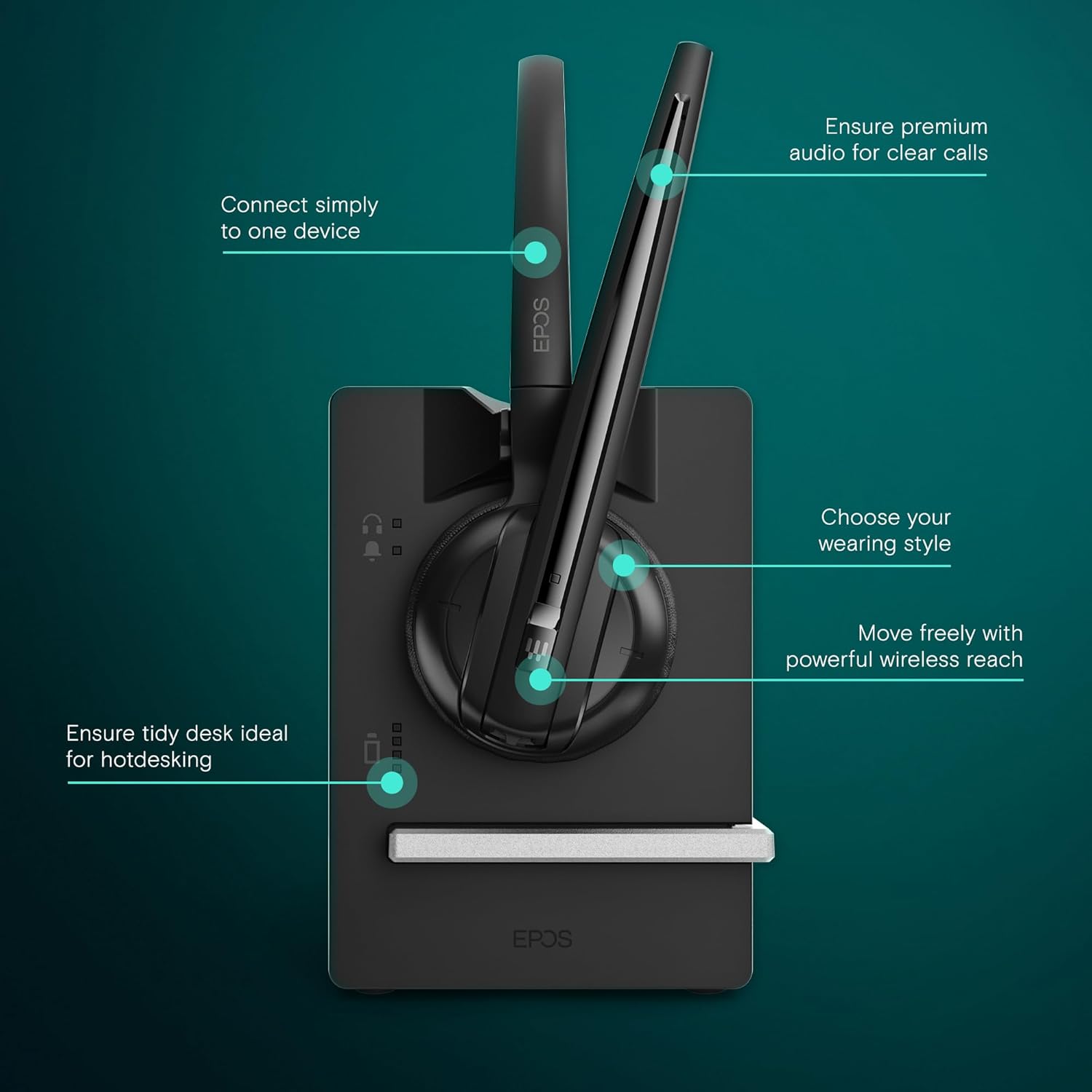
Image: All components included in the EPOS Impact D 10 USB ML II package, including the headset, base station, USB cable, detachable headband, quick guide, and safety guide.
Instruccions de configuració
- Connecteu l'estació base: Connect the provided USB cable to the base station and then to an available USB port on your PC or softphone. The base station will power on automatically.
- Carregueu els auriculars: Place the headset onto the magnetic charging interface of the base station. Ensure it is securely docked. The headset will begin charging. A full charge provides up to 12 hours of talk time.
- Choose Your Wearing Style:
- Ganxo per a l'orella: The bendable ear hook is pre-mounted on the headset for immediate use. Adjust it for a comfortable fit around your ear.
- Diadema: To use the headband, detach the ear hook and attach the headset to the provided headband. Adjust the headband for a secure and comfortable fit over your head.
- Emparellament inicial (si cal): The headset and base station are typically pre-paired. If pairing is required, refer to the detailed Quick Guide for specific instructions.
- Software Installation (optional): For advanced features and settings, you may download and install the EPOS Connect software from the official EPOS weblloc.

Image: The EPOS Impact D 10 USB ML II headset securely docked on its charging base, ready for use or charging.
Instruccions de funcionament
Fer i rebre trucades
- Respondre/Finalitzar la trucada: Press the call control button on the headset to answer an incoming call or end an active call.
- Silenciar el micròfon: Press the mute button on the headset to mute or unmute your microphone during a call.
- Ajustar el volum: Use the volume up/down buttons on the headset to adjust the listening volume.

Image: The EPOS Impact D 10 USB ML II headset on its base, illustrating features like one-touch call management, fast charging, and phone conferencing capabilities.
Wireless Range and Mobility
The headset provides significant wireless freedom. You can move up to 55 meters (180 feet) in typical office environments and up to 180 meters (590 feet) in line-of-sight conditions from the base station. This allows for flexibility during calls and while working.
Optimized for Unified Communications (UC)
The EPOS Impact D 10 USB ML II is optimized for Unified Communications, ensuring seamless integration and high-quality audio with various UC platforms and softphones.

Imatge: Un primer pla view of the EPOS Impact D 10 USB ML II headset's ear cup, emphasizing its optimization for Unified Communications.
Vídeo del producteview
Vídeo: Un funcionari ha acabatview of the EPOS Impact D 10 USB ML II Headset, demonstrating its features and functionality.
Manteniment
- Càrrega: Always dock the headset on the base station when not in use to ensure it is charged and ready for your next call. The headset features fast charging capabilities.
- Neteja: Use a soft, dry cloth to clean the headset and base station. Avoid using harsh chemicals or abrasive materials.
- Emmagatzematge: Store the headset and base station in a cool, dry place away from direct sunlight and extreme temperatures.

Image: The EPOS Impact D 10 USB ML II headset on its charging base, illustrating its compact and tidy design suitable for various workspaces.
Resolució de problemes
If you encounter issues with your EPOS Impact D 10 USB ML II headset, please consider the following common troubleshooting steps:
- Sense àudio/Micròfon no funciona:
- Ensure the headset is properly docked and charged.
- Verify the USB cable is securely connected to both the base station and your PC/softphone.
- Check your PC/softphone audio settings to ensure the EPOS headset is selected as the default input and output device.
- Confirm the microphone is not muted on the headset.
- Poor Wireless Range/Connection Drops:
- Reduce the distance between the headset and the base station.
- Minimize obstructions (walls, large metal objects) between the headset and base station.
- Avoid placing the base station near other wireless devices that may cause interference.
- Els auriculars no s'estan carregant:
- Ensure the headset is correctly seated on the magnetic charging interface.
- Check the USB cable connection to the base station and power source.
- Proveu un altre port USB o adaptador de corrent.
For more detailed troubleshooting or persistent issues, please consult the full user manual or contact EPOS customer support.
Especificacions
| Nom del model | Impact D 10 USB ML II |
| Número de model de l'article | 1000999 |
| Tecnologia de connectivitat | Sense fil (DECT) |
| Wireless Range (Office) | Fins a 55 m / 180 peus |
| Abast sense fil (línia de visió) | Fins a 180 m / 590 peus |
| Temps de conversa | Fins a 12 hores |
| Temps de càrrega | Fast Charging (50% in 20 minutes) |
| Micròfon | Cancel·lació de soroll |
| Conector d'auriculars | USB |
| Pes de l'article | 2 unces (aproximadament 57 grams) |
| Dimensions del producte | 8.12 x 6.12 x 2.62 polzades |
| Col·locació de l'orella | A l'orella |
| Factor de forma | A l'orella |
| Tipus de control | Control tàctil, control per veu |
| Dispositius compatibles | Computers, Laptops, Softphones |
Garantia i Suport
EPOS products are designed for durability and performance. For specific warranty information, please refer to the warranty card included in your product packaging or visit the official EPOS website. If you require technical assistance, support, or have questions regarding your headset, please contact EPOS customer service directly through their official channels.
Additional protection plans may be available for purchase from authorized retailers.