DrayTek Vigor 2865ax Ethernet Router User Manual
Model: V2865AX-K
Introducció
Welcome to the user manual for your DrayTek Vigor 2865ax Ethernet Router. This document provides detailed instructions for setting up, operating, maintaining, and troubleshooting your device to ensure optimal performance and connectivity. The Vigor 2865ax is a high-performance router designed for Small to Medium Businesses (SMBs) and advanced home users, offering robust features like VDSL2/ADSL2+ and Ethernet WAN load balancing, Wi-Fi 6 (AX3000), VPN capabilities, and extensive LAN port options.
Informació de seguretat
Please read these safety instructions carefully before using the device.
- Place the router on a stable, flat surface away from direct sunlight, heat sources, and moisture.
- Assegureu-vos que hi hagi una ventilació adequada al voltant del dispositiu per evitar el sobreescalfament.
- Use only the power adapter supplied with the router.
- Do not open the router casing; demaneu totes les tasques de manteniment a personal qualificat.
- Mantingueu el dispositiu allunyat dels nens i de les mascotes.
- Desconnecteu el subministrament elèctric durant tempestes elèctriques o quan no es faci servir durant períodes prolongats.
Contingut del paquet
Verifiqueu que tots els elements que s'enumeren a continuació s'inclouen al vostre paquet:
- Vigor 2865 Series Router
- Font d'alimentació de 12 V CC amb endoll del Regne Unit
- Guia d'inici ràpid
- Screws & wall plugs for wall mounting
- 2m Cat-5e RJ-45 Network Cable
- 2 antenes LAN sense fil desmuntables
Producte acabatview
Familiarize yourself with the physical components and ports of your DrayTek Vigor 2865ax router.
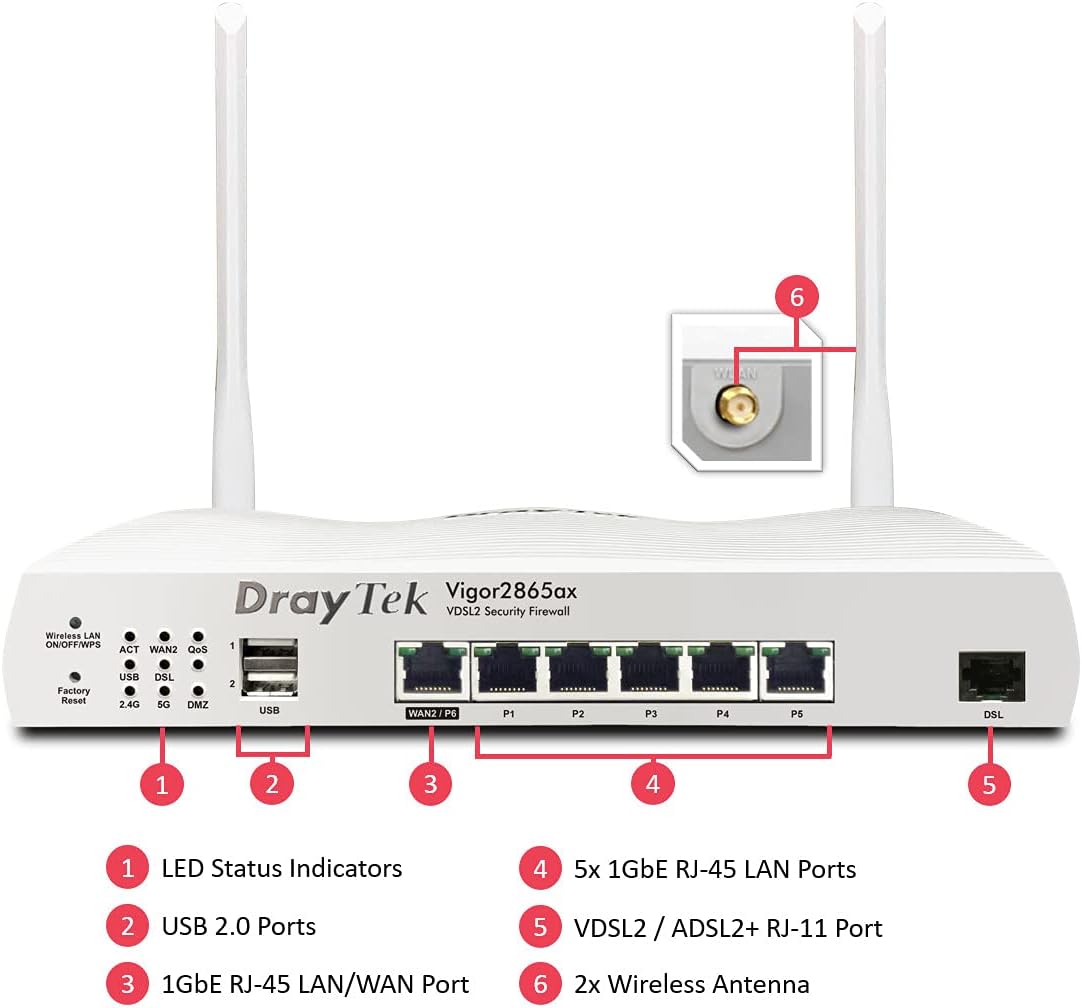
This image displays the front panel of the DrayTek Vigor 2865ax router, highlighting key components. Label 1 points to the LED Status Indicators, Label 2 to the USB 2.0 Ports, Label 3 to the 1GbE RJ-45 LAN/WAN Port (WAN2/P6), Label 4 to the 5x 1GbE RJ-45 LAN Ports (P1-P5), Label 5 to the VDSL2 / ADSL2+ RJ-11 Port (DSL), and Label 6 to the 2x Wireless Antenna connectors.
Panell frontal
- Indicadors d'estat LED: Provide visual feedback on the router's operational status, including power, internet connectivity, Wi-Fi activity, and LAN port status.
- Ports USB 2.0: For connecting external devices such as 3G/4G USB modems for backup WAN or USB storage for network-attached storage (NAS) functionality.
- WAN2/P6 (1GbE RJ-45 LAN/WAN Port): Configurable as either a Gigabit Ethernet WAN port for connecting to a fiber modem or another internet source, or as an additional LAN port.
- P1-P5 (5x 1GbE RJ-45 LAN Ports): Gigabit Ethernet ports for connecting wired devices such as computers, servers, and network switches.
- DSL (VDSL2 / ADSL2+ RJ-11 Port): For connecting directly to your VDSL or ADSL broadband line.
Panell posterior
- Entrada d'alimentació: Connects to the supplied DC 12V power adapter.
- Botó d'encesa: Per encendre o apagar el router.
- Connectors d'antena: For attaching the two detachable wireless LAN antennas.
Configuració
Pas 1: connecteu el maquinari
- Connecteu les antenes: Screw the two detachable wireless LAN antennas onto the connectors at the rear of the router.
- Connexió a Internet (WAN):
- For VDSL/ADSL: Connect an RJ-11 cable from your telephone line's DSL filter/socket to the DSL port on the router.
- For Ethernet WAN (e.g., Fibre/Cable Modem): Connect an Ethernet cable from your fiber/cable modem to the WAN2/P6 port on the router.
- Connexió a la xarxa local (LAN): Connect an Ethernet cable from one of the LAN ports (P1-P5) on the router to your computer or network switch.
- Connectar l'alimentació: Connect the supplied DC 12V power adapter to the router's power input and then plug it into a power outlet. Press the power button to turn on the router.
Pas 2: Configuració inicial
- Accés Web Interfície: Obre a web browser on a connected computer and enter the default IP address: 192.168.1.1.
- Inici de sessió: Introduïu el nom d'usuari per defecte (admin) i contrasenya (admin). It is highly recommended to change the default password immediately after logging in for the first time.
- Run Quick Start Wizard: Follow the on-screen instructions of the Quick Start Wizard to configure your internet connection (WAN settings), Wi-Fi network name (SSID), and password.
- Actualització del firmware: Després de la configuració inicial, navegueu a System Maintenance > Firmware Upgrade to check for and install the latest firmware. This ensures optimal performance and security.
Instruccions de funcionament
Multi-WAN Load Balancing and Failover
The Vigor 2865ax supports multiple WAN connections, allowing for load balancing to increase bandwidth or failover for connection redundancy.

This diagram shows the DrayTek Vigor 2865ax router connected to various internet sources: WiFi WAN, 1Gb Ethernet & FTTP, ADSL2+ & VDSL2 FTTC, and G.Fast FTTC. This illustrates the router's capability to utilize multiple WAN connections simultaneously for load balancing or failover.
Configure WAN settings under WAN > General Setup. You can enable load balancing policies or set up failover rules to ensure continuous internet access.
Wi-Fi 6 (AX3000) Configuration
The router provides high-speed Wi-Fi 6 connectivity across dual bands (2.4GHz and 5GHz).

This image depicts the Wi-Fi coverage provided by the DrayTek Vigor 2865ax router, showing distinct coverage areas for the 2.4GHz (AX600) and 5GHz (AX2400) bands, with various devices connected within these zones.
Access Wi-Fi settings via LAN sense fil menu. Here you can:
- Change SSID (Wi-Fi network name) and password.
- Configure security settings (WPA2/WPA3).
- Set up multiple SSIDs for different networks (e.g., guest network).
- Adjust channel and bandwidth settings for optimal performance.
VPN (xarxa privada virtual)
The Vigor 2865ax supports up to 32 VPN tunnels, including SSL VPN and OpenVPN, for secure remote access and site-to-site connectivity.
Navega a VPN and Remote Access to configure VPN profiles. Detailed guides for various VPN types are available on the DrayTek support weblloc.
LAN Management and VLANs
The router features 5+1 Gigabit LAN ports and supports VLANs for network segmentation.
Manage LAN settings under LAN > General Setup. Tu pots:
- Configure IP addresses and DHCP server settings.
- Create VLANs (Virtual LANs) to isolate network segments for enhanced security and management (e.g., separating guest Wi-Fi from internal network).
- Set up port mirroring or link aggregation if supported.
Manteniment
Actualitzacions de firmware
Regularly check for and install firmware updates to ensure your router has the latest features, security patches, and performance improvements.
- Visit the official DrayTek website and navigate to the support section for the Vigor 2865ax.
- Baixeu l'últim firmware file.
- Accedir al router web interface and go to System Maintenance > Firmware Upgrade.
- Follow the on-screen instructions to upload and install the firmware. Do not power off the router during this process.
Configuració de còpia de seguretat
It is advisable to back up your router's configuration settings before performing major changes or firmware updates.
Vés a System Maintenance > Configuration Backup to save your settings to a file.
Restabliment de fàbrica
If you encounter persistent issues or wish to revert all settings to default, you can perform a factory reset.
Avís: A factory reset will erase all your custom configurations.
Per fer un restabliment de fàbrica:
- Amb l'encaminador engegat, feu servir un clip o un objecte prim per prémer i mantenir premut el Restabliment de fàbrica button (located on the front panel, often recessed) for about 5-10 seconds until the LEDs flash.
- Release the button and wait for the router to restart with default settings.
Resolució de problemes
Sense connexió a Internet
- Comproveu els cables: Ensure all Ethernet and DSL cables are securely connected to the correct ports.
- Comproveu el LED de la WAN: Verify that the WAN LED (DSL or WAN2) is lit and stable, indicating a connection to your ISP.
- Configuració del proveïdor d'Internet: Confirm that your WAN settings (e.g., PPPoE username/password, static IP, DHCP) are correctly configured in the router's web interface, matching your ISP's requirements.
- Estat del mòdem: If using an external modem, check its status lights to ensure it's online.
- Reinicieu: Power cycle both your modem (if applicable) and the DrayTek router.
Wi-Fi Not Working or Slow
- Check Wireless LAN LED: Ensure the Wireless LAN LED is active.
- Transmissió SSID: Verify that your Wi-Fi network (SSID) is being broadcast.
- Contrasenya: Comprova la contrasenya de la teva Wi-Fi.
- Interferència de canal: Try changing the Wi-Fi channel in the router's settings to avoid interference from neighboring networks.
- Intensitat del senyal: Ensure the router is placed centrally and away from obstructions.
No es pot accedir Web Interfície
- Adreça IP: Confirm your computer's IP address is in the same subnet as the router (e.g., 192.168.1.x).
- Connexió per cable: Ensure your computer is directly connected to a LAN port on the router.
- Memòria cau del navegador: Esborra la memòria cau del navegador o prova un altre navegador.
- Tallafocs/Antivirus: Temporarily disable any software firewalls or antivirus programs on your computer that might be blocking access.
- Restabliment de fàbrica: As a last resort, perform a factory reset (see Maintenance section).
Especificacions
| Característica | Detall |
|---|---|
| Dimensions del producte | 34.5 x 28.6 x 7.5 cm; 1.6 kg |
| Número de model de l'article | V2865AX-K |
| Marca | DrayTek |
| Nom del model | Vigor 2865ax |
| Característica especial | Accés remot |
| Classe de banda de freqüència | Doble banda |
| Comunicació sense fils estàndard | 802.11a (Wi-Fi 6 AX3000) |
| Dispositius compatibles | Ordinador portàtil, ordinador personal, tauleta, telèfon intel·ligent |
| Freqüència | 2.4 GHz, 5 GHz |
| Usos recomanats | Jocs, llar, negocis |
| Tecnologia de connectivitat | Wi-Fi, Ethernet, VDSL2/ADSL2+ |
Garantia i Suport
DrayTek products typically come with a standard manufacturer's warranty. Please refer to the warranty card included in your product packaging or visit the official DrayTek weblloc web per obtenir informació detallada sobre els termes i condicions de garantia específics de la vostra regió.
For technical support, firmware downloads, and additional documentation, please visit the official DrayTek support weblloc: www.draytek.co.uk/support. You may also contact DrayTek customer service directly for assistance.
When contacting support, please have your router's model number (Vigor 2865ax) and serial number ready.


