Manual d'usuari de l'estèreo de cotxe PLZ MP-902 de doble DIN
Model: MP-902 | Brand: PLZ
Introducció
This user manual provides comprehensive instructions for the installation, operation, and maintenance of your PLZ MP-902 Double Din Car Stereo. Please read this manual thoroughly before using the product to ensure proper functionality and safety. The MP-902 is designed to enhance your in-car audio and entertainment experience with its advanced features and user-friendly interface.
Característiques del producte
Bluetooth 5.1 & Dual Mic: Enjoy hands-free calling and audio streaming with advanced Bluetooth 5.1. Features a built-in microphone and external microphone interface for clear communication.
Funcionalitat d'enllaç mirall: Supports screen mirroring for both ISO (iPhone) and Android phones via USB, allowing you to display navigation, videos, and other apps on the 7-inch touchscreen.
Darrera/Darrera View Suport de càmera: Designed for safety, the MP-902 automatically displays the rear camera image when reversing. An HD rear camera with night vision and a 170° ultra-wide viewing angle is included.
7 Inch Full HD Capacitive Touchscreen: Features a highly sensitive and accurate 7-inch capacitive touch screen supporting 1080P video playback for an immersive viewexperiència.
16-Band EQ DSP: Customize your audio experience with the built-in 16-band equalizer and Digital Signal Processor (DSP) to match various music styles.
USB Fast Charging & Data Read: Conveniently charge your devices and read data via the USB port.
Ràdio FM/AM: Access your favorite radio stations with FM/AM tuner.
Control del volant: Compatible with steering wheel controls for safe and convenient operation while driving.
Contingut del paquet
Si us plau, assegureu-vos que tots els elements que s'enumeren a continuació estiguin presents al vostre paquet:
PLZ MP-902 Double Din Car Stereo Unit
Control remot
posterior View Càmera
Cable de càmera de seguretat
Marc
Brackets (Mounting Hardware)
Cargols
Arnès de cablejat
Manual d'usuari
Image: Complete package contents for the PLZ MP-902 car stereo.
Configuració i instal·lació
Before beginning installation, ensure your vehicle's dashboard opening is compatible with the standard double din size (173mm x 98mm). If not, a suitable dash kit or modification may be required. Professional installation is recommended.
1. Connexions de cablejat
Connect the included wiring harness to your vehicle's existing wiring. Refer to the detailed wiring diagram provided in the user manual and on the product image for correct connections. Additional wire harness adapters or antenna adapters may be needed for specific car models.
Image: Standard size and wiring diagram for the MP-902 car stereo.
2. Instal·lació de la càmera
The MP-902 supports both front and rear view cameras. The included HD rear camera should be mounted at the rear of your vehicle. Connect the camera's video output to the 'R-CAM' input on the stereo and its power to your vehicle's reverse light circuit for automatic activation when shifting into reverse.
Image: Front and rear camera input setup, highlighting the included rear camera with night vision and wide viewangle de ing.
3. Instal·lació física
Secure the stereo unit into the dashboard opening using the provided brackets and screws. Attach the frame for a clean, integrated look. Ensure all cables are properly routed and secured to prevent interference or damage.
Video: A demonstration of the PLZ MP-902 car stereo's functions, including a brief overview of its physical features and connections.
Instruccions de funcionament
The PLZ MP-902 features an intuitive touchscreen interface for easy navigation and control. Below are instructions for key functions.
1. Navegació bàsica
From the main menu, tap on the desired icon to access functions such as Radio, Bluetooth, Phone Link, USB, Card, AV In, F-CAM (Front Camera), and Setup.
Image: Main menu interface of the MP-902.
2. Connectivitat Bluetooth
To connect your phone via Bluetooth 5.1, go to the 'BT' menu. Enable Bluetooth on your phone and search for 'MP-902'. Pair the devices. Once connected, you can make hands-free calls, access your phonebook, and stream audio. The dual microphone system ensures clear call quality.
Image: Bluetooth 5.1 interface for hands-free calling and music streaming.
3. Mirror Link (Phone Connectivity)
Select 'Phone Link' from the main menu. Connect your ISO or Android smartphone via a USB cable. Follow the on-screen prompts to enable screen mirroring. This allows you to display your phone's screen, including navigation apps and video content, directly on the stereo's display.
Image: Phone Mirror Link feature displaying a mirrored smartphone screen.
4. Audio Settings (16-Band EQ)
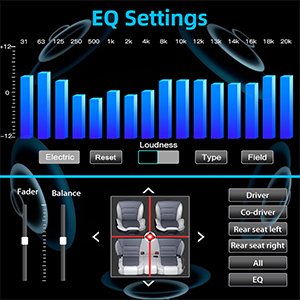
Access the 16-Band EQ settings from the 'EQ' icon. Adjust individual frequency bands to customize your audio output. You can also control fader and balance settings to optimize sound distribution within your vehicle.
Image: Detailed 16-Band EQ settings for audio customization.
5. Operació de ràdio
Select 'Radio' from the main menu. You can manually tune to stations or use the auto-scan feature to find available FM/AM frequencies. Save your favorite stations as presets for quick access.
Image: FM/AM Radio interface.
6. Control del volant (SWC)
If your vehicle supports steering wheel controls, you can configure them in the 'Setup' menu under 'Steering Wheel Setup'. This allows you to control volume, track changes, and other functions directly from your steering wheel.
Image: Steering Wheel Control setup interface.
Manteniment
To ensure the longevity and optimal performance of your PLZ MP-902 car stereo, follow these maintenance guidelines:
Neteja de la pantalla: Feu servir un drap suau i sense borrissol per netejar suaument la pantalla tàctil. Per a taques difícils, fregueu lleugeramentampNetegeu el drap amb aigua o un netejador de pantalles. Eviteu materials abrasius o productes químics agressius.
Neteja general: Mantingueu la unitat neta de pols i deixalles. Feu servir un raspall suau o aire comprimit per netejar els voltants dels botons i les reixetes de ventilació.
Actualitzacions de programari: Reviseu periòdicament el fabricant website or contact customer support for any available software updates. Updates can improve performance, add features, or fix bugs. Follow update instructions carefully.
Eviteu temperatures extremes: No exposeu la unitat a calor o fred extrems durant períodes prolongats, ja que això pot afectar els components electrònics.
Resolució de problemes
If you encounter issues with your PLZ MP-902, refer to the following common troubleshooting steps:
Problema
Causa possible
Solució
Sense poder
Loose wiring, blown fuse, vehicle power issue.
Check power and ground connections. Inspect vehicle's fuse box and the stereo's inline fuse. Ensure ignition is on.
Verify speaker connections. Increase volume. Check if mute is active. Select the correct audio source (e.g., Radio, BT, USB).
Bluetooth no connectat
Bluetooth not enabled on phone/stereo, device not in pairing mode, interference.
Ensure Bluetooth is on for both devices. Put stereo in pairing mode. Delete previous pairings on phone and retry. Move closer to the unit.
Mirror Link Not Working
Incorrect USB cable, phone settings, app compatibility.
Use a high-quality USB cable. Ensure phone's USB debugging or mirroring settings are enabled. Some apps may restrict mirroring due to copyright.
Rear Camera Image Not Displaying
Incorrect camera wiring, reverse trigger wire not connected, faulty camera.
Comproveu l'entrada de vídeo de la càmera i les connexions d'alimentació. Assegureu-vos que el cable del disparador de marxa enrere estigui connectat correctament al llum de marxa enrere del vehicle.
If these steps do not resolve the issue, please contact PLZ customer support for further assistance.
Especificacions
Característica
Detall
Número de model
MP-902
Mida de la pantalla
7 polzades
Tipus de pantalla
Full HD Capacitive Touchscreen
Versió Bluetooth
5.1
Equalitzador d'àudio
16-Band EQ DSP
Connectivitat
Bluetooth, Auxiliar, USB
Supported Video Playback
1080P
Dimensions del producte
3.26" de profunditat x 7" d'amplada x 3.93" d'alçada (8.28 x 17.78 x 9.98 cm)
Pes de l'article
2.51 lliures (1.14 kg)
Included Camera
HD Rear Camera with Night Vision (170° ultra-wide viewangle d'ajust)
Garantia i Suport
PLZ is committed to providing high-quality products and excellent customer service. For any warranty claims, technical support, or inquiries regarding your MP-902 car stereo, please contact PLZ customer support directly. Refer to the contact information provided with your product packaging or visit the official PLZ weblloc d'assistència.
Many common issues can be resolved by referring to the troubleshooting section of this manual or by checking for the latest software updates from PLZ.
Manual d'operació del cartutx estèreo de la sèrie NAGAOKA MP Manual d'instruccions complet per a les càpsules estèreo NAGAOKA sèrie MP, que detalla la instal·lació, la substitució del llapis, les especificacions, les precaucions d'ús i la informació de garantia per als models MP-500, MP-300, MP-200, MP-150 i MP-110.
Manual d'instruccions del PLZ MP-900 Mirror-Link Manual d'instruccions per al sistema PLZ MP-900 Mirror-Link, que detalla la configuració de Phonelink per a Android i iPhone, l'emparellament Bluetooth, la instal·lació de l'aplicació i els passos per resoldre problemes.