1. Introducció
This user manual provides detailed instructions for the operation and maintenance of your Sunbuck AS-60BU Home Audio Amplifier Stereo Receiver. This 2-channel amplifier is designed to enhance your home audio experience, offering versatile input options including Bluetooth 5.0, USB, SD card, AUX, CD, Line-in, and microphone inputs. Please read this manual thoroughly before using the product to ensure proper function and safety.

Figure 1: Sunbuck AS-60BU Amplifier and Remote Control
2. Instruccions de seguretat
- No exposeu aquest aparell a la pluja o la humitat.
- No traieu la coberta. No hi ha peces que l'usuari pugui reparar a l'interior. Demaneu el servei tècnic a personal qualificat.
- Assegureu-vos que hi hagi una ventilació adequada al voltant de la unitat. No bloquegeu les obertures de ventilació.
- Connect only to a grounded AC power outlet.
- No sobrecarregueu els endolls elèctrics ni els cables d'extensió.
- Eviteu col·locar la unitat a prop de fonts de calor o sota la llum solar directa.
- Desconnecteu l'alimentació durant tempestes amb llamps o quan no es faci servir durant períodes prolongats.
- Mantenir fora de l'abast dels nens.
3. Contingut del paquet
Verifiqueu que tots els elements estiguin inclosos al vostre paquet:
- Sunbuck AS-60BU AmpReceptor més viu
- Cable d'alimentació CA
- Manual d'usuari (aquest document)
- Control remot

Figura 2: Què hi ha a la caixa
4. Producte acabatview
4.1 Tauler frontal

Figura 3: Disseny del panell frontal i posterior
| Característica | Descripció |
|---|---|
| ALIMENTACIÓ (ON/OFF) | Interruptor d'alimentació principal de la unitat. |
| Entrada d’ajuda | Jack de 3.5 mm per connectar dispositius d'àudio externs. |
| Selector d'entrada | Rotary knob to select audio input source: LINE, CD, AUX, MEDIA PLAYER. |
| Control BASS | Ajusta la sortida d'àudio de baixa freqüència. |
| Control TREBLE | Ajusta la sortida d'àudio d'alta freqüència. |
| Control ECHO | Adjusts the echo effect for microphone inputs. |
| M.TONE Control | Adjusts the microphone tone. |
| Control de VOLUM MIC | Adjusts the volume of the microphone inputs. |
| MÀSTER VOLUM | Main volume control for all audio output. |
| USB/SD/MMC Port | Input for USB flash drives and SD/MMC cards for media playback. |
| MEDIA PLAYER Display & Buttons | Digital display and controls (MODE, Play/Pause, Previous, Next) for USB/SD/Bluetooth playback. |
| MIC 1 / MIC 2 | Preses d'entrada de micròfon de 6.35 mm. |
4.2 Panell posterior
| Característica | Descripció |
|---|---|
| CD L/R IN | RCA stereo input for CD players. |
| LINE L/R IN | RCA stereo input for general line-level audio sources. |
| Antena FM | Punt de connexió per a l'antena de ràdio FM. |
| Entrada d'alimentació de CC | Power input for the ampmés viu. |
| Speaker Output (L/R) | Binding posts for connecting passive speakers (4-16 ohms). |
5. Configuració
Follow these steps to set up your Sunbuck AS-60BU ampmés viu:
- Connexió de l'altaveu: Connect your passive speakers to the "Speaker Output (L/R)" binding posts on the rear panel. Ensure correct polarity (+ to + and - to -) for optimal sound. This amplifier supports speakers with an impedance range of 4 to 16 ohms.
- Connexió de font d'àudio:
- For CD players, connect RCA cables from the CD player's output to the "CD L/R IN" on the ampmés viu.
- For other line-level devices (e.g., tape drive, tuner), connect RCA cables to the "LINE L/R IN".
- For devices with a 3.5mm output (e.g., smartphones, tablets), use a 3.5mm audio cable to connect to the "AUX INPUT" on the front panel.
- For PC connection, use appropriate cables to connect your PC's audio output to either the LINE IN or AUX IN.

Figura 4: Diagrama de connexió
- Connexió de l'antena FM: If you plan to use the FM radio function, connect an FM antenna to the "FM Antenna" terminal on the rear panel.
- Connexió d'alimentació: Assegureu-vos el amplifier's POWER switch is in the OFF position. Connect the supplied AC power cord to the "DC Power Input" on the rear panel and then to a suitable wall outlet.
6. Instruccions de funcionament
6.1 Encès/Apagat
Per activar el fitxer amplifier, press the PODER switch to the ON position. The LED display will illuminate. To turn off, press the PODER canviar a la posició OFF.
6.2 Selecció d'entrada
Gira el Selector d'entrada knob on the front panel to choose your desired audio source (LINE, CD, AUX, MEDIA PLAYER). When selecting MEDIA PLAYER, you can then use the MODE button on the front panel or remote to switch between USB, SD, and Bluetooth modes.
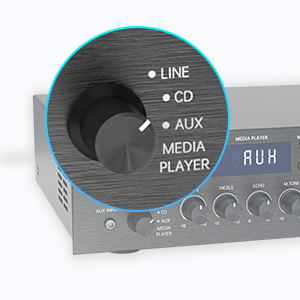
Figure 5: Input Selector
6.3 Connectivitat Bluetooth
Per connectar-se mitjançant Bluetooth:
- Estableix el Selector d'entrada to MEDIA PLAYER.
- Premeu el botó MODE button until "BLUETOOTH" or "BT" appears on the display.
- Al dispositiu mòbil (telèfon intel·ligent, tauleta, ordinador portàtil), activeu el Bluetooth i cerqueu els dispositius disponibles.
- Select "SUNBUCK" or "AS-60BU" from the list to pair.
- Once paired, you can stream audio wirelessly from your device to the ampmés viu.
The Bluetooth range is approximately 40+ feet, but can be affected by obstacles and interference.

Figura 6: Connectivitat Bluetooth
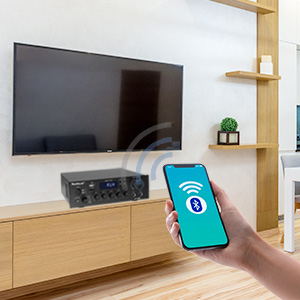
Figure 7: Bluetooth Connection Indicator
6.4 Reproducció des de targeta USB/SD
To play media from a USB drive or SD/MMC card:
- Insert your USB flash drive or SD/MMC card into the corresponding port on the front panel.
- Estableix el Selector d'entrada to MEDIA PLAYER.
- El amplifier will automatically detect and begin playing supported audio files (MP3, WAV, WMA, APE, FLAC).
- Use the Play/Pause, Previous, and Next buttons on the front panel or remote to control playback.
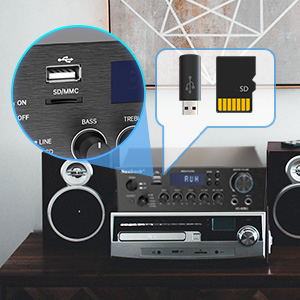
Figure 8: USB/SD Card Slots
6.5 Ús del micròfon
Connect up to two microphones to the MIC 1 and MIC 2 jacks on the front panel. Adjust the VOLUM MIC, ECO, i M.TONE controls to achieve your desired sound for karaoke or public address.

Figure 9: Ideal for Karaoke and Home Entertainment
6.6 Ràdio FM
Per utilitzar la ràdio FM:
- Ensure an FM antenna is connected to the rear panel.
- Estableix el Selector d'entrada to MEDIA PLAYER.
- Premeu el botó MODE fins que aparegui "FM" a la pantalla.
- Use the Previous/Next buttons to scan for stations. Note that this model cannot fix and save FM stations.

Figure 10: FM Mode Display
6.7 Ajustaments d'àudio
Utilitza el BASS, AGUTS, i MÀSTER VOLUM knobs on the front panel to fine-tune your audio output. The MÀSTER VOLUM controls the overall sound level.
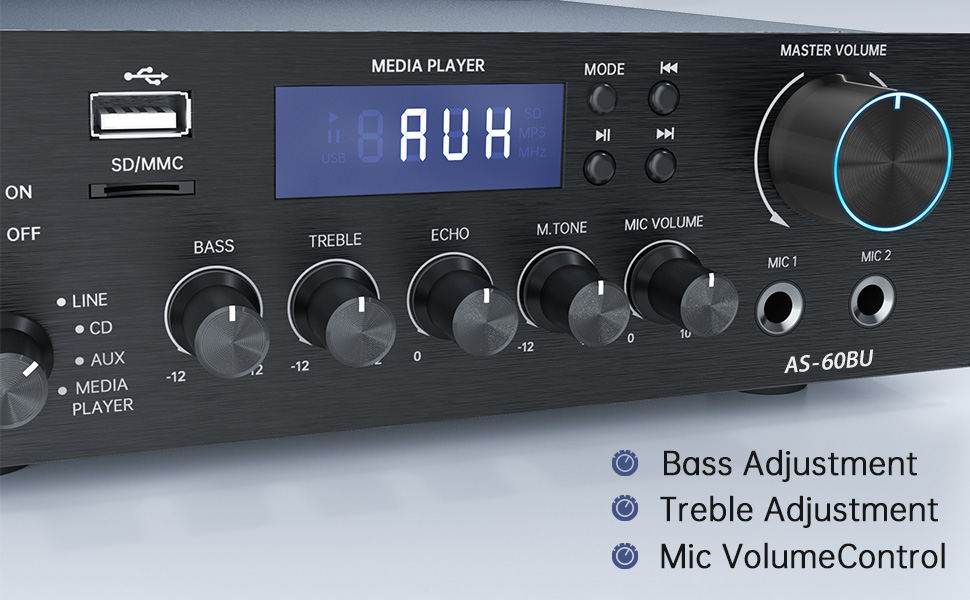
Figure 11: Audio Adjustment Controls
Video 1: Demonstration of Sunbuck AS-60BU amplifier features and sound quality.
7. Manteniment
- Neteja: Utilitzeu un drap suau i sec per netejar l'exterior amplifier. Do not use liquid cleaners or aerosols.
- Emmagatzematge: Quan no s'utilitzi durant períodes prolongats, guardeu-lo ampGuardar en un lloc fresc i sec, allunyat de la llum solar directa i de temperatures extremes.
- Ventilació: Assegureu-vos que les obertures de ventilació estiguin netes de pols i deixalles per evitar el sobreescalfament.
8. Solució De Problemes
| Problema | Causa possible | Solució |
|---|---|---|
| Sense sortida de so. | Incorrect input selected, loose speaker connections, low volume. | Verify input selection, check speaker wiring polarity and tightness, increase MASTER VOLUME. |
| Bluetooth connection unstable or short range. | Obstacles between device and amplifier, interference, device too far. | Reduce distance between devices, remove obstacles, avoid other wireless devices. |
| El comandament a distància no funciona. | Dead batteries, line of sight blocked. | Replace batteries, ensure clear path to ampreceptor d'infrarojos del lifer. |
| Settings not saved after power off. | This is normal behavior for some settings (e.g., input mode). | Re-select desired input mode after powering on. |
| Àudio distorsionat. | Input signal too high, speaker impedance mismatch, faulty cables. | Reduce source volume, ensure speakers are within 4-16 ohm range, check/replace cables. |
9. Especificacions
- Model: AS-60BU
- Potència de sortida: MAX 400W x 2 (RMS 70W x 2)
- Canals: 2-Canals
- Impedància de l'altaveu: 4-16 ohms
- Impedància de sortida: 0.1 ohms
- Entrades: 2 x RCA Audio (CD, Line), 2 x Microphone (6.35mm), USB 2.0, SD Card, Bluetooth 5.0, AUX In (3.5mm), FM Radio
- Supported Audio Formats (USB/SD): MP3, WAV, WMA, APE, FLAC
- Dimensions del producte: 8.27 x 7.68 x 2.44 polzades
- Pes: 3.24 lliures
- Fabricant: JS Electronics Limited
- Primer disponible: 9 de setembre de 2021
10. Garantia i Suport
Sunbuck products are designed for reliability and performance. For warranty information or technical support, please refer to the contact details provided with your purchase documentation or visit the official Sunbuck weblloc web. Conserveu el rebut de compra com a comprovant de compra per a reclamacions de garantia.
For further assistance, you may contact the manufacturer, JS Electronics Limited.


