1. Introducció
This manual provides comprehensive instructions for the installation, operation, and maintenance of your TP-Link Archer C5 AC1200 Dual-Band Gigabit Wireless Wi-Fi Router. The Archer C5 is designed to provide seamless Wi-Fi coverage with its dual-band capabilities, offering speeds up to 750Mbps on the 5GHz band and up to 300Mbps on the 2.4GHz band. It features four external antennas for stable wireless connections and full Gigabit ports for high-speed wired connections.
Please read this manual carefully before using the device to ensure proper setup and optimal performance.
2. Contingut del paquet
Comproveu que el vostre paquet contingui els elements següents:
- Encaminador TP-Link Archer C5
- Power Adapter (DC Adapter)
- Cable Ethernet (RJ45)
- Quick Installation Guide (may be a separate document)
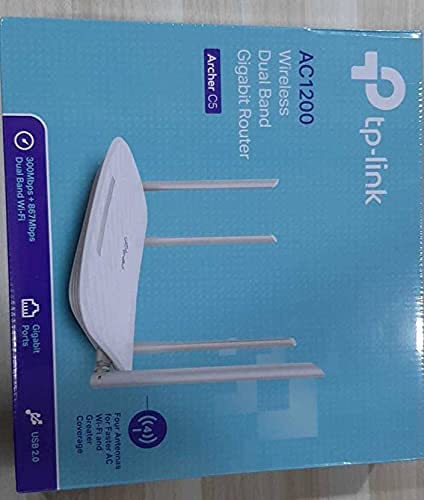
3. Producte acabatview
3.1 Tauler frontal

The front panel features LED indicators that provide information about the router's status, including power, internet connectivity, Wi-Fi status for both 2.4GHz and 5GHz bands, and LAN port activity.
3.2 Panell posterior

The rear panel includes all physical connection ports and buttons:
- Entrada d'alimentació: Es connecta a l'adaptador de corrent proporcionat.
- Botó d'encesa: Encén o apaga el router.
- Port USB: Per connectar dispositius d'emmagatzematge USB per compartir files a través de la xarxa.
- Port WAN (blau): Connects to your modem for internet access. This is a Gigabit port.
- Ports LAN (groc): Four Gigabit Ethernet ports for connecting wired devices such as computers, gaming consoles, or smart TVs.
- Botó de restabliment: S'utilitza per restaurar el router a la configuració de fàbrica.
- Botó WPS/Wi-Fi: Press to enable WPS (Wi-Fi Protected Setup) for easy connection, or press and hold to turn Wi-Fi on/off.
4. Guia de configuració
Follow these steps to set up your TP-Link Archer C5 router:
- Apagueu el mòdem: Desconnecta l'alimentació del mòdem actual.
- Connecteu el router:
- Connect one end of the provided Ethernet cable to the WAN port (blue) on your Archer C5 router.
- Connecteu l'altre extrem del cable Ethernet al port Ethernet del mòdem.
- Dispositius d'encesa:
- Connecteu l'adaptador de corrent a l'entrada d'alimentació del router i endolleu-lo a una presa de corrent.
- Power on your modem, then wait for it to fully boot up (usually indicated by stable LED lights).
- Power on the Archer C5 router. Wait for the LED indicators to stabilize, particularly the Internet LED.
- Connecteu-vos a la xarxa Wi-Fi del router:
- Localitza el nom de la xarxa Wi-Fi (SSID) i la contrasenya impresos a l'etiqueta de la part inferior del teu encaminador.
- A l'ordinador o al dispositiu mòbil, seleccioneu la xarxa Wi-Fi del router i introduïu la contrasenya per connectar-vos.
- Accedeix al Web Interfície de gestió:
- Obre a web navegador (per exemple, Chrome, Firefox) i escriviu
http://tplinkwifi.netor192.168.0.1a la barra d'adreces. - Inicieu la sessió amb el nom d'usuari i la contrasenya predeterminats (normalment
adminper a tots dos, o tal com s'especifica a l'etiqueta del router). - Follow the Quick Setup wizard to configure your internet connection and personalize your Wi-Fi network name and password.
- Obre a web navegador (per exemple, Chrome, Firefox) i escriviu
- Optional: Use the TP-Link Tether App: Download the TP-Link Tether app from your mobile device's app store for easy setup and management.
5. Instruccions de funcionament
Once your router is set up, you can manage its functions through the web management interface or the TP-Link Tether app.
Wi-Fi de doble banda 5.1
The Archer C5 operates on two Wi-Fi bands:
- Banda de 2.4 GHz: Provides wider coverage and better penetration through walls, suitable for general internet use and older devices.
- Banda de 5 GHz: Offers faster speeds and less interference, ideal for bandwidth-intensive activities like online gaming and HD video streaming.
You can configure separate SSIDs (network names) and passwords for each band or use a single SSID with Band Steering enabled (if available in your firmware) to allow the router to automatically assign devices to the best band.
5.2 Gestió de la xarxa
A través del web interfície, podeu:
- Canvia la configuració del Wi-Fi (SSID, contrasenya, tipus de seguretat).
- Set up a Guest Network for visitors.
- Configure parental controls to manage internet access for children.
- Prioritize devices or applications using Quality of Service (QoS).
- Gestioneu els dispositius connectats.
- Access advanced settings like port forwarding, VPN server, and dynamic DNS.
6. Manteniment
Un manteniment regular ajuda a garantir la longevitat i el rendiment òptim del vostre encaminador.
- Actualitzacions de firmware: Consulteu periòdicament el lloc web oficial de TP-Link weblloc web per a actualitzacions de firmware. L'actualització del firmware pot millorar el rendiment, afegir noves funcions i solucionar vulnerabilitats de seguretat.
- Col·locació física: Col·loqueu el router en un lloc central, allunyat d'obstacles i dispositius que emeten interferències electromagnètiques (per exemple, microones, telèfons sense fil). Elevar el router també pot millorar la distribució del senyal.
- Neteja: Keep the router clean and free from dust. Ensure ventilation holes are not blocked to prevent overheating.
- Reiniciant: If you experience slow speeds or connectivity issues, try rebooting the router by unplugging its power adapter for 10 seconds and then plugging it back in.
7. Solució De Problemes
Aquesta secció tracta problemes comuns que podeu trobar amb el vostre encaminador Archer C5.
7.1 Sense accés a Internet
- Comproveu les connexions dels cables: Assegureu-vos que el cable Ethernet del mòdem estigui connectat correctament al port WAN blau del router.
- Estat del mòdem: Verifiqueu que el mòdem funciona correctament i que té una connexió a Internet activa.
- LEDs del router: Check the Internet LED on the router. If it's off or red, there might be an issue with your internet service provider (ISP) or modem connection.
- Reiniciar dispositius: Power cycle your modem and then your router.
- Clonar l'adreça MAC: Some ISPs require MAC address cloning. Access the router's web interface and check WAN settings for this option.
7.2 Wi-Fi Signal Drops or is Weak
- Col·locació del router: Move the router to a central location, away from obstacles and interference sources.
- Orientació de l'antena: Ajusteu les quatre antenes externes per obtenir una recepció òptima del senyal.
- Interferència de canal: En el router web interface, try changing the Wi-Fi channel for both 2.4GHz and 5GHz bands to a less congested one.
- Actualització del firmware: Assegureu-vos que el firmware del vostre encaminador estigui actualitzat.
7.3 Forgot Router Login Password
Si oblideu la contrasenya per a web management interface, you will need to reset the router to its factory default settings. Locate the Reset button on the rear panel, press and hold it for about 10 seconds until the LEDs flash, then release. The router will reboot with default settings (usually admin for username and password).
8. Especificacions
| Característica | Detall |
|---|---|
| Marca | TP-Link |
| Nom del model | Archer C5 |
| Estàndard sense fils | IEEE 802.11ac/n/a 5 GHz, IEEE 802.11n/b/g 2.4 GHz |
| Velocitat Wi-Fi | AC1200 (867 Mbps a 5 GHz, 300 Mbps a 2.4 GHz) |
| Classe de banda de freqüència | Doble banda (2.4 GHz i 5 GHz) |
| Ports Ethernet | 1 port WAN Gigabit, 4 ports LAN Gigabit |
| Port USB | 1 port USB 2.0 |
| Antenes | 4x antenes externes |
| Protocol de seguretat | WPA2-PSK |
| Sistema operatiu | RouterOS (as per product data, typically TP-Link custom firmware) |
| Característica especial | Accés remot |
| Pes de l'article | 710 g |
| Components inclosos | Router, DC Adapter, RJ45 Ethernet Cable |
9. Garantia i Suport
9.1 Informació de la garantia
The TP-Link Archer C5 router typically comes with a 1 anys de garantia. Please refer to the warranty card included in your product packaging or visit the official TP-Link weblloc web per obtenir informació detallada sobre els termes i condicions de garantia específics de la vostra regió.
9.2 Suport tècnic
For technical assistance, firmware updates, or further information, please visit the official TP-Link support website. You can usually find FAQs, troubleshooting guides, and contact information for customer support there.
Oficial de TP-Link Weblloc: www.tp-link.com


