1. Introducció
This manual provides essential information for the safe and efficient operation of your Sundirect MD650-Plus Infrared Mirror Heater. Please read these instructions carefully before installation and use, and retain them for future reference.
The Sundirect MD650-Plus is an infrared mirror heater designed for bathrooms and similar spaces, featuring anti-fog properties and integrated WiFi thermostat control.
2. Instruccions de seguretat
Observeu sempre les següents precaucions de seguretat per evitar lesions o danys:
- Ensure the heater is installed by a qualified electrician in accordance with local regulations.
- Do not cover the heater. Covering can lead to overheating and fire risk.
- Mantingueu els materials inflamables allunyats de l'escalfador.
- No feu funcionar l'escalfador amb un cable o un endoll danyats.
- Avoid direct contact with the hot surface during operation.
- Aquest aparell no està pensat per ser utilitzat per persones (inclosos nens) amb capacitats físiques, sensorials o mentals reduïdes, o amb manca d'experiència i coneixements, tret que hagin rebut la supervisió o instruccions sobre l'ús de l'aparell per una persona responsable de la seva seguretat.
- Els nens han de ser supervisats per assegurar-se que no juguin amb l'aparell.
3. Contingut del paquet
Verifiqueu que tots els components siguin presents abans de la instal·lació:
- Sundirect MD650-Plus Infrared Mirror Heater
- Smart 1.0 Pro WiFi Thermostat (integrated receiver)
- Mounting hardware (Easy-Fit solution)
- Manual d'usuari (aquest document)
4. Especificacions
| Característica | Detall |
|---|---|
| Model | MD650-Plus |
| Dimensions | 60 x 120 cm |
| Potència de sortida | 650 W |
| Zona climatitzada | 7 a 13 m² |
| Profunditat total | 3.8 cm |
| Material | Vidre |
| Pes | 17 kg |
| Termòstat | Smart 1.0 Pro WiFi Thermostat (integrated receiver) |
| Característiques | Quick heating, Wi-Fi compatible, Adjustable temperature, Electronic thermostat, Anti-fog mirror |
5. Instal·lació i configuració
5.1 Selecció d'una ubicació
Select a suitable wall location in your bathroom or desired room. Ensure there is adequate clearance around the heater and that the wall can support its weight (17 kg).

Image: The Sundirect MD650-Plus Infrared Mirror Heater seamlessly integrated into a modern bathroom setting, reflecting a shower area. This illustrates a typical installation environment.
5.2 Muntatge de l'escalfador
The MD650-Plus uses an Easy-Fit mounting solution. Follow these general steps:
- Prepara el mur: Mark the drilling points on the wall according to the mounting template (if provided) or the back of the heater. Ensure the marks are level.
- Forats: Drill holes at the marked points and insert appropriate wall plugs suitable for your wall type.
- Col·loqueu el suport de muntatge: Secure the mounting bracket (if separate) or directly mount the heater to the wall using the provided screws.
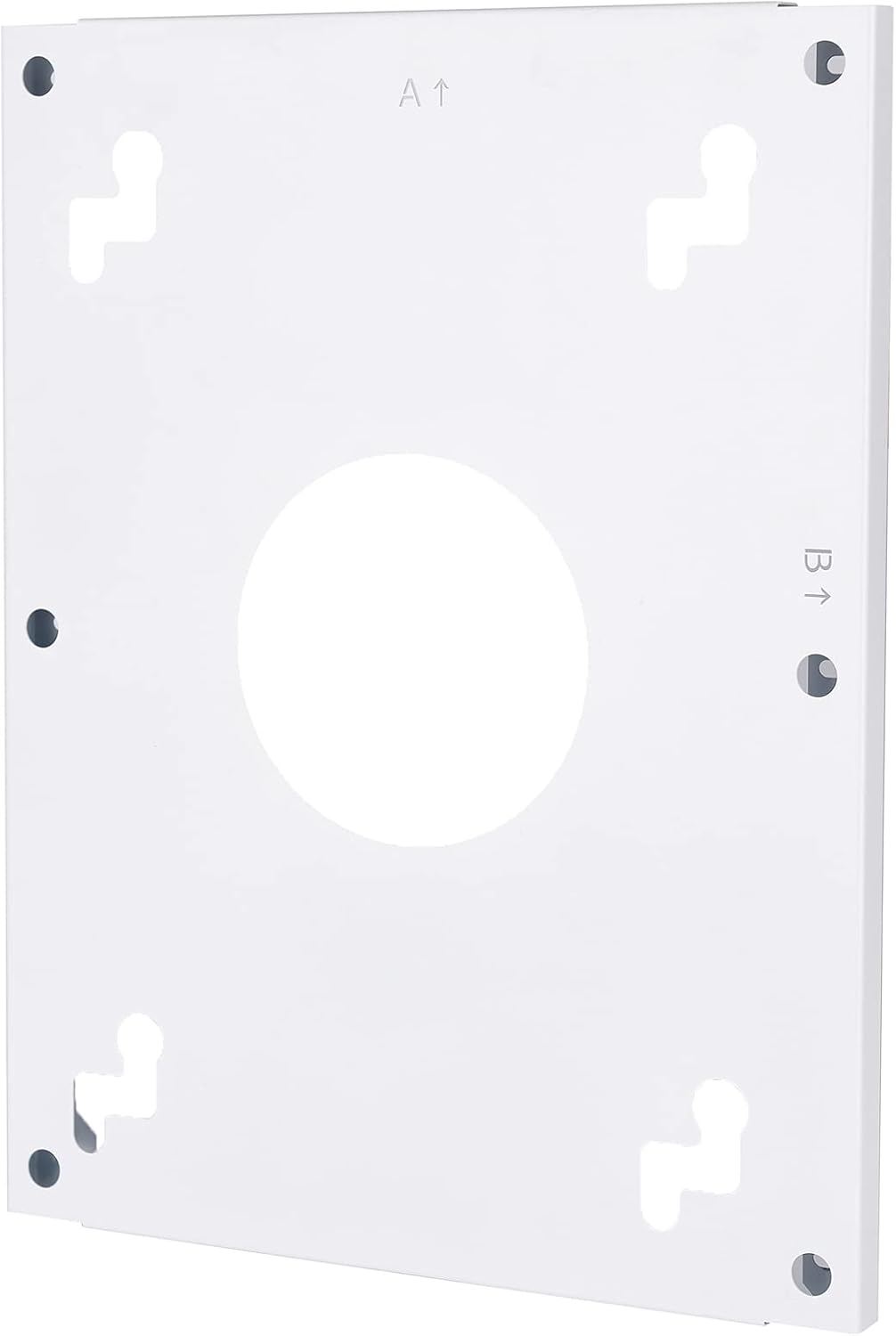
Imatge: Part posterior view of the heater's mounting plate, showing the screw holes and keyhole slots for secure wall attachment. Arrows indicate 'A' and 'B' for orientation.
Image: The back of the Sundirect MD650-Plus heater, displaying the power cable and the integrated receiver box with an on/off switch. This shows the electrical connection point.
5.3 Connexió elèctrica
The heater must be connected to a suitable power supply by a qualified electrician. The integrated receiver and power cable are located on the back of the unit.
- Ensure the power supply matches the heater's requirements (650W).
- The integrated receiver allows for connection to the Smart 1.0 Pro WiFi Thermostat.

Imatge: Una imatge detallada view of the integrated receiver box on the back of the heater, featuring an on/off switch and indicator lights. This highlights the control interface for the heater.
5.4 Smart 1.0 Pro WiFi Thermostat Setup
The MD650-Plus comes with an integrated receiver for the Smart 1.0 Pro WiFi Thermostat. To control your heater via smartphone, you need to pair the thermostat with the Sundirect Smart App.
- Descarrega l'aplicació: Scan the QR code or visit the provided links to download the Sundirect Smart App or Tuya Smart App.
- Maridatge: Follow the in-app instructions to pair your Smart 1.0 Pro WiFi Thermostat with the app. This typically involves putting the thermostat into pairing mode and connecting it to your home WiFi network.
- Control: Once paired, you can control the heater's temperature, schedule, and other settings directly from your smartphone.

Image: Two QR codes for downloading the control applications. The left QR code links to Aplicació Tuya Smart, and the right QR code links to Sundirect Smart App.

Image: A smartphone displaying the Sundirect smart app interface, showing temperature control and a WiFi logo, indicating remote control capabilities.
6. Instruccions de funcionament
6.1 Funcionament bàsic
After successful installation and pairing, you can operate your heater:
- Encès/apagat: Use the physical switch on the integrated receiver (if applicable) or the app to turn the heater on or off.
- Control de temperatura: Adjust the desired room temperature using the Smart 1.0 Pro WiFi Thermostat or the Sundirect Smart App.
- Funció antiboira: The mirror's anti-fog feature activates when the heater is operating, preventing condensation.

Image: The Sundirect MD650-Plus mirror heater shown with an overlay of the Smart 1.0 Pro WiFi Thermostat, illustrating the integrated control system.
6.2 Funcions de control de l'aplicació
The Sundirect Smart App provides advanced control options:
- Programació: Set daily or weekly heating schedules to optimize energy consumption.
- Control de zona: If you have multiple Sundirect heaters, manage them individually or in groups.
- Monitorització energètica: Monitor energy usage (feature availability may vary by app version).
7. Manteniment i Neteja
Un manteniment regular garanteix un rendiment òptim i una llarga vida útil del vostre escalfador.
- Neteja de la superfície del mirall: Utilitzeu un suau, damp cloth and a mild glass cleaner. Do not use abrasive cleaners or harsh chemicals, as these can damage the mirror coating.
- Neteja general: Wipe the frame and back of the heater with a dry or slightly damp cloth. Ensure the heater is unplugged and cool before cleaning.
- Sense peces reparables per l'usuari: No intenteu obrir ni reparar l'escalfador vosaltres mateixos. Envieu totes les tasques de manteniment a personal qualificat.

Image: An icon depicting a crossed-out cleaning brush over a mirror, signifying that abrasive cleaners should not be used on the mirror surface.
8. Solució De Problemes
If you encounter issues with your Sundirect MD650-Plus heater, refer to the following common problems and solutions:
| Problema | Causa possible | Solució |
|---|---|---|
| L'escalfador no s'encén | No power supply; Main switch off; Thermostat not calling for heat | Check power connection; Ensure main switch on receiver is ON; Verify thermostat settings and battery (if applicable). |
| Heater not heating sufficiently | Room size too large for heater; Thermostat set too low; Drafts in room | Ensure heater matches room size (7-13 m²); Increase thermostat setting; Seal drafts. |
| Problemes de connexió Wi-Fi | Incorrect WiFi password; Router too far; Network interference | Re-enter WiFi password in app; Move router closer or use a repeater; Check for other devices interfering with WiFi signal. |
| Mirall que s'entela | Heater not active; Extreme humidity | Ensure heater is on and operating; Allow time for the anti-fog function to work. |
9. Informació de la garantia
Sundirect products are manufactured to high-quality standards. For specific warranty terms and conditions, please refer to the warranty card included with your product or visit the official Sundirect weblloc web. Conserveu el comprovant de compra per a reclamacions de garantia.
10. Atenció al client
For further assistance, technical support, or spare parts inquiries, please contact Sundirect customer service through their official weblloc web o la informació de contacte proporcionada amb la compra.
You can also refer to the seller infrarot-fussboden-de on Amazon for purchase-related queries.