Introducció
The NZXT Kraken Z53 RGB 240mm AIO CPU Liquid Cooler offers advanced liquid cooling performance combined with a customizable LCD display. This all-in-one solution allows users to monitor system information, display personalized images, or animated GIFs directly on the pump's screen. Designed for efficient heat dissipation and quiet operation, the Kraken Z53 RGB provides a unique aesthetic and reliable cooling for your system.
Característiques clau
- Customizable LCD Screen: Features a bright, 2.36-inch LCD screen capable of displaying 24-bit color for personalized images, animated GIFs, or real-time CAM system information.
- CAM Software Integration: Utilize NZXT's intuitive CAM software interface to manage the cooler's performance and appearance with ease.
- High Performance Cooling: Equipped with an improved pump design, chamfered intake, and fluid dynamic bearings for silent operation, long-term reliability, and powerful cooling performance.
- Instal·lació senzilla: The pump's fully programmable display allows rotation to fit motherboard orientation without affecting the logo or image direction.
- Vivid RGB Lighting: Includes two AER RGB 2 120mm fans that provide dramatic lighting effects to complement your system's aesthetics.
Què hi ha a la caixa
- NZXT Kraken Z53 RGB 240mm AIO Liquid Cooler (Radiator, Pump, and Tubing pre-assembled)
- Two (2) AER RGB 2 120mm Radiator Fans
- Installation Manual and Documentation
- Maquinari de muntatge per a sòcols Intel i AMD
- Fan and RGB Cables
- USB Cable for CAM Software Connectivity

Image: The complete NZXT Kraken Z53 RGB 240mm AIO Liquid Cooler unit, showcasing the radiator, two AER RGB 2 fans, and the pump with its customizable LCD display.
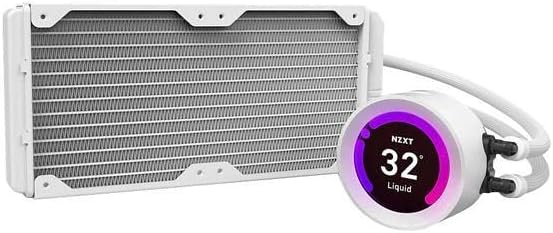
Imatge: Un tancador view of the NZXT Kraken Z53 RGB 240mm radiator connected to the pump unit, highlighting the liquid cooling components.

Imatge: Side profile of the NZXT Kraken Z53 RGB 240mm AIO Liquid Cooler, showing the radiator's slim design and the tubing connecting to the pump.

Imatge: Detallada view of the NZXT Kraken Z53 RGB pump's LCD display, showing a temperature reading and the NZXT logo.

Image: Underside of the NZXT Kraken Z53 RGB pump, revealing the copper cold plate designed for efficient heat transfer from the CPU.
Configuració i instal·lació
Proper installation is crucial for optimal performance and longevity of your NZXT Kraken Z53 RGB liquid cooler. This section provides a general overview of the installation process. For detailed, step-by-step instructions, please refer to the official user guide provided with your product or available on the NZXT support weblloc.
Passos generals d'instal·lació:
- Prepareu el vostre sistema: Ensure your computer is powered off and unplugged. Remove the side panel of your PC case to access the motherboard and CPU area.
- Instal·leu el suport de muntatge: Attach the appropriate CPU mounting bracket to your motherboard, ensuring it is compatible with your CPU socket (Intel LGA 1700/1200/115X or AMD AM5/AM4).
- Muntar el radiador i els ventiladors: Secure the 240mm radiator to an available fan mount location in your PC case (e.g., front, top, or rear), typically where two 120mm fans can be installed. Attach the two AER RGB 2 120mm fans to the radiator.
- Instal·leu la bomba/placa freda: Apply thermal paste to your CPU (if not pre-applied on the cooler's cold plate). Carefully place the pump/cold plate assembly onto the CPU and secure it with the provided screws and backplate. The pump head can be rotated to ensure the LCD display is oriented correctly.
- Connectar els cables: Connect the pump's power cable, USB cable (for CAM software), and fan cables to the appropriate headers on your motherboard. Connect the RGB cables from the fans to the pump or an NZXT RGB controller if applicable.
- Gestió de cables: Col·loca tots els cables amb cura per garantir un flux d'aire adequat i una construcció neta.
- Power On and Software Setup: Close your PC case, reconnect power, and boot your system. Download and install the NZXT CAM software to customize the LCD display, monitor temperatures, and control fan/pump speeds.
For detailed visual guides and specific instructions for different CPU sockets, please consult the official NZXT Kraken Z53 RGB User Manual (PDF) linked aquí.
Operating Your Kraken Z53 RGB
Once installed, the NZXT Kraken Z53 RGB operates automatically to maintain optimal CPU temperatures. The integrated pump and fans adjust their speeds based on the thermal load of your CPU. The primary interface for controlling and customizing your cooler is the NZXT CAM software.
Using NZXT CAM Software:
- Seguiment: CAM provides real-time monitoring of CPU temperature, pump speed, and fan speeds.
- Rendiment Profiles: Choose from pre-set cooling profiles (e.g., Silent, Performance) or create custom fan and pump curves to balance noise and cooling efficiency.
- LCD Customization: Utilize the CAM software to upload custom images or GIFs to the LCD display, or select from various pre-defined display modes showing system information like CPU/GPU temperature, clock speeds, or liquid temperature.
- Control d'il·luminació RGB: Adjust the lighting effects and colors of the AER RGB 2 fans and the pump's RGB ring to match your system's aesthetic.
Ensure CAM software is always running in the background for full control and customization features.
Manteniment
Regular maintenance helps ensure the longevity and optimal performance of your NZXT Kraken Z53 RGB liquid cooler.
- Eliminació de pols: Periodically clean the radiator fins and fan blades using compressed air to remove dust buildup. Dust can impede airflow and reduce cooling efficiency.
- Comprovació de la canonada i les connexions: Inspect the tubing for any signs of kinks or damage. Ensure all cables (power, USB, RGB) are securely connected to the pump and motherboard.
- Monitor Liquid Temperature: Use NZXT CAM software to monitor the liquid temperature. While the system is sealed and does not require liquid refills, unusual temperature spikes might indicate an issue.
- Actualitzacions de programari: Keep your NZXT CAM software updated to the latest version to ensure compatibility and access to new features or performance improvements.
Resolució de problemes
If you encounter issues with your NZXT Kraken Z53 RGB, consider the following common troubleshooting steps before contacting support.
- Temperatures altes de la CPU:
- Ensure the pump is securely mounted to the CPU and making good contact.
- Verify that the fans are spinning and oriented correctly for airflow (intake or exhaust).
- Check that the pump and fan cables are properly connected to the motherboard headers.
- Confirm that NZXT CAM software is running and not reporting any errors with the cooler.
- LCD Display Not Working/Frozen:
- Ensure the USB cable from the pump is securely connected to an internal USB 2.0 header on your motherboard.
- Restart the NZXT CAM software.
- Proveu de reiniciar l'ordinador.
- Check for any CAM software updates.
- Problemes d'il·luminació RGB:
- Verify that the RGB cables from the fans are correctly connected to the pump or an NZXT RGB controller.
- Check lighting settings within the NZXT CAM software.
- Sorolls inusuals:
- Ensure fans are not obstructed by cables or other components.
- If a gurgling sound is heard, it might be air in the loop. Gently tilt your PC case to help move air bubbles to the radiator.
For more in-depth troubleshooting or persistent issues, please refer to the comprehensive troubleshooting section in the official user manual or visit the NZXT support weblloc.
Especificacions
| Característica | Detall |
|---|---|
| Dimensions del producte | 12.13 cm de llargada x 8.43 cm d'amplada x 5.47 cm d'alçada |
| Marca | NZXT |
| Tipus de connector d'alimentació | 4-pins |
| Voltage | 5 Volts |
| Wattage | 2.96 watts |
| Mètode de refrigeració | Aigua |
| Dispositius compatibles | Escriptori |
| Nivell de soroll | 33 dB |
| Material | coure |
| UPC | 815671016645 |
| Fabricant | NZXT |
| Nombre d'articles | 1 |
| Número de model de l'article | RL-KRZ53-RW |
| Pes de l'article | 4 lliures |
| Dimensions de l'article LxWxH | 8.35 x 12.09 x 5.39 polzades |
| Color | Blanc |
| ASIN | B09GKTJKC7 |
| Data de primera disponibilitat | 24 de setembre de 2021 |
Garantia i Suport
NZXT products are backed by a manufacturer's warranty. For specific warranty terms, conditions, and duration, please refer to the warranty information included with your product packaging or visit the official NZXT weblloc.
For technical support, frequently asked questions, and additional resources, please visit the NZXT support page at www.nzxt.com/support. You can also find the full user manual in PDF format aquí.


