1. Introducció
The FOREVER Smartwatch Kids Call Me 2 KW-60 is designed to provide safety and communication for children. This manual will guide you through the setup, operation, and maintenance of your new smartwatch, ensuring a safe and enjoyable experience for your child.

Image: The FOREVER Smartwatch Kids Call Me 2 KW-60 in blue, shown from an angled perspective, highlighting its screen and side buttons.
2. Contingut del paquet
Si us plau, comproveu el paquet per veure si hi ha els elements següents:
- FOREVER Smartwatch Kids Call Me 2 KW-60
- Cable de càrrega USB
- Manual d'usuari (aquest document)

Image: The FOREVER Smartwatch KW-60 displayed next to its green retail packaging, illustrating the product as it appears in its box.
3. Guia de configuració
3.1 Càrrega inicial
Before first use, fully charge the smartwatch. Connect the USB charging cable to the watch's charging port and plug the other end into a USB power adapter (not included) or a computer's USB port. The charging indicator will show the progress.
3.2 Instal·lació de la targeta SIM
The KW-60 requires a 2G Micro SIM card for call and data functions. Ensure the SIM card is active and has sufficient credit/data. Turn off the watch before inserting the SIM card.
- Locate the SIM card slot on the side or back of the watch.
- Carefully open the SIM card tray cover.
- Insert the Micro SIM card with the gold contacts facing up and the notched corner aligned correctly.
- Close the SIM card tray cover securely.
3.3 Instal·lació i emparellament de l'aplicació
To manage the smartwatch and access all its features, download the Forever KidsCare application on your smartphone. The app is compatible with Android 5.0 or later and iOS 10.0 or later.
- Scan the QR code provided in the watch's packaging or search for "Forever KidsCare" in your smartphone's app store.
- Instal·leu i obriu l'aplicació.
- Registra un compte nou o inicia la sessió si ja en tens un.
- In the app, select "Add Device" and scan the QR code displayed on the smartwatch screen (or enter the device ID manually).
- Seguiu les instruccions a la pantalla per completar el procés de vinculació.
4. Instruccions de funcionament
4.1 Navegació bàsica
The KW-60 features a touch screen for easy navigation. Swipe left/right or up/down to browse through menus and tap to select options.
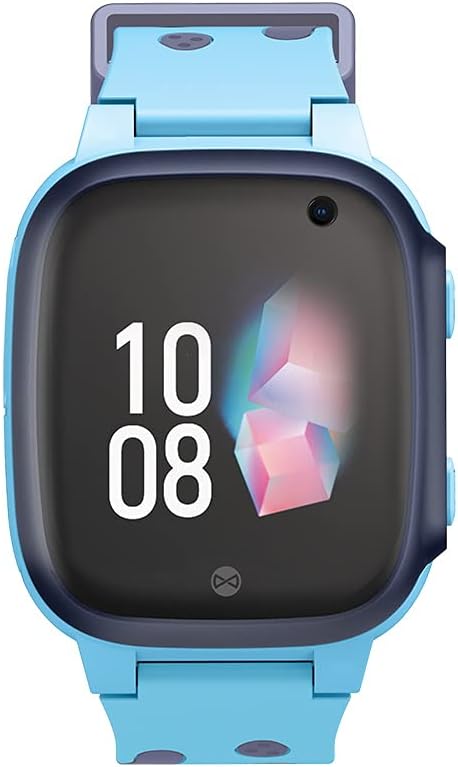
Imatge: Un front directe view of the FOREVER Smartwatch KW-60, showing its display with time and date, and the integrated camera lens.
4.2 Fer i rebre trucades
The watch allows calls to and from up to 10 registered numbers. These numbers must be set up by the parent/guardian through the Forever KidsCare app.
- Fer una trucada: From the watch's phonebook, select a contact and tap to dial.
- Recepció d'una trucada: When a call comes in, tap the green answer icon on the screen.
4.3 Funció SOS
In case of emergency, the child can press and hold the SOS button on the side of the watch. This will automatically dial pre-set emergency contacts until one answers, and send a location alert to the parent's app.
4.4 Location Tracking (GPS/LBS)
The smartwatch uses GPS and LBS (Location Based Service) to track the child's location, which can be viewed in real-time on the Forever KidsCare app. You can also define safe zones on the map; an alert will be sent to your phone if the child enters or leaves these zones.

Image: The FOREVER Smartwatch KW-60 positioned over a stylized map with various colored location pins, illustrating its tracking capabilities.
4.5 Camera and Photo Sharing
The watch is equipped with a camera. Children can take photos directly from the watch. Parents can also remotely activate the camera via the app to check the child's surroundings.

Image: A hand interacting with the FOREVER Smartwatch KW-60, with chat bubbles displaying "Hi!", "OK", and "Yes!", indicating communication features.
4.6 Messaging (SMS)
The watch supports text messaging. Children can send and receive messages from approved contacts.
4.7 Alarm Clock, Flashlight, and Games
- Despertador: Set alarms via the app for reminders like wake-up times or study breaks.
- Llanterna: A built-in flashlight can be activated from the watch's menu.
- Jocs: The watch includes pre-installed games for entertainment.
5. Manteniment
5.1 Neteja
Wipe the watch regularly with a soft, dry cloth. For stubborn dirt, slightly dampNetegeu el drap amb aigua. No utilitzeu productes químics agressius ni netejadors abrasius.
5.2 Cura de la bateria
- Eviteu les temperatures extremes, ja que poden afectar la durada de la bateria.
- Carregueu el rellotge regularment, però eviteu deixar-lo completament descarregat durant períodes prolongats.
- Utilitzeu només el cable de càrrega subministrat.
5.3 Emmagatzematge
When not in use for a long time, store the watch in a cool, dry place, away from direct sunlight. Ensure it has some charge to prevent deep discharge.
6. Solució De Problemes
| Problema | Causa possible | Solució |
|---|---|---|
| El rellotge no s'encén | Low battery; Power button not pressed long enough; System crash. | Charge the watch; Press and hold the power button for 5-10 seconds; Perform a soft reset (if applicable, check device specific instructions). |
| No network signal / Cannot make calls | SIM card not inserted correctly; SIM card inactive/no credit; Poor network coverage. | Reinsert SIM card; Check SIM card status with provider; Move to an area with better signal. |
| GPS location inaccurate | Weak GPS signal (indoors/dense areas); LBS used instead of GPS. | Move to an open outdoor area; Ensure watch has clear sky view. |
| No es pot emparellar amb l'aplicació | Incorrect device ID/QR code; Watch not powered on; App issues. | Verify ID/QR code; Ensure watch is on; Restart app and watch; Check app permissions. |
| La bateria s'esgota ràpidament | Frequent GPS updates; High screen brightness; Excessive usage. | Adjust GPS update frequency in app; Lower screen brightness; Reduce continuous usage. |
7. Especificacions
- Marca: PER SEMPRE
- Nom del model: setmana 60
- Sistema operatiu: Android Wear 2.6
- Mida de la pantalla: 3.66 centímetres
- Connectivitat: Bluetooth
- Característiques especials: Camera, GPS, Alarm Clock
- Dispositius compatibles: Smartphone
- Composició de la bateria: Ió de liti
- Bateria recarregable: Sí
- ASIN: B09HHNTT8B
- Date of Availability: 5 de juny de 2022
8. Garantia i Suport
For detailed warranty information and technical support, please refer to the warranty card included with your product or visit the official FOREVER weblloc web. Conserveu el rebut de compra com a comprovant de compra per a reclamacions de garantia.
For further assistance, you may contact FOREVER customer service through their official channels.


