1. Introducció
Gràcies per la compraasing the RCA RCWR7V AM/FM Weather Alert Radio. This device is designed to keep you informed of important weather events through NOAA weather alerts, while also providing standard AM/FM radio functionality and a digital alarm clock. Please read this manual thoroughly before operating the unit to ensure proper use and to maximize its features.
2. Informació de seguretat
Per garantir un funcionament segur i evitar danys, observeu les precaucions següents:
- No exposeu la unitat a la pluja, la humitat o les temperatures extremes.
- Eviteu col·locar la unitat a prop de fonts de calor com ara radiadors, registres de calor, estufes o altres aparells (inclosos amplificadors) que produeixen calor.
- Netegeu només amb un drap sec.
- No obstruïu cap obertura de ventilació.
- Utilitzeu només accessoris/accessoris especificats pel fabricant.
- Desendolleu aquest aparell durant les tempestes amb llamps o quan no l'utilitzeu durant llargs períodes de temps.
- Demaneu tot el servei a personal de servei qualificat.
3. Contingut del paquet
Verifiqueu que tots els elements siguin presents al vostre paquet:
- RCA RCWR7V AM/FM Weather Alert Radio
- Manual d'usuari
- Adaptador de corrent alterna
Note: AAA batteries for backup power are sold separately.
4. Característiques del producte
- NOAA weather alerts for severe events (tornadoes, floods, hurricanes, earthquakes).
- Automatic alerts for immediate notification.
- Digital clock with alarm and snooze functions.
- AM/FM radio tuner.
- Built-in headphone jack for private listening.
- AC power compatible for continuous use.
- Battery powered for protection against power outages and portability (4 x AAA batteries, sold separately).

Figure 4.1: Instant Weather Alerts Feature. This image shows the radio with icons representing various weather events it can alert you to, including tornadoes, floods, hurricanes, and earthquakes.
5. Controls i pantalla
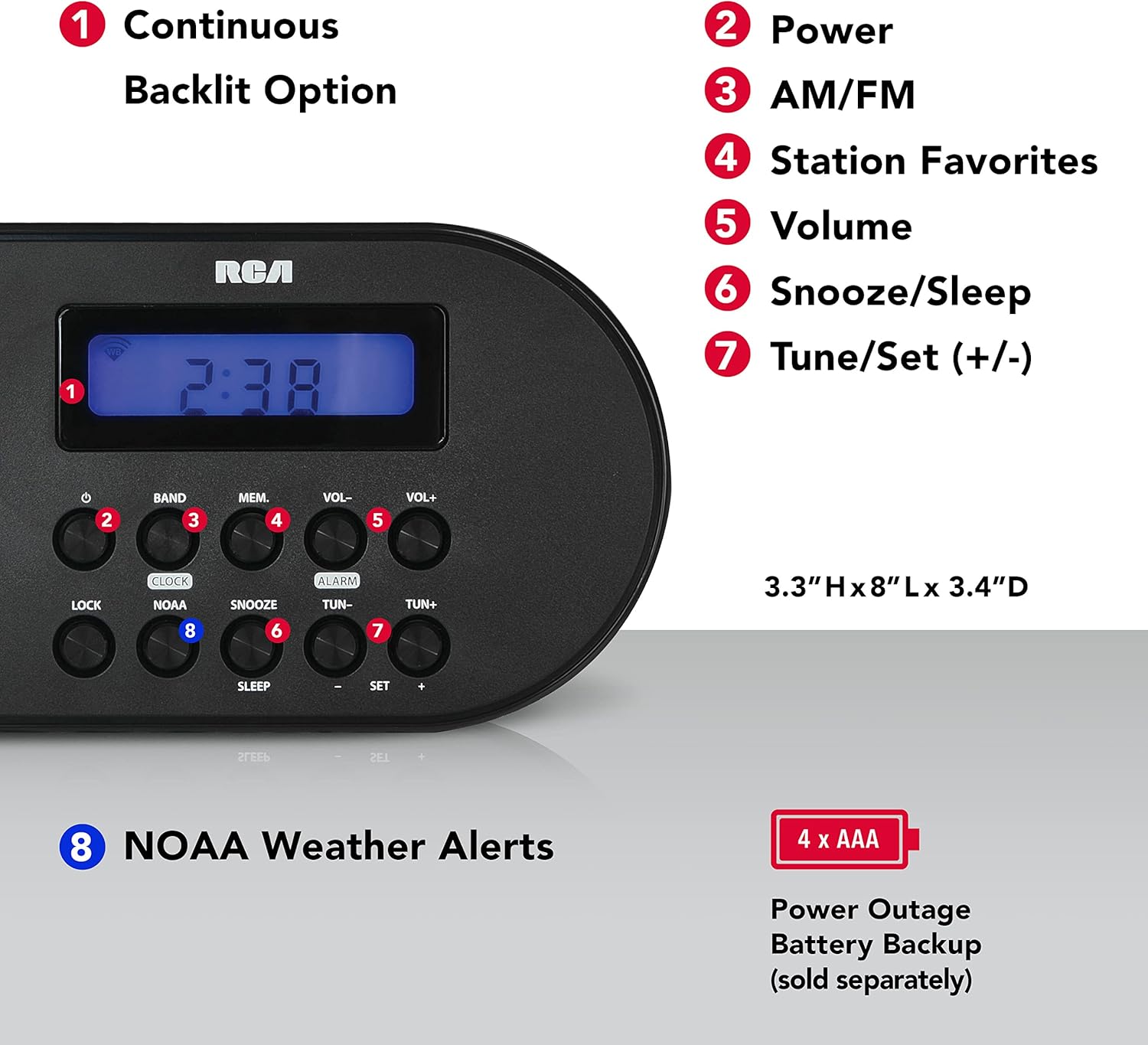
Figure 5.1: Front Panel Controls and Display. This diagram highlights key features: 1. Continuous Backlit Option, 2. Power Button, 3. AM/FM Band Button, 4. Station Favorites (Memory) Button, 5. Volume Controls, 6. Snooze/Sleep Button, 7. Tune/Set (+/-) Buttons, and 8. NOAA Weather Alerts Button.
5.1. Tauler frontal
- Visualització: Shows time, frequency, and alert indicators.
- Botó d'encesa: Encén/apaga la unitat.
- Botó BAND: Switches between AM, FM, and Weather bands.
- MEM. (Memory) Button: Saves and recalls radio station presets.
- Botons VOL- / VOL+: Ajusta el nivell de volum.
- Botó RELLOTGE: Used for setting the time.
- Botó ALARMA: Used for setting the alarm.
- Botó SNOOZE: Silencia temporalment l'alarma.
- NOAA Button: Activates/deactivates NOAA weather alert functions.
- TUN- / TUN+ Buttons: Tunes radio frequency or adjusts settings.
- Botó BLOC: Locks buttons to prevent accidental changes.
- Botó SLEEP: Sets a sleep timer for the radio.
- SET +/- Buttons: Used for confirming settings or navigating menus.
5.2. Panell posterior

Figure 5.2: Rear Panel and Battery Compartment. This image displays the back of the radio, highlighting the compartment for 4 AAA batteries, which provide backup power.
- Entrada d'alimentació de CA: Connects to the included AC adapter for primary power.
- Compartiment de la bateria: Holds 4 x AAA batteries for backup power during outages.
- Auriculars Jack: Per connectar auriculars (3.5 mm).
- Antena telescòpica: Extends for improved FM and Weather band reception.
6. Configuració
6.1. Alimentació de la unitat
- Alimentació CA: Connect the AC power adapter to the "AC Power Input" jack on the rear of the radio, then plug the adapter into a standard wall outlet.
- Bateria de reserva (opcional): Per poder outage protection and portability, open the battery compartment on the rear of the unit. Insert 4 x AAA batteries (not included), ensuring correct polarity (+/-). Close the compartment securely.
6.2. Configuració del rellotge
- Manteniu premut el botó RELOJ botó fins que la pantalla de l'hora parpellegi.
- Utilitza el TUN- or TUN + botons per ajustar l'hora. Premeu RELOJ de nou per confirmar l'hora.
- Utilitza el TUN- or TUN + botons per ajustar els minuts. Premeu RELOJ again to confirm the minute and exit clock setting mode.
7. Instruccions de funcionament
7.1. Funcionament de la ràdio AM/FM
- Premeu el botó PODER botó per encendre la ràdio.
- Premeu el botó BANDA button to select either AM or FM band.
- Extend the telescopic antenna for better FM reception. For AM reception, rotate the unit for best signal.
- Utilitza el TUN- or TUN + buttons to manually tune to a desired frequency. Press and hold these buttons to auto-scan for the next available station.
- Ajusteu el volum amb el botó VOL- or VOL+ botons.
7.2. Setting Radio Presets
- Sintonitza l'emissora desitjada.
- Manteniu premut el botó memes fins que el número preestablert parpellegi a la pantalla.
- Utilitza el TUN- or TUN + botons per seleccionar el número preestablert desitjat (per exemple, P01, P02).
- Premeu memes de nou per desar l'emissora a la predefinició seleccionada.
- Per recuperar una predefinició, premeu breument la tecla memes botó i després feu servir TUN- or TUN + to cycle through saved stations.
7.3. Configuració de l'alarma
- Manteniu premut el botó ALARMA botó fins que l'hora de l'alarma parpellegi.
- Utilitza el TUN- or TUN + botons per ajustar l'hora de l'alarma. Premeu ALARMA de nou per confirmar.
- Utilitza el TUN- or TUN + botons per ajustar els minuts de l'alarma. Premeu ALARMA de nou per confirmar.
- La icona de l'alarma apareixerà a la pantalla, indicant que l'alarma està configurada.
- Per apagar l'alarma, premeu el botó ALARMA button once. The alarm icon will disappear.
7.4. Snooze and Sleep Functions
- Dormitar: Quan soni l'alarma, premeu el botó DORMITAR per silenciar temporalment l'alarma durant uns minuts. L'alarma tornarà a sonar després del període de posposició.
- Temporitzador de son: Mentre sona la ràdio, premeu el botó DORMIR Premeu el botó repetidament per alternar entre les durades del temporitzador de son disponibles (per exemple, 90, 60, 30, 15 minuts, OFF). La ràdio s'apagarà automàticament després del temps seleccionat.
7.5. NOAA Weather Alert Operation
The radio is designed to automatically receive NOAA weather alerts. Ensure the unit is powered on or in standby mode with battery backup for continuous monitoring.
- Premeu el botó NOAA button to activate the weather alert function. The NOAA icon will appear on the display.
- When a severe weather alert is issued by the National Weather Service for your localized area, the radio will automatically switch to the NOAA weather band and sound an alert tone, followed by the weather broadcast.
- To deactivate the NOAA alert function, press the NOAA button again. The NOAA icon will disappear.
7.6. Using the Headphone Jack
Plug any standard 3.5mm stereo headphones into the headphone jack on the rear of the unit for private listening. The internal speaker will be muted automatically.
8. Manteniment
8.1. Neteja
Netegeu l'exterior de la unitat amb un drap suau i sec. No utilitzeu productes de neteja abrasius ni dissolvents.
8.2. Substitució de la bateria
If using battery backup, replace all 4 AAA batteries when the display dims or the unit fails to power on during an AC power outage. Assegureu-vos de la polaritat correcta quan inseriu piles noves.
9. Solució De Problemes
| Problema | Causa possible | Solució |
|---|---|---|
| No hi ha alimentació / La unitat no s'encén. | AC adapter not properly connected; Batteries are dead or incorrectly inserted. | Ensure AC adapter is securely plugged in. Replace batteries, checking polarity. |
| Mala recepció de ràdio. | Antena no estesa; Senyal feble; Interferències. | Fully extend the telescopic antenna. For AM, rotate the unit. Try moving the radio to a different location away from electronic devices. |
| No s'han rebut alertes de la NOAA. | NOAA function not activated; Out of NOAA broadcast range; No active alerts. | Ensure the NOAA function is turned on (NOAA icon visible). Verify you are within range of a NOAA broadcast. Check for active alerts in your area. |
| L'alarma no sona. | Alarm not set; Volume too low; Alarm turned off. | Ensure the alarm is set and the alarm icon is visible. Increase volume. Check if alarm was accidentally deactivated. |
10. Especificacions
| Característica | Detall |
|---|---|
| Número de model | RCWR7V |
| Dimensions del producte | 0.9" de llargada x 3.6" d'amplada x 3.1" d'alçada (2.29 x 9.14 x 7.87 cm) |
| Pes de l'article | 15.2 unces (0.43 kg) |
| Font d'alimentació | Corded Electric (AC Adapter), 4 x AAA Batteries (backup, not included) |
| Tecnologia del sintonitzador | AM, FM, banda meteorològica de la NOAA |
| Característica especial | Built-In Clock, Weather Alert |
| Interfície del maquinari | Àudio de 3.5 mm (connector per a auriculars) |
11. Garantia i Suport
Per obtenir informació sobre la garantia i assistència tècnica, consulteu la targeta de garantia inclosa amb el producte o visiteu el lloc web oficial de RCA. weblloc web. Conserveu el rebut de compra com a comprovant de compra.
For further assistance, you may contact RCA customer service through their official channels.


