1. Introduction to Your KROM POP LOL Kendama
The KROM POP LOL Kendama is a traditional Japanese skill toy designed for developing hand-eye coordination, balance, and concentration. It consists of a wooden handle (ken) with three cups and a spike, and a ball (tama) with a hole, connected by a string. This manual provides essential information for the setup, operation, maintenance, and troubleshooting of your Kendama.

Figure 1.1: Fully assembled KROM POP LOL Kendama. The orange ball (tama) rests on the natural wood handle (ken).
2. Què inclou la caixa
Your KROM POP LOL Kendama Premium Pack includes the following components:
- 1 x KROM POP LOL Kendama (assembled)
- 1 x Bonus Replacement String
- KROM Brand Stickers

Figure 2.1: Contents of the KROM POP LOL Kendama Premium Pack, including the Kendama, a bonus string, and stickers.
3. Muntatge i muntatge
Your KROM POP LOL Kendama comes pre-assembled. However, it is important to ensure the string is correctly attached and at an appropriate length for optimal play.
3.1. Checking String Length
To check the string length, hold the ken (handle) with the spike pointing upwards. The tama (ball) should hang freely. The ideal string length allows the tama to reach just below the base of the spike, or approximately the width of two fingers from the bottom of the ken when held taut.
3.2. Replacing the String
If the string becomes worn or breaks, use the provided bonus string for replacement. Follow these steps:
- Carefully untie the old string from the ken and the tama.
- Thread one end of the new string through the small hole in the tama. Secure it with a knot inside the tama's larger hole.
- Thread the other end of the string through the hole in the ken, from the bottom cup up through the spike.
- Tie a secure knot at the end of the string, ensuring it is snug against the base of the ken.
4. Operating Your Kendama: Basic Techniques
The KROM POP LOL Kendama features a special sticky paint on the tama and larger cups, designed to assist with landing tricks and improving grip. Practice is key to mastering the Kendama.
4.1. Holding the Kendama
Hold the ken firmly by the handle, ensuring a comfortable grip. The spike can point upwards or downwards depending on the trick. For basic catches, hold the ken with the large cup facing upwards.

Figure 4.1: Proper grip for holding the Kendama's ken (handle).
4.2. Basic Catch (Big Cup)
- Hold the ken with the large cup facing up. Let the tama hang freely.
- Gently swing the tama upwards in a controlled motion.
- As the tama reaches its peak, guide the large cup to meet the hole in the tama, catching it securely.
4.3. Spike Catch
- Hold the ken with the spike pointing upwards. Let the tama hang freely.
- Swing the tama upwards, aiming for the hole in the tama to align with the spike.
- Carefully impale the tama onto the spike. The sticky paint on the tama assists in this maneuver.
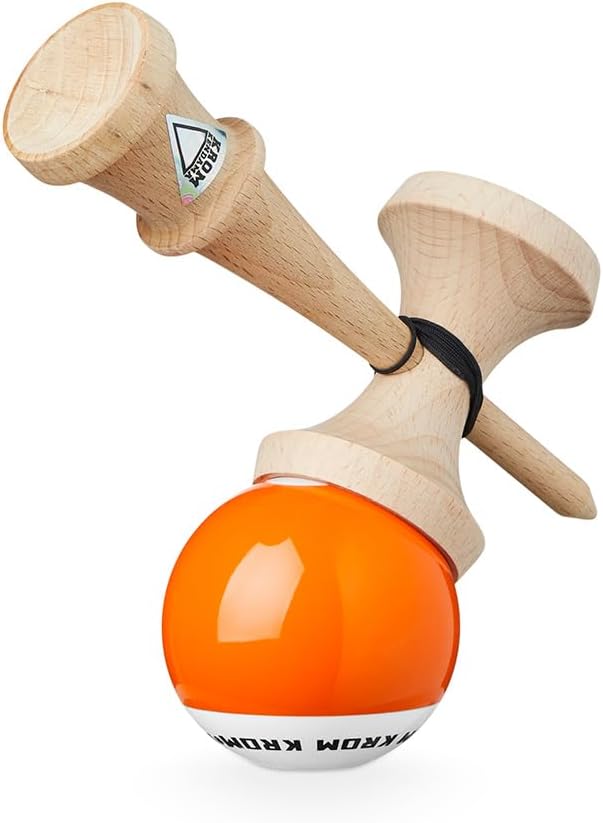
Figure 4.2: The Kendama in motion, demonstrating the dynamic nature of play.
For advanced tricks and techniques, refer to online Kendama tutorials and communities. The KROM brand also provides step-by-step guides and videos by professional players.
5. Manteniment i cura
Proper care will extend the life of your KROM POP LOL Kendama.
- Neteja: Wipe the wooden parts with a dry, soft cloth. Avoid using water or harsh cleaning agents, as this can damage the wood and paint.
- Emmagatzematge: Store your Kendama in a dry place away from direct sunlight and extreme temperatures to prevent warping or cracking of the wood.
- String Longevity: The string is subject to wear and tear. Replace it promptly when it shows signs of fraying to prevent unexpected breaks during play.
- Desgast de la pintura: The sticky paint on the tama may show signs of wear over time, especially with frequent spike catches. This is normal and does not affect the functionality of the Kendama.
6. Resolució de problemes comuns
Aquí teniu solucions a problemes comuns que podeu trobar:
- Tangled String: If the string becomes tangled, carefully untangle it by hand. Ensure the string is not twisted before beginning play.
- Tama Not Sticking: The sticky paint may accumulate dust or debris over time. Gently wipe the tama with a clean, dry cloth to restore some of its grip.
- Loose Ken/Tama: If the string knot becomes loose, re-tie it securely as described in Section 3.2.
- Wood Damage: Minor dents and scratches are common with regular use. These generally do not affect playability. For significant damage, consider replacing the Kendama.
7. Especificacions del producte
| Número de model | PL-ORA |
| Dimensions del producte | 3 x 2.4 x 6.5 polzades (7.6 x 6.1 x 16.5 cm) |
| Pes de l'article | 0.035 ounces (1 gram) |
| Material | High-quality Beech Wood |
| Tama Coating | Special Sticky Paint |
| Edat recomanada | 3 anys i més |
| Fabricant | KROM |
8. Garantia i Suport
KROM Kendamas are crafted with high-quality materials and attention to detail. For specific warranty information or support inquiries, please visit the official KROM website or contact their customer service directly. General wear and tear from normal use, such as paint chipping or string breakage, are not typically covered under warranty as they are inherent to the nature of Kendama play.
Recursos en línia:
- KROM Official Amazon Store
- Cerca "KROM Kendama tutorials" on video platforms for trick guides.
9. Vídeos oficials de productes
No official seller-created product videos were found in the provided data for direct embedding. Please refer to the online resources mentioned in Section 8 for video tutorials and demonstrations from KROM.


