1. Introducció
This manual provides detailed instructions for the assembly, operation, and maintenance of the KIMEX 015-1624 Quad Monitor Desk Mount. This product is designed to support four computer monitors ranging from 17 to 32 inches, with VESA compatibility of 75x75mm or 100x100mm, and a maximum weight capacity of 8 kg per screen. It offers flexible mounting options (desk clamp or grommet) and adjustable screen positioning for an optimized workspace.

Figura 1: The KIMEX 015-1624 Quad Monitor Desk Mount with four monitors installed, demonstrating its full configuration and space-saving design.
2. Informació de seguretat
Please read all instructions carefully before assembly and installation. If you do not understand these instructions or have doubts about the safety of the installation, contact a qualified installer. Improper assembly or installation may cause damage or serious injury.
- Ensure the mounting surface can safely support the combined weight of the mount and all attached equipment.
- Do not exceed the maximum weight capacity of 8 kg per screen.
- Use only the provided hardware. Do not use damaged or missing parts.
- Mantingueu els nens allunyats durant el muntatge. Les peces petites poden ser un perill d'asfíxia.
- Periodically check that the mount is secure and stable.
3. Contingut del paquet
Verifiqueu que tots els components siguin presents i no estiguin danyats abans de continuar amb el muntatge.
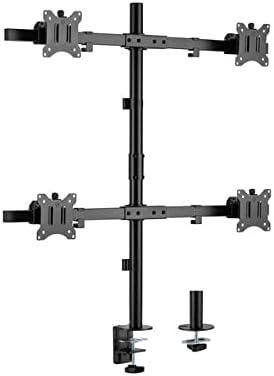
Figura 2: Acabatview of the KIMEX 015-1624 Quad Monitor Desk Mount components, including the main pole, monitor arms, VESA plates, and the desk clamp/grommet mounting options.
- Main Pole (x1)
- Monitor Arms (x2, each supporting two monitors)
- Plaques VESA (x4)
- Escriptori Clamp Muntatge (x1)
- Grommet Mount Assembly (x1)
- Kit de ferramenta (cargols, volanderes, claus Allen)
4. Configuració i instal·lació
The KIMEX 015-1624 offers two installation methods: desk clamp o muntatge amb ojal.
4.1. Trieu el mètode de muntatge
Determine whether to use the desk clamp for attaching to the edge of a desk or the grommet mount for installation through a desk hole.

Figura 3: The KIMEX 015-1624 Quad Monitor Desk Mount assembled with its main pole and monitor arms, ready for monitor attachment.
4.2. Escriptori Clamp Instal·lació
- Col·loca l'escriptori clamp assembly to the bottom of the main pole using the provided screws.
- Col·loca el clamp on the edge of your desk and tighten the knob until the mount is secure.
4.3. Grommet Mount Installation
- If your desk has a grommet hole, insert the grommet mount assembly through the hole.
- Secure the grommet mount from underneath the desk using the provided plate and nut.
- Connecteu el pal principal al suport de l'orella.
4.4. Fixació dels braços del monitor i les plaques VESA
- Slide the monitor arms onto the main pole at your desired heights. Secure them with the locking mechanisms.
- Attach the VESA plates to the back of each monitor using the appropriate screws from the hardware kit. Ensure the screws are tightened securely but do not overtighten.
- Slide the monitors (with VESA plates attached) onto the monitor arms. Ensure they click into place or are secured with the provided locking screws.
5. Funcionament i ajustos
The KIMEX 015-1624 mount offers various adjustment options for optimal viewing.

Figura 4: The KIMEX 015-1624 Quad Monitor Desk Mount from a slightly angled view, highlighting the adjustable monitor arms and VESA mounting points.
- Ajust d'alçada: Loosen the locking mechanism on the main pole to slide the monitor arms up or down. Retighten to secure.
- Ajust d'inclinació: Monitors can be tilted up to 45 degrees. Use the tilt knob or screw on the VESA plate to adjust the angle.
- Ajust de gir: The monitor arms can swivel 360 degrees around the main pole. Individual monitors can also swivel horizontally.
- Rotació: Monitors can be rotated from landscape to portrait orientation (360 degrees) without removing them from the mount.
5.1. Gestió de cables
Utilize the integrated cable management clips or channels on the monitor arms and main pole to route and organize your cables for a tidy workspace.

Figura 5: Un costat view of the KIMEX 015-1624 Quad Monitor Desk Mount, illustrating the robust construction of the arms and the main pole.
6. Manteniment
Un manteniment regular garanteix la longevitat i el funcionament segur del suport del monitor.
- Neteja: Netegeu la muntura amb un drap suauamp drap. Eviteu productes de neteja o dissolvents abrasius.
- Comprovació de fixació: Reviseu periòdicament tots els cargols i perns per assegurar-vos que estiguin ben ajustats. Torneu a apretar-los si cal.
- Capacitat de pes: Do not add monitors that exceed the specified weight or size limits.
7. Solució De Problemes
| Problema | Causa possible | Solució |
|---|---|---|
| Mount is unstable/wobbly. | Muntatge clamp/grommet not tightened sufficiently. | Assegureu-vos que l'escriptori clamp or grommet bolt is fully tightened. Check desk stability. |
| Monitors sag or tilt downwards. | Tilt mechanism not tight enough; monitor weight exceeds capacity. | Tighten the tilt adjustment screw/knob. Verify monitor weight is within 8 kg limit. |
| Monitors cannot be attached to VESA plate. | Incorrect VESA pattern; wrong screws used. | Confirm monitor VESA pattern is 75x75mm or 100x100mm. Use correct screws from hardware kit. |
8. Especificacions
- Model: KIMEX 015-1624
- Compatibilitat de la mida de la pantalla: 17 - 32 polzades
- Compatibilitat VESA: 75x75mm, 100x100mm
- Capacitat de pes: 8 kg (17.6 lbs) per screen
- Opcions de muntatge: Escriptori Clamp, Muntatge d'oxells
- Ajustaments: Height, Tilt (45°), Swivel (360°), Rotation (360°)
- Material: Acer
- Color: Negre
- Pes del producte: 7.5 kg
9. Garantia i Suport
Per obtenir informació sobre la garantia o assistència tècnica, consulteu el lloc web oficial del fabricant. weblloc web o poseu-vos en contacte amb el seu departament d'atenció al client. Conserveu el rebut de compra per a reclamacions de garantia.
Manufacturer: KIMEX
País d'origen: França


