1. Introducció
Thank you for choosing the Vikeri B1 Trail Camera. This manual provides detailed instructions for setting up, operating, and maintaining your camera to ensure optimal performance for wildlife monitoring, hunting, farm surveillance, and home security. Please read this manual thoroughly before using the camera.

Figure 1.1: Vikeri B1 Trail Camera
2. Producte acabatview
2.1 Components

Figura 2.1: Frontal view of the camera with key components labeled, including 40pcs No Glow IR-LEDs, Blue LED Indicator, 20 MP HD Lens, Red/Yellow LED Indicator, Center Motion Sensor, and Side Motion Sensors.
- 40pcs 940nm No Glow IR-LEDs: For invisible night vision illumination.
- Lent HD de 20 MP: Captures high-resolution photos and 1520P videos.
- Motion Sensors (PIR): Central and side sensors for wide-angle motion detection.
- Indicadors LED: Blue, Red/Yellow LEDs for status indication.
- Ranura per a targetes Micro SD: For memory storage (Micro SD card required, not standard SD).
- Port micro USB: Per connectar-se a un ordinador.
- Interruptor d'alimentació: To turn the camera On/Off.
- DC Port (6V 1.5A): Per a font d'alimentació externa.
- Fixation Port: Per muntar accessoris.
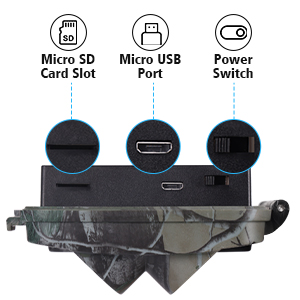
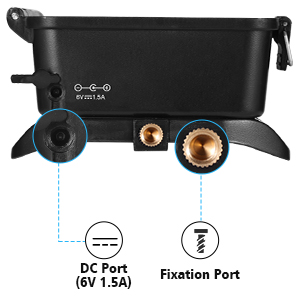
Figura 2.2: superior i inferior views showing the Micro SD card slot, Micro USB port, power switch, DC port, and fixation port.
2.2 Característiques clau
- Imatges d'alta resolució: Captures 20 MP still photos and 1520P video resolution.
- Velocitat de disparador ràpida: Ultra-fast 0.1-second trigger speed to capture quick movements.
- Wide Angle Detection: 120° wide-angle PIR sensor with an 80 ft detection distance.
- Visió nocturna millorada: 65 ft night vision range with 40pcs 940nm no-glow infrared LEDs for discreet monitoring.
- Resistent i impermeable: IP66 waterproof rating ensures reliable operation in various weather conditions.
- Aplicacions versàtils: Ideal for hunting, wildlife monitoring, farm surveillance, and home security.

Figure 2.3: Comparison of daytime and nighttime image quality, highlighting the 20 MP HD lens for daytime and 40pcs 940nm IR-LEDs for clear night vision.

Figure 2.4: Diagram illustrating the 120° wide-angle PIR detection and 80 ft detection distance.
3. Configuració
3.1 Instal·lació de la bateria
The Vikeri B1 Trail Camera requires 4 AA batteries (included). For optimal performance and longer battery life, it is recommended to use high-quality alkaline or rechargeable AA batteries.
- Obre la càmera casing desenganxant els clips laterals.
- Localitzeu el compartiment de la bateria.
- Introduïu 4 piles AA, assegurant-vos de la polaritat correcta (+/-) tal com s'indica a l'interior del compartiment.
- Close the battery compartment and secure the side clips.
3.2 Instal·lació de la targeta Micro SD
A Micro SD card (not included) is required to store photos and videos. The camera supports Micro SD cards. It is recommended to use a Class 10 or higher Micro SD card for best results.

Figure 3.1: Reminder to use a Micro SD card, not a standard SD card.
- With the camera powered off, locate the Micro SD card slot.
- Insert the Micro SD card into the slot with the gold contacts facing down until it clicks into place.
- Per treure-la, premeu suaument la targeta fins que surti.
Important: Ensure the camera is powered off before inserting or removing the Micro SD card to prevent data corruption.
3.3 Muntatge de la càmera
The camera can be mounted using the included strap or a tripod mount (not included).
- Muntatge de la corretja: Passeu la corretja proporcionada per les ranures de la part posterior de la càmera i fixeu-la al voltant d'un arbre o un pal.
- Muntatge del trípode: Use the 1/4"-20 threaded insert on the bottom of the camera to attach it to a tripod or other mounting accessory.
Position the camera at a height of approximately 3-6 feet (1-2 meters) from the ground, pointing towards the area you wish to monitor. Ensure there are no obstacles directly in front of the camera that could trigger false detections (e.g., swaying branches).
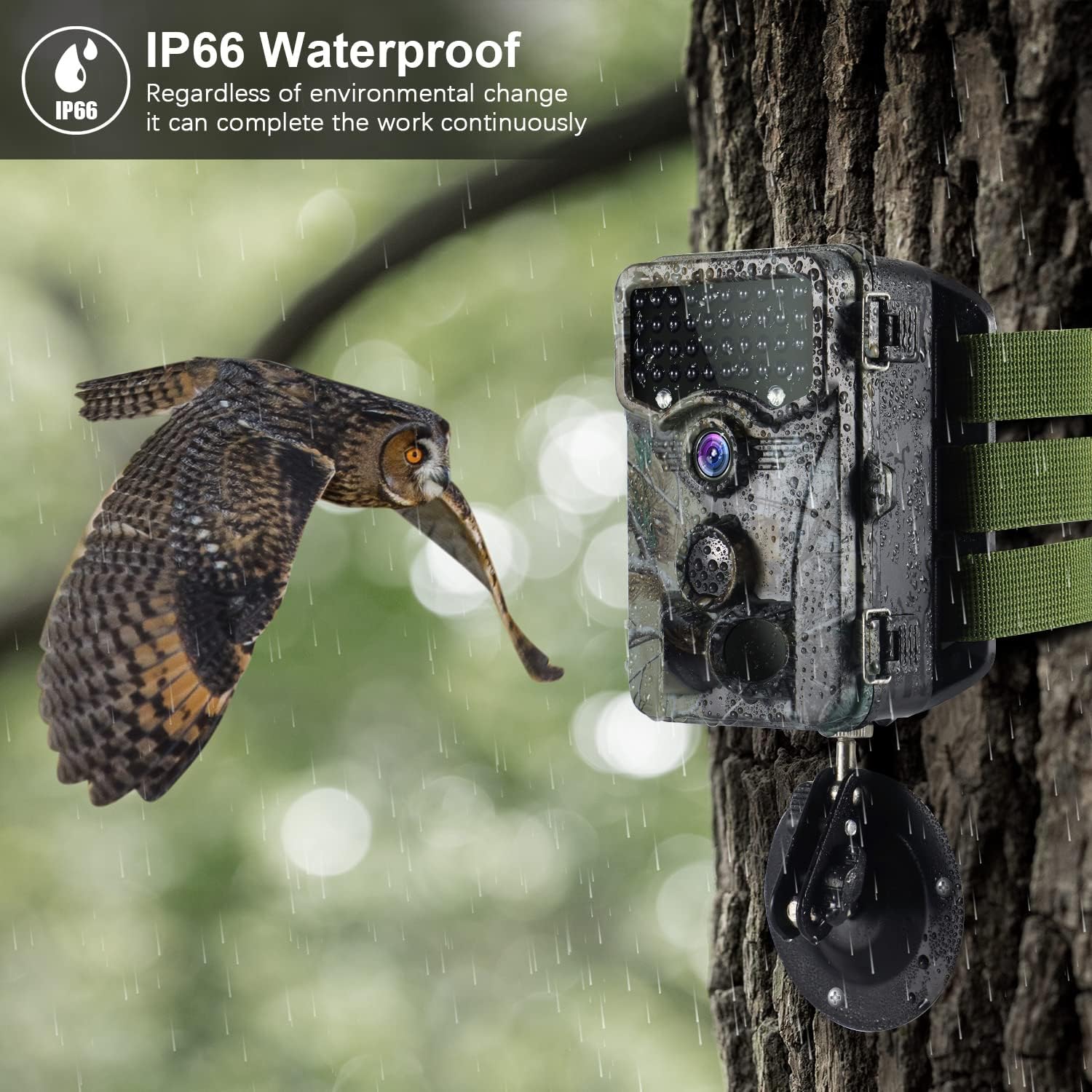
Figure 3.2: The camera mounted on a tree, demonstrating its IP66 waterproof capability in rainy conditions.
4. Instruccions de funcionament
4.1 Engegada/apagada
- To power on, slide the Power Switch to the "ON" position.
- To power off, slide the Power Switch to the "OFF" position.
4.2 Selecció del mode
The camera typically has different operating modes, such as Photo, Video, and Photo+Video. Refer to the on-screen menu for specific mode selection and settings.
- Mode de fotografia: Captura imatges fixes quan detecta moviment.
- Mode de vídeo: Grava clips de vídeo quan detecta moviment.
- Mode foto+vídeo: Captures a still image followed by a video clip when motion is detected.
4.3 Configuració del menú
Access the camera's menu to configure various settings, including:
- Resolució: Set photo (up to 20MP) and video (up to 1520P) resolution.
- Sensibilitat PIR: Adjust the sensitivity of the motion sensors (Low, Medium, High).
- Interval de desencadenament: Set the delay between detections.
- Durada del vídeo: Define the duration of video recordings (up to 10 minutes).
- Laps de temps: Enable time-lapse photography.
- Data i hora: Set the current date and time for timestamps en les gravacions.
- Format de la targeta SD: Format the inserted Micro SD card. This will erase all data.
Navigate the menu using the control buttons (usually Up, Down, Left, Right, OK/Menu) on the camera's interface.
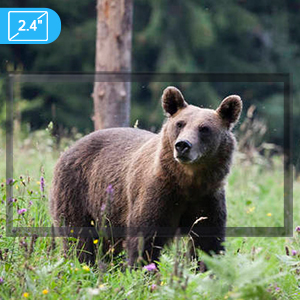
Figure 4.1: The camera features a built-in screen for reviewing images and configuring settings.
5. Manteniment
- Neteja: Use a soft, dry cloth to clean the camera lens and PIR sensors. Avoid abrasive cleaners or solvents.
- Substitució de la bateria: Replace batteries when the low battery indicator appears or when performance degrades.
- Gestió de la targeta SD: Regularly back up data from your Micro SD card and format it periodically to maintain optimal performance and prevent errors.
- Emmagatzematge: Quan no la feu servir durant períodes prolongats, traieu les piles i guardeu la càmera en un lloc fresc i sec.
6. Solució De Problemes
| Problema | Causa possible | Solució |
|---|---|---|
| La càmera no s'encén. | Piles baixes o gastades; polaritat incorrecta de la pila. | Canvieu les piles; assegureu-vos de la polaritat correcta. |
| No s'han fet fotos/vídeos. | SD card full or corrupted; PIR sensitivity too low; camera in wrong mode; no motion detected. | Format/replace SD card; increase PIR sensitivity; check camera mode; ensure camera is in an active area. |
| Mala qualitat d'imatge/vídeo a la nit. | IR LEDs obstructed; object too far or too close. | Clear obstructions from IR LEDs; adjust camera distance to subject. |
| Excessive false triggers. | PIR sensitivity too high; swaying branches or grass in detection zone; direct sunlight. | Decrease PIR sensitivity; clear detection zone; reposition camera. |
| No es pot connectar a l'ordinador. | Faulty USB cable; driver issue. | Try a different USB cable; ensure camera is in USB mode (if applicable); check computer's device manager. |
7. Especificacions
| Característica | Detall |
|---|---|
| Resolució fotogràfica | Fins a 20 MP |
| Resolució de vídeo | 1520P |
| Velocitat de desencadenament | 0.1 segons |
| Angle de detecció PIR | 120 graus |
| Distància de detecció | 80 peus |
| Gamma de visió nocturna | 65 peus |
| IR LED | 40pcs 940nm No Glow Infrared LEDs |
| Resistència a l'aigua | IP66 |
| Emmagatzematge | Targeta Micro SD (no inclosa) |
| Font d'alimentació | 4 AA Batteries (included) or 6V 1.5A DC external power |
| Dimensions | 5.4 x 3.5 x 1.8 polzades |
| Pes | 1.37 lliures |
8. Garantia i Suport
For warranty information and technical support, please refer to the contact details provided with your purchase or visit the official Vikeri weblloc web. Conserveu el rebut de compra com a comprovant de compra per a reclamacions de garantia.
Assistència en línia: Visita la botiga Vikeri a Amazon
9. Escenaris d'ús
The Vikeri B1 Trail Camera is designed for a variety of outdoor monitoring applications:

Figure 9.1: Common applications for the Vikeri B1 Trail Camera, including hunting, wildlife monitoring, farm monitoring, and home security.
- Caça: Monitor game trails and animal activity for hunting preparation.
- Seguiment de la fauna: Observe and record local wildlife behavior in natural habitats.
- Farm Monitoring: Keep an eye on livestock, property boundaries, or potential intruders.
- Seguretat domèstica: Provide discreet surveillance for your property, especially in remote areas.


