Introducció
Benvingut al manual d'usuari del vostre nou Amplicomms BigTel 1500 Cordless Big Button Phone. This phone is designed with enhanced features for ease of use, particularly for individuals who are hard of hearing, visually impaired, or prefer simplified technology. It offers loud ringer volume, increased audio during calls, large buttons, and direct memory dialling for convenience and accessibility.
Contingut del paquet
Marqueu la casella per als elements següents:
- Amplicomms BigTel 1500 Handset
- Unitat base
- Adaptador d'alimentació
- Cordó de línia telefònica
- Piles AAA recarregables (2x)
- Manual d'usuari (aquest document)
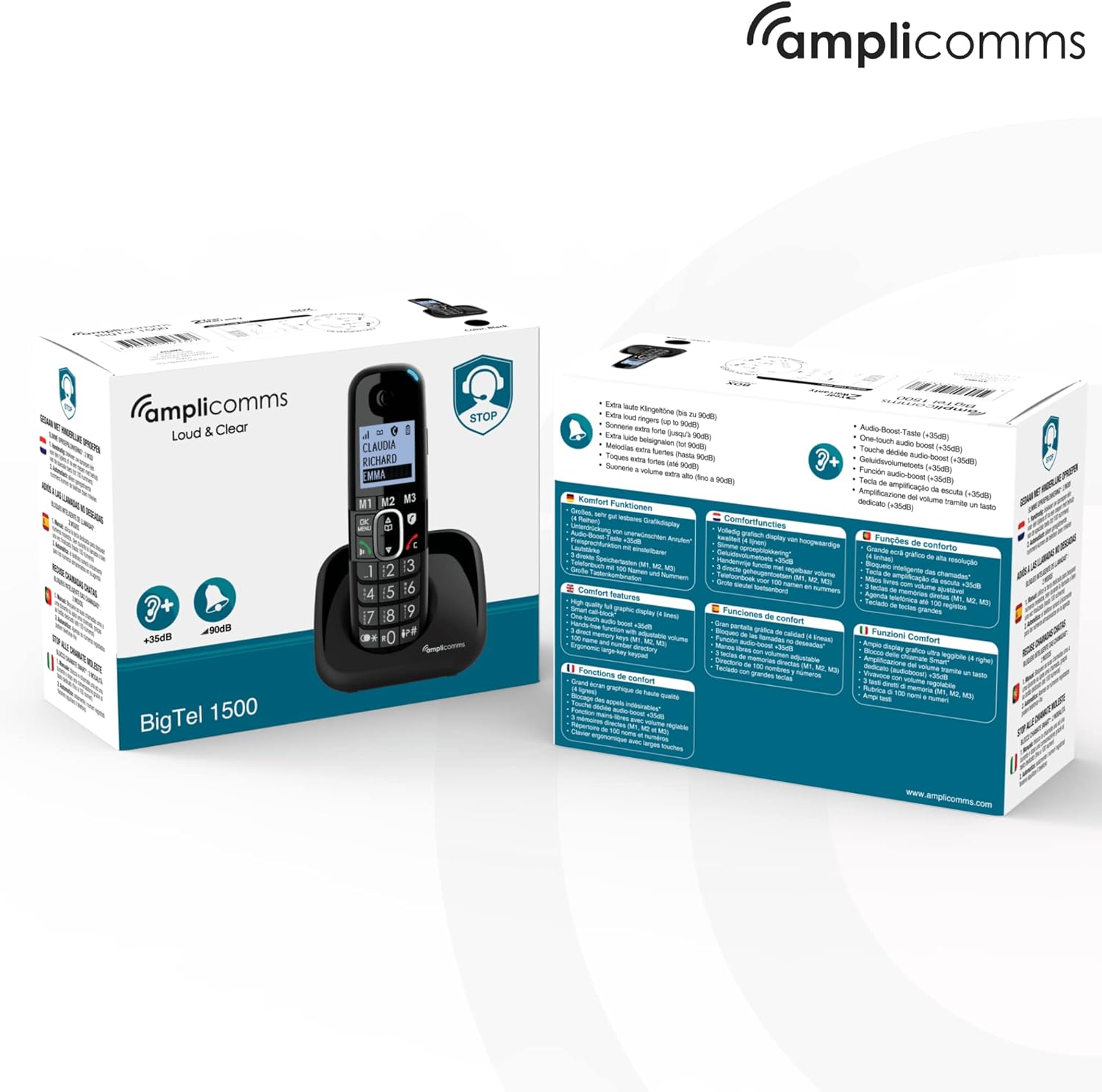
Imatge: El/La Amplicomms BigTel 1500 phone and its retail packaging, showing the contents and key features.
Producte acabatview
El Amplicomms BigTel 1500 is designed for clarity and ease of use. Below are the main components and their functions.

Imatge: Frontal view de la Amplicomms BigTel 1500 cordless phone handset docked in its charging base. The handset features a large backlit display and oversized buttons.
Característiques principals:
- Pantalla gran retroil·luminada: Per fàcil viewing of caller ID and menu options.
- Botons grans: Oversized dialling keys and memory buttons for improved visibility and tactile feedback.
- Adjustable Ringer Volume: Ringer can be increased up to 90 dB, with a visual ring indicator.
- Increased Audio Volume: Handset audio can be boosted by up to +35 dB during calls.
- 3 Direct Memory Buttons (M1, M2, M3): For quick dialling of frequently called numbers.
- Funció mans lliures: Built-in speakerphone for convenient conversations.
- Bloqueig de trucades: Dedicated button to block up to 100 unwanted numbers.
- Compatible amb audiòfons: Reduces interference for hearing aid users.

Image: Diagram highlighting key features of the Amplicomms BigTel 1500: large backlit screen, 3 memory buttons (M1, M2, M3), increased audio up to +35dB, and adjustable ringer volume up to 90dB.

Image: Infographic showing the target users for the Amplicomms BigTel 1500: individuals with unsteady hands, the visually impaired, non-tech savvy users, and those who are hard of hearing.
Configuració
1. Instal·lació de la bateria
- Obriu la tapa del compartiment de la bateria a la part posterior del telèfon.
- Introduïu les dues piles recarregables AAA subministrades, respectant la polaritat correcta (+/-).
- Tanqueu bé la tapa del compartiment de la bateria.
2. Connexió de la unitat base
- Connecteu un extrem del cable de línia telefònica al port LINE de la unitat base.
- Connecteu l'altre extrem del cable de la línia telefònica a la presa de corrent de la paret.
- Connect the small plug of the power adapter to the DC IN port on the base unit.
- Plug the power adapter into a mains electrical outlet.
- Place the handset on the base unit to charge. The battery indicator on the handset display will show charging status. Allow at least 15 hours for the initial charge.
3. Registering Additional Handsets (Optional)
The BigTel 1500 system supports up to 3 additional handsets (BigTel 1501, sold separately). To register an additional handset:
- A la unitat base, premeu i manteniu premut el botó PÀGINA button until the registration indicator flashes.
- On the new handset, access the menu and select the "Register Handset" option.
- Enter the system PIN (default is 0000).
- Once registered, the handset will display its assigned number (e.g., Handset 2).

Imatge: El/La Amplicomms BigTel 1500 base unit and handset, shown alongside three additional BigTel 1501 handsets, illustrating the system's expandability.
Instruccions de funcionament
Fent una trucada
- Dialling: Enter the phone number using the large keypad.
- Premeu el botó Green Call Button per iniciar la trucada.
- Per finalitzar una trucada, premeu el botó Red End Call Button or place the handset back on the base.
Recepció d'una trucada
- Quan soni el telèfon, premeu la tecla Green Call Button per respondre.
- The visual ring indicator will flash during an incoming call.
Using Direct Memory Buttons (M1, M2, M3)
You can store up to three important numbers for quick dialling.
- Per emmagatzemar un número:
- Press and hold the desired memory button (M1, M2, or M3) until you hear a beep.
- Introduïu el número de telèfon que voleu desar.
- Premeu el botó D'acord/MENÚ botó per guardar.
- Per marcar un número desat:
- Simply press the desired memory button (M1, M2, or M3). The phone will automatically dial the stored number.
Ajust de volum
- Volum del timbre: Access the phone's menu to adjust the ringer volume. It can be set up to 90 dB.
- Handset Audio Volume (during call): Durant una trucada, utilitzeu Up/Down Navigation Buttons to increase or decrease the earpiece volume. The volume can be boosted by up to +35 dB.
Using Hands-Free (Speakerphone)
- Durant una trucada, premeu el botó Botó de l'altaveu (often indicated by a speaker icon) to activate the hands-free function.
- Press it again to switch back to the earpiece.
Bloqueig de trucades
The BigTel 1500 allows you to block unwanted numbers.
- Per bloquejar un número:
- Durant una trucada entrant d'un número no desitjat, premeu el botó dedicat Call Blocker Button (often indicated by a shield icon).
- Alternatively, you can add numbers to the block list via the phone's menu. The phone can block up to 100 numbers.
Manteniment
- Neteja: Netegeu el telèfon i la unitat base amb un drap suau.amp tela. No utilitzeu netejadors abrasius ni dissolvents.
- Cura de la bateria: Use only the supplied rechargeable batteries. If the phone will not be used for an extended period, remove the batteries.
- Col·locació: Avoid placing the phone in direct sunlight, near heat sources, or in areas with high humidity.
Resolució de problemes
| Problema | Possible causa/solució |
|---|---|
| Sense to de marcatge |
|
| El telèfon no es carrega |
|
| Mala qualitat de trucada / Estàtic |
|
| No puc fer/rebre trucades |
|
Especificacions
- Model: Amplicomms BigTel 1500
- Dimensions: 5.5 x 3 x 18 cm (Handset)
- Pes: 216 g (Handset)
- Bateries: 2 piles recarregables AAA (incloses)
- Tipus de telèfon: Telèfon DECT sense fil
- Volum del timbre: Fins a 90 dB
- Handset Audio Boost: Fins a +35 dB
- Capacitat de bloqueig de trucades: Fins a 100 números
- Fabricant: Atlinks
- País d'origen: Hong Kong
Garantia i Suport
Amplicomms products are designed for reliability and performance. For warranty information and technical support, please refer to the warranty card included in your package or visit the official Amplicomms weblloc web. Conserveu el comprovant de compra per a reclamacions de garantia.
For further assistance, you may also contact your retailer or the Amplicomms customer service department.


