1. Introducció
This manual provides detailed instructions for the proper use and maintenance of your Cellularline Task Dual-Mode Headset. Please read this manual thoroughly before using the product to ensure optimal performance and longevity.
The Cellularline Task headset is designed for versatility, offering both wired and wireless (Bluetooth) connectivity. It features a detachable microphone, making it suitable for smart working, remote learning, and music listening.
2. Producte acabatview
The Cellularline Task headset combines comfort with functionality, featuring over-ear cushions and intuitive controls. Its dual-mode capability allows seamless switching between wired and Bluetooth connections.

Figura 2.1: Cellularline Task Dual-Mode Headset with detachable microphone connected.
Característiques principals:
- Dual-mode stereo headset (wired and Bluetooth).
- Wireless communication technology compatible with various devices (iPhone, Samsung, Huawei, Xiaomi, etc.).
- Modern design with comfortable over-ear cushions.
- Adaptable and removable microphone, ideal for video calls and audio recording.
- Volume limitation feature for hearing protection.
- Up to 18 hours of continuous music playback or talk time.
3. Configuració
3.1 Contingut del paquet
Before proceeding, ensure your package contains the following items:
- Cellularline Task Headset
- Micròfon desmuntable
- Cable de càrrega (USB)
- Cable d'àudio (connector de 3.5 mm)
- Manual d'usuari (aquest document)
3.2 Càrrega dels auriculars
Before first use, fully charge the headset. Connect the provided USB charging cable to the charging port on the headset and to a compatible USB power source. The LED indicator will show charging status and turn off or change color when fully charged.
3.3 Attaching the Detachable Microphone
The microphone can be easily attached or detached based on your usage needs.
- Localitza el port d'entrada del micròfon a l'auricular esquerre dels auriculars.
- Align the 3.5mm jack of the detachable microphone with the port.
- Gently push the microphone jack into the port until it is securely seated.
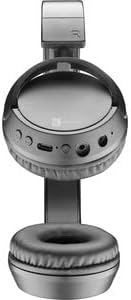
Figura 3.1: Headset with the detachable microphone removed, showing the input port.
3.4 Connexió per cable
Per utilitzar els auriculars en mode cablejat:
- Assegureu-vos que els auriculars estan apagats.
- Connect one end of the 3.5mm audio cable to the audio input port on the headset.
- Connect the other end of the 3.5mm audio cable to the audio output jack of your device (e.g., computer, smartphone, tablet).
- The headset will function as a wired headset, drawing power from the connected device if needed, or using its own battery for active features.

Figura 3.2: Headset connected via 3.5mm audio cable, demonstrating wired mode.
3.5 Vinculació Bluetooth
To connect your headset wirelessly via Bluetooth:
- Encès: Press and hold the Power button on the headset until the LED indicator flashes, indicating pairing mode.
- Activa el Bluetooth: Al dispositiu (telèfon intel·ligent, tauleta, ordinador), aneu a la configuració de Bluetooth i assegureu-vos que el Bluetooth estigui activat.
- Cerca Dispositius: El dispositiu cercarà els dispositius Bluetooth disponibles.
- Selecciona auriculars: From the list of found devices, select "Cellularline Task" (or similar name).
- Confirmeu la connexió: Once connected, the LED indicator on the headset will change to a steady light or flash slowly, and your device will confirm the connection.
The headset is compatible with iPhone, Samsung, Huawei, Xiaomi, and other Bluetooth-enabled devices.
4. Instruccions de funcionament
4.1 Encès/Apagat
- Encès: Premeu i manteniu premut el botó d'engegada durant aproximadament 3 segons fins que l'indicador LED s'encengui.
- Apagar: Premeu i manteniu premut el botó d'engegada durant aproximadament 5 segons fins que l'indicador LED s'apagui.
4.2 Control de volum
The headset features tactile controls for volume adjustment.
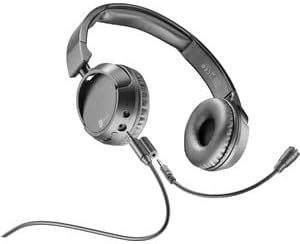
Figura 4.1: Primer pla view of the earcup showing control buttons for volume and playback.
- Augmenta el volum: Premeu el botó '+'.
- Disminueix el volum: Premeu el botó '-'.
The headset includes a volume limitation feature to protect your hearing.
4.3 Gestió de trucades
When connected via Bluetooth, you can manage calls directly from the headset:
- Respon a la trucada: Press the Multi-function button (usually the Power button or a dedicated call button) once.
- Finalitzar la trucada: Premeu el botó multifunció una vegada durant una trucada.
- Rebutja la trucada: Press and hold the Multi-function button for 2 seconds when an incoming call rings.
4.4 Reproducció de música
When connected via Bluetooth, control your music playback:
- Reproduir/pausa: Premeu el botó multifunció una vegada.
- Pista següent: Premeu i manteniu premut el botó '+'.
- Pista anterior: Premeu i manteniu premut el botó '-'.
4.5 Ús del micròfon
The detachable microphone is designed for clear voice capture during calls or recordings.
- Ensure the microphone is securely attached (refer to Section 3.3).
- Position the microphone appropriately for optimal voice pickup.
- When using the headset in wired mode, the microphone functionality will depend on the connected device's compatibility with 4-pole 3.5mm jacks.
5. Manteniment
5.1 Neteja
- Use a soft, dry cloth to clean the headset.
- No utilitzeu netejadors abrasius, dissolvents ni productes químics agressius.
- Eviteu que entri humitat a cap obertura.
5.2 Emmagatzematge
- Guardeu els auriculars en un lloc fresc i sec, allunyat de la llum solar directa i de temperatures extremes.
- If storing for an extended period, ensure the battery is partially charged (around 50%) to maintain battery health.
5.3 Cura de la bateria
- Eviteu descarregar completament la bateria amb freqüència.
- No exposeu la bateria a altes temperatures.
- If the headset will not be used for a long time, charge it every few months to prevent deep discharge.
6. Solució De Problemes
6.1 Headset Does Not Power On
- Ensure the headset is fully charged. Connect it to a power source and wait a few minutes before attempting to power on again.
- Prova un cable de càrrega o un adaptador de corrent diferent.
6.2 Sense so o volum baix
- Comproveu els nivells de volum tant dels auriculars com del dispositiu connectat.
- If using Bluetooth, ensure the headset is properly paired and connected.
- If using wired mode, ensure the 3.5mm audio cable is fully inserted into both the headset and the device.
- Prova amb una font o dispositiu d'àudio diferent.
6.3 Problemes d'emparellament Bluetooth
- Assegureu-vos que els auriculars estiguin en mode d'emparellament (el LED parpelleja).
- Desactiva i activa el Bluetooth al dispositiu.
- Forget the headset from your device's Bluetooth list and attempt to pair again.
- Ensure the headset is within the effective range of your device (typically 10 meters).
6.4 El micròfon no funciona
- Assegureu-vos que el micròfon desmuntable estigui ben connectat als auriculars.
- Check microphone settings on your connected device to ensure the headset's microphone is selected as the input device.
- Prova el micròfon amb una altra aplicació o dispositiu.
- Ensure the microphone is not muted on your device or via any headset controls (if applicable).
7. Especificacions
| Marca | Línia cel·lular |
| Nom del model | BTHEADBTASKK |
| Tecnologia de connectivitat | Wireless (Bluetooth), Wired (3.5mm jack) |
| Tecnologia de comunicació sense fils | Bluetooth |
| Factor de forma | Sobre l'orella |
| Característiques especials | Fast Charging, Volume Control, Included Microphone |
| Hora de jugar | Fins a 18 hores |
| Temps de conversa | 18 hores |
| Dispositius compatibles | Laptop, Tablet, Mobile Phone, Universal |
| Tipus de control | Control tàctil, control remot |
| Material | Plàstic, cautxú |
| Color | Negre |
8. Garantia i Suport
Cellularline products are designed and manufactured to the highest quality standards. For information regarding warranty coverage, please refer to the warranty card included with your product or visit the official Cellularline weblloc.
If you encounter any issues not covered in this manual or require further assistance, please contact Cellularline customer support through their official weblloc web o la informació de contacte que es proporciona a l'embalatge del producte.
Weblloc: www.cellularline.com


