1. Producte acabatview
This manual provides instructions for the ELECOM Finger Operated Trackball Set, which includes four distinct trackball models: DEFT PRO, Huge, bitra, and rilacon. Each model offers unique ergonomic features and functionalities designed to enhance user comfort and productivity.

Image 1.1: The ELECOM Finger Operated Trackball Set, showcasing the DEFT PRO, Huge, bitra, and rilacon models.
Característiques principals:
- Tecnologia de seguiment òptic: Provides precise cursor movement for accuracy and reduced hand movement.
- Manteniment fàcil: Features artificial ruby ball bearings for smooth operation and easy cleaning. The trackball can be easily removed for maintenance.
- Ajust del cursor DPI: Allows switching between 500, 1000, and 1500 DPI settings for customizable cursor speed.
- Botons funcionals: Equipped with multiple programmable buttons (up to 8 on some models) for assigning custom functions using the ELECOM Mouse Assistant software.
- Confort ergonòmic: Sculpted shapes support the hand, allowing cursor movement without arm movement, suitable for various hand sizes and orientations.
2. Instruccions de configuració
2.1. Instal·lació de la bateria
- Locate the battery compartment on the underside of your trackball.
- Obriu la tapa del compartiment de la bateria.
- Insert the required batteries (typically AA or AAA, refer to the specific model's packaging) ensuring correct polarity (+/-).
- Tanqueu bé la tapa del compartiment de la bateria.
2.2. Connectivitat
The trackballs in this set utilize 2.4GHz wireless connectivity.
- Inseriu el receptor USB en un port USB disponible de l'ordinador.
- Turn on the power switch on the trackball (if applicable).
- The trackball should automatically connect to your computer. If not, refer to the troubleshooting section.
2.3. Software Installation (ELECOM Mouse Assistant)
To customize button functions and optimize performance, download and install the ELECOM Mouse Assistant software.
- Visita l'ELECOM oficial weblloc.
- Navigate to the support or downloads section for your specific trackball model.
- Download the latest version of the "ELECOM Mouse Assistant" software.
- Seguiu les instruccions a la pantalla per completar la instal·lació.
3. Instruccions de funcionament
3.1. Basic Trackball Usage
To operate the trackball, use your thumb or fingers to roll the trackball sphere. The cursor on your screen will move in correlation with the ball's movement. The ergonomic design of each trackball is intended to keep your hand stationary, reducing wrist and arm strain.
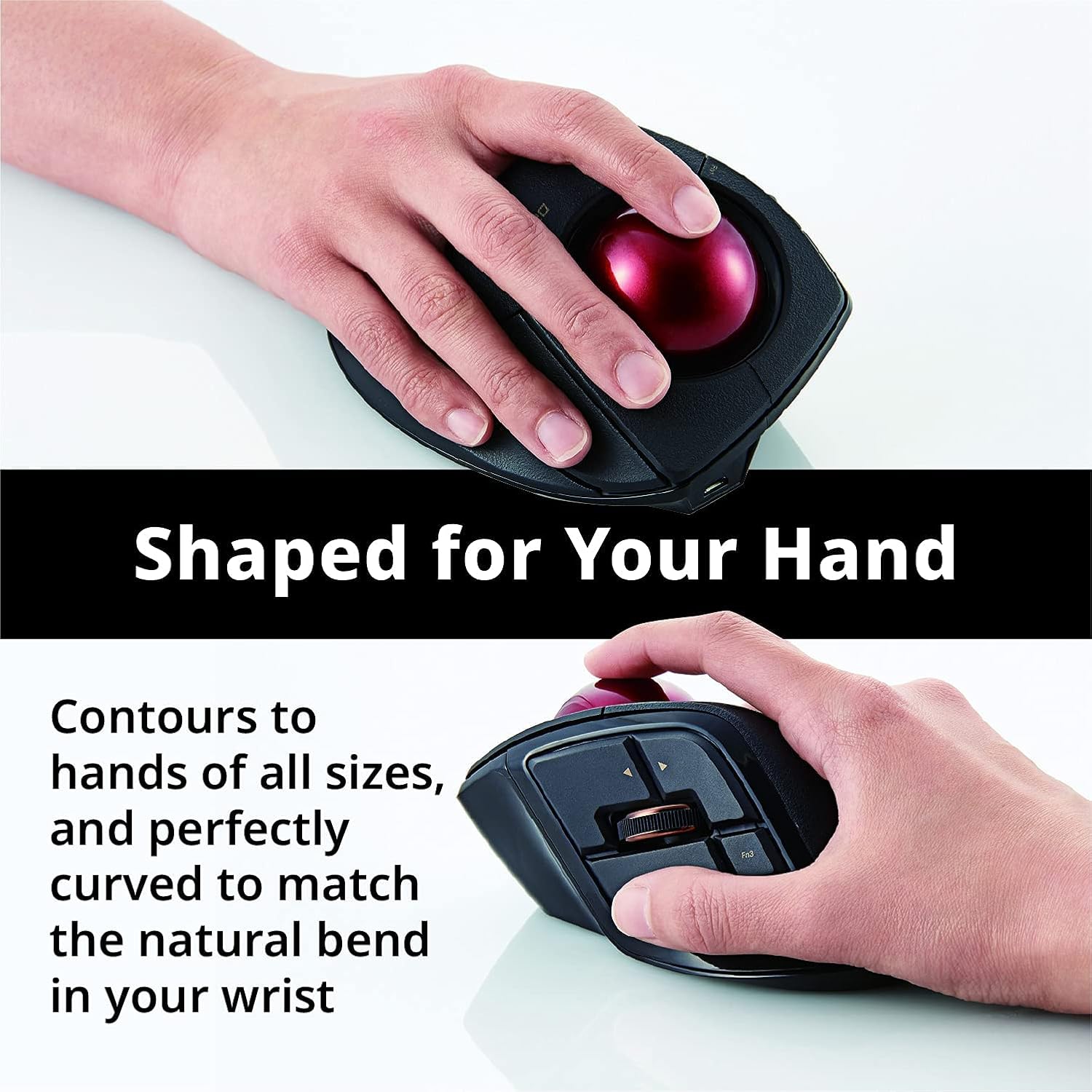
Image 3.1: The ergonomic design of an ELECOM trackball, shaped to fit the hand for comfortable use.
3.2. Ajust de DPI
The DPI (Dots Per Inch) button allows you to adjust the cursor speed. Press the DPI button (typically located near the trackball or on the side) to cycle through available settings: 500 DPI (slower), 1000 DPI (medium), and 1500 DPI (faster). Select the setting that best suits your task and preference.

Image 3.2: Demonstrating the precise control offered by the ELECOM trackball.
3.3. Botons programables
Many ELECOM trackballs feature multiple buttons that can be programmed using the ELECOM Mouse Assistant software. This allows you to assign frequently used functions, macros, or keyboard shortcuts to enhance workflow efficiency.

Image 3.3: The extra-large 44mm trackball, designed for optimal precision and control.

Imatge 3.4: Interna view showing the high-performance optical sensors for precise cursor movement.
4. Manteniment
4.1. Neteja del trackball
Regular cleaning of the trackball and its bearings is essential for maintaining smooth operation and preventing cursor erraticism.
- Apagueu el trackball i desconnecteu-lo de l'ordinador.
- Localitzeu el petit forat a la part inferior del trackball.
- Using a pen or a similar blunt object, gently push the trackball out through this hole.
- Wipe the trackball sphere with a soft, lint-free cloth.
- Clean the three artificial ruby ball bearings and the optical sensor inside the trackball housing using a cotton swab lightly dampened with isopropyl alcohol, or a dry air blower.
- Ensure all components are dry before reinserting the trackball.
- Gently place the trackball back into its housing until it clicks into place.

Image 4.1: The trackball removed, illustrating the ease of access for cleaning the internal components and bearings.
5. Solució De Problemes
5.1. Cursor Not Moving or Moving Erratically
- Comproveu les bateries: Assegureu-vos que les piles estiguin instal·lades correctament i que tinguin la càrrega suficient. Substituïu-les si cal.
- Comproveu la connectivitat: Verify the USB receiver is securely plugged into a working USB port. For wireless models, ensure the trackball's power switch is on.
- Trackball net: Dust or debris on the trackball or bearings can cause erratic movement. Refer to Section 4.1 for cleaning instructions.
- Interferència: Acosteu el trackball al receptor USB o allunyeu-lo d'altres dispositius sense fil que puguin causar interferències.
5.2. Els botons no responen
- Comprovació de programari: Si feu servir assignacions de botons personalitzades, assegureu-vos que el programari ELECOM Mouse Assistant s'estigui executant i configurant correctament.
- Reemparella el dispositiu: For wireless models, try re-pairing the trackball with its USB receiver if the issue persists. Refer to the ELECOM website for specific re-pairing instructions for your model.
5.3. Software Not Detecting Trackball
- Reinstal·lar el programari: Uninstall and then reinstall the ELECOM Mouse Assistant software.
- Actualitzacions de controladors: Assegureu-vos que els controladors del vostre sistema operatiu estiguin actualitzats.
6. Especificacions
| Característica | Detall |
|---|---|
| Marca | ELECOM |
| Sèrie | DEFT PRO (also Huge, bitra, rilacon) |
| Números de model d'article | M-DPT1MRXBK, M-HT1DRBK, M-MT2DRSBK, M-RT1DRBK |
| Color | Negre |
| Font d'alimentació | Funciona amb bateria |
| Tecnologia de connectivitat | Radiofreqüència (2.4 GHz) |
| Característica especial | Disseny ergonòmic |
| Tecnologia de detecció de moviment | Trackball (Optical) |
| Configuració de DPI | 500, 1000, 1500 DPI |
7. Garantia i Suport
For information regarding product warranty, technical support, or additional resources, please refer to the official ELECOM website or contact ELECOM customer service directly.
Visita el ELECOM Store per a més productes i informació.


