Introducció
Gràcies per la compraasing the Dolphin LX80 Portable Wireless Speaker. This manual provides essential information for the safe and efficient operation of your device. Please read it thoroughly before use and retain it for future reference.
The Dolphin LX80 is a versatile portable speaker designed for powerful audio output and dynamic party lighting. Featuring DSP technology, dual 3.5" woofers, and IPX5 water resistance, it is suitable for various indoor and outdoor environments. It supports multiple input options including Bluetooth 5.0, MicroSD, and 3.5mm Aux, and offers WaveSync technology for wireless stereo pairing.
Contingut del paquet
- Dolphin LX80 Portable Wireless Speaker
- Cable de càrrega USB-C
- Manual d'usuari (aquest document)
Producte acabatview
Familiarize yourself with the components of your Dolphin LX80 speaker.

Figure 1: Dolphin LX80 Portable Wireless Speaker, showcasing its IPX5 water resistance.
The LX80 features a robust design with a large integrated handle for portability. The front panel houses dual woofers, often illuminated by dynamic LED party lights. Control buttons are typically located on the top panel, while various input ports are found on the rear or side, protected by a cover.
Característiques principals:
- DSP Technology & Equalizer: Enhances sound quality for a rich audio experience.
- Dual 3.5" Woofers & 5" Diaphragms: Delivers powerful, high-definition sound.
- Bluetooth 5.0: Provides seamless wireless connectivity with a range of up to 100 feet.
- WaveSync Technology: Allows wireless pairing of two LX80 speakers for true stereo sound.
- Resistència a l'aigua IPX5: Protects against splashes and light rain, making it suitable for outdoor use.
- Múltiples opcions d'entrada: Supports MicroSD cards and 3.5mm Aux connections.
- Rechargeable Battery & Power Bank: Built-in 3600mAh battery offers extended playtime and can charge other devices via USB-C.
- Sound-Activated Party Lights: Integrated LED lights synchronize with your music.
Configuració
Càrrega inicial:
- Before first use, fully charge the Dolphin LX80 speaker.
- Connect the supplied USB-C charging cable to the speaker's USB-C port (typically located under a protective flap).
- Connect the other end of the USB-C cable to a compatible USB power adapter (not included). A 5V/2.1A adapter is recommended for fast charging.
- El llum indicador de càrrega s'il·luminarà. Un cop completament carregat, el llum pot canviar de color o apagar-se, segons el model.
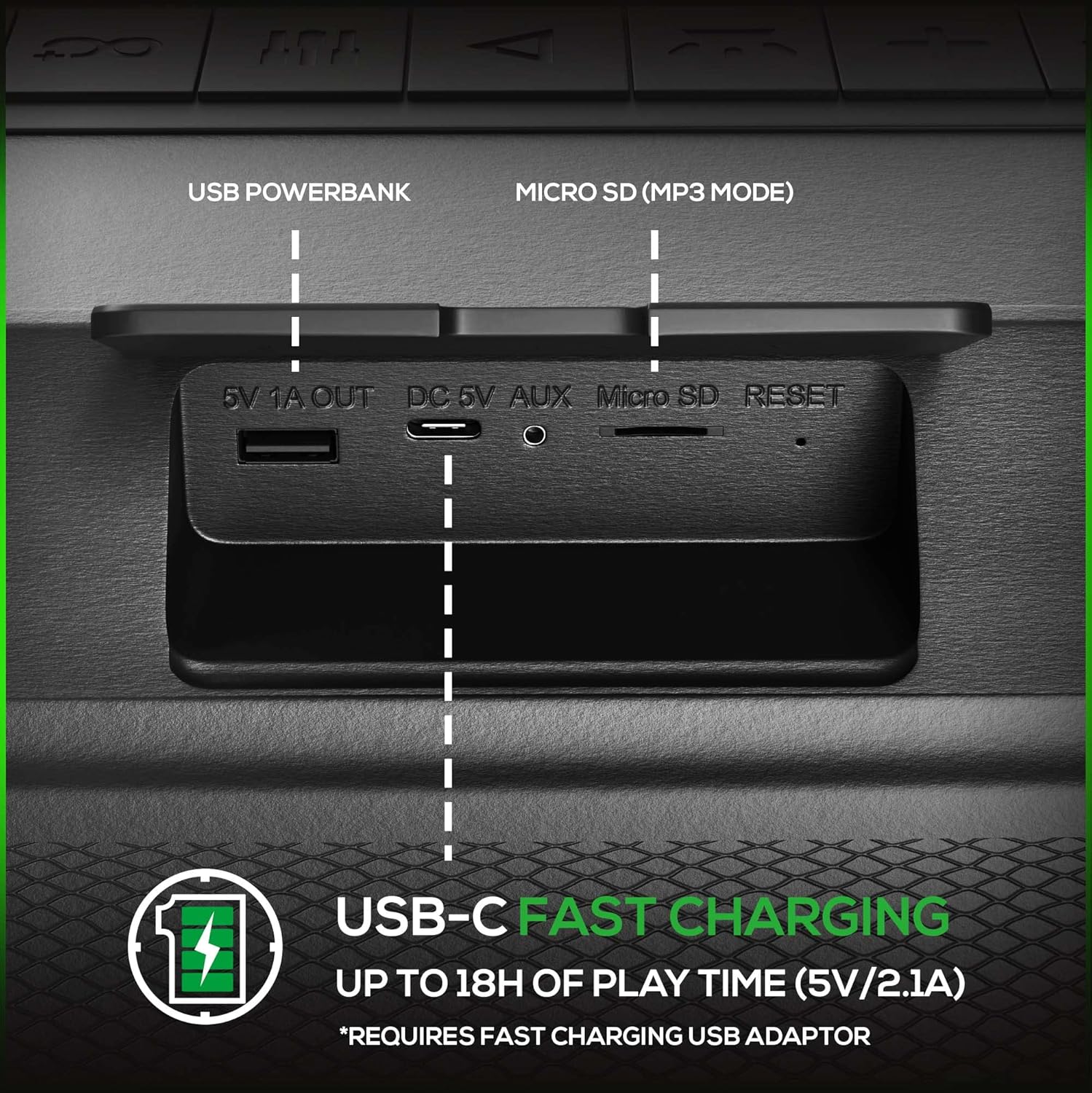
Figure 2: Input panel with USB-C charging port, MicroSD slot, and 3.5mm Aux input.
Encès/apagat:
- To power on, press and hold the Power button (usually marked with a power symbol) for a few seconds until you hear an audible prompt or see the indicator lights activate.
- Per apagar-lo, premeu i manteniu premut el botó d'engegada de nou fins que l'altaveu s'apagui.
Instruccions de funcionament
Emparellament Bluetooth:
- Ensure the speaker is powered on and in Bluetooth mode. If not, press the Mode button to switch to Bluetooth. The Bluetooth indicator light will typically flash, indicating it's ready for pairing.
- Al dispositiu mòbil (telèfon intel·ligent, tauleta, etc.), activeu el Bluetooth i cerqueu els dispositius disponibles.
- Select "Dolphin LX80" from the list of devices.
- Once paired, the speaker will confirm with an audible prompt, and the Bluetooth indicator light will become solid.
- You can now play audio from your device through the Dolphin LX80 speaker.
WaveSync (Wireless Stereo Pairing):
WaveSync technology allows you to connect two Dolphin LX80 speakers wirelessly for a true stereo sound experience.
- Ensure both LX80 speakers are powered on and in Bluetooth mode, but not yet connected to any device.
- On one of the speakers (this will be your primary speaker), press and hold the WaveSync button (or a dedicated pairing button, refer to your speaker's specific button layout).
- The primary speaker will search for the secondary speaker. Once connected, both speakers will confirm with an audible prompt.
- Now, connect your mobile device to the primary speaker via Bluetooth as described above. Audio will play in stereo through both speakers.

Figure 3: WaveSync feature for pairing two speakers wirelessly.
MicroSD Card Playback:
- Insert a MicroSD card (with supported audio files like MP3) into the MicroSD slot on the speaker.
- The speaker should automatically switch to MicroSD mode and begin playing music. If not, press the Mode button to select MicroSD mode.
- Feu servir els botons Reprodueix/Pausa, Pista següent i Pista anterior per controlar la reproducció.
3.5mm Aux Input:
- Connecteu un extrem d'un cable d'àudio de 3.5 mm (no inclòs) al port d'entrada AUX de l'altaveu.
- Connect the other end to the audio output jack of your device (e.g., smartphone, MP3 player).
- The speaker should automatically switch to AUX mode. If not, press the Mode button to select AUX mode.
- Audio will now play through the speaker from your connected device. Volume control can be managed on both the speaker and the source device.
Llums de festa:
The Dolphin LX80 features sound-activated LED lights that enhance your listening experience.
- To activate or change the party light mode, press the dedicated Light button (often marked with a lightbulb icon).
- Pressing the button repeatedly may cycle through different light patterns or turn the lights off.

Figure 4: LED Party Mode with sound-activated lights.
Ús com a banc d'energia:
The LX80's built-in battery can also serve as a power bank to charge other devices.
- Connect your device's charging cable to the USB-A output port (labeled "5V 1A OUT") on the speaker.
- The speaker will begin charging your device. Note that using this feature will reduce the speaker's playtime.
Manteniment
- Neteja: Netegeu l'altaveu amb un suau, damp tela. No utilitzeu netejadors abrasius ni dissolvents.
- Resistència a l'aigua (IPX5): The LX80 is IPX5 rated, meaning it is protected against low-pressure water jets from any direction. It is resistant to splashes and light rain. Do not submerge the speaker in water. Ensure all port covers are securely closed before exposure to water.
- Emmagatzematge: Guardeu l'altaveu en un lloc fresc i sec, allunyat de la llum solar directa i de temperatures extremes.
- Cura de la bateria: Per allargar la durada de la bateria, eviteu descarregar-la completament amb freqüència. Carregueu l'altaveu regularment, fins i tot si no l'utilitzeu durant períodes prolongats.

Figure 5: IPX5 Outdoor-Proof design for splash resistance.
Resolució de problemes
| Problema | Causa possible | Solució |
|---|---|---|
| L'altaveu no s'encén. | La bateria està baixa o esgotada. | Carregueu completament l'altaveu amb el cable USB-C proporcionat. |
| No es pot emparellar per Bluetooth. | Speaker is not in pairing mode; device Bluetooth is off; speaker is too far from device; speaker is already connected to another device. | Ensure speaker is in Bluetooth pairing mode (flashing indicator). Turn on Bluetooth on your device. Move device closer to speaker. Disconnect speaker from other devices. |
| No hi ha so de l'altaveu. | Volume is too low; incorrect input mode selected; audio source issue. | Increase volume on both speaker and source device. Ensure correct mode (Bluetooth, Aux, MicroSD) is selected. Check audio source for playback issues. |
| WaveSync pairing fails. | Els altaveus estan massa separats; un altaveu ja està emparellat amb un dispositiu. | Ensure both speakers are in Bluetooth mode and not connected to any device. Place speakers close to each other during pairing. |
| Durada de la bateria curta. | Speaker not fully charged; high volume usage; party lights constantly on; using power bank feature. | Ensure full charge. Reduce volume. Turn off party lights if not needed. Avoid using power bank feature if maximum playtime is desired. |
Especificacions
| Característica | Detall |
|---|---|
| Marca | Dofí |
| Model | LX80 |
| Dimensions del producte (L x A x A) | 5.5 x 15.5 x 7 polzades |
| Pes de l'article | 6 lliures |
| Tecnologia de connectivitat | Bluetooth 5.0, MicroSD, 3.5mm Aux |
| Tipus d'altaveu | Outdoor, Woofer (Dual 3.5" Woofers, Dual 5" Diaphragms) |
| Font d'alimentació | Alimentat per bateria (recarregable de 3600 mAh) |
| Classificació de resistència a l'aigua | IPX5 |
| Fabricant | General Sound Co |
Garantia i Suport
For warranty information and technical support, please refer to the contact details provided with your purchase documentation or visit the official Dolphin weblloc web. Conserveu el comprovant de compra per a reclamacions de garantia.
Per a més ajuda, també podeu consultar la Dolphin Store on Amazon.



