1. Producte acabatview
The Blink Outdoor (3rd Gen) + Solar Panel Charging Mount system provides a wire-free, high-definition smart security solution powered by solar energy. This system offers day and infrared night vision, two-way audio communication, and customizable motion detection alerts, ensuring continuous operation with sustainable power from the sun.

Image 1.1: The Blink Outdoor (3rd Gen) + Solar Panel Charging Mount 3-camera system, including the Sync Module 2.
2. Contingut del paquet
Verifiqueu que tots els components siguin presents al vostre paquet:
- Three (3) Blink Outdoor (3rd Gen) Cameras
- Three (3) Solar Panel Charging Mounts
- One (1) Blink Sync Module 2
- Three (3) Mounting Kits (for solar panel mounts)
- Required AA Lithium Batteries (pre-installed or included)
3. Guia de configuració
Follow these steps to set up your Blink Outdoor security camera system:
- Baixeu l'aplicació Blink Home Monitor: Cerca "Blink Home Monitor" in your device's app store and install it.
- Crea un compte: Open the app and follow the on-screen instructions to create a new Blink account or log in if you already have one.
- Set Up Sync Module 2: Plug in the Sync Module 2 and connect it to your home Wi-Fi network using the in-app instructions. The Sync Module acts as the central hub for your cameras.
- Afegir càmeres: In the app, add each Blink Outdoor camera to your system. The app will guide you through the process of syncing the cameras with the Sync Module.
- Attach Solar Panel Charging Mount: Securely attach each Blink Outdoor camera to its respective Solar Panel Charging Mount. Ensure the connection is firm.
- Muntar càmeres: Choose an outdoor location for each camera that receives direct sunlight for most of the day to ensure optimal solar charging. Use the included mounting kits to securely install the solar panel mount. The solar panel can be pivoted or detached up to two feet from the camera for flexible placement.

Image 3.1: A Blink Outdoor camera with its solar panel charging mount installed on an exterior wall, demonstrating typical placement.

Image 3.2: A Blink Outdoor camera with its solar panel charging mount positioned on the corner of a building for wider coverage.
4. Funcionament del sistema
Once set up, you can manage and monitor your Blink system through the Blink Home Monitor app:
- Viu View: Access real-time video from your cameras at any time. This feature allows you to see what is happening around your property instantly.
- Àudio bidireccional: Speak and listen to visitors through the camera's built-in microphone and speaker. This is useful for communicating with delivery personnel or deterring unwanted guests.
- Detecció de moviment: Receive alerts on your phone when motion is detected. You can customize motion zones within the app to focus on specific areas and reduce unnecessary notifications.
- Emmagatzematge de vídeo: Choose to save and share video clips in the cloud with a Blink Subscription Plan (a free 30-day trial is typically included) or locally with a Sync Module 2 and a compatible USB drive (sold separately).
- Integració d'Alexa: The system works with Alexa-enabled devices. Use voice commands to monitor your home, view live feeds on compatible screens, or arm/disarm your system.
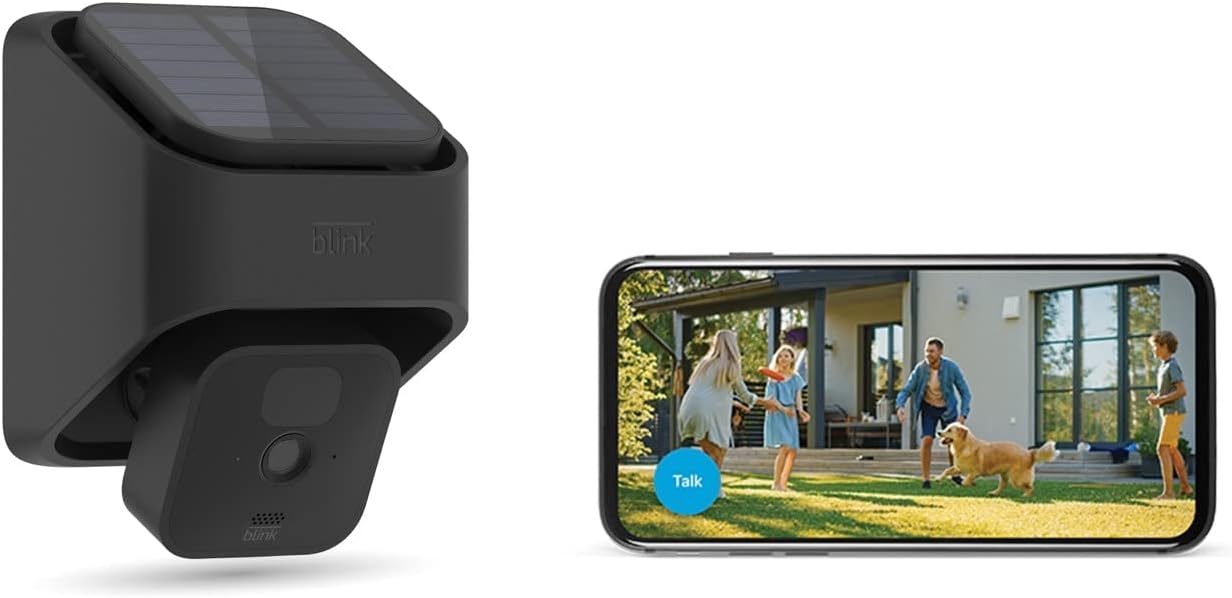
Image 4.1: A Blink Outdoor camera with solar mount alongside a smartphone showing the live view interface, demonstrating remote monitoring capabilities.
5. Manteniment
Regular maintenance ensures optimal performance and longevity of your Blink system:
- Panells solars nets: Netegeu periòdicament la superfície dels panells solars amb un drap suau iamp drap per eliminar la pols, la brutícia o les restes que puguin obstruir la llum solar i reduir l'eficiència de la càrrega.
- Neteja la lent de la càmera: Gently clean the camera lens with a microfiber cloth to ensure clear video quality. Avoid abrasive materials that could scratch the lens.
- Comprovació de la bateria: While the solar panel provides primary power, the cameras use AA lithium batteries as a backup. The app will notify you if battery levels are low. Replace batteries as needed with new, non-rechargeable AA lithium batteries.
- Actualitzacions de firmware: Ensure your Blink app and camera firmware are up to date. Updates often include performance improvements and new features. The app will typically prompt you for available updates.
6. Solució De Problemes
If you encounter issues with your Blink Outdoor system, consider the following common solutions:
- No Live View/Càmera fora de línia:
- Check your Wi-Fi connection. Ensure the Sync Module 2 is connected to the internet.
- Verify the camera's distance from the Sync Module and Wi-Fi router. Reduce interference from other electronic devices.
- Check camera battery levels in the app.
- Poca qualitat de vídeo:
- Netegeu la lent de la càmera.
- Ensure adequate lighting for day vision or proper infrared illumination for night vision.
- Check Wi-Fi signal strength to the camera.
- Solar Panel Not Charging:
- Assegureu-vos que el panell solar rebi llum solar directa durant diverses hores al dia.
- Netegeu la superfície del panell solar.
- Verify the connection between the camera and the solar panel mount.
- Problemes de detecció de moviment:
- Ajusta la configuració de la sensibilitat al moviment a l'aplicació.
- Review i ajustar les zones de moviment per excloure zones amb desencadenants falsos freqüents (per exemple, arbres en moviment).
- Assegureu-vos que la càmera view no està obstruït.
For further assistance, refer to the Blink Home Monitor app's help section or visit the official Blink support weblloc.
7. Especificacions
- Model de càmera:
- Blink Outdoor (3rd Gen)
- Font d'alimentació:
- Solar Panel Charging Mount (primary), 2 AA 1.5V Lithium Batteries (backup)
- Resolució de vídeo:
- HD (1080p day, infrared night vision)
- Àudio:
- Àudio bidireccional
- Connectivitat:
- Wi-Fi (2.4 GHz)
- Opcions d'emmagatzematge:
- Cloud storage (Blink Subscription Plan), Local storage (via Sync Module 2 with USB drive, sold separately)
- Temperatura de funcionament:
- Refer to product packaging or official Blink specifications for exact range.
8. Garantia i Suport
For detailed information regarding product warranty, technical support, and frequently asked questions, please visit the official Blink weblloc web. Els termes i condicions de la garantia poden variar segons la regió i la data de compra.
Official Blink Weblloc: www.blinkforhome.com


