1. Introducció
Gràcies per la compraasing the eKids Cocomelon Karaoke Machine, Model CO-550. This portable Bluetooth party speaker is designed to provide hours of musical fun for children, featuring built-in Cocomelon songs, a real working microphone, and versatile connectivity options. This manual provides essential information for safe and optimal use of your new karaoke machine.
2. Producte acabatview
2.1 Característiques clau
- Connectivitat Bluetooth: Wirelessly stream audio from any compatible Bluetooth device.
- Cançons integrades: Includes 24 popular Cocomelon songs for immediate entertainment.
- Reproductor d'àudio USB: Connect a USB drive to play your own MP3 music files.
- Real Working Microphone: Sing along with the included wired microphone.
- Disseny per a nens: Lightweight and portable with a built-in handle.
- Bateria recarregable: Enjoy portable use with the integrated rechargeable battery (USB charging cable included).
- Auriculars Jack: Per a una escolta privada.
2.2 Components
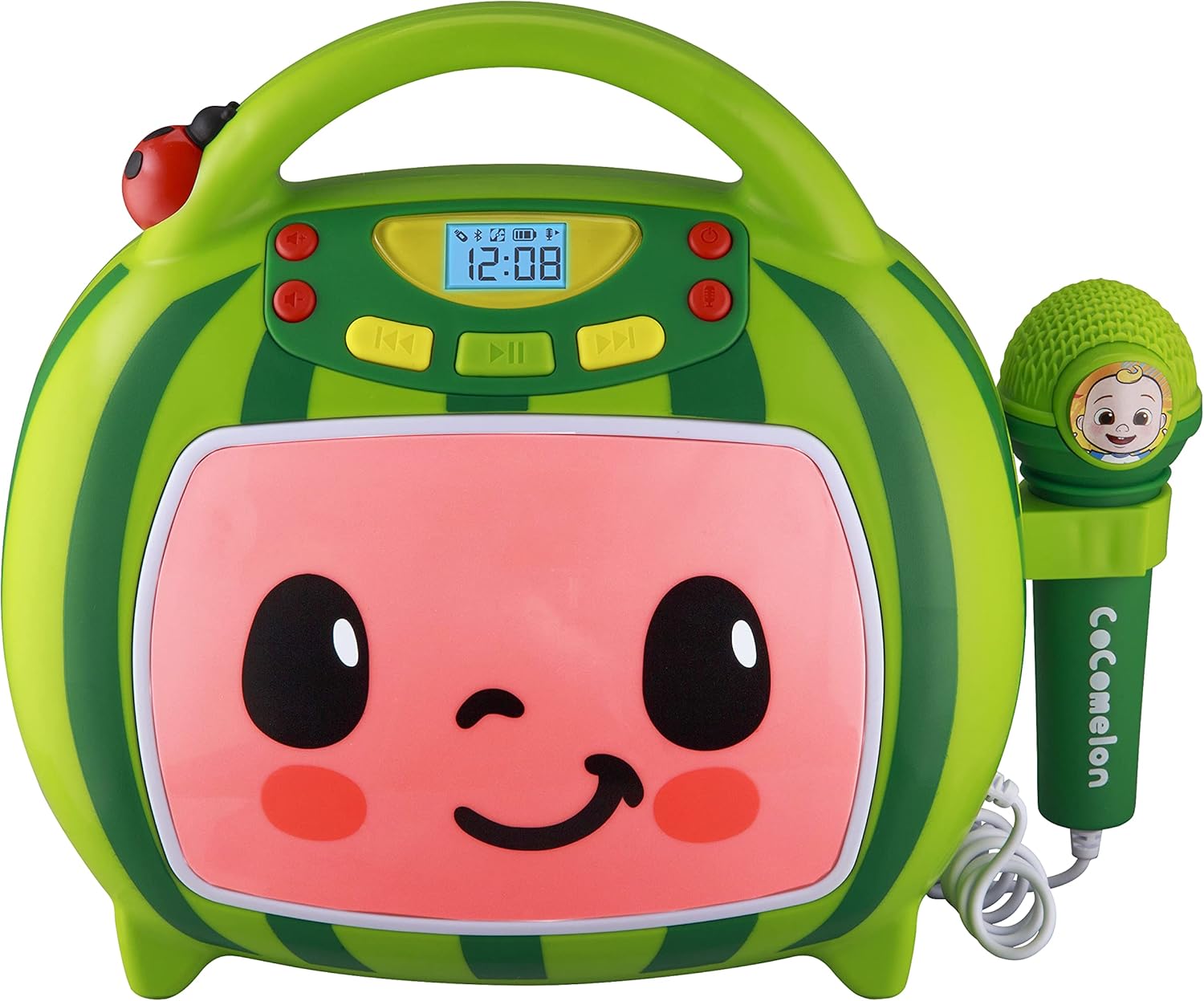
Davant view of the eKids Cocomelon Karaoke Machine, featuring the watermelon-themed design and integrated microphone.

An annotated diagram detailing the dimensions, control buttons (volume, play/pause, power), microphone jack, USB port, and battery compartment of the karaoke machine.
El paquet inclou:
- eKids Cocomelon Karaoke Machine
- Micròfon per cable
- Cable de càrrega USB
3. Configuració
3.1 Instal·lació de la bateria
The karaoke machine requires 1 Lithium Ion battery. Ensure the battery is correctly installed according to the polarity markings in the battery compartment, located on the back of the unit.
3.2 Encès inicial
- Locate the Power ON/OFF button on the unit.
- Press and hold the Power ON/OFF button to turn on the device. The display will illuminate.
4. Instruccions de funcionament
4.1 Vinculació Bluetooth
- Turn on the karaoke machine. It will automatically enter Bluetooth pairing mode.
- On your compatible device (e.g., smartphone, tablet), enable Bluetooth and search for available devices.
- Select 'eKids Cocomelon' from the list of devices to pair.
- Once paired, you can stream audio wirelessly from your device to the karaoke machine.

The karaoke machine is shown with icons indicating its compatibility with various Bluetooth-enabled devices such as PCs, smartwatches, tablets, and mobile phones.
This video demonstrates the Bluetooth pairing process for the eKids Cocomelon Karaoke Machine, showing how to connect a mobile device to stream music wirelessly.
Reproducció d'àudio USB 4.2
- Insert a USB drive containing MP3 music files into the USB port located on the back of the unit.
- The machine will automatically detect the USB drive and begin playing music.
- Use the playback controls (Play/Pause, Forward, Reverse) to navigate your music.
4.3 cançons incorporades
The karaoke machine comes pre-loaded with 24 Cocomelon songs. To play these songs, ensure no Bluetooth device is connected and no USB drive is inserted. Use the playback controls to select and play the desired song.

A visual representation of the 24 pre-loaded Cocomelon songs, including popular titles like 'Hello Song' and 'Wheels on the Bus'.
4.4 Microphone Use
- Plug the wired microphone into the microphone jack on the side of the unit.
- Adjust the microphone volume using the dedicated controls.
- Sing along to your favorite tunes!

A young child engaging with the eKids Cocomelon Karaoke Machine, holding the microphone and singing along.
Un acabatview presentació de vídeoasing the eKids Cocomelon Karaoke Machine in action, highlighting its portability, microphone, and various functions for children's entertainment.
4.5 Controls
- Encès/apagat: Encén o apaga la unitat.
- Volume UP/DOWN: Ajusta el volum general del so.
- Reproduir/pausa: Inicia o posa en pausa la reproducció.
- Endavant/marrere: Salta a la pista següent o anterior.
- Micròfon ON/OFF: Activates or deactivates the microphone.
5. Manteniment
- Neteja: Wipe the unit with a soft, dry cloth. Do not use abrasive cleaners or immerse in water.
- Emmagatzematge: Store the karaoke machine in a cool, dry place away from direct sunlight when not in use.
- Cura de la bateria: If the unit will not be used for an extended period, remove the battery to prevent leakage.
6. Solució De Problemes
| Problema | Solució |
|---|---|
| La unitat no s'encén. | Check battery installation and ensure the battery is charged. |
| No hi ha so de l'altaveu. | Increase volume. Ensure Bluetooth device is connected and playing, or USB is inserted correctly. |
| El Bluetooth no es connecta. | Ensure the unit is in pairing mode. Turn off and on Bluetooth on your device. Move closer to the unit. |
| El micròfon no funciona. | Ensure the microphone is securely plugged in and the microphone ON/OFF switch is activated. |
7. Especificacions
| Característica | Detall |
|---|---|
| Número de model | CO-550 |
| Pes de l'article | 2.12 lliures |
| Dimensions del producte | 12 x 4 x 1 polzades |
| Bateries | Necessita 1 bateria de ions de liti |
| Connectivitat | Bluetooth, USB |
| Recompte de parlants | 1 |
| Components inclosos | Cable USB |
8. Garantia i Suport
Per obtenir informació sobre la garantia o assistència tècnica, consulteu les dades de contacte que figuren a l'embalatge del producte o visiteu el lloc web oficial d'eKids. weblloc web. Conserveu el rebut de compra com a comprovant de compra.
9. Informació de seguretat
- This product is intended for children aged 18 months and up.
- Es recomana la supervisió d'un adult durant l'ús.
- No exposeu la unitat a l'aigua ni a una humitat excessiva.
- No intenteu desmuntar ni modificar la unitat.
- Keep the USB cable and microphone cord away from young children to prevent choking hazards.
- Desfeu-vos de les piles de manera responsable d'acord amb la normativa local.


