1. Producte acabatview
The Logitech MX Master 3S for Mac is a high-performance wireless mouse optimized for macOS and compatible with iPadOS. It features advanced tracking, quiet clicks, and ultra-fast scrolling designed to enhance productivity and comfort for Mac users.

Figure 1: Logitech MX Master 3S for Mac in Pale Grey.
Característiques principals:
- Optimized for Mac: Seamless integration with macOS and iPadOS.
- Clics silenciosos: 90% less click noise compared to previous models for a quieter work environment.
- 8K DPI Track-on-Glass Sensor: High-precision tracking on virtually any surface, including glass (minimum 4mm thickness).
- Desplaçament MagSpeed: Ultra-fast, precise, and nearly silent electromagnetic scrolling, capable of scrolling 1,000 lines per second.
- Disseny ergonòmic: Sculpted for a natural wrist posture and comfortable grip, featuring a dedicated thumb rest.
- App-Specific Customizations: Personalize workflow with predefined macOS and application-specific profiles using Logi Options+ software.
- Multi-Mac Workflow: Pair with up to 3 Mac computers or laptops and effortlessly transfer text, images, and files entre ells.
- USB-C recarregable: Bateria de llarga durada amb capacitat de càrrega ràpida.
- Materials sostenibles: Plastic parts include certified post-consumer recycled plastic (22% for Pale Grey model).
2. Què hi ha a la caixa
- MX MASTER 3S Mouse
- Cable de càrrega USB-C (USB-C a USB-C)
- Documentació d'usuari

Figure 2: Included items: MX Master 3S mouse and USB-C charging cable.
3. Configuració i connectivitat
Configuració inicial:
- Encès: Locate the power switch on the bottom of the mouse and slide it to the ON position.
- Carrega el ratolí: Connect the included USB-C charging cable to the front of the mouse and to a USB-C power source.
- Instal·leu el programari Logi Options+: Per a una personalització completa i funcions avançades, descarregueu i instal·leu el programari Logi Options+ des de la pàgina oficial de Logitech. weblloc.
Vinculació amb dispositius:
The MX Master 3S for Mac can connect to up to three devices wirelessly via Bluetooth. It is compatible with macOS and iPadOS operating systems.
- Activa el mode de vinculació: On the bottom of the mouse, press the profile switcher button (labeled 1, 2, or 3) for a few seconds until the corresponding LED light starts blinking rapidly. This indicates the mouse is in pairing mode.
- Activa el Bluetooth al teu dispositiu: On your Mac or iPad, go to System Settings (or Settings) > Bluetooth and ensure Bluetooth is turned on.
- Select the Mouse: In the list of available Bluetooth devices, select "MX Master 3S M" (or similar). Follow any on-screen prompts to complete the pairing process.
- Canvia entre dispositius: Once paired, simply press the profile switcher button (1, 2, or 3) on the bottom of the mouse to instantly switch between your connected devices.

Figure 3: The MX Master 3S for Mac is compatible with macOS and iPadOS.
4. Funcionament del ratolí
Desplaçament MagSpeed:
The primary scroll wheel features MagSpeed scrolling, offering two distinct modes:
- Ratchet Mode: Provides precise, click-by-click scrolling, ideal for line-by-line navigation.
- Free-Spin Mode: Allows for ultra-fast, smooth scrolling, perfect for navigating long documents or web pages. This mode is activated by pushing the button located directly above the scroll wheel.

Figure 4: The MagSpeed scroll wheel offers fast and precise navigation.
Sensor de 8K DPI:
The advanced 8K DPI optical sensor allows the mouse to track accurately on virtually any surface, including glass, wood, fabric, or plastic, without skipping a beat.

Figure 5: The 8K DPI sensor enables tracking on various surfaces, including glass.
Customizable Buttons and Gestures:
The MX Master 3S for Mac features six programmable buttons and four gestures, offering a total of ten customizable actions. These can be configured using the Logi Options+ software to streamline your workflow and execute complex commands with ease.

Figure 6: Customize mouse functions with Logi Options+ software.
Control multiordinador (flux):
Utilize Logitech Flow technology via Logi Options+ to seamlessly control multiple Mac computers with a single MX Master 3S mouse. You can move your cursor across screens and even transfer text, images, and files entre ells.

Figure 7: Seamlessly transfer content across multiple computers.
5. Bateria i càrrega
The Logitech MX Master 3S for Mac is equipped with a rechargeable Li-Po (500 mAh) battery. A full charge provides up to 70 days of use, and a quick 1-minute charge can provide 3 hours of use. The mouse charges via a USB-C port located at the front.
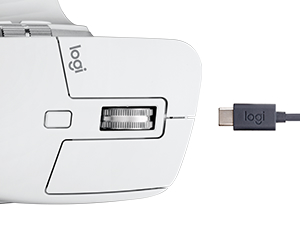
Figure 8: USB-C charging port located at the front of the mouse.
6. Physical Design and Materials
The MX Master 3S for Mac is designed for comfort and durability. Its ergonomic shape supports a natural hand and wrist position, reducing strain during prolonged use. The mouse features a thumb rest on the left side for added comfort.
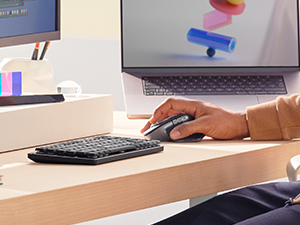
Figure 9: Ergonomic design with a comfortable thumb rest.
The top surface where the palm rests is made of a grippy rubber material, while the main click buttons are matte-finished plastic. The scroll wheels (both primary and thumb wheel) are constructed from machined steel, providing a premium feel and precise control. The underside features a smooth plastic finish with a slight gloss.
It is important to note that this mouse is designed for medium to large hands due to its size. Users with smaller hands may find it less comfortable for extended use, particularly with palm grip styles.
Disseny sostenible:
Logitech is committed to sustainability. The Pale Grey MX Master 3S for Mac contains 22% certified post-consumer recycled plastic, and the packaging is responsibly sourced.

Figure 10: Designed with recycled plastic and responsible packaging.
7. Especificacions
| Característica | Detall |
|---|---|
| Marca | Logitech |
| Número de model | 910-006570 |
| Color | Gris pàl·lid |
| Tecnologia de connectivitat | Bluetooth |
| Tecnologia de detecció de moviment | Òptic |
| Sensor de DPI | 8K DPI |
| Compatibilitat de sistemes operatius | macOS, iPadOS |
| Pes de l'article | 5 unces (141 g) |
| Dimensions del producte (LxWxH) | 4.9 x 3.3 x 0.1 polzades (124.9 x 84.3 x 51 mm) |
| Tipus de bateria | Li-Po recarregable (500 mAh) |
| Durada de la bateria | Fins a 70 dies amb una càrrega completa |
| Port de càrrega | USB-C |
| Distància operativa sense fil | 33 peus (10 m) |
8. Solució De Problemes
Problemes de connectivitat:
- Ensure Bluetooth is enabled on your Mac/iPad.
- Verify the mouse is charged.
- Reinicia el mode d'emparellament al ratolí i torna a escanejar els dispositius de l'ordinador.
- If issues persist, try restarting both the mouse and your device.
Software Malfunctions (Logi Options+):
- Ensure Logi Options+ is updated to the latest version.
- Try restarting the Logi Options+ application.
- If necessary, uninstall and reinstall the Logi Options+ software.
Problemes de seguiment:
- Netegeu el sensor òptic de la part inferior del ratolí.
- Ensure the surface you are tracking on is clean and free of debris.
- Adjust the pointer speed settings in Logi Options+ or your system settings.
9. Garantia i Suport
Per obtenir informació detallada sobre la garantia i assistència tècnica, consulteu la pàgina oficial de Logitech. website or the user manual PDF provided with your product. You can also visit the Botiga Logitech a Amazon per obtenir recursos addicionals.
Una còpia digital del manual d'usuari està disponible aquí: Manual d'usuari (PDF)


