1. Introducció
Welcome to the user manual for your Wallbox Pulsar Plus Electric Vehicle Charger. This document provides essential information for the safe and efficient use of your charger, including setup, operation, maintenance, and troubleshooting. The Wallbox Pulsar Plus is a powerful and intelligent charging solution designed for home use, featuring 22 kW charging capability, a Type 2 connector, and advanced connectivity options like WiFi and Bluetooth. It integrates seamlessly with the MyWallbox app and offers innovative features such as Power Boost and Eco-Smart for optimized energy management.
2. Informació de seguretat
Llegiu atentament tots els avisos i instruccions de seguretat abans de la instal·lació i l'ús. Si no seguiu aquestes instruccions, podeu patir descàrregues elèctriques, incendis o lesions greus.
- Instal·lació professional: The Wallbox Pulsar Plus charger must be installed by a qualified and certified electrician in accordance with all local and national electrical codes and regulations.
- Ús interior / exterior: The charger is designed for both indoor and outdoor installation. Ensure the installation location is appropriate and protected from direct impact.
- Aigua i humitat: Do not immerse the charger in water or expose it to excessive moisture. Ensure hands are dry when handling the charger or charging cable.
- Inspecció de danys: Before each use, inspect the charger, cable, and plug for any signs of damage. Do not use if any part is damaged.
- Nens i animals de companyia: Mantingueu els nens i les mascotes allunyats de la zona de càrrega durant el funcionament.
- Parada d'emergència: Familiarize yourself with the location of your electrical panel's circuit breaker for the charger, in case an emergency shutdown is required.
3. Producte acabatview
The Wallbox Pulsar Plus is an advanced electric vehicle charger designed for efficient and smart home charging. This package includes the Pulsar Plus charger and the Power Meter for enhanced energy management.
3.1 Components
- Wallbox Pulsar Plus Charger: The main charging unit, compact and designed for wall mounting.
- Mesurador de potència: An external device that measures real-time energy consumption, enabling features like Power Boost and Eco-Smart.
- Charging Cable (Type 2): Integrated or supplied separately, connects the charger to your electric vehicle.
- Plug Holder: For neat storage of the charging plug when not in use.

This image presents the main components of the Wallbox charging system laid out on a grey surface. It includes the white Wallbox Pulsar Plus charging station, a long black charging cable with a Type 2 charging plug, and a white plug holder designed to neatly store the charging plug when not in use.
3.2 Característiques clau
- Sortida d'alta potència: Up to 22 kW for fast charging.
- Connectivitat: Built-in WiFi and Bluetooth for seamless connection to the MyWallbox app.
- Eco-Smart: Utilizes excess solar energy for EV charging. Offers two modes:
Full-Green: Charges exclusively with 100% solar energy.
Ressò: Combines solar and grid energy for optimized charging. - Potència: Dynamically adjusts charging power based on real-time household energy consumption, preventing overloads and maximizing charging speed.
- MyWallbox App: Control, monitor, and schedule charging sessions from your smartphone.
- OCPP Compatibility: Open Charge Point Protocol for integration with various charging networks.
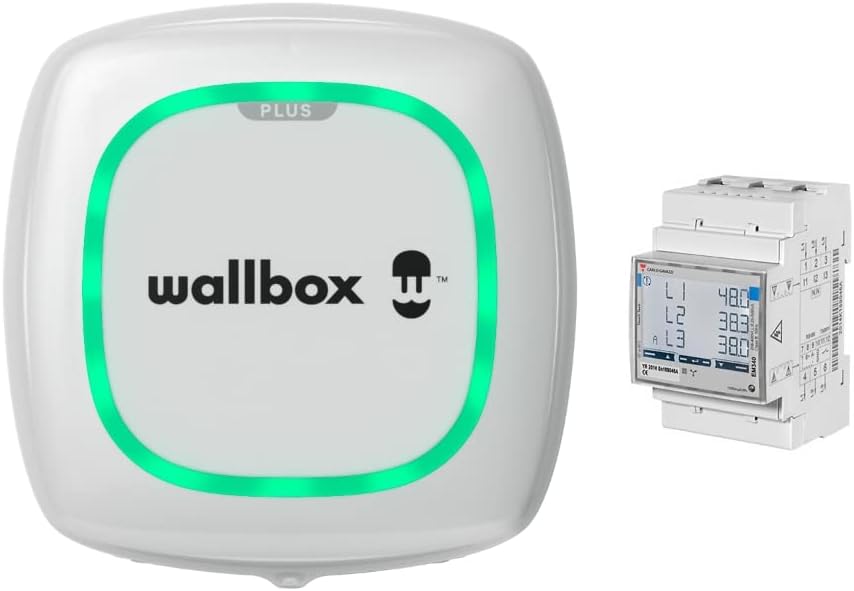
This image displays the Wallbox Pulsar Plus EV charger, a compact white unit with a green LED ring, positioned next to the Wallbox Power Meter. The Power Meter is a small, rectangular device designed for electrical panel installation, showing digital readings.
4. Configuració i instal·lació
The installation of the Wallbox Pulsar Plus charger requires professional expertise. It involves electrical wiring and adherence to specific safety standards. Please ensure a certified electrician performs the installation.
4.1 Comprovacions prèvies a la instal·lació
- Verify your home's electrical capacity can support the charger's power requirements (22 kW).
- Ensure the chosen installation location is suitable, considering cable length, accessibility, and environmental factors.
- Confirm all necessary permits and inspections are obtained as required by local regulations.
4.2 Passos d'instal·lació (més enllà)view for Professional)
- Muntatge: Securely mount the Pulsar Plus charger to a solid wall or suitable structure using the provided mounting kit.
- Connexió elèctrica: Connect the charger to your home's electrical supply. This includes wiring the main power, ground, and communication cables for the Power Meter.
- Power Meter Installation: Install the Power Meter in your electrical panel to enable Power Boost and Eco-Smart functionalities.
- Engegada inicial: Once all connections are secure, power on the charger.
- Configuració de l'aplicació: Download the MyWallbox app and follow the on-screen instructions to connect your charger via Bluetooth or WiFi. This involves registering the charger and setting up your user profile.

This image shows the Wallbox Pulsar Plus charger mounted on the side of a dark-colored building, likely a garage or shed, with solar panels on its roof. An electric vehicle is parked nearby, connected to the charger, illustrating an outdoor charging setup integrated with solar energy.
5. Instruccions de funcionament
Operating your Wallbox Pulsar Plus is primarily done through the MyWallbox mobile application, offering comprehensive control and monitoring features.
5.1 MyWallbox App Usage
- Baixeu i inicieu sessió: Download the MyWallbox app from your device's app store. Log in or create an account.
- Connectar al carregador: Ensure your smartphone's Bluetooth is enabled or connect to the same WiFi network as your charger. Select your charger from the app's device list.
- Start/Stop Charging: Plug the Type 2 connector into your EV's charging port. Use the app to start or stop charging manually.
- Programar la càrrega: Set specific times for charging sessions to take advantage de les tarifes d'electricitat fora de punta.
- Estat del monitor: View real-time charging status, power consumption, and session history.

The Wallbox Pulsar Plus charger and Power Meter are shown with a smartphone displaying the MyWallbox app. The app interface shows charging status, current ampera (32 AMPS), and energy consumption statistics, highlighting the smart control capabilities.
5.2 Eco-Smart Charging Modes
With the Power Meter installed, you can utilize solar energy for charging:
- Full-Green Mode: The charger will only use 100% green energy from your solar panels. If there isn't enough solar energy, charging will pause until sufficient solar power is available.
- Mode Eco: The charger prioritizes solar energy but will draw from the grid if solar production is insufficient to meet the minimum charging requirements. This ensures continuous charging while maximizing solar usage.
5.3 Power Boost Functionality
Power Boost dynamically adjusts the charging current to your EV based on your home's real-time energy consumption. This prevents overloading your electrical system while ensuring your EV charges at the maximum possible speed without exceeding your grid connection limit.
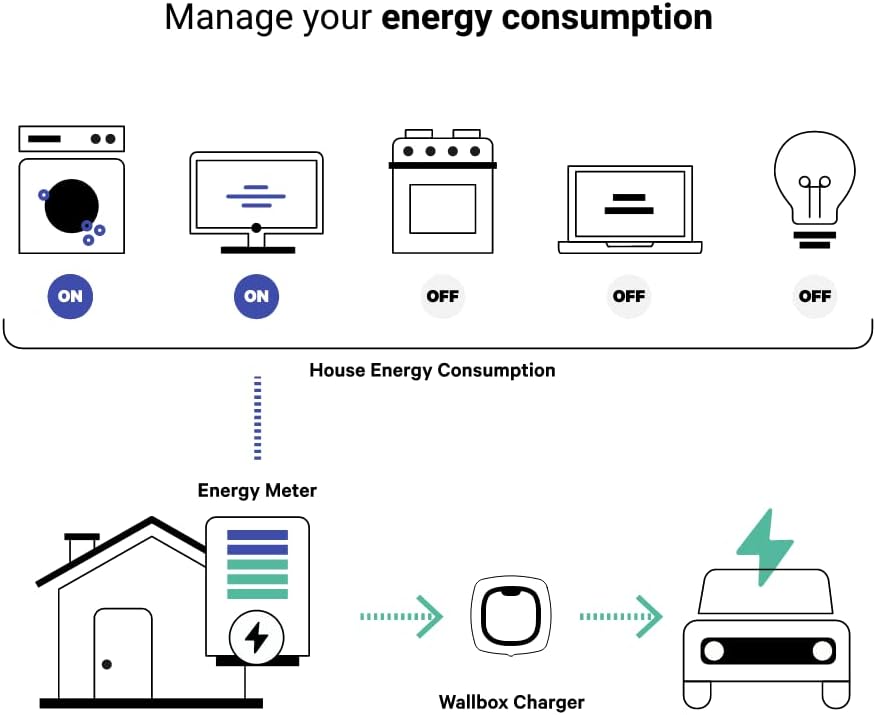
A schematic diagram depicts how the Wallbox charger manages household energy. It shows a house connected to an energy meter, which then communicates with the Wallbox charger. The charger intelligently distributes power to the electric car based on real-time household appliance usage (washing machine, monitor, oven, laptop, light bulb), optimizing energy flow and preventing overloads.
6. Manteniment
Regular maintenance ensures the longevity and optimal performance of your Wallbox Pulsar Plus charger.
- Neteja: Clean the exterior of the charger with a soft, damp cloth. Do not use abrasive cleaners or solvents. Ensure the charger is powered off before cleaning.
- Inspecció de cables i connectors: Periodically inspect the charging cable and connector for any signs of wear, cuts, or damage. Replace if necessary.
- Actualitzacions de programari: Keep your charger's firmware updated through the MyWallbox app. Updates often include performance improvements, new features, and security enhancements.
- Ventilació: Ensure the charger's ventilation areas are clear of obstructions to prevent overheating.
7. Solució De Problemes
If you encounter issues with your Wallbox Pulsar Plus, refer to the following common problems and solutions:
| Problema | Causa possible | Solució |
|---|---|---|
| El carregador no s'encén | No hi ha subministrament elèctric; s'ha saltat l'interruptor. | Check the circuit breaker in your electrical panel. Ensure the charger is properly connected to the power supply. |
| La càrrega no comença | Cable not properly connected; app issue; vehicle not ready to charge; Eco-Smart mode waiting for solar. | Ensure the cable is securely plugged into both the charger and the vehicle. Check the MyWallbox app for error messages or charging schedules. Verify your vehicle is ready to accept a charge. If in Full-Green mode, wait for sufficient solar production. |
| Velocitat de càrrega lenta | Power Boost limiting power; vehicle limitation; grid limitation. | Check household energy consumption via the MyWallbox app. Ensure Power Boost is configured correctly. Verify your vehicle's maximum charging rate. |
| Problemes de connectivitat de l'aplicació | WiFi/Bluetooth off; charger not connected to network; app outdated. | Ensure WiFi/Bluetooth is enabled on your phone. Restart your router and the charger. Update the MyWallbox app to the latest version. Re-pair the charger in the app. |
| Llums indicadors d'error | Internal fault; connection issue. | Refer to the MyWallbox app for specific error codes and descriptions. If the issue persists, contact Wallbox support. |
If you are unable to resolve an issue using these steps, please contact Wallbox customer support or your certified installer.
8. Especificacions
| Característica | Detall |
|---|---|
| Marca | Wallbox |
| Número de model | PLP1-0-2-4-9-001-METER |
| Potència de càrrega màxima | 22 kW |
| Longitud del cable | 5 metres |
| Tipus de connector | Tipus 2 |
| Connectivitat | WiFi, Bluetooth |
| Característiques especials | Eco-Smart, Power Boost, Fast Charging |
| Entorn d'instal·lació | Interior/Exterior |
| Color | Blanc |
| Pes de l'article | 5.88 quilos |
| Entrada Voltage | 240 Volts |
| Vol. De sortidatage | 400 volts (CC) |
| Fabricant | Wallbox |
| País d'origen | Espanya |
9. Garantia i Suport
For detailed warranty information, please refer to the official Wallbox website or the documentation provided with your product at the time of purchase. Warranty terms typically cover manufacturing defects for a specified period.
9.1 Atenció al client
If you require technical assistance, have questions about your charger, or need to report an issue, please contact Wallbox customer support through the following channels:
- Wallbox Official Weblloc: Visit the support section on the Wallbox weblloc web per a preguntes freqüents, guies de resolució de problemes i formularis de contacte.
- MyWallbox App: L'aplicació pot oferir opcions de suport directe o enllaços a recursos rellevants.
- Certified Installer: For installation-related issues, contact the certified electrician who installed your charger.
Please have your charger's model number (PLP1-0-2-4-9-001-METER) and serial number ready when contacting support.


