1. Introducció
This manual provides essential instructions for the safe and efficient operation of your XIAOMI Soundbar 3.1ch. Please read this manual thoroughly before using the product and retain it for future reference.
The XIAOMI Soundbar 3.1ch is designed to enhance your home theater audio experience with its 3.1 channel configuration and wireless subwoofer, delivering clear sound and powerful bass.
2. Informació de seguretat
- No exposeu el dispositiu a la pluja ni a la humitat per evitar incendis o descàrregues elèctriques.
- No obriu la c.asing. Demaneu totes les tasques de manteniment a personal qualificat.
- Assegureu-vos que hi hagi una ventilació adequada al voltant de la unitat. No bloquegeu cap obertura de ventilació.
- Place the soundbar and subwoofer on a stable, flat surface.
- Mantingueu el dispositiu allunyat de fonts de calor com ara radiadors, registres de calor, estufes o altres aparells (inclosos amplificadors) que produeixen calor.
- Utilitzeu només accessoris/accessoris especificats pel fabricant.
- Desendolleu l'aparell durant les tempestes amb llamps o quan no l'utilitzeu durant llargs períodes de temps.
3. Contingut del paquet
Verifiqueu que tots els elements siguin presents al paquet:
- XIAOMI Soundbar 3.1ch (Main Unit)
- Subwoofer sense fil
- Cable(s) d'alimentació
- Control remot
- Manual d'usuari (aquest document)
- Cable HDMI (pot variar segons la regió)
4. Producte acabatview
Familiarize yourself with the components of your XIAOMI Soundbar system.

Figura 4.1: Davant view of the XIAOMI Soundbar 3.1ch and its accompanying wireless subwoofer. The soundbar is a long, slender unit typically placed in front of a television, while the subwoofer is a larger, rectangular unit designed to provide deep bass sounds.
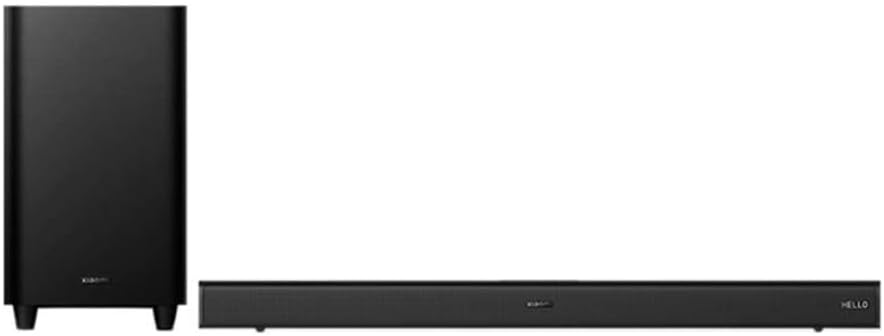
Figura 4.2: En angle view of the XIAOMI Soundbar 3.1ch and wireless subwoofer, showing the compact design of both units. The soundbar features a minimalist design with controls often integrated discreetly.
4.1 Soundbar Front Panel
- Botó d'encesa: Activa/desactiva la barra de so.
- Pujar/baixar el volum: Ajusta el nivell de volum.
- Botó font/entrada: Switches between input sources (HDMI, Bluetooth, Optical, etc.).
- Indicadors LED: Display current status or input mode.
4.2 Soundbar Rear Panel
- Port HDMI eARC: Connects to your TV for high-quality audio.
- Entrada òptica: Connects to devices with an optical audio output.
- Port USB: For firmware updates or media playback (if supported).
- Entrada d'alimentació: Connects to the AC power cord.
4.3 Subwoofer sense fil
- Entrada d'alimentació: Connects to the AC power cord.
- Botó de sincronització: For manual pairing with the soundbar (if automatic pairing fails).
- LED d'estat: Indicates pairing status.
5. Configuració
5.1 Col·locació
- Barra de so: Place the soundbar centrally below your TV. Ensure there are no obstructions in front of the soundbar.
- subwoofer: The wireless subwoofer can be placed anywhere in the room, ideally near a wall or corner for enhanced bass. Avoid placing it directly against a wall or in a cabinet, which can muffle the sound.
5.2 Connexió a l'alimentació
- Connecteu el cable d'alimentació a l'entrada d'alimentació de la barra de so i, a continuació, endolleu-lo a una presa de corrent.
- Connecteu el cable d'alimentació a l'entrada d'alimentació del subwoofer sense fil i, a continuació, endolleu-lo a una presa de corrent.
- The soundbar and subwoofer will automatically attempt to pair. The subwoofer's status LED will indicate pairing status (e.g., blinking while searching, solid when connected).
5.3 Connexió al televisor
Trieu un dels mètodes de connexió següents:
Option 1: HDMI eARC (Recommended)
- Connect one end of an HDMI cable to the HDMI eARC port on your TV.
- Connect the other end of the HDMI cable to the HDMI eARC port on the soundbar.
- On your TV, enable HDMI-CEC (Consumer Electronics Control) and eARC/ARC functions in the audio settings.
Option 2: Optical Cable
- Connect one end of an optical cable to the Optical OUT port on your TV.
- Connect the other end of the optical cable to the Optical IN port on the soundbar.
- On your TV, set the audio output to "Optical" or "PCM".
6. Instruccions de funcionament
6.1 Encès/Apagat
- Premeu el botó Poder botó de la barra de so o del comandament a distància per encendre o apagar la unitat.
6.2 Selecció de la font d'entrada
- Premeu el botó Font or Entrada button on the soundbar or remote control repeatedly to cycle through available input sources (e.g., HDMI eARC, Optical, Bluetooth).
- The LED indicators on the soundbar will show the currently selected input.
6.3 Control de volum
- Premeu Puja el volum (+) or Baixar el volum (-) botons de la barra de so o del comandament a distància per ajustar el volum.
- Premeu el botó Silenciar button on the remote control to mute or unmute the sound.
6.4 Vinculació Bluetooth
- Premeu el botó Bluetooth button on the remote control or cycle through inputs until "Bluetooth" mode is selected. The Bluetooth indicator will blink.
- Al dispositiu mòbil, activeu el Bluetooth i cerqueu els dispositius disponibles.
- Select "XIAOMI Soundbar 3.1ch" from the list.
- Once paired, the Bluetooth indicator on the soundbar will become solid.
6.5 NFC Pairing (Near Field Communication)
Si el vostre dispositiu és compatible amb NFC:
- Assegureu-vos que l'NFC estigui activat al vostre dispositiu mòbil.
- Tap your NFC-enabled device gently against the NFC tag area on the soundbar (refer to product diagram for exact location).
- Confirm the pairing request on your mobile device.
7. Manteniment
7.1 Neteja
- Always unplug the soundbar and subwoofer from the power outlet before cleaning.
- Use a soft, dry, lint-free cloth to wipe the surfaces of the soundbar and subwoofer.
- Do not use liquid cleaners, aerosol sprays, or abrasive cleaning agents, as they may damage the finish or internal components.
7.2 Emmagatzematge
- If storing the unit for an extended period, unplug it from the power source and store it in a cool, dry place, away from direct sunlight and extreme temperatures.
8. Solució De Problemes
| Problema | Causa possible | Solució |
|---|---|---|
| Sense poder | Cable d'alimentació no connectat correctament. | Ensure power cords are firmly plugged into the soundbar/subwoofer and wall outlet. |
| Sense so | Font d'entrada incorrecta seleccionada. El volum és massa baix o està silenciat. Els cables no estan connectats correctament. | Seleccioneu la font d'entrada correcta. Augmenta el volum i comprova l'estat del silenci. Reconnect HDMI or Optical cables. |
| El subwoofer no s'aparella | Fora d'abast o interferència. Manual pairing required. | Acosta el subwoofer a la barra de so. Press the pairing button on the subwoofer and then on the soundbar (if available, refer to specific product instructions for manual pairing sequence). |
| Problemes de connexió Bluetooth | El dispositiu no està en mode de vinculació. Interferència. | Assegureu-vos que la barra de so estigui en mode d'emparellament Bluetooth. Move Bluetooth device closer to the soundbar. Disconnect and reconnect Bluetooth. |
9. Especificacions
- Model: Soundbar 3.1ch
- Tipus d'altaveu: Barra de so amb subwoofer sense fil
- Configuració del canal de so envoltant: 3.1
- Potència de sortida màxima dels altaveus: 430 watts
- Tecnologia de connectivitat: Bluetooth, NFC, HDMI eARC, Optical
- Connectivitat del subwoofer: Sense fil
- Diàmetre del subwoofer: 6.5 polzades
- Mètode de control: Remot
- Font d'alimentació: Elèctric amb cable
- Dimensions del producte: 11.02 x 4.33 x 9.06 polzades
- Pes de l'article: 24.2 lliures
10. Garantia i Suport
XIAOMI products are manufactured to the highest quality standards. For detailed warranty information, please refer to the warranty card included with your product or visit the official XIAOMI weblloc web. Conserveu el rebut de compra com a comprovant de compra.
For technical support or service inquiries, please contact XIAOMI customer service through their official channels. Contact information can typically be found on the XIAOMI weblloc web o a l'embalatge del producte.


