1. Introducció
Thank you for choosing the CHONCHOW Wireless LED Rechargeable Mouse. This device offers versatile connectivity options, including 2.4GHz USB and Bluetooth, along with a silent click design and adjustable DPI settings. Its rechargeable battery ensures long-lasting performance, making it suitable for various computing environments. This manual provides essential information for setting up, operating, and maintaining your mouse.
2. Contingut del paquet
- CHONCHOW Wireless LED Rechargeable Mouse
- Receptor USB de 2.4 GHz
- Adaptador USB-C a USB-A
- Cable de càrrega USB-C
- Manual d'usuari

Image 2.1: The CHONCHOW Wireless LED Rechargeable Mouse, accompanied by its 2.4GHz USB receiver and a USB-C to USB-A adapter, demonstrating the primary components included in the package.
3. Producte acabatview
Familiarize yourself with the various parts of your CHONCHOW mouse:
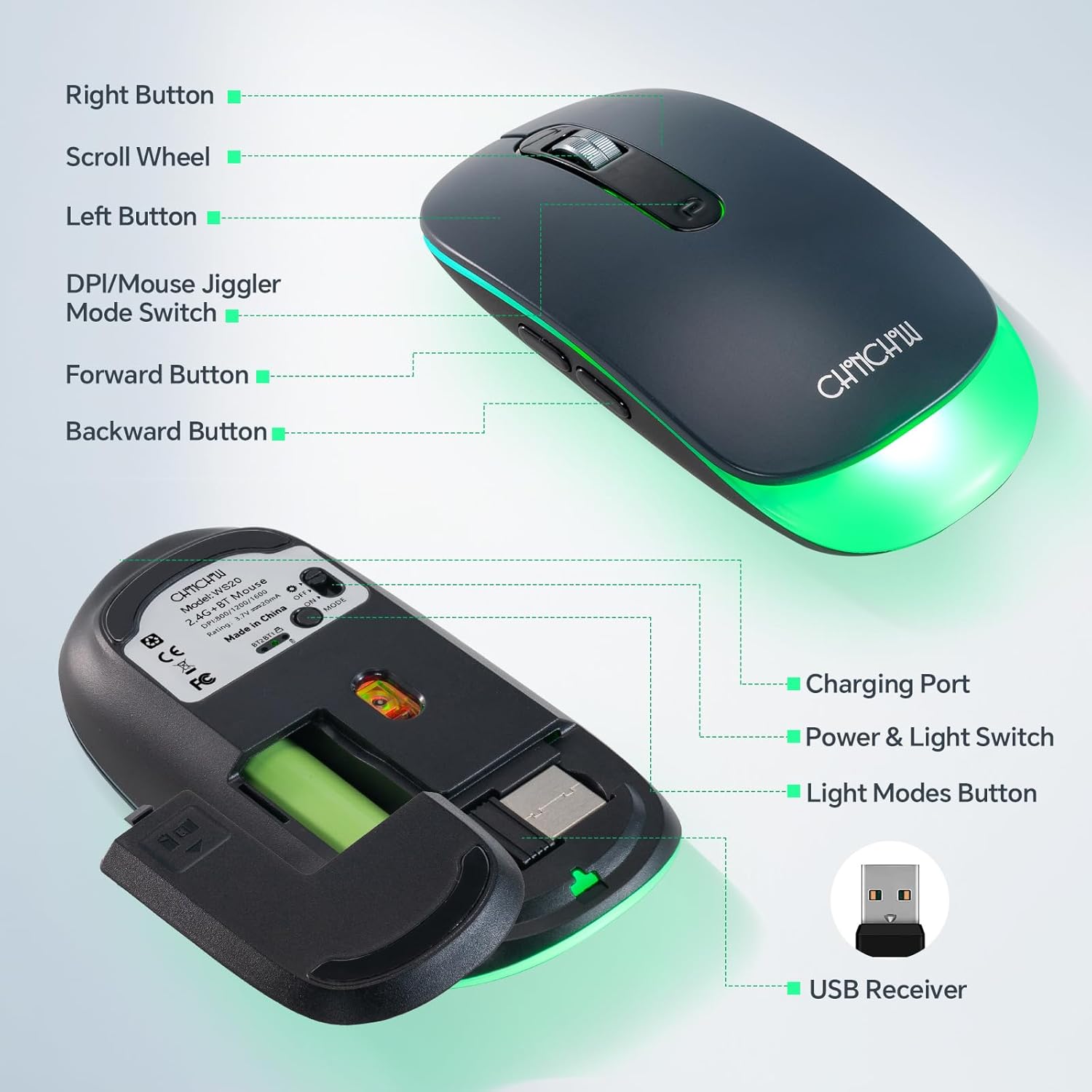
Image 3.1: A detailed diagram illustrating the various components of the CHONCHOW mouse, including the Left Button, Right Button, Scroll Wheel, DPI/Mouse Jiggler Mode Switch, Forward Button, Backward Button, Charging Port, Power & Light Switch, Light Modes Button, and the USB Receiver storage compartment.
- Botó esquerre: Funció estàndard del clic esquerre.
- Botó dret: Funció estàndard del clic dret.
- Roda de desplaçament: Per al desplaçament vertical i el clic amb el botó central.
- DPI/Mouse Jiggler Mode Switch: Adjusts cursor sensitivity (DPI) and activates mouse jiggler mode.
- Botó Endavant: Navega cap endavant web navegadors o file exploradors.
- Botó enrere: Navega cap enrere web navegadors o file exploradors.
- Port de càrrega: Port USB-C per recarregar la bateria interna.
- Power & Light Switch: Turns the mouse on/off and controls the LED backlight.
- Light Modes Button: Cycles through different LED backlight modes.
- Receptor USB: 2.4GHz wireless receiver, stored in the mouse's bottom compartment.
4. Configuració
4.1 Càrrega inicial
Before first use, it is recommended to fully charge the mouse. Connect the provided USB-C charging cable to the mouse's charging port and the other end to a USB power source (e.g., computer USB port, USB wall adapter). The LED indicator will show charging status.
Connexió sense fil 4.2 de 2.4 GHz
- Locate the USB receiver in the compartment on the bottom of the mouse.
- Insert the USB receiver into an available USB-A port on your computer. If your device only has USB-C ports, use the included USB-C to USB-A adapter.
- Turn on the mouse using the Power & Light Switch on the bottom.
- El ratolí s'hauria de connectar automàticament al dispositiu.
4.3 Connexió Bluetooth
The mouse supports two Bluetooth channels (BT1 and BT2) for connecting to multiple devices.
- Turn on the mouse using the Power & Light Switch.
- Press the DPI/Mouse Jiggler Mode Switch to cycle through connection modes until the indicator light for BT1 or BT2 is active.
- Per a la primera parella: Press and hold the DPI/Mouse Jiggler Mode Switch for 3-5 seconds until the indicator light flashes rapidly. This indicates pairing mode.
- On your device (PC, Mac, tablet, phone):
- Aneu a la configuració de Bluetooth.
- Cerca nous dispositius.
- Select "CHONCHOW Mouse" (or similar name) from the list to pair.
- Un cop emparellat, l'indicador lluminós deixarà de parpellejar i romandrà fix durant uns segons abans d'apagar-se.
- To switch between paired Bluetooth devices, simply press the DPI/Mouse Jiggler Mode Switch to select BT1 or BT2.

Image 4.1: This illustration demonstrates the multi-connect capabilities of the CHONCHOW mouse, showing simultaneous connections to a Macbook via Bluetooth 2 (BT2), a tablet via Bluetooth 1 (BT1), and a desktop computer using the 2.4GHz USB receiver.
5. Instruccions de funcionament
5.1 Ajust de DPI
The mouse features adjustable DPI (Dots Per Inch) settings to control cursor sensitivity. Press the DPI/Mouse Jiggler Mode Switch (located on the top of the mouse) to cycle through the available DPI levels: 800, 1200, and 1600 DPI. Choose the setting that best suits your preference and task.
5.2 Silent Click
All buttons on the CHONCHOW mouse are designed for ultra-silent operation, producing minimal noise (under 15dB) during use. This feature is ideal for quiet environments, ensuring you do not disturb others.
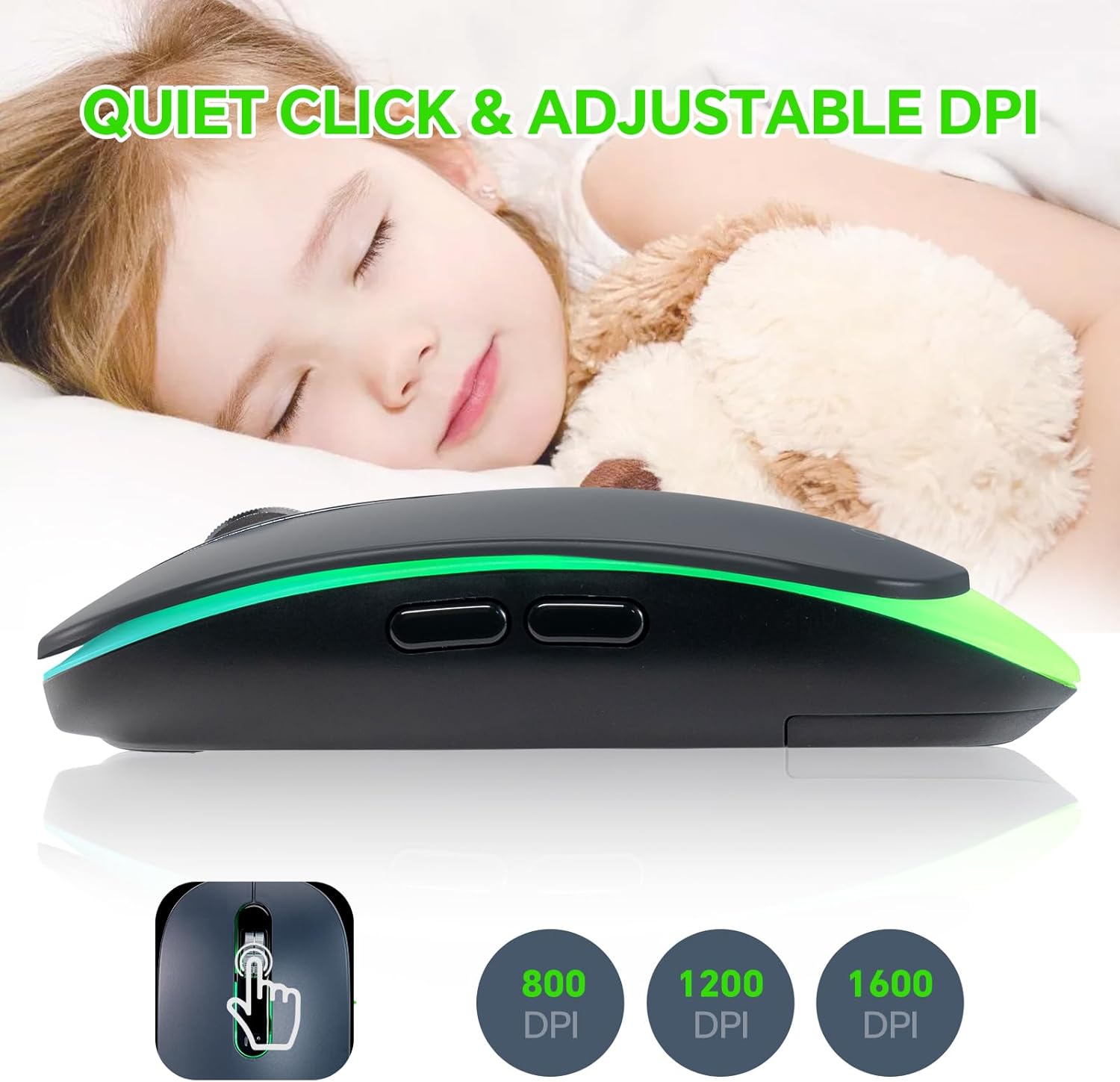
Image 5.1: This image emphasizes the quiet click functionality and adjustable DPI settings (800, 1200, 1600) of the CHONCHOW mouse, illustrating its suitability for environments where minimal noise is desired.
Retroil·luminació de 5.3 LED
The mouse features a soft LED backlight. Use the Light Modes Button on the bottom of the mouse to cycle through different lighting effects or to turn the backlight off to conserve battery life.
5.4 Mode de vibració del ratolí
To activate the mouse jiggler feature, press and hold the DPI/Mouse Jiggler Mode Switch for approximately 3 seconds until the mouse cursor starts moving slightly on its own. This feature prevents your computer from going into sleep mode or locking the screen due to inactivity. Press the switch again to deactivate.
6. Bateria i càrrega
The CHONCHOW mouse is equipped with a built-in 500mAh rechargeable Lithium-Ion battery, providing extended usage time. When the backlight is off, the mouse can operate for over 50 hours on a single charge.

Image 6.1: This graphic highlights the mouse's built-in 500mAh rechargeable Li-ion battery, capable of providing over 60 hours of continuous playtime, emphasizing its long-lasting power.
6.1 Càrrega del ratolí
When the battery is low, the mouse's LED indicator may flash or change color. Connect the mouse to a power source using the provided USB-C cable. A full charge typically takes a few hours.
6.2 Emergency AA Battery Option
In an emergency, if the rechargeable battery is depleted and you do not have access to a charging cable, you can temporarily replace the internal rechargeable battery with a standard AA battery. Open the battery compartment on the bottom of the mouse to perform this exchange. Ensure correct polarity when inserting the AA battery.
7. Manteniment
7.1 Neteja
To clean your mouse, gently wipe its surface with a soft, damp cloth. Avoid using harsh chemicals or abrasive materials, as these can damage the finish. Ensure no liquid enters the mouse's internal components.
7.2 Cura de la bateria
- Eviteu exposar el ratolí a temperatures extremes.
- Do not attempt to disassemble or replace the built-in rechargeable battery unless using the emergency AA battery option as described.
- Charge the mouse regularly to maintain battery health, even if not in frequent use.
8. Solució De Problemes
- El ratolí no respon:
- Assegureu-vos que el ratolí estigui encès.
- Comproveu el nivell de la bateria i carregueu-la si cal.
- For 2.4GHz connection, ensure the USB receiver is securely plugged in. Try a different USB port.
- For Bluetooth connection, ensure the mouse is in the correct BT mode (BT1/BT2) and re-pair if needed.
- El moviment del cursor és erràtic o lent:
- Adjust the DPI setting using the DPI/Mouse Jiggler Mode Switch.
- Assegureu-vos que el ratolí s'utilitzi sobre una superfície neta i no reflectant.
- Bluetooth connection drops frequently:
- Ensure the mouse is within the effective range of your device.
- Remove any potential sources of interference (e.g., other wireless devices).
- Prova de tornar a emparellar el ratolí amb el dispositiu.
- LED backlight not working:
- Press the Light Modes Button on the bottom of the mouse to cycle through modes or turn it on.
- Assegureu-vos que el ratolí tingui prou bateria.
9. Especificacions
| Model | CH-601 |
| Tecnologia de connectivitat | Sense fil de 2.4 GHz, Bluetooth (BT1, BT2) |
| Detecció de moviment | Òptic |
| Configuració de DPI | 800 / 1200 / 1600 |
| Característiques especials | LED Lights, Lightweight, Portable, Rechargeable, Silent Click, Mouse Jiggler |
| Tipus de bateria | 1 x Lithium Ion (included), 500mAh |
| Opció de bateria d'emergència | 1 x piles AA (no incloses) |
| Pes de l'article | 3.52 unces (aproximadament 100 grams) |
| Dimensions del paquet | 4.72 x 3.31 x 1.34 polzades |
| Compatibilitat | Mac, Windows 7/8/10, PC, Laptops, Tablets, Smart TVs |
10. Garantia i Suport
Specific warranty information is not provided in this manual. For details regarding warranty coverage, technical support, or service inquiries, please refer to the product packaging or contact CHONCHOW customer support directly through their official weblloc web o el venedor on es va comprar el producte.


