1. Introducció
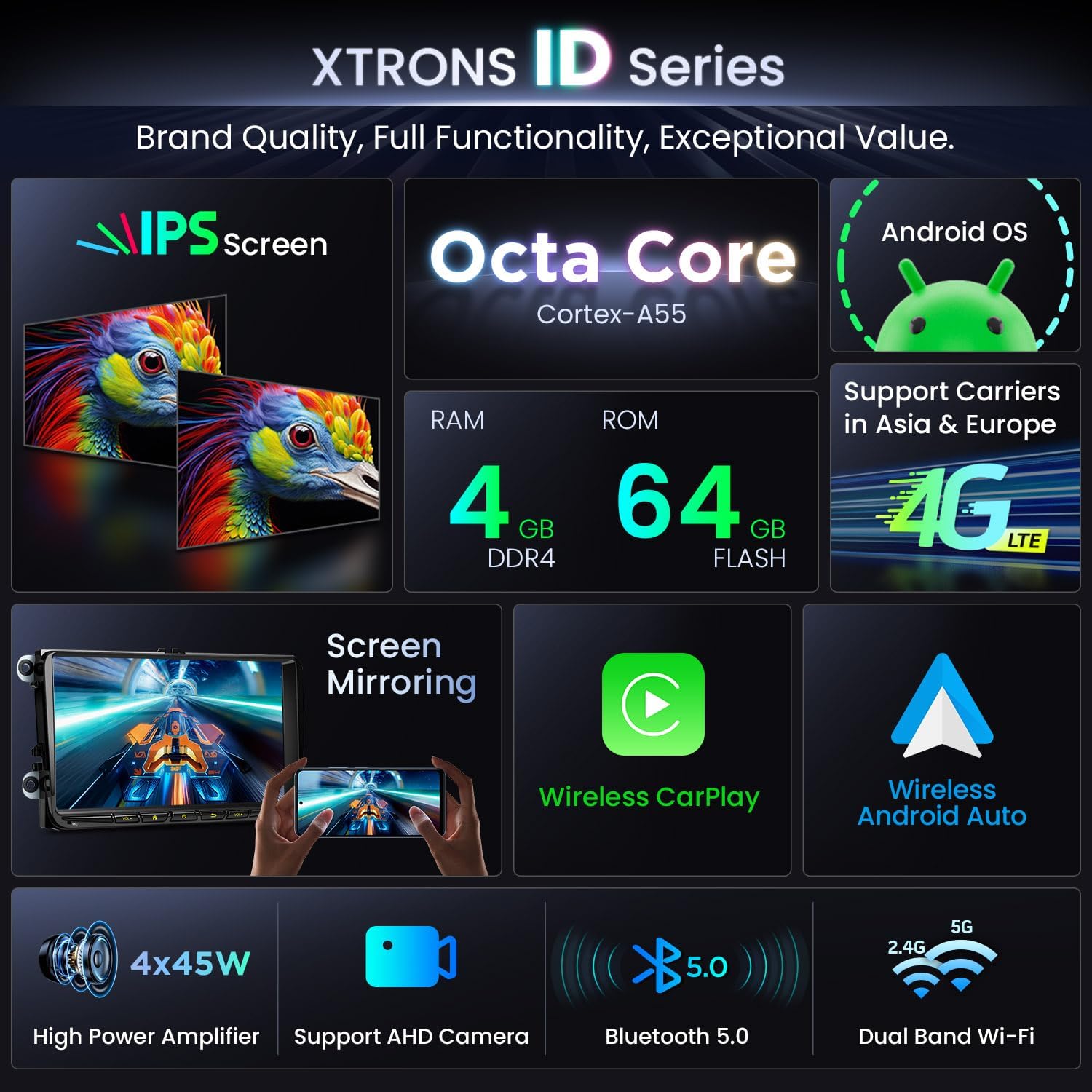
This manual provides detailed instructions for the installation, operation, and maintenance of your XTRONS 9-inch IPS HD Screen Android Car Radio. This unit features an Octa-Core A55 processor, 4GB RAM, 64GB internal memory, Android 14 operating system, built-in 4G LTE, AKM DSP, Car Play, Android Auto, WiFi, Bluetooth, and GPS navigation. Please read this manual thoroughly before use to ensure proper functionality and safety.
Imatge 1.1: acabatview of the XTRONS 9-Inch Android Car Radio unit.
2. Notes importants de compatibilitat
Abans de la instal·lació, torneu amb curaview the compatibility information to ensure this unit is suitable for your vehicle.
- Muntatge del vehicle: This device is designed for specific VW, Skoda, and Seat models. Refer to the detailed list below.
- Center Console Check: For VW T5 and Skoda vehicles, compare your car's center console with the provided images. If the shape does not match, this unit is NOT compatible.
- Sound Systems: This unit does NOT support vehicles equipped with Dynaudio or Fender sound systems.
- Additional Cables: Depending on your vehicle's specific configuration, additional cables may be required for installation (e.g., for original reversing cameras).

Image 2.1: List of applicable car models and years.

Image 2.2: Visual guide for checking center console compatibility and identifying necessary cables.
3. Contingut del paquet
Verifiqueu que tots els elements que s'enumeren a continuació s'inclouen al vostre paquet:
- 1 x XTRONS 9-Inch Android Car Radio Unit
- 2 x Arnès de cablejat ISO
- 2 x cable USB
- 1 x antena 4G
- 1 x Antena GPS
- 1 x Cable de ranura per a targeta SIM
- 1 x Original USB Cable Adapter
- 1 x micròfon
- 1 x Manual d'usuari (aquest document)
- 1 x Caixa CANbus
- 1 cable CANbus
- 1 x cable de càmera
4. Configuració i instal·lació
Professional installation is recommended. If performing self-installation, ensure the vehicle's battery is disconnected before starting. Refer to your vehicle's specific wiring diagrams and the provided cables.
4.1 Connexions de cablejat
- Connexió d'alimentació: Connect the ISO wiring harness to your vehicle's power port. Ensure correct pin alignment.
- Connexió CANbus: Connect the CANbus box and cable to integrate with your vehicle's systems for steering wheel controls and original vehicle information display.
- Antenes: Connect the GPS antenna and 4G antenna to their respective ports on the unit. Position them for optimal signal reception.
- USB i micròfon: Connect the USB cables and external microphone. Route the microphone to a suitable location for clear audio.
- Connexions opcionals: If using an original reversing camera, connect the appropriate camera cable. If your vehicle has a 40-pin or 36-pin power port with an original reversing camera, you may need to order an additional ICE/SS/VWCAN01 cable.
- Targeta SIM: Insert a Micro-SIM card (not included) into the SIM card slot cable for 4G network access.
4.2 Muntatge de la unitat
Carefully mount the head unit into your vehicle's double-DIN slot. Ensure all cables are securely connected and not pinched. Test the unit before fully reassembling your dashboard.
5. Instruccions de funcionament
This section details the primary functions and features of your XTRONS Android Car Radio.
5.1 Funcionament bàsic
- Encès/apagat: The unit typically powers on with the vehicle's ignition. Press and hold the power button for manual control.
- Pantalla tàctil: The 9-inch IPS HD display features G+G touch screen technology for responsive control.
- Control de volum: Use the physical buttons or on-screen controls to adjust volume.
5.2 Android Operating System
The unit runs on an optimized Android 14 operating system, providing a familiar interface and access to various applications.
- Navegació: Utilize the built-in GPS for navigation with support for GPS, BDS, GLONASS, and Galileo.
- Instal·lació de l'aplicació: Baixeu i instal·leu aplicacions des de Google Play Store.
- Configuració del sistema: Access the settings menu to customize display, audio, network, and other system preferences.
5.3 Característiques de connectivitat
- CarPlay i Android Auto: Connect your iOS or Android phone wirelessly or via cable for integrated smartphone functionality. This allows access to Siri/Google Assistant, navigation, music, and messaging directly on the unit's screen.
- Replica de pantalla: Mirror your smartphone's screen onto the car radio display.
- Bluetooth 5.0: Pair your phone for hands-free calling and audio streaming (A2DP supported).
- Wi-Fi: Connect to a Wi-Fi hotspot using the dual-band WLAN module for internet access.
- 4G LTE: With a Micro-SIM card inserted, enjoy seamless 4G connectivity for online services, supporting European and Asian 4G networks (FDD-LTE Bands 1,3,5,7,8,20; TDD-LTE Bands 38,40,41; WCDMA Bands 1,5,8).

Image 5.1: Details on 4G LTE connectivity and supported frequencies.
5.4 Àudio i pantalla
- AKM DSP: The built-in AKM DSP chip provides reliable audio processing and flexible adjustment options for sound customization.
- Ampmés viu: A powerful TDA7388 4 x 45W amplifier delivers clear sound.
- Ràdio: Features an STMicroelectronics SI4755 radio with RDS for enhanced radio experience.
- Visualització: The 9-inch HD display offers 1280x720 pixel resolution and 1080P video support with advanced IPS technology for ultra-wide 178° viewing angles and outstanding color accuracy.

Image 5.2: Details on the 9-inch HD IPS display.

Image 5.3: Customizable audio settings with AKM DSP.
5.5 Integració de vehicles
- Controls del volant: Optimized CANbus decoding allows the unit to integrate with your vehicle's steering wheel controls.
- Original Vehicle Information: Display various original vehicle functions and information, including parking sensors, PDC, reversing radar, air conditioning info, door status, fuel consumption, mileage, battery voltage, engine speed, radio frequency, Bluetooth status, GPS status, ACC control, reversing control, light control, and handbrake control.

Image 5.4: Display of vehicle information and steering wheel control integration.
5.6 User Interface Themes
The unit supports multiple UI themes, allowing you to customize the interface design to your preference.

Imatge 5.5: Ex.amples of various UI themes.
6. Manteniment
To ensure the longevity and optimal performance of your XTRONS car radio, follow these maintenance guidelines:
- Neteja: Feu servir un drap suau i sec per netejar la pantalla i la unitat. Eviteu productes de neteja o dissolvents abrasius.
- Actualitzacions de programari: Periodically check for and install software updates to ensure the system runs efficiently and has the latest features.
- Condicions ambientals: Eviteu exposar la unitat a temperatures extremes, a la llum solar directa durant períodes prolongats o a una humitat excessiva.
- Connexions de cable: Comproveu periòdicament totes les connexions dels cables per assegurar-vos que estiguin ben fixades.
7. Solució De Problemes
If you encounter issues with your XTRONS car radio, refer to the following common troubleshooting steps:
- Sense energia: Check all power connections and the vehicle's fuse box. Ensure the unit is properly seated.
- Sense so: Verify speaker connections, volume levels, and audio output settings. Check if the mute function is active.
- Mala recepció de ràdio: Ensure the radio antenna is properly connected and positioned. Check for local interference.
- Problemes amb el senyal GPS: Assegureu-vos que l'antena GPS estigui instal·lada correctament i que tingui una visió clara view del cel.
- Bluetooth/Wi-Fi Connection Problems: Ensure Bluetooth/Wi-Fi is enabled on both the unit and your device. Try re-pairing or reconnecting.
- El sistema no respon: If the unit becomes unresponsive, try restarting it by holding the power button. If the issue persists, a factory reset may be necessary (note: this will erase all user data).
- Problemes de compatibilitat: Re-verify all compatibility notes, especially regarding vehicle models and sound systems.
For persistent issues, contact XTRONS customer support.
8. Especificacions
| Marca | XTRONS |
| Número de model | fe67dce7-e146-4896-ac23-00ca1b849641 |
| Mida de la pantalla | 9 polzades |
| Tipus de visualització | LCD IPS HD |
| Resolució | 1280 x 720 píxels |
| Sistema operatiu | Android 14 |
| Processador | Octa-Core A55 |
| RAM | 4 GB |
| Emmagatzematge intern | 64 GB |
| Potència de sortidatage | 4 x 45W (TDA7388 Ampmés viu) |
| Mode de sortida d'àudio | Stereo, Surround (4.0 Channel) |
| Connectivitat | Bluetooth 5.0, Wi-Fi (Dual Band), USB, 4G LTE |
| Característiques especials | Built-in 4G LTE, Built-in AKM DSP, Wireless Car Play, Wireless Android Auto, GPS Navigation, AHD Camera Support, Steering Wheel Control Integration |
| Dispositius compatibles | For Seat (Alhambra, Altea, Leon Mk2, Toledo), For Skoda (Fabia, Roomster, Octavia, Yeti, Superb), For Volkswagen (various models) |
| Dimensions del paquet | 41.8 x 24.5 x 18.9 cm |
| Pes de l'article | 2.69 kg |
9. Garantia i Suport
XTRONS is committed to providing high-quality products and customer service.
- Garantia: Aquest producte té una garantia d'un any des de la data de compra.
- Devolucions/Substitucions: XTRONS offers a 30-day refund policy and a replacement or repair service for issues arising more than 30 days after purchase, within the warranty period.
- Suport tècnic: Professional technical support is available to assist with any questions or issues you may encounter. Please refer to the XTRONS official weblloc per obtenir informació de contacte.


