1. Introducció
This manual provides detailed instructions for the proper use and maintenance of the Autel MaxiSys MS906S Vehicle Diagnostic Tablet. The MS906S is a professional diagnostic scan tool designed for comprehensive vehicle system analysis, service functions, ECU coding, and bi-directional control. It operates on Android 4.4 and features an 8-inch touchscreen with a powerful 6-core processor.

Image 1.1: The Autel MaxiSys MS906S diagnostic tablet and its VCI (Vehicle Communication Interface) Mini.
2. Configuració
2.1. Desembalatge i contingut del paquet
Upon opening the package, verify that all components are present according to the packing list. The MS906S comes with various OBD2 connectors for different vehicle brands, a VCI Mini, and essential accessories.
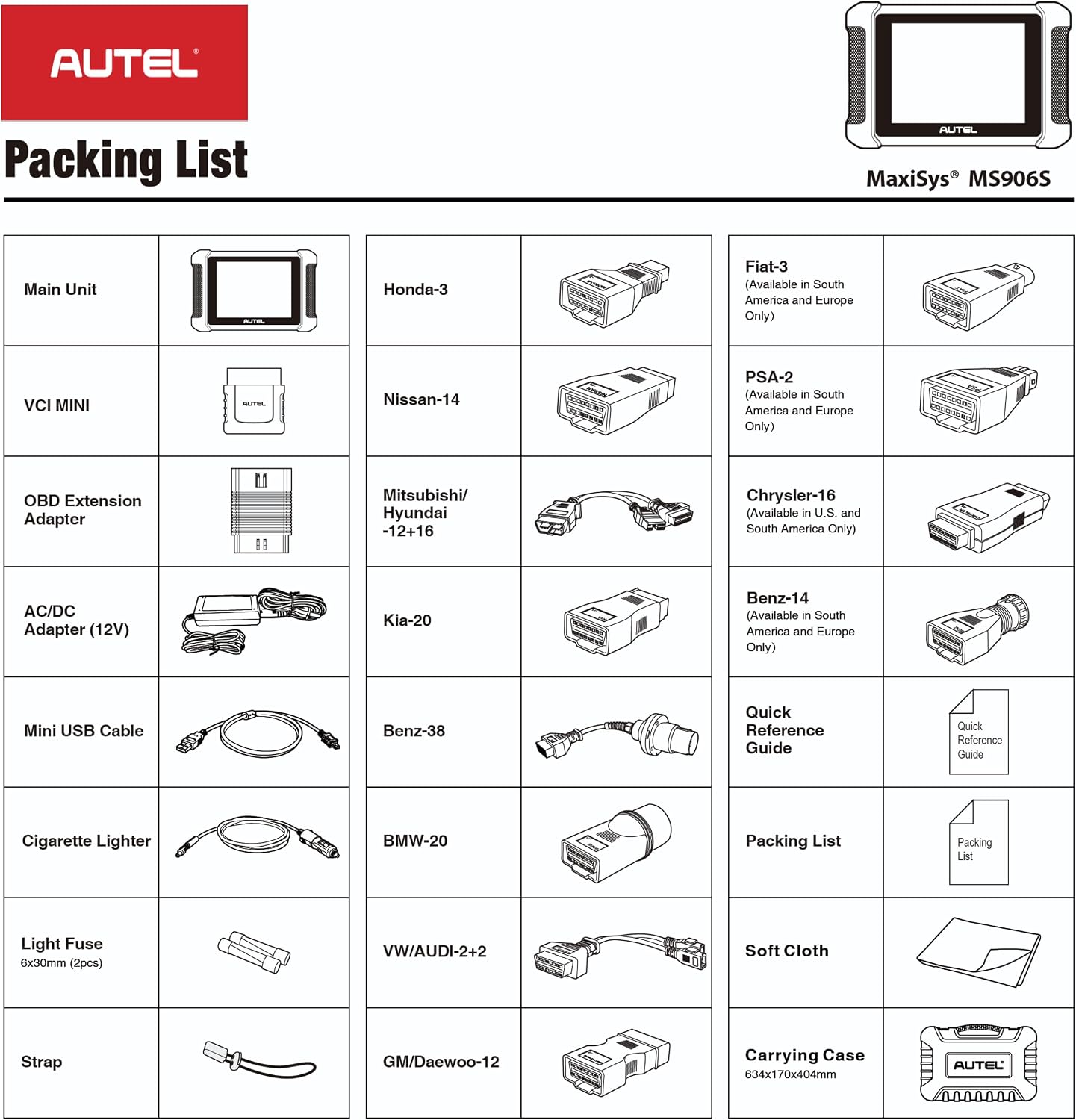
Image 2.1: A visual representation of the Autel MaxiSys MS906S packing list, showing the main unit, VCI Mini, various adapters, cables, and accessories.
Articles inclosos:
- Main Unit (Diagnostic Tablet)
- VCI Mini (Vehicle Communication Interface)
- OBD Extension Adapter
- AC/DC Adapter (12V)
- Mini cable USB
- Adaptador per encenedor de cigarrets
- Light Fuse (6x30mm, 2pcs)
- Corretja
- Various OBD2 Connectors (e.g., Honda-3, Nissan-14, Mitsubishi/Hyundai-12+16, Kia-20, Benz-38, BMW-20, VW/AUDI-2+2, GM/Daewoo-12, Fiat-3, PSA-2, Chrysler-16, Benz-14)
- Guia de referència ràpida
- Packing List Document
- Drap suau
- Maleta de transport
2.2. Engegada i càrrega inicials
Before first use, ensure the tablet is fully charged. Connect the AC/DC adapter to the tablet and a power outlet. The tablet will indicate charging status. Press and hold the power button to turn on the device.
2.3. Connecting the VCI Mini
The VCI Mini facilitates wireless communication between the tablet and the vehicle. Plug the VCI Mini into the vehicle's OBD-II port. Ensure a secure connection. The VCI Mini communicates with the tablet via Bluetooth, allowing for wireless diagnosis up to 50 meters.
3. Instruccions de funcionament
3.1. S'ha acabat la interfície principalview
The tablet's main screen provides access to key functions:
- Diagnòstic: For performing vehicle system scans and retrieving diagnostic trouble codes.
- Servei: Accesses various maintenance and reset functions.
- Shop Manager: Manages customer and vehicle information.
- Data Manager: Stores and reviews diagnostic data.
- Configuració: Configures device preferences and system settings.
- Actualització: Manages software updates for the tablet and vehicle software.
3.2. Diagnòstic complet del sistema
The MS906S can access all available vehicle modules to read and clear Diagnostic Trouble Codes (DTCs), retrieve live data streams, and view ECU information. This includes systems such as Engine, Transmission, Airbag, ABS, ESP, TPMS, SRS, BMS, Immobilizer, Gateway, and Steering.

Image 3.1: Illustration of the Autel MaxiSys MS906S performing all systems diagnostics on a vehicle, highlighting various accessible electronic and on-board systems.
Using AutoVIN:
The Smart AutoVIN technology automatically identifies vehicle information for efficient diagnosis. If AutoVIN does not work on a specific vehicle, manual VIN entry may be required.
3.3. Funcions especials
The device supports over 31 service functions for various maintenance tasks. Examples inclouen:
- Restabliment d’oli
- Restabliment del fre d'estacionament electrònic (EPB)
- Calibració del sensor d'angle de direcció (SAS).
- Restabliment del sistema de gestió de bateries (BMS)
- Reinicialització de l'accelerador
- Calibratge de la suspensió
- Sagnat de l’ABS
- Adaptació de la transmissió
- Codificació d'injectors
- VGT Turbo Calibration
- Equilibri de poder
- Idle Relearn
Compatibility for specific functions varies by vehicle make and model. It is recommended to verify compatibility by providing the vehicle's VIN to Autel support if unsure.
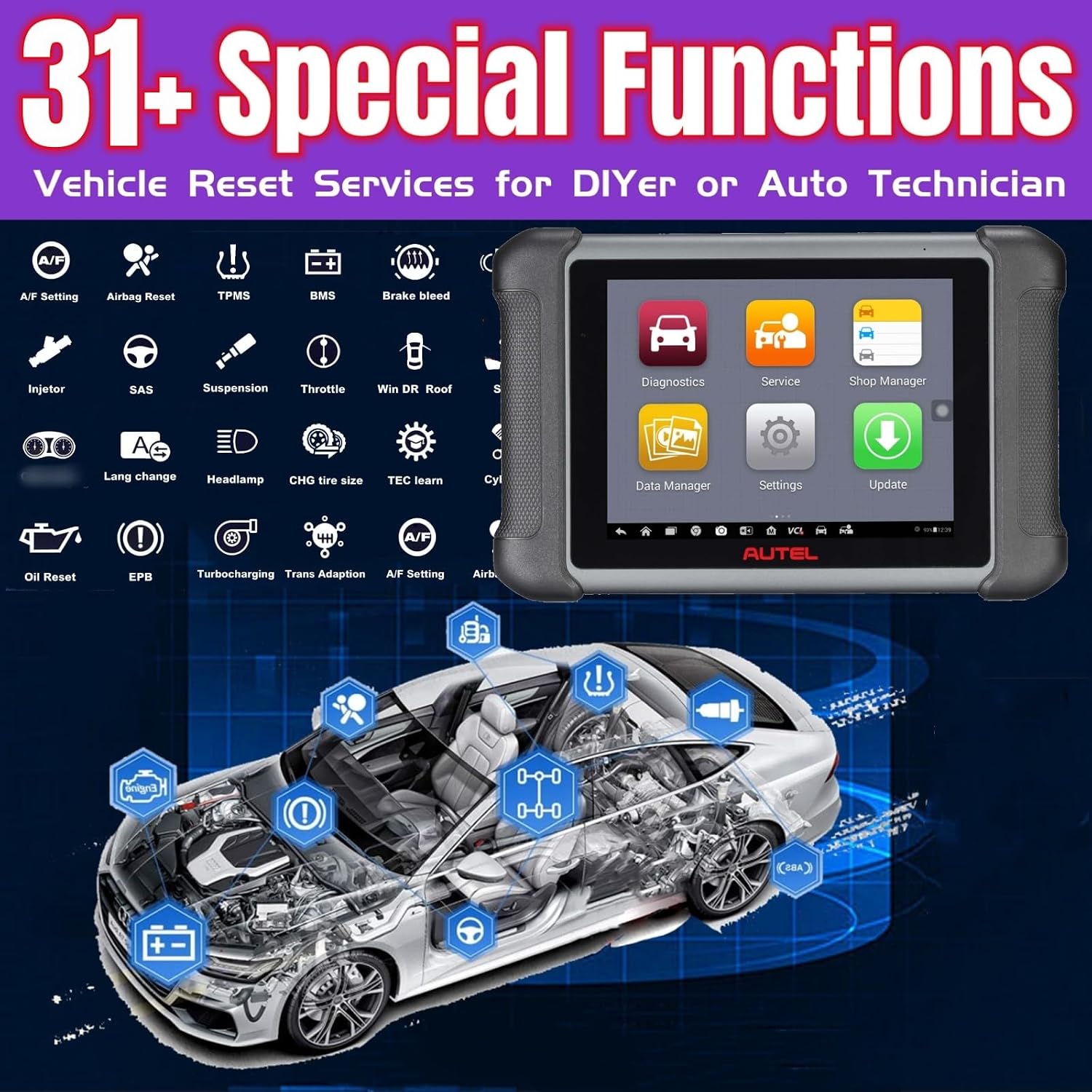
Imatge 3.2: acabatview of the 31+ special functions available on the Autel MaxiSys MS906S, including various vehicle reset services.
3.4. ECU Coding and Adaptation
ECU coding allows for repairing and maintaining modern vehicles by modifying pre-programmed options. This function can optimize vehicle performance and efficiency by adjusting parameters within the Engine Control Unit (ECU), which controls various vehicle functions like the engine, transmission, and brakes.

Image 3.3: Visual representation of ECU coding and adaptations capabilities of the MS906S, illustrating how it can improve vehicle performance and simulate high-end car functions by changing preprogrammed options.
3.5. Control bidireccional (proves actives)
The MS906S features bi-directional control, enabling active tests to assess the integrity of systems or components. This involves sending commands to the vehicle's ECU to operate actuators, such as:
- Opening/Closing windows and doors
- Turning on/off headlamps
- Prova dels actuadors de pany de porta
- Opening mirrors
- Operating the windscreen wiper
These tests help in diagnosing issues by monitoring the operation of actuators or reading ECU data.

Image 3.4: Depiction of the MS906S performing bi-directional control, sending commands to a vehicle's ECU to activate various components for active testing.
4. Manteniment
4.1. Actualitzacions de programari
The MS906S includes a one-year free software upgrade period. During this period, you will receive new software updates and enhancements for vehicle models and technologies. After this period, the device will continue to function with its existing software. To receive further updates, an additional one-year upgrade card or subscription can be purchased.
4.2. Cura de la bateria
The tablet is equipped with a 10,000mAh Lithium Ion battery. To prolong battery life:
- Eviteu temperatures extremes.
- No permeteu que la bateria es descarregui completament amb freqüència.
- Store the device with a partial charge if not used for extended periods.
4.3. Neteja
Utilitzeu un suau, damp cloth to clean the tablet screen and body. Avoid abrasive cleaners or solvents that could damage the device.
5. Solució De Problemes
5.1. Qüestions generals
- El dispositiu no s'encén: Ensure the battery is charged. Connect the AC adapter and attempt to power on.
- VCI Mini not connecting: Verify the VCI Mini is securely plugged into the vehicle's OBD-II port and that Bluetooth is enabled on the tablet.
- Diagnostic functions not working: Ensure the vehicle's ignition is on. Check for proper VCI connection. Verify vehicle compatibility for the specific function.
5.2. Compatibilitat
The Autel MS906S is compatible with a wide range of vehicles (from 1996 and newer with OBD2 protocols) but may not work on all cars for every function. If you encounter compatibility issues, please provide your vehicle's VIN to Autel customer support for verification.
6. Especificacions
6.1. Maquinari
- Processador: 6-core processor
- Memòria: 64 GB
- Visualització: Pantalla tàctil de 8 polzades
- Bateria: Ió de liti de 10,000 mAh (inclosa)
- Càmera: Càmera posterior de 8 MP
- Connectivitat: Wi-Fi (for software updates), Bluetooth (for wireless diagnosis up to 50 meters), HDMI interface
- Pes de l'article: 2 lliures
- Dimensions del producte: 10 x 7 x 2 polzades
6.2. Programari
- Sistema operatiu: Android 4.4
- Idioma: Anglès
- Actualitzacions de programari: 1-year free upgrade included

Imatge 6.1: Un sobreview of the Autel MaxiSys MS906S, highlighting its upgraded hardware, expanded software features, and cloud services.
7. Garantia i Suport
Per obtenir informació sobre la garantia i assistència tècnica, consulteu la pàgina oficial d'Autel. website or contact Autel customer service directly. Keep your purchase receipt for warranty claims. Software updates are provided free for one year from activation; continued updates require a subscription.


