1. Introducció
This manual provides detailed instructions for the proper use and maintenance of your Casio G-Shock G-5600UE-1 digital watch. Designed for durability and functionality, this timepiece features shock resistance, 200-meter water resistance, and Tough Solar power. Please read this manual thoroughly to ensure optimal performance and longevity of your watch.
2. Producte acabatview
2.1 Característiques clau
- Shock Resistant (G-SHOCK construction)
- 200-Meter Water Resistance
- Tough Solar Power (solar charging system)
- LED Backlight with Afterglow
- World Time (supports multiple time zones)
- 1/100-Second Stopwatch
- Temporitzador de compte enrere
- Multi-function Alarms and Hourly Senyal horari
- Full Auto Calendar (pre-programmed until 2099)
- Format 12/24 hores
- Flash Alert (flashes with buzzer for alarms, hourly time signal, countdown timer time-up alarm)
2.2 Components del rellotge
The Casio G-Shock G-5600UE-1 features a standard four-button configuration for navigation and function control.
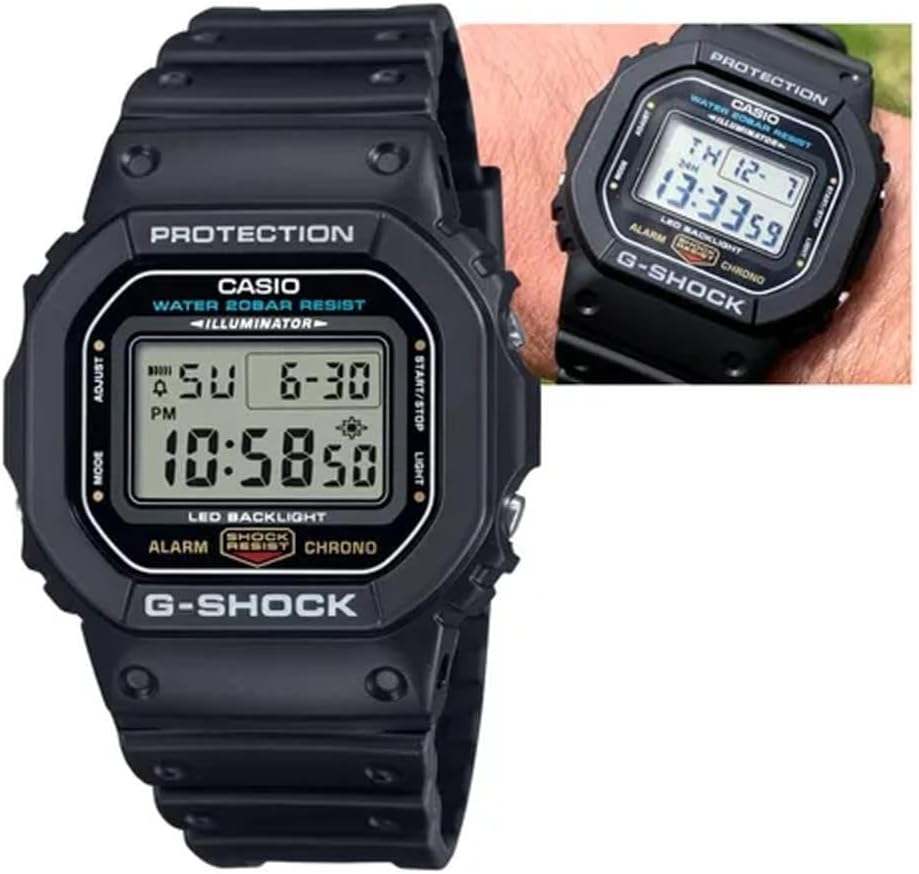
Figura 1: Davant view of the Casio G-Shock G-5600UE-1 digital watch. The display shows time, date, and day. Buttons are located on the left (MODE, ADJUST) and right (START/STOP, LIGHT) sides of the case.
- Botó AJUST (a dalt a l'esquerra): S'utilitza per entrar i sortir dels modes de configuració i per confirmar la configuració.
- Botó MODE (a baix a l'esquerra): Used to cycle through the watch's various modes (Timekeeping, World Time, Alarm, Stopwatch, Countdown Timer).
- Botó LLUM (a dalt a la dreta): Activates the LED backlight. Also used to increase values during setting.
- START/STOP Button (Bottom Right): Used to start/stop stopwatch and countdown timer operations. Also used to decrease values during setting.
3. Configuració
3.1 Initial Charging (Tough Solar)
Your watch is equipped with Tough Solar technology, which converts light into power. Before initial use, or if the watch display is blank, expose the watch face to bright light (e.g., sunlight or a bright window) for several hours to ensure it is sufficiently charged. Avoid prolonged exposure to extreme heat.
3.2 Setting the Home City and Time
- En el mode d'indicació de l'hora, manteniu premut AJUSTAR fins que el codi de la ciutat comenci a parpellejar. Això indica el mode de configuració.
- Utilitza el LLUM i INICI/PARA buttons to select your desired Home City code.
- Premeu el botó MODE button to cycle through other settings: DST (Daylight Saving Time), 12/24-hour format, Seconds, Hour, Minute, Year, Month, Day.
- For each setting, use the LLUM i INICI/PARA botons per ajustar el valor.
- Once all settings are configured, press the AJUSTAR botó per sortir del mode de configuració.
4. Instruccions de funcionament
4.1 Navegació de modes
Premeu el botó MODE button to cycle through the watch's modes in the following order:Timekeeping Mode → World Time Mode → Alarm Mode → Stopwatch Mode → Countdown Timer Mode → Timekeeping Mode.
4.2 Mode d'hora mundial
En el mode Hora mundial, podeu view the current time in 48 cities (29 time zones) around the world.
- Premeu el botó INICI/PARA button to scroll through city codes.
- To toggle Daylight Saving Time (DST) for the currently displayed city, hold down the AJUSTAR button for approximately two seconds.
4.3 Mode d'alarma
The watch has multiple alarms and an hourly senyal horari.
- In Alarm Mode, use the INICI/PARA button to select the desired alarm (AL1, AL2, AL3, AL4, AL5, SNZ for Snooze Alarm, or SIG for Hourli Senyal horari).
- Manteniu premuda la AJUSTAR fins que l'hora de l'alarma comenci a parpellejar.
- Utilitza el LLUM i INICI/PARA botons per ajustar l'hora i els minuts.
- Premeu el botó AJUSTAR botó per sortir del mode de configuració.
- Premeu el botó INICI/PARA button to toggle the alarm or hourly time signal ON/OFF.
4.4 Mode de cronòmetre
El cronòmetre mesura el temps transcorregut, els temps dividits i els dos acabats.
- En el mode de cronòmetre, premeu la tecla INICI/PARA button to start and stop the measurement.
- Premeu el botó AJUSTAR botó per reiniciar el cronòmetre a zero.
4.5 Mode de temporitzador de compte enrere
The countdown timer can be set for a period of 1 minute to 24 hours.
- In Countdown Timer Mode, hold down the AJUSTAR fins que l'hora d'inici del compte enrere actual parpellegi.
- Utilitza el LLUM i INICI/PARA buttons to set the desired countdown start time.
- Premeu el botó AJUSTAR botó per sortir del mode de configuració.
- Premeu el botó INICI/PARA button to start and stop the countdown.
- Quan el compte enrere arribi a zero, sonarà una alarma. Premeu qualsevol botó per aturar l'alarma.
Retroil·luminació de 4.6 LED
Premeu el botó LLUM botó per il·luminar la pantalla fàcilment viewing in low-light conditions. The backlight duration can typically be adjusted in the Timekeeping Mode settings.
5. Manteniment
5.1 Power Management (Tough Solar)
To ensure stable operation, expose the watch to light regularly. The watch has a power saving function that turns off the display when left in the dark for a certain period. The power indicator on the display shows the current charge level.
- Exposure to Light: Place the watch where it can receive direct sunlight or strong artificial light.
- Evitar obstruccions: Ensure the watch face is not covered by clothing or other objects.
- Nivell de càrrega: Monitor the charge indicator. If it drops to a low level, expose the watch to light immediately.
5.2 Resistència a l'aigua
Your G-Shock G-5600UE-1 is water resistant to 200 meters (20 BAR). This means it is suitable for showering, swimming, and diving (excluding saturation diving).
- Do not operate buttons while the watch is submerged in water or wet.
- Després de l'exposició a l'aigua salada, esbandiu el rellotge amb aigua neta i eixugueu-lo amb un drap suau.
- Eviteu exposar el rellotge a aigua calenta o vapor, ja que això pot danyar les juntes.
5.3 Neteja
Wipe the watch and band with a soft, dry cloth to remove dirt and moisture. For stubborn dirt, use a soft brush with mild soap and water, then rinse thoroughly and dry. Avoid using chemical cleaners or solvents.
6. Solució De Problemes
- La pantalla està en blanc o té poca llum: The watch may be low on charge. Expose it to bright light for several hours. Ensure the power saving function is not active (if in a dark environment).
- L'hora és incorrecta: Re-check your Home City setting and DST setting. Perform a manual time adjustment as described in Section 3.2.
- Els botons no responen: Ensure the watch is not in a mode that locks button operations. If submerged or wet, dry the watch thoroughly before attempting to operate buttons.
- Aigua dins del rellotge: If you notice condensation or water droplets inside the watch, stop using it immediately and contact Casio service for inspection.
7. Especificacions
| Número de model | G-5600UE-1 |
| Case Dimensions (L×W×H) | 48.9 × 42.8 × 13.4 mm |
| Pes | 52 g |
| Case and Band Material | Resina |
| Cristall | Vidre mineral |
| Resistència a l'aigua | 200 metres (20 bar) |
| Font d'alimentació | Tough Solar (energia solar) |
| Tipus de bateria | 1 bateria de metall de liti (inclosa) |
| Approx. Battery Life (without solar charge) | 2 years on CR2016 (Note: Tough Solar power system significantly extends operational life with regular light exposure.) |
| Precisió | ± 15 segons al mes |
| Llum de fons | Electro-luminescent backlight with Afterglow |
| Característiques especials | Shock Resistant, World Time, 1/100-second Stopwatch, Countdown Timer, Multi-function Alarms, Hourly Time Signal, Full Auto Calendar, 12/24-hour format, Flash Alert |
8. Garantia i Suport
Your Casio G-Shock G-5600UE-1 watch is covered by a manufacturer's warranty. For specific warranty terms, service, or technical support, please refer to the warranty card included with your purchase or visit the official Casio weblloc.
Assistència oficial de Casio: https://www.casio.com/us/support/


