1. Introducció
This manual provides detailed instructions for the setup, operation, and maintenance of your Mars Gaming MKULTRA mechanical keyboard. The MKULTRA is a compact 96% mechanical keyboard designed for performance and durability, featuring PBT pudding keycaps, full RGB Chroma lighting, and Outemu SQ mechanical switches.

Figure 1: Mars Gaming MKULTRA Mechanical Keyboard (Pink RGB, Portuguese-US Layout)
2. Contingut del paquet
Verifiqueu que tots els elements siguin presents al paquet:
- Mars Gaming MKULTRA Mechanical Keyboard
- Cable USB-C a USB-A desmuntable
- Manual d'usuari (aquest document)
3. Instruccions de configuració
3.1 Connexió del teclat
- Localitza el cable USB-C a USB-A desmuntable.
- Connect the USB-C end of the cable to the port on the keyboard.
- Connect the USB-A end of the cable to an available USB port on your computer (PC, Mac, PS4, PS5, Xbox One, Xbox Series S-X).
- El sistema operatiu reconeixerà automàticament el teclat.
3.2 Instal·lació de programari (opcional)
For advanced customization of RGB lighting and macro settings, download the dedicated control software from the official Mars Gaming website. Refer to the software's documentation for installation and usage details.
Vídeo 1: Acabatview of the Mars Gaming MKULTRA keyboard, demonstrating its compact design and RGB lighting. This video highlights the keyboard's features and aesthetic appeal.
4. Instruccions de funcionament
4.1 Keyboard Layout and Form Factor
The MKULTRA features a 96% compact layout, which includes a full set of keys, including a numeric keypad, in a space-saving design. It supports a dual Portuguese + US layout.

Figure 2: The 96% compact format of the Mars Gaming MKULTRA keyboard, illustrating its space-saving design while retaining essential keys.
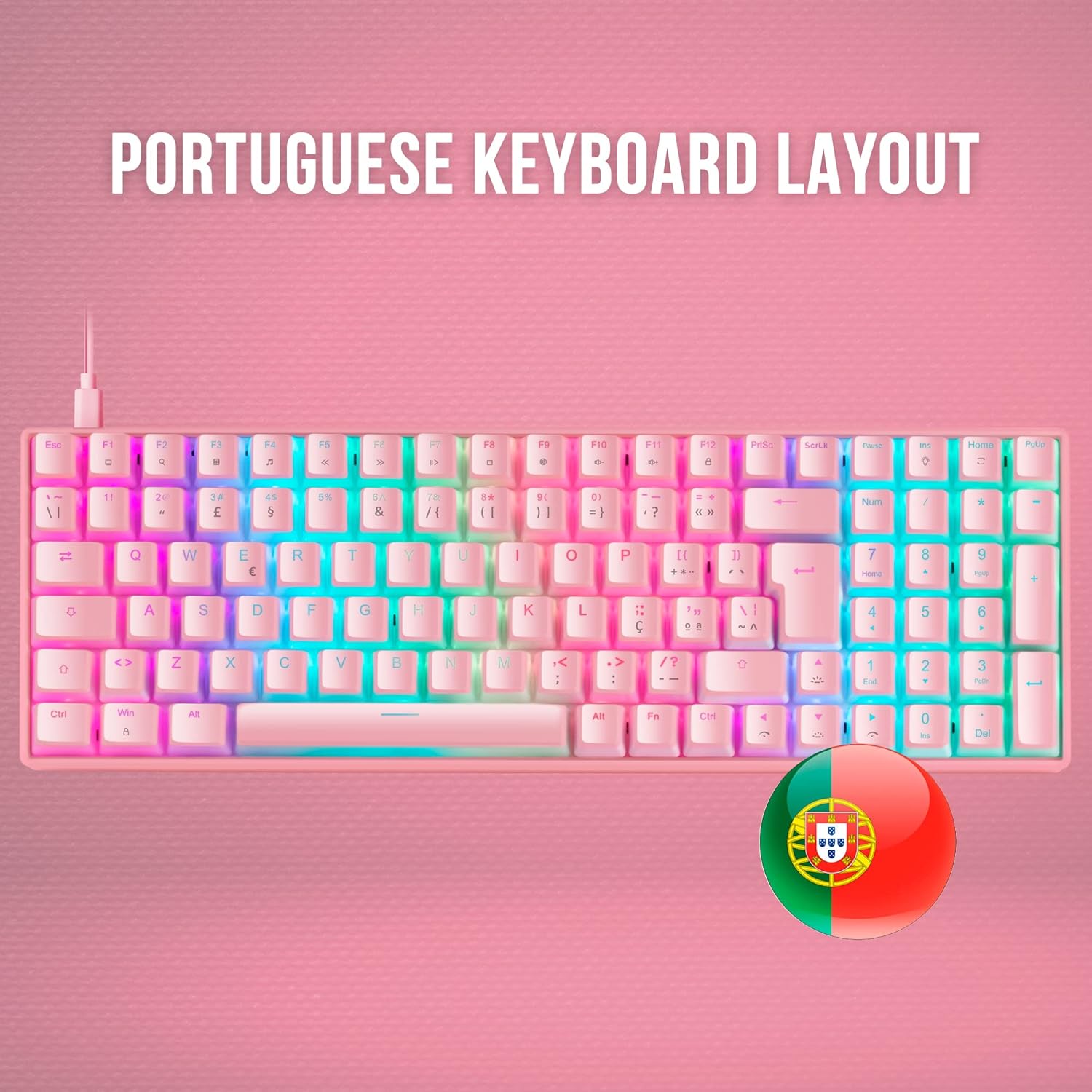
Figure 3: The Portuguese keyboard layout of the Mars Gaming MKULTRA, showing specific key placements for this regional standard.
4.2 PBT Pudding Keycaps
The keyboard is equipped with double-injected PBT pudding keycaps. These keycaps are highly durable and designed to enhance the RGB lighting effects, creating a 'floating' light appearance.

Figura 4: Primer pla view of the PBT pudding keycaps on the Mars Gaming MKULTRA, highlighting their translucent sides for enhanced RGB illumination.
4.3 RGB Chroma Lighting
The MKULTRA features a customizable RGB LED lighting system with 16.8 million colors. You can select from various special effects and create custom profiles using the control software. The lighting enhances both aesthetics and visibility.

Figure 5: The full RGB illumination of the Mars Gaming MKULTRA keyboard, showcasing the vibrant and customizable lighting effects.
4.4 Outemu SQ Mechanical Switches
The keyboard utilizes Outemu SQ mechanical switches, which provide precise and reliable key actuation. These switches are designed with dust protection to ensure longevity and consistent performance. The specific model features Outemu SQ Brown switches, known for their tactile feedback without an audible click.

Figure 6: A close-up of the Outemu SQ mechanical switches on the Mars Gaming MKULTRA, highlighting their design for durability and dust protection.
4.5 Anti-Ghosting and Polling Rate
The MKULTRA supports full anti-ghosting, ensuring that every keypress is registered accurately, even during rapid simultaneous inputs. It also features a 1000Hz polling rate for professional-grade response without lag.
5. Manteniment
5.1 Neteja del teclat
- Desconnecteu el teclat de l'ordinador abans de netejar-lo.
- Utilitzeu un drap suau i sense pelusa lleugerament dampRenteu-les amb aigua o una solució netejadora suau per netejar les tecles i el xassís.
- Per a la pols i les restes entre les tecles, feu servir aire comprimit.
- Eviteu utilitzar productes químics agressius, netejadors abrasius o humitat excessiva, ja que poden danyar el teclat.
5.2 Keycap Removal (Advanced)
If you need to remove keycaps for deeper cleaning or replacement, use a keycap puller. Gently pull the keycap straight up to avoid damaging the switch. Realign the keycap and press down firmly to reattach.
6. Solució De Problemes
6.1 El teclat no respon
- Assegureu-vos que el cable USB estigui connectat correctament tant al teclat com a l'ordinador.
- Prova de connectar el teclat a un port USB diferent de l'ordinador.
- Prova el teclat en un altre ordinador per descartar problemes específics del sistema.
- Reinicieu l'ordinador.
6.2 Problemes d'il·luminació RGB
- Check the keyboard's control software for lighting settings and ensure they are configured correctly.
- Assegureu-vos que el programari estigui actualitzat.
- If using onboard controls, refer to the software documentation for key combinations to adjust lighting.
6.3 Incorrect Key Input
- Verify that the correct keyboard layout is selected in your operating system settings.
- If specific keys are not working, try removing and reattaching their keycaps to ensure proper seating.
- Consider performing a factory reset via the control software if available.
7. Especificacions
| Característica | Detall |
|---|---|
| Marca | Mars Gaming |
| Número de model | MKULTRAPBRPT |
| Descripció del teclat | Mecànica |
| Tecnologia de connectivitat | USB-C |
| Dispositius compatibles | PC |
| Característica especial | Backlit (RGB) |
| Suport de color de retroil·luminació del teclat | RGB |
| Material | Tereftalat de polibutilè (PBT) |
| Dimensions del producte | 14.57 x 4.84 x 1.57 polzades |
| Pes de l'article | 1.62 lliures |
| Fabricant | Mars Gaming |
| ASIN | B09MJ8WCD2 |
| Data de primera disponibilitat | 9 de gener de 2025 |
8. Garantia i Suport
For warranty information and technical support, please refer to the documentation provided with your purchase or visit the official Mars Gaming weblloc web. Conserveu el comprovant de compra per a reclamacions de garantia.


