Introducció
This manual provides detailed instructions for the setup, operation, and maintenance of your NPET K10 Pink Gaming Keyboard and NPET WK20 Wireless Keyboard. Please read this manual thoroughly before using the keyboards to ensure optimal performance and longevity.

Image: The NPET K10 Pink Gaming Keyboard (top) and the NPET WK20 Wireless Keyboard (bottom) shown together.
NPET K10 Pink Gaming Keyboard Features
- Professional Gaming Design: Features UV coated keycaps and injection laser carving ABS keycaps for durability and fade resistance.
- Il·luminació de colors: Offers 4 LED lighting backlit modes, including a 7-color alternate breathing effect.
- Alçada ajustable: Equipped with two angle feet on the back to adjust keyboard height for ergonomic comfort.
- Multimedia Hot Keys: Includes 14 hotkeys for quick access to various functions.

Image: The NPET K10 Pink Gaming Keyboard, illustrating its 104-key standard layout and 26 anti-ghosting keys for simultaneous input.
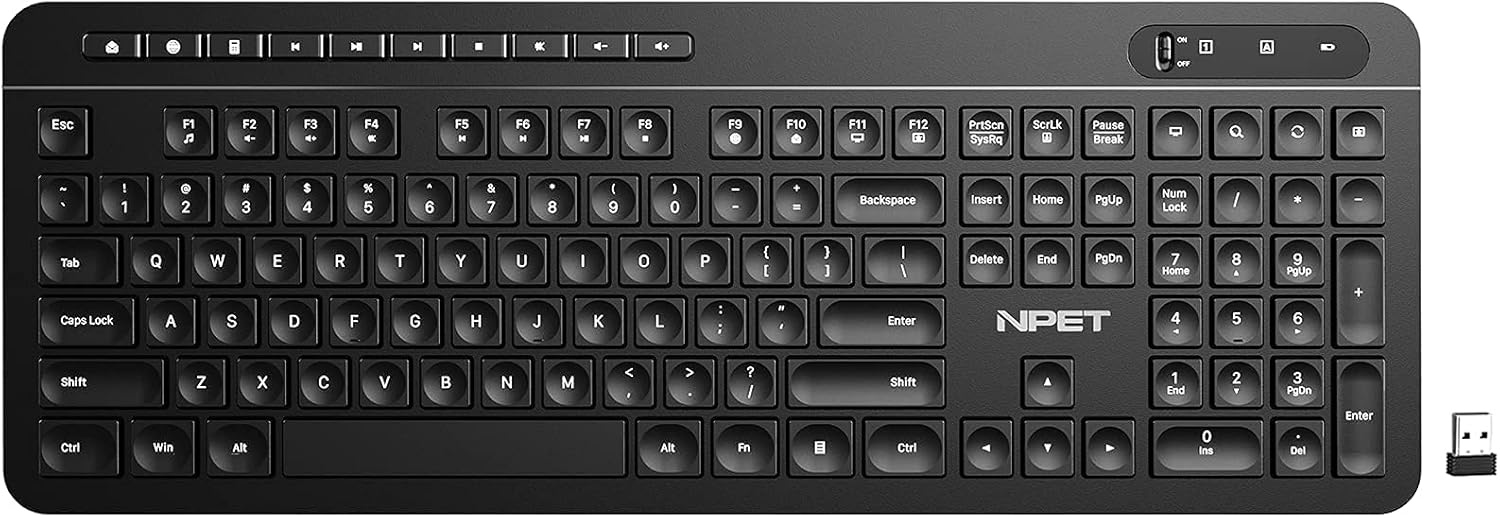
Image: Diagram illustrating the ergonomic design of the NPET K10, including medium height keycaps for faster response and adjustable rear feet for comfortable typing angles.
NPET WK20 Wireless Keyboard Features
- Power-Saving Design: Optimized for long battery life, up to 24 months with a single 1.5V AAA alkaline battery (not included).
- Interruptor d'encesa/apagada: Features a convenient power switch to conserve battery life when not in use.
- Mode de repòs automàtic: Enters auto-sleep after 10 minutes of inactivity to further save power.
- 12 Multimedia Shortcuts: Provides quick access to media controls and other functions via FN key combinations.
- Distribució de 104 tecles: Full-size layout with arrow keys and a number pad for comprehensive functionality.
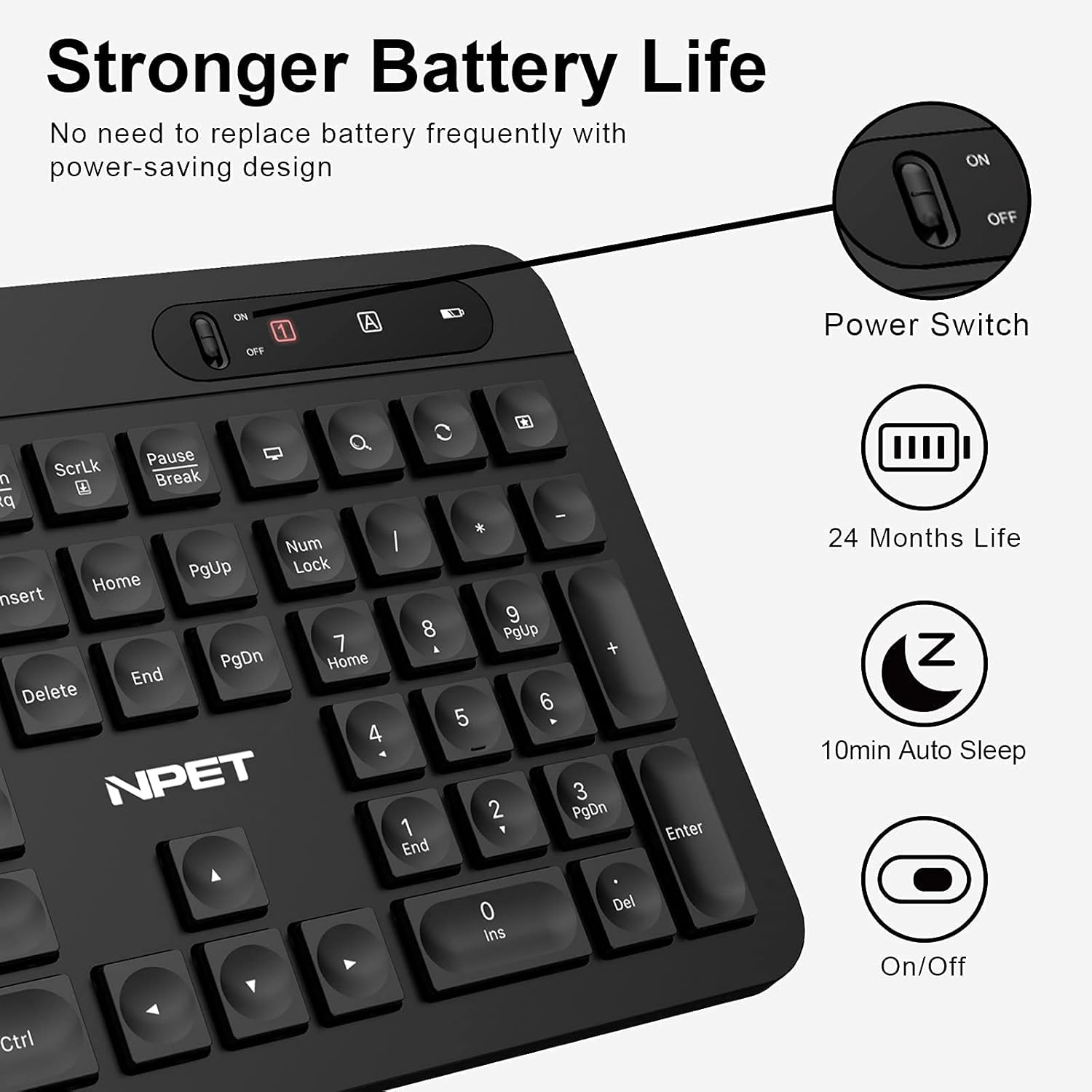
Image: The NPET WK20 Wireless Keyboard shown with its compact USB receiver, highlighting its wireless connectivity.

Image: Details of the NPET WK20's power-saving features, including the on/off switch, 24-month battery life, and 10-minute auto-sleep function.
Instruccions de configuració
NPET K10 Pink Gaming Keyboard (Wired)
- Unpack the K10 keyboard from its packaging.
- Connect the USB cable of the keyboard to an available USB port on your computer.
- El sistema operatiu detectarà i instal·larà automàticament els controladors necessaris. Això pot trigar uns instants.
- Un cop finalitzada la instal·lació, el teclat ja està llest per al seu ús.
NPET WK20 Wireless Keyboard
- Unpack the WK20 keyboard and the USB receiver from its packaging.
- Localitzeu el compartiment de la bateria a la part inferior del teclat.
- Insert one 1.5V AAA alkaline battery (not included), ensuring correct polarity (+/-).
- Tanqueu la tapa del compartiment de la bateria.
- Connecteu el receptor USB a un port USB disponible de l'ordinador.
- Turn on the keyboard using the power switch located on the top right side of the keyboard.
- The operating system will automatically detect and install the necessary drivers. The keyboard should now be ready for use.
Instruccions de funcionament
NPET K10 Pink Gaming Keyboard
- Modes de llum de fons: Premeu el botó LED key (usually near Scroll Lock) to cycle through the 4 available LED lighting modes, including a breathing effect.
- Tecles d'accés directe multimèdia: Use the dedicated 14 hotkeys located on the top row for quick access to functions like volume control, media playback, and more.
- Intercanvi de tecles WASD i fletxa: For gaming, press FN + W simultaneously to swap the functionality of the WASD keys with the arrow keys. Press again to revert.
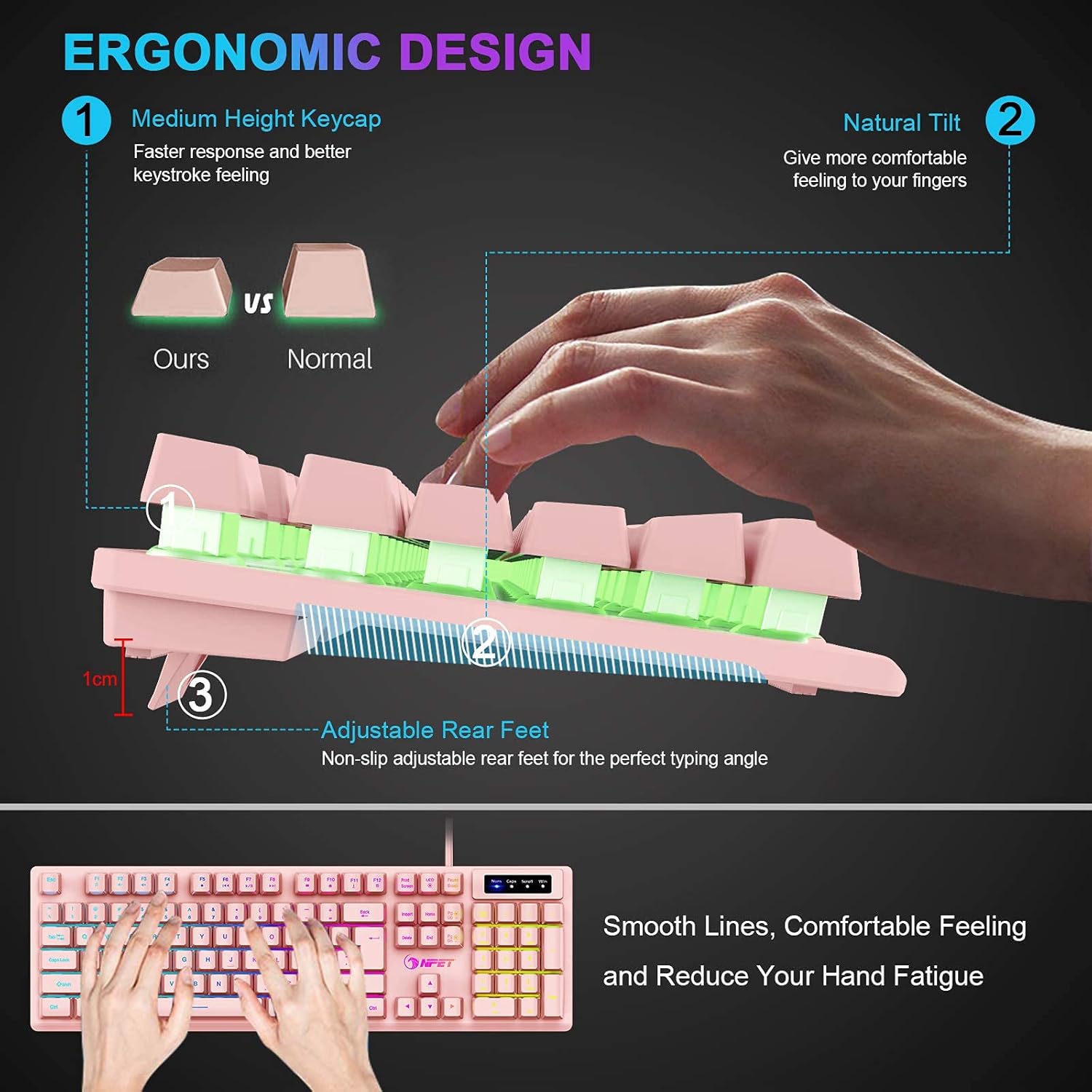
Image: Illustration of the FN+W key combination on the NPET K10 keyboard, used to interchange the WASD keys with the arrow keys for gaming preferences.
NPET WK20 Wireless Keyboard
- Encès/apagat: Use the slide switch on the top right of the keyboard to turn the power ON or OFF.
- Dreceres multimèdia: Manteniu premut el botó FN key, then press one of the F1-F12 keys to activate its corresponding multimedia function (e.g., FN+F1 for media player, FN+F2 for volume down).

Image: The NPET WK20 Wireless Keyboard highlighting the 12 multimedia shortcuts accessible by combining the FN key with the F1-F12 function keys.
- Funció de repòs automàtic: El teclat entrarà automàticament en mode de repòs després de 10 minuts d'inactivitat per estalviar bateria. Premeu qualsevol tecla per activar-lo.
Manteniment
- Neteja: Feu servir un drap suau i sec per netejar la superfície del teclat. Per a la brutícia persistent, netegeu lleugerament.amp cloth can be used, ensuring no liquid enters the keyboard. Avoid harsh chemicals.
- Battery Replacement (WK20): When the keyboard's performance degrades or it stops responding, replace the AAA battery. Ensure the power switch is OFF before replacing the battery. Dispose of old batteries responsibly.
- Emmagatzematge: Guardeu el teclat en un lloc fresc i sec, allunyat de la llum solar directa i de temperatures extremes.
Resolució de problemes
Assumptes generals
- El teclat no respon:
- For K10 (wired): Ensure the USB cable is securely connected to both the keyboard and the computer. Try a different USB port.
- For WK20 (wireless): Ensure the USB receiver is securely plugged into a USB port. Check if the keyboard is turned ON. Replace the AAA battery if necessary. Try a different USB port for the receiver.
- Les tecles no funcionen correctament:
- Check for any debris under the keycaps.
- Ensure no liquid has been spilled on the keyboard.
NPET K10 Specific Issues
- La retroiluminació no funciona:
- Assegureu-vos que el teclat estigui connectat correctament.
- Press the LED key to cycle through modes; it might be turned off or in a very dim mode.
NPET WK20 Specific Issues
- Connexió intermitent o retard:
- Ensure the keyboard is within range of the USB receiver (typically up to 10 meters).
- Minimitzar les interferències d'altres dispositius sense fil (per exemple, encaminadors Wi-Fi, telèfons sense fil).
- Try moving the USB receiver to a different port, preferably one closer to the keyboard.
- Substituïu la bateria.
Especificacions
| Característica | NPET K10 (Pink Gaming Keyboard) | NPET WK20 (Wireless Keyboard) |
|---|---|---|
| Marca | NPET | NPET |
| Tecnologia de connectivitat | Amb cable (USB) | Sense fil (receptor USB) |
| Descripció del teclat | Jocs | Sense fil |
| Característica especial | Backlit, Anti-ghosting, Multimedia Hotkeys, Adjustable Height | Power-Saving, Auto-Sleep, Multimedia Shortcuts |
| Color | Rosa | Black (as per images) |
| Material | Acrilonitril butadiè estirè (ABS) | Acrilonitril butadiè estirè (ABS) |
| Dispositius compatibles | Consola de jocs, PC | PC |
| Battery (WK20 only) | N/A | 1 x 1.5V AAA Alkaline Battery (not included) |
| Battery Life (WK20 only) | N/A | Fins a 24 mesos |
Informació de seguretat
- Do not expose the keyboards to water or excessive moisture.
- Avoid dropping or subjecting the keyboards to strong impacts.
- Do not attempt to disassemble or repair the keyboards yourself. Contact customer support if issues arise.
- Mantenir fora de l'abast dels nens.


