1. Introducció
The Audizio Trento is a versatile digital radio tuner designed to enhance your audio experience. It integrates seamlessly into existing home hi-fi systems, offering access to a vast array of internet radio stations, DAB+ and FM broadcasts, Bluetooth streaming, and network media playback. This manual provides detailed instructions for setup, operation, and maintenance of your Trento unit.
2. Informació de seguretat
- Llegiu atentament totes les instruccions abans d'utilitzar.
- Mantingueu la unitat allunyada de l'aigua, la humitat i les temperatures extremes.
- No bloquejar les obertures de ventilació.
- Utilitzeu només l'adaptador d'alimentació subministrat.
- No intenteu reparar la unitat vosaltres mateixos. Envieu totes les tasques de manteniment a personal qualificat.
- Desconnecteu l'endoll durant tempestes amb llamps o quan no l'utilitzeu durant períodes prolongats.
3. Contingut del paquet
Verifiqueu que tots els elements siguin presents a la caixa:
- Audizio Trento Internet Radio Unit
- Control remot
- Adaptador de corrent (5 V)
- Cable d'àudio RCA
- Antena externa
- Manual d'instruccions (aquest document)

Image: Audizio Trento unit and included accessories.
4. Producte acabatview
4.1 Tauler frontal

Imatge: Frontal view of the Audizio Trento unit with its remote control. The unit features a central display, control buttons, and a rotary knob.
- Botó d'encesa: Encén o apaga la unitat.
- Visualització: 2.4" TFT color display for navigation and information.
- Auriculars Jack: Sortida de 6.3 mm per a escolta privada.
- Botons de navegació: Per a la navegació pel menú.
- Rotary Knob (Tune/Select): For scrolling through menus and confirming selections.
4.2 Connexions del panell posterior

Image: Rear panel of the Audizio Trento, highlighting various input and output ports with labels.
- Port LAN (RJ45): Per a connexió a Internet per cable.
- Entrada d'antena: For connecting the external Wi-Fi/DAB/FM antenna.
- Digital Output (Optical/Toslink): Per connectar-se a un amplifier or DAC with an optical input.
- Digital Output (Coaxial): Per connectar-se a un amplifier or DAC with a coaxial input.
- Sortida de línia (RCA L/R): Sortida d'àudio analògica per connectar-se a un amplifier o altaveus actius.
- Entrada de CC (5 V): Entrada d'alimentació per a l'adaptador inclòs.
- Interruptor d'encesa/apagada: Interruptor d'alimentació principal.
4.3 Control remot
Imatge: Detallada view of the Audizio Trento remote control, showing various buttons for power, navigation, mode selection, and volume.
The remote control provides full functionality for operating the Trento unit. Insert 2x AAA batteries (not included) into the remote before first use. Familiarize yourself with the buttons for power, volume, navigation, mode selection, and direct access functions.
5. Configuració
5.1 Connexió de l'antena
Screw the provided external antenna into the "ANTENNA" connector on the rear panel. Position the antenna for optimal reception of DAB+ and FM signals.

Image: Close-up of the rear panel showing the external antenna connected, indicating its role in extending signal range.
5.2 Connexió d'alimentació
Connect the power adapter to the "DC IN 5V" port on the rear of the unit, then plug the adapter into a wall outlet. Ensure the main power switch on the rear is in the "ON" position.
5.3 Connexions de sortida d'àudio
Choose one of the following methods to connect the Trento to your audio system:
- Sortida analògica RCA: Use the supplied RCA cable to connect the "LINE OUT (L/R)" ports on the Trento to the analog input (e.g., "AUX IN") of your amplifier o altaveus actius.
- Optical (Toslink) Digital Output: Use an optical cable (not supplied) to connect the "OPTICAL" port on the Trento to an optical input on your amplifier o DAC.
- Coaxial Digital Output: Use a coaxial cable (not supplied) to connect the "COAXIAL" port on the Trento to a coaxial input on your amplifier o DAC.
5.4 Network Connection (Wi-Fi / Ethernet)
The Trento requires an internet connection for Internet Radio and media streaming features.
- Connexió Wi-Fi:
- Engegueu la unitat.
- Navigate to "Settings" > "Network" > "Wi-Fi Network".
- Select "Scan" to find available networks.
- Choose your Wi-Fi network and enter the password using the rotary knob and navigation buttons.
- Confirmeu la connexió.
- Connexió Ethernet:
Connect an Ethernet cable (not supplied) from your router to the "LAN" port on the rear of the Trento. The unit will automatically detect and connect to the wired network.
6. Instruccions de funcionament
6.1 Funcionament bàsic
- Encès/apagat: Premeu el botó d'engegada del panell frontal o del comandament a distància.
- Control de volum: Use the "Volume" buttons on the remote or the rotary knob on the unit.
- Selecció del mode: Press the "MODE" button on the remote or navigate through the main menu to select between Internet Radio, DAB+, FM, Bluetooth, and Media Player.
6.2 Ràdio per Internet
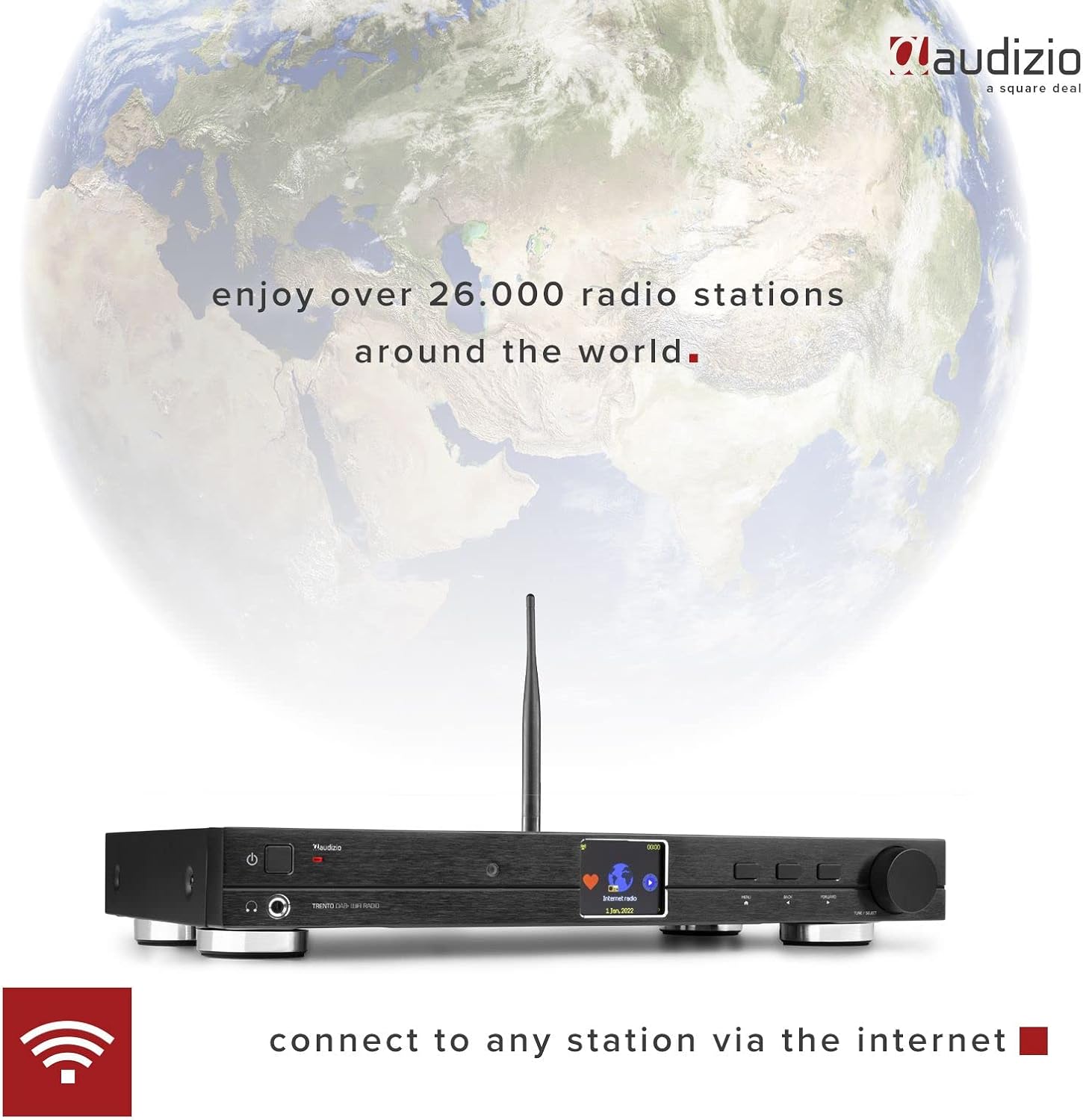
Access over 26,000 internet radio stations worldwide.

Image: The Audizio Trento's 2.4-inch full-color display showing the "Internet radio" option, indicating the unit's capability to connect to global stations.
- Select "Internet Radio" from the main menu.
- Browse stations by location, genre, or search by name.
- Seleccioneu una emissora per iniciar la reproducció.
- To save a station as a preset, refer to the "Presets" section in the full manual.
Ràdio DAB+ 6.3
Enjoy high-quality digital audio broadcasts.
- Select "DAB+ Radio" from the main menu.
- The unit will perform a scan for available DAB+ stations.
- Use the navigation buttons or rotary knob to select a station.
6.4 Ràdio FM
Tune into traditional analog FM broadcasts.
- Select "FM Radio" from the main menu.
- Use the navigation buttons to manually tune or perform an auto-scan for stations.
6.5 Transmissió per Bluetooth
Reprodueix àudio en streaming sense fil des dels teus dispositius amb Bluetooth.
- Select "Bluetooth" mode on the Trento. The unit will enter pairing mode.
- On your smartphone or other Bluetooth device, search for "Audizio Trento" in the Bluetooth settings.
- Select the Trento to pair. Once connected, you can play audio from your device through the Trento.
6.6 Media Player (UPnP/DLNA)
Reprodueix música files from network-connected devices (e.g., PC, NAS) via UPnP/DLNA.
- Ensure your media server is set up and accessible on the same network as the Trento.
- Select "Media Player" from the main menu.
- Browse your media server's content and select files per a la reproducció.
6.7 Despertador i temporitzador de son
The Trento features dual alarms and a programmable sleep timer.
- Alarma: Access "Alarm" in the settings menu to set up two independent alarms with customizable sources (buzzer, internet radio, DAB+, FM) and schedules.
- Temporitzador de son: Access "Sleep Timer" in the settings menu to set a countdown (15 to 180 minutes) after which the unit will automatically turn off.
7. Manteniment
- Neteja: Netegeu la unitat amb un drap suau i sec. No utilitzeu productes de neteja abrasius ni dissolvents.
- Actualitzacions de programari: Periodically check for firmware updates via the "Settings" > "Software Update" menu to ensure optimal performance and access to new features.
8. Solució De Problemes
| Problema | Causa possible | Solució |
|---|---|---|
| Sense poder | Power adapter not connected; main switch off. | Check power connections; ensure main switch is ON. |
| Sense so | Volume too low; incorrect audio output selected; ampmés viu. | Increase volume; check audio cable connections; ensure external amplifier is on and set to correct input. |
| No es pot connectar a la Wi-Fi | Incorrect password; out of range; network issue. | Re-enter password; move unit closer to router; check router status. |
| Internet Radio buffering/disconnecting | Weak Wi-Fi signal; slow internet connection. | Improve Wi-Fi signal (e.g., use Ethernet); check internet speed. |
| Mala recepció DAB+/FM | Antena no connectada o posicionada correctament. | Adjust antenna position; ensure secure connection. |
| Problemes de vinculació de Bluetooth | Device not in pairing mode; too far from unit. | Ensure Trento is in Bluetooth mode; place devices closer; restart both devices. |
9. Especificacions
| Característica | Detall |
|---|---|
| Marca | Audizio |
| Número de model | 102.236 |
| Connectivitat | Wi-Fi (802.11b/g/n), Ethernet (RJ45), Bluetooth |
| Tecnologia del sintonitzador | DAB+, FM |
| Mostra | 2.4" TFT Color LCD with adjustable brightness |
| Sortides d'àudio | RCA Analog, Optical (Toslink), Coaxial, 6.3mm Headphone Jack |
| Protocols de xarxa | UPnP, DLNA |
| Protocols de seguretat | WEP / WPA / WPA2 |
| Característiques especials | Dual Alarm Clock, Programmable Sleep Timer, Remote Control |
| Font d'alimentació | 100-240 VCA 50/60 Hz (adaptador de 5 V) |
| Dimensions (L x A x A) | 430 x 260 x 62 mm (aprox. 16.9 x 10.2 x 2.4 polzades) |
| Pes | 2.5 kg (aprox. 5.5 lliures) |
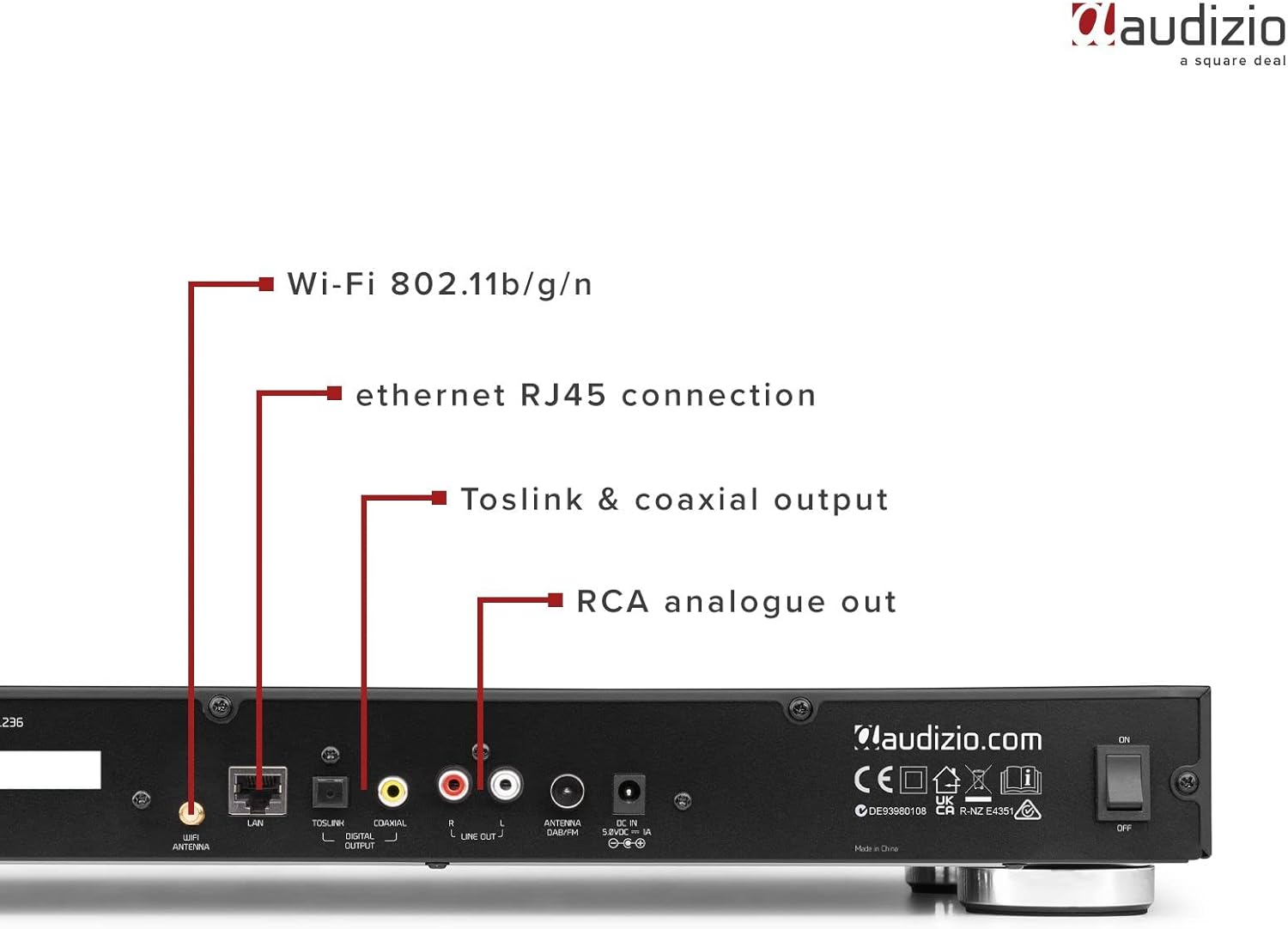
Image: Audizio Trento unit with remote control, showing approximate dimensions of 260mm length and 62mm height.
10. Garantia i Suport
Audizio products are designed and manufactured to the highest standards. For detailed warranty information, please refer to the warranty card included with your product or visit the official Audizio website. For technical support or service inquiries, please contact your retailer or the Audizio customer service department.
Conserveu el vostre comprovant de compra per a reclamacions de garantia.


