1. Introducció
This manual provides essential instructions for the safe and efficient operation of your Crosley CR6252A-YS Portfolio 3-Speed Bluetooth Turntable. Please read this manual thoroughly before using the product and retain it for future reference.
The Crosley Portfolio turntable is designed to play vinyl records at three speeds and features built-in speakers, Bluetooth connectivity for wireless audio streaming, and a moving magnetic cartridge for audio reproduction.

Figure 1.1: Crosley CR6252A-YS Portfolio Turntable (Open View)
2. Instruccions de seguretat
- Llegiu totes les instruccions abans d'utilitzar.
- Mantingueu el producte lluny de l'aigua o la humitat.
- No el col·loqueu a prop de fonts de calor com ara radiadors, registres de calor, estufes o altres aparells que produeixin calor.
- Netegeu només amb un drap sec.
- Utilitzeu només accessoris/accessoris especificats pel fabricant.
- Desendolleu aquest aparell durant les tempestes amb llamps o quan no l'utilitzeu durant llargs períodes de temps.
- Demaneu tot el servei a personal de servei qualificat. El manteniment és necessari quan l'aparell s'ha fet malbé d'alguna manera, com ara el cable d'alimentació o l'endoll està danyat, s'ha vessat líquid o han caigut objectes a l'aparell, l'aparell ha estat exposat a la pluja o la humitat, no funciona amb normalitat. , o s'ha deixat caure.
3. Contingut del paquet
Verifiqueu que tots els elements que s'enumeren a continuació s'inclouen al vostre paquet:
- Crosley CR6252A-YS Portfolio Turntable
- Adaptador d'alimentació
- Manual d'usuari (aquest document)
4. Característiques i components del producte
The Crosley CR6252A-YS Portfolio Turntable includes the following key features and components:
- Tocadiscos de 3 velocitats: Admet discos de 33 1/3, 45 i 78 RPM.
- Built-in Bluetooth Receiver: Permet la transmissió sense fil des de dispositius compatibles.
- Adjustable Pitch Control: Fine-tune record speed.
- Moving Magnetic Cartridge: Pre-mounted for optimal sound.
- Entrada auxiliar: Connect external audio sources.
- USB habilitat: For PC connection.
- Altaveus integrats: Sortida d'àudio integrada.

Figure 4.1: Turntable Mechanism and Controls
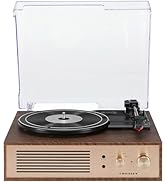
Figura 4.2: Detall del tauler de control

Figura 4.3: Connexions del panell posterior
5. Configuració
5.1 Col·locació inicial
Place the turntable on a flat, stable surface away from direct sunlight, heat sources, and excessive dust or vibrations.
5.2 Connexió d'alimentació
- Connect the power adapter to the DC 12V input jack on the rear of the turntable.
- Connecteu l'adaptador de corrent a una presa de corrent adequada.
5.3 Turntable Preparation
- Carefully remove any protective packaging materials from the turntable platter and tonearm.
- Ensure the tonearm is unlocked from its rest.
6. Instruccions de funcionament
6.1 Reproduint discos
- Gireu el ON/OFF knob clockwise to power on the unit.
- Select the desired speed (33 1/3, 45, or 78 RPM) using the speed selector switch. Note: A 78 RPM stylus (not included) is required for 78 RPM records.
- Place a record on the turntable platter. If playing a 45 RPM single, place the 45 RPM adapter (if included) over the spindle.
- Lift the tonearm using the cueing lever and position it over the desired track on the record.
- Baixeu el braç lentament sobre el disc utilitzant la palanca de cueing. El disc començarà a reproduir-se.
- Ajusteu el volum amb el botó VOLUM perilla.
- Utilitza el TERRA control knob to fine-tune the playback speed if necessary.
- To stop playing, lift the tonearm, return it to its rest, and turn the ON/OFF botó en sentit contrari a les agulles del rellotge.
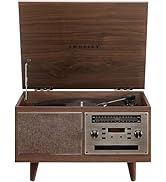
Figure 6.1: Stylus on Record
6.2 Funcionament Bluetooth
- Gireu el ON/OFF knob clockwise to power on the unit.
- Slide the function switch to the Bluetooth position. The indicator light will flash, indicating pairing mode.
- Enable Bluetooth on your external device (e.g., smartphone, tablet) and search for "Crosley Portfolio".
- Select "Crosley Portfolio" from the list of available devices to pair. Once paired, the indicator light will stop flashing and remain solid.
- You can now stream audio wirelessly from your device to the turntable's built-in speakers.
- Ajusteu el volum amb el botó VOLUM knob on the turntable and/or your external device.
6.3 Auxiliary Input (AUX IN)
- Gireu el ON/OFF knob clockwise to power on the unit.
- Connect an external audio device (e.g., MP3 player, CD player) to the AUX IN port using a 3.5mm audio cable (not included).
- El tocadisc canviarà automàticament al mode AUX IN.
- Ajusteu el volum amb el botó VOLUM knob on the turntable and/or your external device.
Connectivitat USB 6.4
The turntable features a PC-USB port for connecting to a computer. This allows for digital conversion of your vinyl records using appropriate software (not included). Refer to your chosen software's instructions for recording procedures.
7. Manteniment
7.1 Neteja del plat giratori
- Always unplug the turntable from the power outlet before cleaning.
- Feu servir un drap suau i sec per netejar les superfícies exteriors. No utilitzeu productes de neteja abrasius ni dissolvents.
- Raspalleu suaument el llapis amb un raspall suau dissenyat per a la neteja del llapis, movent-lo de darrere cap endavant.
7.2 Substitució del llapis òptic
The stylus (needle) is a consumable part and will wear out over time. A worn stylus can damage your records and degrade sound quality. Replace the stylus after approximately 200-300 hours of playback. Consult your retailer or Crosley support for compatible replacement styli.
8. Solució De Problemes
| Problema | Causa possible | Solució |
|---|---|---|
| Sense poder | L'adaptador de corrent no està connectat o la presa de corrent està defectuosa. | Assegureu-vos que l'adaptador de corrent estigui connectat correctament i que la presa de corrent funcioni. |
| No hi ha so dels altaveus | Volume too low; function switch in wrong position; Bluetooth not paired. | Increase volume; ensure function switch is set to PHONO or Bluetooth is correctly paired. |
| Saltar registres | Record is dirty or damaged; stylus is worn; turntable not level. | Clean record; replace stylus; ensure turntable is on a level surface. |
| El dispositiu Bluetooth no s'aparella | Turntable not in pairing mode; device too far; device already paired to another unit. | Ensure turntable is in Bluetooth pairing mode; move device closer; disconnect from other Bluetooth devices. |
9. Especificacions
- Dimensions del producte: 12.4 x 15.28 x 6.5 polzades
- Pes de l'article: 13 lliures
- Número de model de l'article: CR6252A-YS
- Marca: Crosley
- Components inclosos: CR6252A-YS Portfolio Turntable
- Estil: Vintage
- Color: Yellow Submarine
- Format del senyal: Analògic
- Font d'alimentació: Elèctric amb cable
- UPC: 710244246569
10. Garantia i Suport
For warranty information and technical support, please refer to the warranty card included with your product or visit the official Crosley weblloc web. Conserveu el rebut de compra com a comprovant de compra per a qualsevol reclamació de garantia.
Fabricant: Crosley
Data de primera disponibilitat: 30 de novembre de 2021